
SoapySDR-Octave
The purpose of this tutorial is to show you how to drive an Amarisoft SDR card from Octave through the SoapySDR bindings.
Table of Contents
- SoapySDR-Octave
- Introduction
- Summary of the Tutorial
- If you are a human
- What This Tutorial Adds
- Installing Octave
- The Octave Binding
- Where soapy sits
- What a .oct file is
- One entry point instead of many
- The shape of the source
- Getting the arguments in
- Getting the samples out
- Handles and lifetime
- The call surface
- Building it
- Example 1 - a minimal receiver
- Example 2 - SSB detection in Octave
- Reading in batches
- Sizing the overlap-save block
- Two arithmetic changes
- Example run
- Proving the port is faithful
- Using the Card from the Octave GUI
- Checking It Still Works
- Installing/Uninstalling soapy_project package
- Directory Structure
Introduction
GNU Octave is the language most engineers already reach for when they want to look at IQ samples. It has the transforms, the plots and the matrix notation, and it is free. What it does not have is any way to talk to a radio. The SoapySDR tutorial ends with an Amarisoft SDR card that any SoapySDR application can drive. It reaches that card from C++ and from Python. Octave is the gap: no packaged binding connects it to SoapySDR, so there is nothing to install. This tutorial writes that binding, uses it to port the two Python example programs, and then asks the harder question. Octave charges far more per operation than numpy does, so a receiver written in it meets the sample rate much sooner. That makes it a better test of the module than Python was, because it shows whether the limit lies in the streaming interface or in the language on top of it. The support module itself is never touched. It registers with the SoapySDR runtime. Anything that reaches that runtime reaches the card by the same code path. What is built here sits entirely above the abstraction.
-
Context and Background
- The SoapySDR support module for the Amarisoft card is already built and installed by the preceding tutorial. Nothing in it is rebuilt or reconfigured here.
- Python reaches that module through python3-SoapySDR, which is a packaged binding. Octave has no equivalent, so the first thing this tutorial produces is one.
- An Octave extension is a .oct file: an ELF shared object linked against the interpreter, loaded by name the first time it is used. It is not a built-in, and it is not installed into a system directory.
- The two programs ported here are the ones from the Python section, a minimal receiver and a real time 5G NR SSB detector, with the same options and the same output.
-
Relevance and Importance
- A card that answers to Octave needs no export step. Samples arrive in the workspace and can be transformed, plotted and measured where they land.
- SoapySDR CF32 is exactly how Octave stores a single precision complex array, so the driver writes straight into the array that comes back. There is no conversion between the card and the workspace.
- Sustained sample rate processing from a matrix language is usually assumed to be out of reach. The detector here keeps up with a 7.68 Msps stream and misses no SSB, which says the assumption is about how the code is written rather than about the language.
- The same binding works at the windowed prompt, so a live spectrum is a few lines rather than a program.
-
Learning Outcomes
- Install Octave and confirm that both the terminal and the windowed front end are present and usable on a headless machine.
- Write, build and load an Octave extension with DEFUN_DLD and mkoctfile, and understand how Octave finds and loads it.
- Pass structures, strings and numbers across the C++ boundary, and return sample arrays without copying them.
- Manage a device that the language will not release for you, and recognise the case where unloading the extension leaves the card held.
- Find the three changes that let an interpreted detector reach real time, and measure rather than guess which of them matter.
- Prove a port is faithful by running it and the original over identical recorded samples.
-
Prerequisite Knowledge and Skills
- The SoapySDR tutorial completed, with libamarisoftSupport.so installed and a board that SoapySDRUtil can probe.
- Familiarity with Linux and the command line, and enough C++ to read a function that fills an array.
- Working knowledge of Octave or MATLAB syntax. No prior experience of Octave extensions is assumed.
- For the detector, an idea of what an SSB is and why an ARFCN names one. The signal processing itself is carried over from the earlier tutorial and is not re-derived.
Summary of the Tutorial
This tutorial adds GNU Octave to the set of languages that can drive the Amarisoft SDR card through SoapySDR. Because no packaged binding exists, one is written, built and explained, and then used to port the two Python example programs unchanged in behaviour. The emphasis is on measuring rather than asserting. Every performance claim here was timed on the machine. The detector is proved correct against the Python original over identical recorded samples. The one interesting failure case is demonstrated with a file descriptor count rather than described.
- Goal and Scope:
- The target is an Octave session that can open the card, stream from it, and run real time signal processing on the result, using only the public SoapySDR API.
- The support module is not touched. It sits below the SoapySDR runtime, while the Octave binding sits above it, so the two are siblings either side of the abstraction rather than stacked on each other.
- Six layers run from the RF at the antenna to a variable in the workspace. Only one of the files involved has to live in a system directory, and the diagram gives the path of each.
- Everything lives in one directory beside the python one, inside the soapy_project tree described in the SoapySDR tutorial.
- Installing Octave:
- Two packages are needed, octave and octave-devel, the second for mkoctfile. One package supplies both front ends, so octave-cli and the windowed octave arrive together and there is no separate GUI package.
- A .oct file is loaded only by the Octave version it was built against, which is 5.2.0 here.
- On a headless machine the windowed front end should be checked before it is needed, since the GUI binary lives under libexec rather than on the path. It runs over ssh -X or against a virtual display.
- mkoctfile compiles with the flags Octave itself was built with. On this Fedora release those include an annobin gcc plugin. It crashes the compiler on any input at all. build.sh strips that one flag and leaves everything else alone.
- The Octave Binding:
- The whole binding is one function, soapy, whose first argument names the operation. That keeps it to a single .oct file with no autoload machinery, and the operation names are the C++ method names so the two read alike.
- DEFUN_DLD expands into two exported symbols: Fsoapy, the function, and Gsoapy, the hook Octave calls to install it. Loading is lazy, and exist reports 3 for it against the 5 a built-in reports.
- Arguments cross the boundary through octave_value accessors that carry their own error message, and an Octave structure is converted to the SoapySDR argument map field by field.
- Samples cross it with no conversion at all. The buffer is allocated as an Octave array and the driver is pointed at its own storage, because CF32 and Octave single complex are the same layout.
- Devices and streams are handed out as small integers backed by two tables, so a stale handle is reported rather than dereferenced. The tables survive between calls because they are function static.
- Octave does not release the card for you. Both programs release inside unwind_protect, and interactively soapy ("unmakeAll") closes everything. Unloading the extension resets the tables without unmaking what is in them, which leaves the board held until Octave exits.
- Example 1, a minimal receiver:
- The same mandatory sequence as the C++ and Python versions, in the same order. The two easy mistakes are repeated deliberately. A timeout return is an ordinary event, and the return value is the count actually delivered.
- It reads 7.682 Msps against a configured 7.680, and 30.728 against 30.720, with no timeouts and no overflows. The binding is therefore not the limit at any rate the card offers.
- Example 2, SSB detection in Octave:
- Three changes were needed to reach real time, and none of them touch the detection. Each was chosen from a measurement.
- The card hands over one MTU per read, so a second of radio is fifteen thousand reads. Gathering them in the binding removes the per read interpreter cost. A batch is one contiguous run, because a read arriving after dropped samples is held back to start the next one, which keeps the single timestamp honest.
- The overlap-save block is 32768 samples against the Python 2048, chosen from a table of measured throughput at seven block sizes. A longer block spends less on fixed per operation cost and wastes less on the overlap.
- Writing the squared magnitude out as real squared plus imaginary squared is four times quicker than abs squared, and the reference energy is folded into the matched filter for the same reason. Single precision transforms were tried and gave nothing, so the port stays in double and matches the Python exactly.
- Against a live cell it runs at 7.667 Msps and reports all 100 SSBs in two seconds with one overflow. The Python original reaches 5.755 Msps and finds 88 with 67 overflows, because it slows down when there is something to decode.
- Correctness is settled separately from speed. Run over one recorded capture, the two detectors produce byte identical output: the same 26 detections, the same identities, the same correlations to four decimals.
- Using the Card from the GUI:
- The binding does not care which front end calls it, so the same calls work at the windowed prompt once the two paths are added.
- One transform is not a spectrum when the cell is idle, because an SSB burst lasts about a quarter of a millisecond in every twenty. Averaging sixty four of them turns it into a spectrum analyser.
- A 30 MHz span around the cell centre shows the carrier as a flat block about 18 MHz wide. That is the 51 resource blocks a 20 MHz channel uses at 30 kHz subcarrier spacing.
- The tall line at the middle of that display is the receiver's own DC rather than a signal, because the card is tuned exactly there.
- Checking It Still Works:
- run_tests.sh exercises both programs and prints a pass or fail tally, picking a free board the way the module's own test tool does.
- It answers whether the software works, not whether anything is transmitting, so the detector finding no SSB on a bare bench counts as a pass.
- Two checks run each program several times over, because a board opened exclusively shows a leaked handle as the next run failing to open it.
- With --expect-ssb it also requires that a real cell is found, and that every SSB in the interval is found. That makes it a throughput regression test as well.
The conclusion is narrower than it first looks. Nothing here says Octave is faster than Python. It says two particular programs were written differently. The three changes that made the difference were all found by measurement. What the exercise does establish is narrower. The SoapySDR abstraction is not the bottleneck in either language. A matrix language can hold a real time sample stream, so long as the per operation cost is accounted for rather than ignored.
If you are a human
This tutorial is relatively lengthy and covers many technical details, so you may find it difficult or time-consuming to read the entire page from beginning to end on your own. If that is the case, you can use an AI chatbot to help you understand the contents more efficiently. Simply provide the URL of this tutorial to a chatbot of your choice, such as ChatGPT, Claude, or Grok, and ask it to summarize the tutorial, explain a particular section, or answer questions about topics that are not clear to you. You can also use the chatbot interactively and learn the material through a question-and-answer process instead of reading everything sequentially.
AI coding agents can also be useful for the practical parts of this tutorial. For example, if you want to install or uninstall the soapy_project package, you can ask a coding agent such as Claude Code or Codex to perform the procedure for you by referring to the section titled "Installing/Uninstalling soapy_project package". The coding agent can examine the instructions, execute the necessary commands in your development environment, and help diagnose any errors that occur during the installation process.
In this way, you do not necessarily have to follow every step of this lengthy tutorial manually. You can use the tutorial as a reference source and let an AI chatbot or coding agent help you navigate, understand, and apply the parts that are relevant to your task.
What This Tutorial Adds
The SoapySDR tutorial ends with the support module installed and driven from C++ and from Python. This one carries the same work into GNU Octave. The module is not touched, not rebuilt and not reconfigured. It registers itself with the SoapySDR runtime. Anything that reaches that runtime reaches the Amarisoft card by the same code path. What changes is only what sits above the runtime.
Octave is worth the trip for two reasons. It is the language most people already use to look at IQ data, so a card that answers to it needs no export step. And it is a harder test of the module than Python was. Octave charges far more per operation than numpy does. A receiver written in it therefore runs into the sample rate much sooner. That is where you find out whether the limit is the streaming interface or the language.
Three things had to be built to get there. Octave has no SoapySDR binding of its own, so the first is one. Octave has no argparse either, so the second is the little of it the programs need. The third is the pair of programs themselves, which are the Python examples again with the same options and the same output.
Installing Octave
Octave is not part of the soapy_project prerequisites, so install.sh does not put it there. Two packages are needed. One is Octave itself. The other is the development package. It carries mkoctfile, the compiler driver used to build the binding.
Step 1 - Install Octave and mkoctfile
On the Fedora machine used throughout this tutorial both come from the distribution repository. The x86_64 qualifier matters on this system because the i686 build is also offered, and pulling both wastes time and disk.
|
sudo dnf install octave.x86_64 octave-devel.x86_64 |
One package supplies both front ends. octave-cli is the terminal one and /usr/bin/octave is the windowed one, so there is no separate GUI package to look for. The install is large because Octave drags in a full TeX installation for its documentation.
The version matters for one reason only. A .oct file is a shared object built against the Octave API, so it is loaded only by the Octave it was built against. This tutorial was built and run against 5.2.0.
[root@UESB-2021102500 ~]# octave-cli --version | head -2 GNU Octave, version |
Step 2 - Check both front ends
Before building anything, confirm that the windowed front end is really present. On a headless machine it is easy to install Octave and never notice that the Qt side is missing. The GUI is a separate binary under libexec rather than a command on the path.
|
ls /usr/bin/octave-cli ls /usr/libexec/octave/5.2.0/exec/*/octave-gui ldd /usr/libexec/octave/5.2.0/exec/*/octave-gui | grep -c 'not found' |
The last line is the one that matters on a server install. It counts unresolved libraries in the GUI binary, and the answer has to be zero. A machine that boots to multi-user.target still has the X libraries installed, so the GUI runs over ssh -X or against a virtual display without adding anything.
The Octave Binding
Nothing packaged connects Octave to SoapySDR, so the binding is the first thing this tutorial builds. It is a single C++ file. It calls the same SoapySDR API the C++ programs call, and it contains nothing Amarisoft specific.
Where soapy sits
Six layers separate the RF at the antenna from a variable in the Octave workspace. Only two of them are new here. The lower four are the ones the SoapySDR tutorial builds and describes, and they are not rebuilt or reconfigured for Octave.
The join that matters is in the middle. soapy.oct is linked against the SoapySDR runtime and against nothing else. It carries no undefined symbol from the support module or from libsdr, and the only occurrence of the word amarisoft in its source is the driver name in an example. That name is data. It is handed to the runtime, and the runtime uses it to choose a factory.
So the support module is not underneath soapy in the way a library usually is. The two are siblings on either side of the runtime. Point the same soapy.oct at a different SoapySDR-supported card and nothing in it changes.
The stack below reads from the board at the bottom to the Octave prompt at the top. The left column says where each layer comes from. The arrows on the right say what crosses each boundary, and a dashed arrow marks the one join that is made at run time rather than at build time.
Only one of those files has to be in a particular place. The SoapySDR runtime finds its modules by scanning two fixed directories, /usr/lib64/SoapySDR/modules0.7 and /usr/local/lib64/SoapySDR/modules0.7, and it loads whatever it finds there. So libamarisoftSupport.so is installed rather than merely built. The build leaves a copy at /root/soapy_project/SoapyAmarisoft/build/libamarisoftSupport.so, and install.sh puts it on the search path. A module left in the build tree is a module the runtime never sees.
The Octave binding is the opposite case. Nothing scans for a .oct file, so build/soapy.oct stays in the project tree and Octave is told where it is with addpath. Copying it into a system directory would gain nothing.
libsdr.so is a third arrangement again. It stays in the Amarisoft release directory. The module records that location as an RPATH when it is linked. That is why /root/trx_sdr/api/libsdr.so resolves at load time without the library being on the system path. That path is two symlinks deep: api/libsdr.so points at the release root, and /root/trx_sdr points at the dated release, here trx_sdr-linux-2026-08-27. Moving or renaming the release breaks the module until it is rebuilt.
The kernel module is not in /lib/modules either, so modinfo cannot find it by name. It is loaded straight out of /root/trx_sdr/kernel/sdr.ko, and it creates the four character devices on major 237.
That run time join is visible from inside a session. Watching which shared objects the process has mapped, as the session goes from starting up to holding the card, shows each layer arriving only when it is first needed.
--- before soapy is ever called --- (nothing) --- after the first soapy() call --- /root/soapy_project/octave/build/soapy.oct /usr/lib64/libSoapySDR.so.0.7.1 --- after opening the card --- /root/soapy_project/octave/build/soapy.oct /usr/lib64/libSoapySDR.so.0.7.1 |
Two things show in that. The extension itself is not loaded until the name soapy is first used. And the support module arrives later still, at the first make, because that is when the runtime first consults its factory registry. Asking for the constants pulls in neither.
What a .oct file is
soapy is not a built-in. Octave does not ship it, and nothing in Octave knows the name until it is loaded. It is an extension, and the mechanism for those is the .oct file.
A .oct file is an ordinary ELF shared object with a different extension. build/soapy.oct is one, and it is linked against Octave itself rather than only against SoapySDR. mkoctfile adds -loctinterp -loctave for that, because the file has to call back into the interpreter to read its arguments and build its return values.
Two symbols in it are what make it loadable. The DEFUN_DLD macro expands into both.
[root@UESB-2021102500 octave]# nm -DC build/soapy.oct | grep ' T ' 00000000000076b0 T |
Fsoapy is the function itself. Gsoapy is the hook Octave calls when it opens the file, and its job is to install Fsoapy in the symbol table under the name soapy. The F and G prefixes are how DEFUN_DLD names them, and the name after the prefix is the name Octave will know.
Loading is lazy. Putting build/ on the path does not load anything; Octave only opens the file the first time the name soapy is evaluated. Nothing has to be imported or initialised first, which is why the addpath lines are the whole of the setup.
Asking Octave what the name is makes the difference from a built-in plain. The return codes of exist are the clearest statement of it.
exist ("soapy") =
|
So getargs.m, soapy.oct and fft are three different kinds of thing wearing the same syntax. Only the middle one had to be compiled, and only it has to be rebuilt when the machine changes.
One entry point instead of many
Octave finds a function by looking for a file named after it. A binding of twenty calls would therefore be twenty .oct files, or one file plus an autoload script that has to be run before any of it works. Neither is pleasant to install.
So the whole binding is one function called soapy, and the first argument says which operation to perform. The operation names are the C++ method names, so a line of Octave and the matching line of detectssb.cpp read the same way. Directions are the strings "RX" and "TX" rather than integer constants, and channels are zero based exactly as SoapySDR numbers them.
The shape of the source
Every .oct function has the same signature, and DEFUN_DLD writes it for you. The three names in the macro are the function name, the incoming argument list and the number of outputs the caller asked for. What follows is an ordinary C++ function body.
DEFUN_DLD (soapy, args, nargout,
           "-*- texinfo -*-\n\
@deftypefn  {} {@var{dev} =} soapy (\"make\", @var{args})\n\
...\n\
@end deftypefn")
{
  octave_value_list retval;

  if (args.length () < 1)
    error ("soapy: an operation name is required; see \"help soapy\"");

  const std::string op
    = args(0).xstring_value ("soapy: the operation name must be a string");

  if (op == "make")
    { ... }
  else if (op == "setSampleRate")
    { ... }
  ...
  else
    error ("soapy: unknown operation \"%s\"; see \"help soapy\"", op.c_str ());

  return retval;
}
|
args is an octave_value_list, which is the argument list as Octave holds it. args.length () is how many were passed and args(0) is the first. Values come back the same way, by filling retval and returning it.
The string block is not a comment. It is the help text, written in Octave texinfo. It is compiled into the file, so help soapy prints it. There is no separate documentation to install or keep in step.
error () is Octave's, not C++'s. It does not return. It throws an exception the interpreter catches, so the message reaches the prompt as an ordinary Octave error and the session survives. That is why the branches below can call it and then carry on as if the bad case cannot happen.
Getting the arguments in
An octave_value is a variant: it holds whatever the caller put in the variable. Reading one means asking for the type you want, and the x-prefixed accessors do that with an error message attached. args(3).xidx_type_value ("soapy: channel must be an integer") either produces an integer or stops with that sentence.
The device arguments are the one case where a whole Octave structure has to be converted. SoapySDR wants a map of string to string. The fields are walked one by one. A field that is not already a string is formatted. So the caller can pass a number where a number is natural.
// An Octave struct of strings becomes the device argument map.  Numbers are
// accepted and formatted, since args like "device=/dev/sdr0" are strings but
// a caller may reasonably pass a numeric index.
static SoapySDR::Kwargs
get_kwargs (const octave_value &ov)
{
  SoapySDR::Kwargs kw;

  if (ov.is_string ())
    return SoapySDR::KwargsFromString (ov.string_value ());

  if (! ov.isstruct ())
    error ("soapy: device arguments must be a struct or a string");

  const octave_scalar_map m
    = ov.xscalar_map_value ("soapy: device arguments must be a 1x1 struct");
  const string_vector keys = m.fieldnames ();

  for (octave_idx_type i = 0; i < keys.numel (); i++)
    {
      const std::string k = keys[i];
      const octave_value v = m.contents (k);
      if (v.is_string ())
        kw[k] = v.string_value ();
      else
        {
          std::ostringstream os;
          os << v.double_value ();
          kw[k] = os.str ();
        }
    }

  return kw;
}
|
A string is accepted too, because SoapySDR has its own parser for the "driver=amarisoft,device=/dev/sdr0" form. That is one line rather than a special case.
Getting the samples out
This is the part that decides whether the binding is fast enough to matter, and it turns out to need no work at all. SoapySDR CF32 is std::complex<float>. That is exactly how Octave stores a single precision complex array, element for element.
So the buffer is allocated as an Octave array first, and the driver is pointed straight at it. fortran_vec () hands out a writable pointer to the array's own storage. There is no staging buffer, no interleave step and no conversion between the card and the workspace.
  else if (op == "readStream")
    {
      check_nargin (args, 5, "readStream");
      get_device (args(1));
      stream_ref &ref = get_stream (args(2));

      const octave_idx_type n
        = args(3).xidx_type_value ("soapy: sample count must be an integer");
      if (n <= 0)
        error ("soapy: sample count must be positive, got %d", int (n));
      const long timeout
        = long (args(4).xdouble_value ("soapy: timeout must be numeric"));

      // CF32 is std::complex<float>, which is exactly Octave's single
      // precision complex storage, so the radio writes straight into the
      // array that is handed back.
      FloatComplexMatrix buf (n, 1);
      void *buffs[1];
      buffs[0] = buf.fortran_vec ();

      int flags = 0;
      long long timeNs = 0;
      const int ret = ref.dev->readStream (ref.stream, buffs, size_t (n),
                                           flags, timeNs, timeout);

      retval(0) = buf;
      retval(1) = double (ret);
      retval(2) = double (flags);
|
The four values assigned to retval are the four the caller may ask for. Octave decides how many it wants at the call site, and the extra ones cost nothing when they are not collected.
>> x = soapy ("readStream", dev, st, 512, 100000);
x is 512x1
|
timeNs is int64 and not a double on purpose. A hardware timestamp in nanoseconds outgrows the 53 bits a double carries exactly, and the detector adds sample offsets to it, so the arithmetic stays in int64 the whole way.
Handles and lifetime
SoapySDR::Device::make returns a pointer. Handing that pointer to Octave as a number would work until someone kept a stale one, and then it would be dereferenced. So the binding keeps the open devices and streams in two tables and gives out an index instead.
// Open devices and streams, keyed by the id the caller was given.  Both maps
// are function static so that they survive between calls into the .oct file.
typedef std::map<int, SoapySDR::Device *> dev_map;

struct stream_ref
{
  int dev_id;
  SoapySDR::Device *dev;
  SoapySDR::Stream *stream;

  // readStreamBatch state.  A batch is one contiguous run of samples, so a
  // read that arrives after a gap cannot join the batch in progress; it is
  // held here and becomes the first read of the next one.  An error met
  // after samples were already collected waits the same way, so that the
  // samples are delivered before the error that followed them.
  std::vector<std::complex<float> > carry;
  long long carry_timeNs;
  int pending_err;
};

typedef std::map<int, stream_ref> stream_map;

static dev_map &
devices (void)
{
  static dev_map m;
  return m;
}

static stream_map &
streams (void)
{
  static stream_map m;
  return m;
}

static int
next_id (void)
{
  static int id = 0;
  return ++id;
}

// Look a handle up, or stop with a message naming the handle.  A closed or
// never issued id lands here rather than in a segfault.
static SoapySDR::Device *
get_device (const octave_value &ov)
{
  const int id = ov.xint_value ("soapy: device handle must be an integer");
  dev_map::iterator it = devices ().find (id);
  if (it == devices ().end ())
    error ("soapy: %d is not an open device handle", id);
  return it->second;
}

static stream_ref &
get_stream (const octave_value &ov)
{
|
The maps are function static rather than file static. That is the usual C++ way of getting an object constructed on first use. It is also what makes the tables survive from one call into the .oct file to the next. A .oct file keeps its state exactly as long as it stays loaded.
Every handle is checked on the way in. A closed or invented id produces a message naming the number, which is the whole reason for not passing pointers.
The thing to know about lifetime is that Octave does not release the card for you. The board is opened exclusively, so a handle that is dropped rather than unmade stays open for the life of the Octave process. Unloading the extension does not help, because it destroys the tables without unmaking what is in them.
The file descriptor is the easiest way to watch it happen.
before open sdr0 fds = 0
while open sdr0 fds = 1
after soapy ("unmakeAll") sdr0 fds =
|
The call surface
The sequence below is the whole interface in one session. It is the same mandatory order as the C++ and Python versions: construct, configure, set up a stream, activate it, read, then release everything.
|
dev = soapy ("make", struct ("driver", "amarisoft", "device", "/dev/sdr0")); soapy ("setSampleRate", dev, "RX", 0, 7.68e6); soapy ("setFrequency", dev, "RX", 0, 3488.16e6); soapy ("setGain", dev, "RX", 0, 40);
st = soapy ("setupStream", dev, "RX", 0); soapy ("activateStream", dev, st); [x, n] = soapy ("readStream", dev, st, soapy ("getStreamMTU", dev, st), 100000);
soapy ("deactivateStream", dev, st); soapy ("closeStream", dev, st); soapy ("unmake", dev); |
Two of those lines deserve a note. readStream always hands back a buffer of the size you asked for. n says how many samples in it are real. The buffer is sliced to n before use. And the last line has no counterpart in the Python example. Python has a garbage collector standing behind an unreleased device; Octave does not, and the board is opened exclusively, so a handle left open locks out the next run. Both programs release inside unwind_protect. In an interactive session, soapy ("unmakeAll") closes everything that session has open.
There is no conversion cost between the driver and the workspace. CF32 is std::complex<float>. That is exactly how Octave stores a single precision complex array. The radio writes straight into the array that comes back.
The error and flag codes are not copied into Octave. soapy ("constants") returns them read out of the SoapySDR headers at build time, so SOAPY_SDR_TIMEOUT and the rest cannot drift out of step with the library they came from.
Building it
build.sh compiles the binding and puts it in build/, for the same reason the C++ programs put their binaries there. A .oct file carries this machine's Octave ABI and SoapySDR version, and make_tarball.sh drops */build, so it cannot be shipped to a machine where it would not load.
|
cd /root/soapy_project/octave ./build.sh |
The build prints the two versions it is binding together before it starts, which is the quickest way to catch a mismatch later.
[root@UESB-2021102500 octave]# ./build.sh Octave : 5.2.0 SoapySDR : 0.7.1 Built: /root/soapy_project/octave/build/soapy.oct |
Example 1 - a minimal receiver
This is the Octave counterpart of the minimal Python receiver, and it makes the same calls in the same order. The mandatory ones are
The read loop repeats the two traps from the Python version. A return of C.TIMEOUT is an ordinary event and not an error, so the loop continues instead of aborting. And the return value is the number of samples actually delivered, so the buffer is sliced to that length. The release lives in unwind_protect, which runs whether the body finished or threw.
#!/usr/bin/octave -qf
##
## The smallest *correct* SoapySDR receiver for the Amarisoft card, in Octave.
##
## Same mandatory sequence as the C++ and Python versions: open, set up a
## stream, activate it, read while checking the return, then deactivate, close
## and release. Nothing in this file is Amarisoft specific except the driver
## name.
##
## ./rx_minimal.m --device /dev/sdr0 --freq 3479.52e6 --rate 30.72e6 --gain 6
##
## Octave has no garbage collector standing behind the card the way Python
## does, so the release is explicit and lives in unwind_protect: the board is
## opened exclusively and a leaked handle locks out the next run.
1;
__here__ = fileparts (mfilename ("fullpath"));
addpath (__here__); # the .m files
addpath (fullfile (__here__, "build")); # soapy.oct, built by build.sh
function status = main (args)
spec = {
"device", "string", "", "board to open, e.g. /dev/sdr0";
"freq", "double", 3479.52e6, "centre frequency in Hz";
## 30.72 MHz works on both front ends; 7.68 is AD9361 only.
"rate", "double", 30.72e6, "sample rate in Hz";
"gain", "double", 6.0, "RX gain in dB";
"seconds", "double", 2.0, "how long to capture";
};
## argparse exits 2 on a usage error and prints one line; do the same,
## rather than letting the error out as an Octave traceback.
try
o = getargs ("rx_minimal.m", "A minimal SoapySDR receiver.", spec, args);
catch err
fprintf (stderr (), "%s\n", err.message);
status = 2;
return;
end_try_catch
if (o.help)
status = 0;
return;
endif
## A capture length turns into a sample target. A huge value simply
## never completes, which reads as a hang; a non-positive one reads
## zero samples and reports success. Reject both.
if (! isfinite (o.seconds) || o.seconds <= 0.0 || o.seconds > 300.0)
fprintf (stderr (), ["ERROR: --seconds must be greater than 0 and at " ...
"most 300, got %g\n"], o.seconds);
status = 1;
return;
endif
args_kw = struct ("driver", "amarisoft"); # required
if (! isempty (o.device))
args_kw.device = o.device;
endif
C = soapy ("constants");
dev = [];
rx = [];
status = 0;
unwind_protect
try
|
Run at 7.68 Msps it keeps up exactly, with no timeouts and no overflows. The mean power is the noise floor of a board that is not pointed at anything in particular.
[root@UESB-2021102500 octave]# ./rx_minimal.m --device /dev/sdr0 --rate 7.68e6 --gain 6 --seconds 1 tuned 3479.520 MHz at 7.680 Msps, gain 6 dB, MTU 512 read 7680000 samples in 1.000 s = |
The same program at 30.72 Msps reads 30.728 Msps, again with no overflows. So the binding is not the limit at any rate the card offers, and anything that falls behind later is the signal processing above it.
Example 2 - SSB detection in Octave
The second example is the SSB detector again, ported from detect_ssb.py. It performs the same overlap-save PSS correlation and the same SSS decode, and it takes the same options and prints the same columns. This is where the Python version ran out of time, so it is the interesting one.
The port needed three changes to reach real time, and none of them touch the detection. Two are about how often Octave is asked to do something, and one is about arithmetic that costs more than it needs to.
Reading in batches
The card hands over one MTU per readStream, which is 512 samples on this hardware. A second of radio at 7.68 Msps is therefore about fifteen thousand reads. Python can afford an interpreter round trip on each of them. Octave charges tens of microseconds for a function call, and fifteen thousand of those is most of a core before any work is done.
So the gathering moved into the binding. readStreamBatch repeats readStream until it holds the number of samples asked for, and returns the whole run in one call. It is the only entry point in the binding that is not a SoapySDR call.
The reason it is not simply a loop is the timestamp. A batch has one timestamp, and that is only honest if every sample in it is contiguous with the one before. The support module already says when it is not: it sets END_ABRUPT on the first read after samples were dropped. A read carrying that flag is held back and becomes the first read of the next batch, rather than being glued onto the current one. That gives exactly the re-anchoring Python gets from pushing every read separately.
  else if (op == "readStreamBatch")
    {
      // Not a SoapySDR call.  The card hands over one MTU per readStream --
      // 512 samples on this hardware, so fifteen thousand calls for a second
      // of radio at 7.68 Msps -- and an Octave call costs tens of
      // microseconds, which at that rate is most of a core.  This gathers a
      // whole run inside one call.
      //
      // A batch is one *contiguous* run: the support module sets END_ABRUPT
      // on the first read after samples were dropped, and such a read is
      // held back for the next batch instead of being glued on.  So the
      // single returned timestamp describes every sample in the batch,
      // exactly as it does for a single readStream.
      check_nargin (args, 5, "readStreamBatch");
      get_device (args(1));
      stream_ref &ref = get_stream (args(2));

      const octave_idx_type n
        = args(3).xidx_type_value ("soapy: sample count must be an integer");
      if (n <= 0)
        error ("soapy: sample count must be positive, got %d", int (n));
      const long timeout
        = long (args(4).xdouble_value ("soapy: timeout must be numeric"));

      if (octave_idx_type (ref.carry.size ()) > n)
        error ("soapy: readStreamBatch needs room for at least %d samples, "
               "the stream MTU; asked for %d",
               int (ref.carry.size ()), int (n));

      FloatComplexMatrix buf (n, 1);
      FloatComplex *out = buf.fortran_vec ();

      octave_idx_type coll = 0;
      long long anchor = 0;
      int outflags = 0;

      // Whatever the last call held back starts this one.
      if (! ref.carry.empty ())
        {
          coll = octave_idx_type (ref.carry.size ());
          std::memcpy (out, &ref.carry[0], size_t (coll) * sizeof (FloatComplex));
          anchor = ref.carry_timeNs;
          outflags = SOAPY_SDR_HAS_TIME;
          ref.carry.clear ();
        }
      else if (ref.pending_err != 0)
        {
          const int e = ref.pending_err;
          ref.pending_err = 0;
          retval(0) = buf;
          retval(1) = double (e);
          retval(2) = 0.0;
          retval(3) = octave_value (octave_int64 (0));
          return retval;
        }

      while (coll < n)
        {
          void *buffs[1];
          buffs[0] = out + coll;

          int flags = 0;
          long long timeNs = 0;
          const int r = ref.dev->readStream (ref.stream, buffs,
                                             size_t (n - coll), flags,
                                             timeNs, timeout);

          if (r == SOAPY_SDR_TIMEOUT)
            {
              if (coll > 0)
                break;                  // deliver what there is; not an error
              retval(0) = buf;
              retval(1) = double (SOAPY_SDR_TIMEOUT);
              retval(2) = 0.0;
              retval(3) = octave_value (octave_int64 (0));
              return retval;
            }
          if (r < 0)
            {
              if (coll > 0)
                {
                  ref.pending_err = r;  // report it once these are consumed
                  break;
                }
              retval(0) = buf;
              retval(1) = double (r);
              retval(2) = 0.0;
              retval(3) = octave_value (octave_int64 (0));
              return retval;
            }
          if (r == 0)
            {
              // The module returns 0 after growing its buffers; nothing was
              // lost and the read is simply repeated.
              if (coll > 0)
                break;
              continue;
            }

          if (coll == 0)
            {
              anchor = timeNs;
              outflags = flags;
            }
          else if (flags & SOAPY_SDR_END_ABRUPT)
            {
              // Samples were dropped before these, so they belong to the
              // next run, not this one.
              ref.carry.assign (out + coll, out + coll + r);
              ref.carry_timeNs = timeNs;
              break;
            }

          coll += r;
        }

      retval(0) = buf;
      retval(1) = double (coll);
      retval(2) = double (outflags);
      retval(3) = octave_value (octave_int64 (anchor));
    }
|
With that in the binding, the read loop in the detector goes back to the shape of the Python one. One call, one contiguous run, one timestamp, then push it into the detector and print whatever came out.
      ## The card hands over one MTU at a time -- 512 samples here -- so a
      ## second of radio is fifteen thousand reads.  Python can afford an
      ## interpreter round trip on each of them; Octave cannot, so the reads
      ## are gathered in the binding and one batch of HOP samples comes back
      ## per call.  A batch is one contiguous run, so time_ns still dates
      ## every sample in it.
      batch = max (det.p.HOP, mtu);
      t0 = tic ();

      while (got < target)
        [buf, ret, ~, time_ns] = soapy ("readStreamBatch", dev, rx, batch, 100000);
        if (ret == C.TIMEOUT)
          continue;
        endif
        if (ret < 0)
          fprintf (stderr (), "readStream error %d (%s)\n", ...
                   ret, soapy ("errToStr", ret));
          break;
        endif
        got += ret;
        det = detector_push (det, buf(1:ret), time_ns);
        [det, hits] = detector_process (det, rate);
        for i = 1 : numel (hits)
          ndet++;
          d = hits{i};
          printf ("  %10.4f  %15s   %5d  %5d  %4d  %5.3f  %5.1f dB\n", ...
                  toc (t0), sprintf ("%d", d.time_ns), d.nid2, d.nid1, ...
                  d.pci, d.corr, d.margin);
        endfor
      endwhile
|
Sizing the overlap-save block
The Python detector correlates in blocks of 2048 samples. That size is not part of the algorithm. It only decides how much of the correlation is computed at a time, and the right value is different in Octave for two reasons.
The first is the fixed cost per operation. An FFT of 32768 points does not cost sixteen times an FFT of 2048 in Octave, because a large part of each call is overhead rather than transform. The second is the overlap. Only M - N_FFT + 1 samples of each block are usable. A 2048 block therefore wastes 12.5 per cent of the work. A 32768 block wastes 0.8 per cent.
I measured the detector on its own at each size, feeding it one second of samples and timing only the processing. The right hand column is the sample rate it could sustain, against the 7.680 Msps the test needs.
block M cpu per 1 s of radio sustainable rate
-------- -------------------- ----------------
1024 3.425 s 2.24 Msps
2048 1.891 s 4.06 Msps <- the Python size
4096 1.219 s 6.30 Msps
8192 0.995 s 7.72 Msps
16384 0.799 s 9.61 Msps
|
32768 is where the curve flattens, so that is what the port uses. It costs 4.3 ms of buffering at this sample rate. That does not move the reported timestamps, because those come from the hardware anchor and not from when Octave got round to looking at the samples.
Two arithmetic changes
The remaining change is in the block itself. Writing the squared magnitude as abs(x).^2 asks for a square root that the square then undoes. Over a matrix of 32768 by 3 that is not free, and writing it out is four times quicker. The same applies to the sliding window energy.
at M = 2048, per block abs() form written out ------------------------------ ---------- ----------- squared magnitude of the corr 81.4 us 21.0 us sliding window energy 34.7 us 18.4 us |
The reference energy that normalises the metric was folded into the matched filter for the same reason. Scaling each reference by 1/sqrt(E) when it is built makes the squared magnitude come out already divided by E, and the block loses a full division.
One change I expected to help did not. Octave 5.2 shows no gain from single precision transforms. The same length FFT takes 50.4 us in single against 49.4 us in double. So the port stays in double throughout and matches the Python exactly.
function [det, out] = detector_process (det, rate)

  p = det.p;
  out = {};
  nvalid = p.HOP;                         # = M - N_FFT + 1

  while (numel (det.buf) >= p.M + p.NEED_AHEAD)
    blk = double (det.buf(1:p.M));
    spec = fft (blk);
    ## One ifft over an M-by-3 matrix does all three correlations at once.
    corr = ifft (bsxfun (@times, spec, det.ref_f));           # (M, 3)

    ## |corr|^2, written out.  abs() takes a square root that .^2 immediately
    ## undoes, and over this matrix that costs four times as much as doing it
    ## by hand.  ref_f already carries 1/sqrt(reference energy), so this is
    ## the numerator of the metric and not just the correlator output.
    ## The tail rows past nvalid are computed too: dropping them first costs
    ## a copy of the complex matrix, which is dearer than squaring them.
    pw = real (corr) .^ 2 + imag (corr) .^ 2;                 # (M, 3)
    [best_m, best_k] = max (pw, [], 2);

    ## sliding N_FFT energy of the block, via a cumulative sum.  The zero is
    ## prepended on its own line: inside [ ] a space before ( starts a new
    ## element, so "[0; cumsum (x)]" would not be the call it looks like.
    cs = cumsum (real (blk) .^ 2 + imag (blk) .^ 2);
    cs = [0; cs];
    e_win = cs(p.N_FFT+1 : p.N_FFT+nvalid) - cs(1:nvalid);
    e_win(e_win <= 0) = Inf;

    best_m = best_m(1:nvalid) ./ e_win;
    mx = max (best_m);
    if (mx > det.best_seen)
      det.best_seen = mx;
    endif

    ## Below the threshold there is no peak to pick, which is the usual case:
    ## one comparison here saves scanning the whole block.
    if (mx >= det.threshold)
      for k = find (best_m >= det.threshold)'
        if (k > 1 && best_m(k-1) >= best_m(k))
          continue;
        endif
        if (k < nvalid && best_m(k+1) > best_m(k))
          continue;
        endif
        off = k - 1;                      # zero based offset into det.buf
        a = det.abs_start + off;
        if (a - det.last_det < p.SYM)
          continue;
        endif
        d = detector_decode (det, off, best_k(k) - 1, best_m(k), a, rate);
        if (! isempty (d))
          det.last_det = a;
          out{end+1} = d;
        endif
      endfor
    endif

    det.buf = det.buf(p.HOP+1 : end);
    det.abs_start += p.HOP;
  endwhile
|
Example run
The cell used for this run is the idle mode gNB on the bench, band n78, 20 MHz, 30 kHz subcarrier spacing. Its SSB ARFCN is 632544, which is not the same as its cell centre ARFCN of 632628. The detector wants the SSB one, and pointed at the centre it correctly finds nothing.
[root@UESB-2021102500 octave]# ./detect_ssb.m --arfcn 632544 --scs 30 --device /dev/sdr0 --gain 40 --seconds 2
detect_ssb.m - 5G NR SSB detection (Octave)
ARFCN : 632544
SSB centre : 3488.160 MHz
SCS : 30 kHz
sample rate : 7.680 Msps
time timestamp(ns) NID_2 NID_1 PCI PSS SSS
------------ --------------- ----- ----- ---- ----- ------
0.0209 83033333 1 33 100 0.957 16.7 dB
0.0418 103033334 1 33 100 0.961 16.9 dB
0.0626 123033333 1 33 100 0.965 16.7 dB
0.0841 143033333 1 33 100 0.968 16.8 dB
... ... ... ... ... ... ...
2.0014 2060870834 1 33 100 0.858 16.7 dB
--- summary ---
detections :
|
The SSB period on this cell is 20 ms, so two seconds carries exactly one hundred of them and the detector reported one hundred. There is no warning line at the end, because it kept up. The single overflow is the one that happens while the stream is starting.
Running the Python version against the same cell puts the two side by side. Both decode the same identity, and the cell is PCI 100 either way. The difference is in how much of the air each of them actually saw.
Octave detect_ssb.m Python detect_ssb.py throughput 7.667 Msps 5.755 Msps rx overflows 1 67 detections in 2 s 100 (every SSB) 88 cell identity PCI 100 PCI 100 (identical) PSS correlation 0.98 0.98 (identical) SSS margin 16.7 dB 16.7 dB (identical) |
Proving the port is faithful
A detector that keeps up is not worth much if it is finding different things. Comparing two live runs cannot settle that, because the two ran over different noise. The only clean test is to give both the same samples.
So I captured four million samples once, wrote them to a file as raw complex float, and ran both detectors over that file with the radio no longer involved. Both were fed in 512 sample chunks to keep the push pattern identical.
|
diff /tmp/py.txt /tmp/oct.txt && echo 'PARITY: byte identical' |
The two agree completely. Same twenty six detections, same N_ID_1 and N_ID_2 on every one, same correlation to four decimals, same SSS margin to three, and the same best correlation seen to six decimals. The larger block size changes nothing in the result.
octave: 26 detections, # best 0.893959 python: 26 detections, # best 0.893959 |
Using the Card from the Octave GUI
Everything so far has been a program run from a shell. The reason to have Octave at all, for most people, is the other way of working: open the card, take some samples, and look at them. The binding does not care which front end is calling it, so the same calls work at the GUI prompt.
Two paths have to be added before soapy is visible. The directory holds the .m files, and build/ holds the compiled binding.
|
addpath ("/root/soapy_project/octave"); % the .m files addpath ("/root/soapy_project/octave/build"); % soapy.oct |
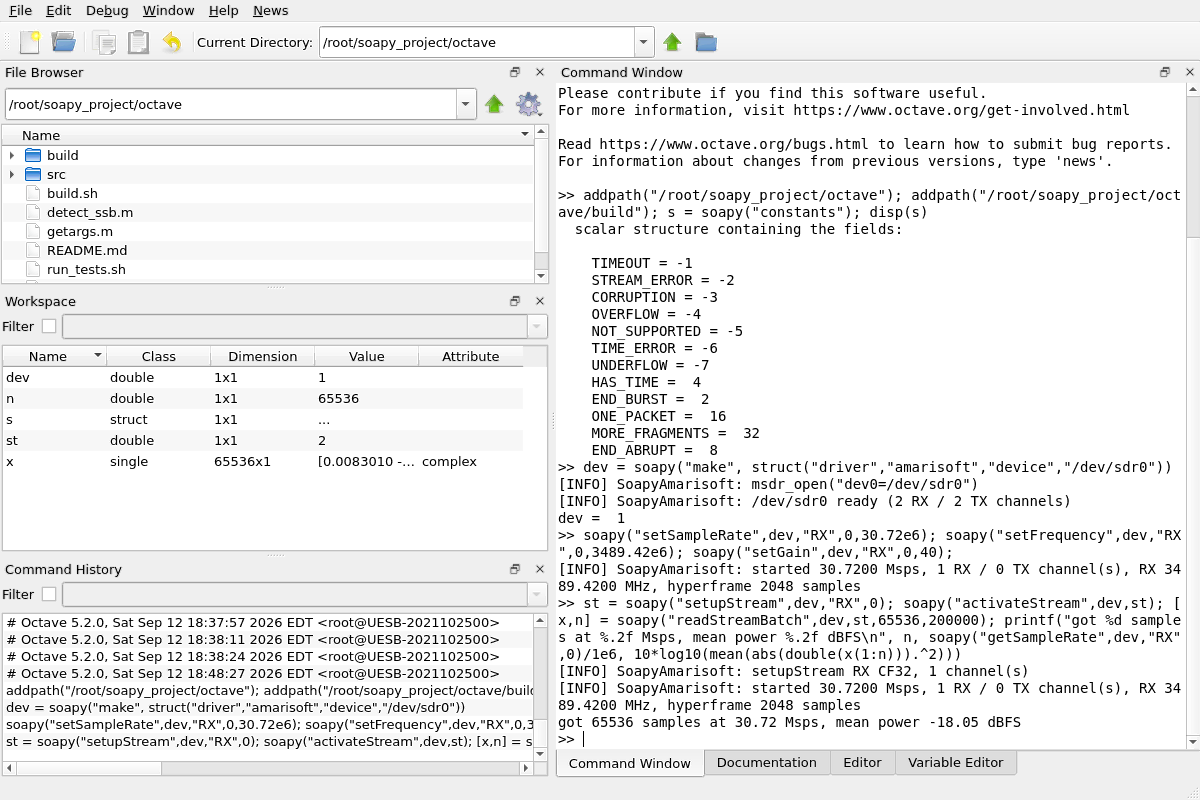
With those in place the session below opens the card, configures it and reads one batch, all from the command window. soapy ("constants") is listed first because it is the quickest confirmation that the binding loaded at all, and it needs no radio.
The constants come back as a plain structure, so TIMEOUT is -1, OVERFLOW is -4 and END_ABRUPT is 8, which is the flag readStreamBatch uses to close a run. Opening the device prints the module's own log lines, and /dev/sdr0 reports 2 RX and 2 TX channels.
This session is tuned wider than the detector was. The rate is 30.72 Msps and the centre is 3489.42 MHz. That is the cell centre rather than the SSB centre, so the whole carrier falls inside the span. Setting the three parameters starts the hardware there, and the hyperframe is now 2048 samples rather than the 512 of the 7.68 Msps case.
The last line reads 65536 samples in one call and reports a mean power of -18.05 dBFS. The workspace pane carries the result: x is a 65536 by 1 single precision complex array, which is the driver format arriving in Octave with no conversion in between.
Samples in the workspace can then be treated like any other Octave array. One batch is not much of a spectrum, though. The cell is idle, so it transmits an SSB burst lasting about a quarter of a millisecond every twenty, and a single 32768 point transform covers only about one millisecond. Most single shots catch nothing but noise.
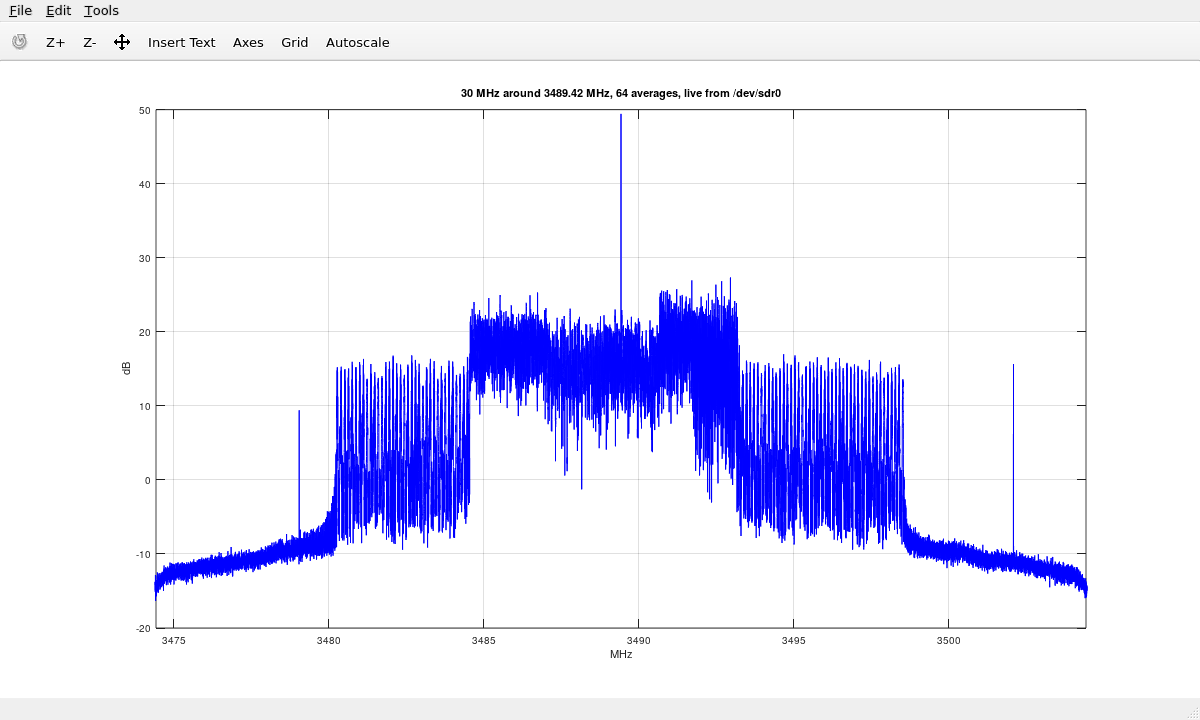
Averaging is what makes it a spectrum analyser. The loop below reads sixty four batches and accumulates the squared magnitude of each, which is a little over two milliseconds of radio per transform and sixty eight in total. That is long enough to cover several SSB periods.
|
N = 32768; K = 64; S = zeros (N, 1); w = hanning (N); for k = 1:K [b, m] = soapy ("readStreamBatch", dev, st, N, 200000); S = S + abs (fft (double (b(1:N)) .* w)) .^ 2; end X = 10 * log10 (fftshift (S / K) + 1e-12); f = (-N/2 : N/2-1) / N * 30.72 + 3489.42; plot (f, X, "b"); grid on; xlim ([3474.42 3504.42]); xlabel ("MHz"); ylabel ("dB"); |
The span is set to 30 MHz around 3489.42 MHz, which leaves clear air either side of a 20 MHz carrier. The carrier itself shows as a flat block about 18 MHz wide, measured from 3480.4 to 3498.4 MHz. That is the 51 resource blocks a 20 MHz channel uses at 30 kHz subcarrier spacing, which is 18.36 MHz.
Inside it a stronger block stands about 7 dB higher and runs roughly 8.6 MHz, which is the region the idle cell actually transmits in. Everything outside the channel sits at about -12 dB, and two narrow spurs break that floor near 3479 and 3502 MHz.
The single line at 3489.42 MHz reaching about 50 dB is not a signal. It is the receiver's own DC, and it lands at the middle of the display because the card is tuned exactly there. Tuning a little off centre moves it away from whatever you are trying to look at.
The plot window is a normal Octave one, so the toolbar zoom, pan, grid and autoscale controls all work on live samples.
Releasing the card at the end is not optional in an interactive session. The device stays open until it is unmade, and until then no other program can have the board.
|
soapy ("deactivateStream", dev, st); soapy ("closeStream", dev, st); soapy ("unmake", dev); |
On a machine that boots to multi-user.target there is no desktop session to show a window in. ssh -X carries it if you have an X server, and a virtual display works when you do not.
|
Xvfb :99 -screen 0 1600x1200x24 & DISPLAY=:99 octave --gui |
Checking It Still Works
run_tests.sh exercises both programs and prints a pass or fail tally. It follows the same principle as healthcheck_sw.sh: it answers whether the software still works, not whether anything is transmitting. The detector finding no SSB on a bare bench is healthy and counts as a pass.
|
./run_tests.sh # auto-pick a free board, run everything ./run_tests.sh --quick # only what needs no radio ./run_tests.sh /dev/sdr2 # pin a board instead of auto-selecting ./run_tests.sh --expect-ssb # also require that an SSB is really found |
The board is chosen the same way the module's own test tool chooses one, by reading /proc to find a /dev/sdrN that no other process is holding. That keeps it away from a board already taken by lteue or lteenb.
--expect-ssb is for a bench where a cell really is on the ARFCN being tested. It turns two extra checks on. One requires the detector to exit zero, meaning it decoded at least one SSB. The other requires it to find all one hundred in two seconds, which fails if the detector has fallen behind the radio, so it doubles as a throughput regression test.
[root@UESB-2021102500 octave]# ./run_tests.sh --expect-ssb --- the binding --- PASS soapy.oct loads, constants match headers (rc 0) --- no radio needed --- PASS rx_minimal.m --help (rc 0) PASS detect_ssb.m --help (rc 0) PASS rx_minimal.m rejects --seconds 1e99 (rc 1) PASS detect_ssb.m rejects --seconds -1 (rc 1) PASS detect_ssb.m rejects --seconds 0 (rc 1) PASS detect_ssb.m requires --arfcn (rc 2) PASS detect_ssb.m rejects unknown option (rc 2) PASS detect_ssb.m rejects a non-number (rc 2) PASS detect_ssb.m rejects a missing value (rc 2) PASS rx_minimal.m reports a bad device (rc 1) PASS detect_ssb.m reports a bad device (rc 1) --- live radio --- using /dev/sdr0, SSB ARFCN 632544 PASS rx_minimal.m at 7.68 Msps (rc 0) PASS rx_minimal.m at 30.72 Msps (rc 0) PASS rx_minimal.m releases the board (rc 0) PASS detect_ssb.m runs to the summary (rc 0) PASS detect_ssb.m releases the board (rc 0) PASS detect_ssb.m finds the cell on 632544 (rc 0) PASS detect_ssb.m keeps up with the radio (rc 0) |
The two release checks are worth pointing at. Each runs its program several times in a row. The board is opened exclusively, so a handle leaked by the first run shows up as the second run failing to open it.
Installing/Uninstalling soapy_project package
You can install all the package and examples for this tutorial refering to this tutorial.
Directory Structure
Everything in this tutorial lives in one directory beside the python one, inside the soapy_project tree described in the SoapySDR tutorial. The list below is what is there after a successful build, and which of it is needed at run time.
/root/soapy_project/octave/
  +-- src/soapy.cc              [MANDATORY] the SoapySDR binding, source
  +-- getargs.m                 [MANDATORY] option parsing for both programs
  +-- rx_minimal.m              the minimal receiver
  +-- detect_ssb.m              the SSB detector
  +-- build.sh                  builds the binding
  +-- run_tests.sh              checks both programs
  +-- README.md                 design notes and measured numbers
  +-- build/                    created by build.sh
        +-- soapy.oct           [MANDATORY] loaded by Octave at run time

Needed on the system, beyond the soapy_project prerequisites:

  octave                        [MANDATORY] 5.2.0 here; both front ends
  octave-devel                  [MANDATORY] supplies mkoctfile, to build
  /usr/local/lib64/SoapySDR/modules0.7/libamarisoftSupport.so
                                [MANDATORY] the module, unchanged from
                                the SoapySDR tutorial
|
Nothing under build/ should be copied to another machine. A .oct file is a shared object built against one Octave API version and one SoapySDR ABI, so it is rebuilt on the target with build.sh instead.