
Amarisoft gNB and Benetel RAN650 n77u RU integration Guide
This guide describes method of employing Benetel RAN650 RU with Amarisoft Callbox using Open RAN 7.2 interface.
In this guide, we assume that Amarisoft Callbox gNB is initially in its default configuration, while Benetel RAN650 RU’s configuration file is as presented in Appendix A.
Table of Contents
- Amarisoft gNB and Benetel RAN650 n77u RU integration Guide
- Hardware requirements
- Intended 5G network parameters
- Amarisoft Callbox operating system and network stack configuration
- Configuration of network device(s)
- Time synchronization (S-Plane) configuration
- PTP Grandmaster (PTP GM) configuration
- Amarisoft Callbox S-Plane configuration
- Benetel RAN650 RU S-Plane configuration
- Benetel RAN650 Radio Unit configuration
- Amarisoft CallBox gNB configuration
- Startup and verification of operation
- LLS-C1 Architecture Setup
- Appendix A: Benetel RAN650 n77u configuration file – ru_config.cfg
Hardware requirements
- An Amarisoft Callbox (Advanced, Ultimate or Extreme version) with 7.2 interface or Amarisoft vRAN and Core network software installed on compatible hardware.
- A 10 Gbps Ethernet NIC with PTP hardware timestamping (e.g. Intel E810-XXVDA4),
- A Benetel RAN650 n77u Radio Unit (RANx50-1V2.1.0 RU SW Release),
- A fronthaul switch with PTP Grand Master functionality (e.g. FibroLAN uFalcon MX/G),
- Cabling necessary to connect Amarisoft Callbox and Benetel RU – SFP+ modules for Callbox, Ethernet switch and RU with appropriate fiberoptic cables.
The presented example utilizes LSS-C3 architecture, as shown in the figure below.
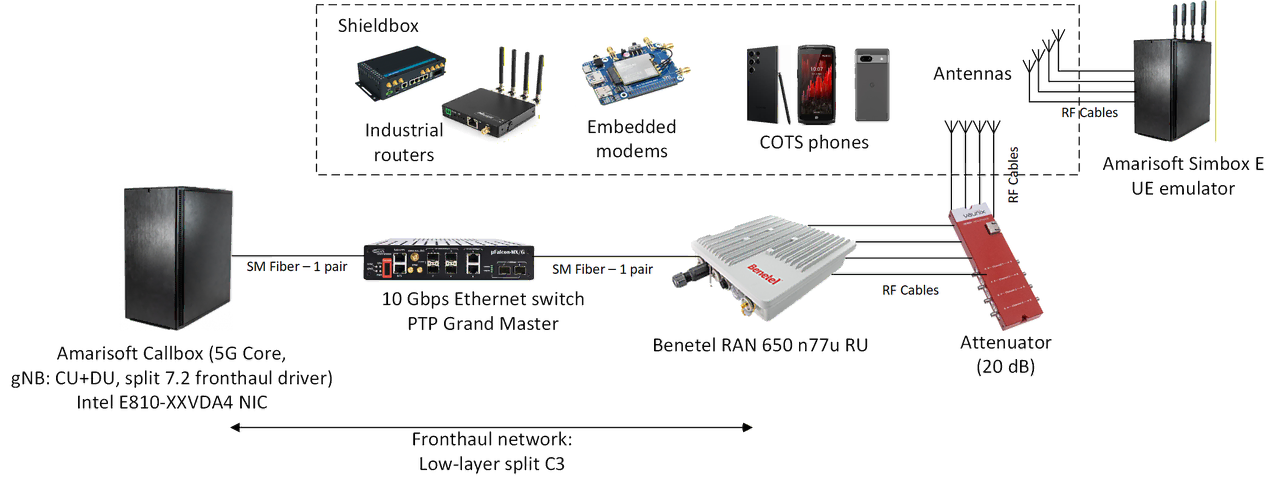
In our setup, we have employed a shieldbox environment for UE devices, connecting the Radio Unit to antennas inside it using RF cabling and a 20 dB RF attenuator.
Intended 5G network parameters
The procedure is described assuming the following values of crucial 5G NR network cell parameters:
- TDD operation
- Radio frequency: n77 (FR1) band, center frequency: 3950.40 MHz (5G ARFCN: 663360)
- Radio bandwidth: 100 MHz
- Subcarrier Spacing (SCS): 30 kHz
- MIMO 4x4, 4 layers DL, 4 layers UL
- Configured RU TX power: 24 dBm
Amarisoft Callbox operating system and network stack configuration
In preparation for running the Callbox software gNB employing an O-RAN driver to communicate with a Radio Unit (RU) using a 10 Gigabit Ethernet link, we need to ensure correct configuration of a network interface.
First we need to identify the network interface connecting our computer to a fronthaul network device. For that purpose we can use ip link command displaying a list of network interfaces. If an Ethernet interface is configured to be active (UP in <...> section), it will display either LOWER_UP (link is connected and active) or NO-CARRIER (link is not connected), which can be used to identify the correct interface.
In case of Intel E810-C NIC its 4 network interfaces will be displayed as shown below:
|
In this case, the active interface is ens1f1np0, as it displays both LOWER_UP and state UP. Please note the MAC address of your own interface, as you will be required to substitute it for the example one in many of subsequent steps.
As this interface will be used to support Synchronization Plane (S-Plane), it requires hardware support of Precision Time Protocol (PTP). To verify this capability, we use ethtool -T ens1f1np0 command.
|
To indicate the required PTP support, the result should include hardware-transmit, hardware-receive and hardware-raw-clock capabilities, and PTP Hardware Clock must indicate a specific number (instead of “none”). As can be seen above, our chosen interface supports the necessary functionalities.
Having confirmed suitability of the chosen interface we proceed with its configuration. As a first, optional step, we can change the interface name, to facilitate further configuration. For that purpose we need to create a following file, substituting a MAC address of your interface:
/etc/systemd/network/70-fhaul1.link
|
This will result in the interface matching the supplied MAC (in our case ens1f1np0) to be renamed to fhaul1.
As the default IP address of Benetel RAN650 RU is 10.10.0.100/8, we need to assign an appropriate IP address to fhaul1 interface. To prevent routing disruptions in case our system already contains 10.0.0.0/8 networks reachable by a default route, we will assign a 10.10.0.1 address with a 24 bit mask – it will allow IP connectivity between the gNB computer and RU, without redirecting unwanted traffic to the interface.
In our example, the IP connectivity with RU will only be used for management using SSH protocol. The communication between gNB and RU will be conducted using eCPRI over Layer 2 transport (directly using Ethernet frames).
Due to large amount of data exchanged when using wide radio bandwidth the Maximum Transmission Unit (MTU) of the fhaul1 interface needs to be increased from the default 1500 B to a higher value. We need to take into account, that the s72 communication driver we are going to use supports messages of up to 9000 B, so preferably it should be a value capable of accommodating such messages. However, we should make sure, that such an MTU size is supported by all intermediary network devices between gNB and RU. In our case a FibroLAN uFalcon MX/G switch supports up to 10240 B, so we are going to set the MTU to a maximum value selectable for Intel E810 NIC under Linux OS: 9216 B.
The addressing and MTU changes can be done at runtime using the following commands:
|
However, if we want the changes to persist, we need to create an appropriate connection definition for NetworkManager which Fedora 42 uses to manage network configuration. For this purpose we will create a following file, substituting MAC address of your fhaul1 interface in the mac-address field:
/etc/NetworkManger/system-connections/fhaul1.nmconnection
|
After creating the file, the command nmcli connection reload will cause the configuration to be loaded and applied. The same configuration can be achieved using command line tools such as nmcli, without the need to edit configuration files (such approach is employed below, during configuration of a VLAN interface) which are created automatically – we have employed both approaches for illustration purposes.
Having finished network configuration, we can test IP connectivity with RU using ping 10.10.0.100 (default IP address of Benetel RAN650 RU). If the connectivity is confirmed, we can also attempt to login. For help with first login into RU, please contact Benetel Support.
While the SSH communication with RAN650 RU is conducted using untagged Ethernet frames, O-RAN User and Control Plane connectivity between gNB and RU requires use of Ethernet frames tagged with VLAN ID defined in /etc/ru_config.cfg configuration file of RU (parameters: u_plane_du_vlan_uplink, u_plane_du_vlan_downlink, c_plane_du_vlan) – by default all use VLAN ID 3. To satisfy this requirement, we are going to create a VLAN interface using fhaul1 interface as a parent. To make it persistent across reboots, we create a new NetworkManager connection:
|
Apart from the above configuration of the fronthaul network interface, we must also ensure that the operating system is configured for real-time operation, minimizing and keeping latency of process execution and network access constant. For this purpose, we:
- Disable NIC adaptive interrupt moderation to ensure predictable response times of our Intel E810 NIC:
|
- Ensure there is minimal delay in reception of incoming network data:
|
- Allow real-time tasks to operate without OS-induced limits:
|
These commands need to be executed after each system restart, so it is advised to include them as a shell script run automatically after system boot. The operation (3) can also be made permanent by creating a file containing appropriate value assignment in /etc/sysctl.d directory:
echo "kernel.sched_rt_runtime_us=-1" > /etc/sysctl.d/99-rt_runtime.conf
Configuration of network device(s)
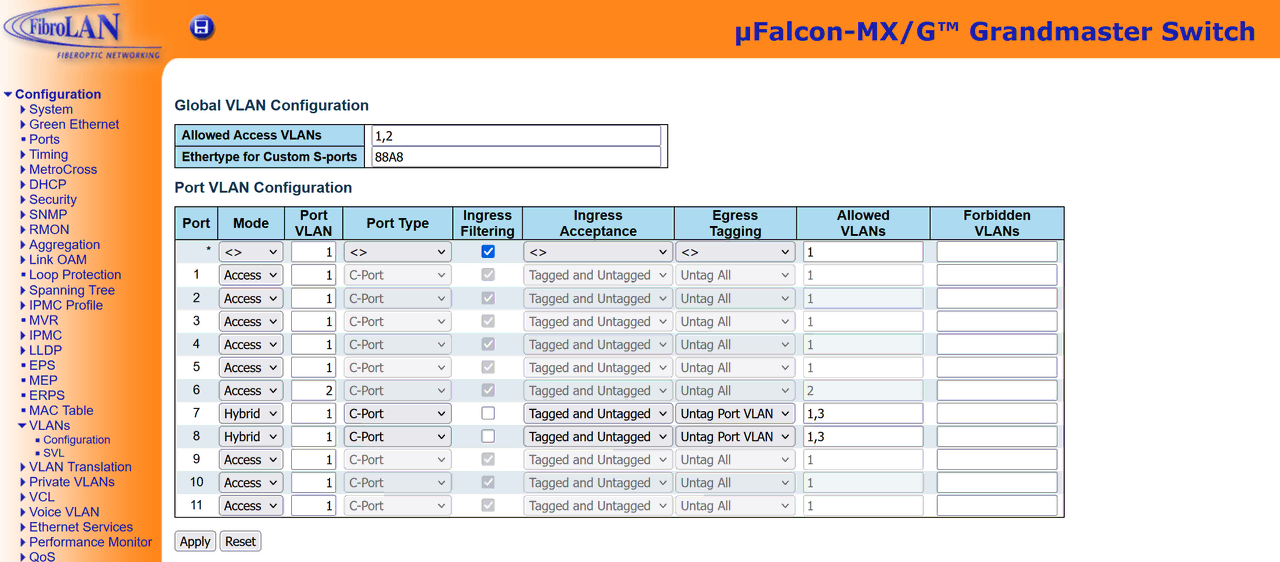
As we are using a network device for the connection between gNB and RU, we need to configure it to forward both untagged frames and frames tagged with VLAN ID 3 between ports to which these devices are connected. The specifics depend on the exact model of the switch – below we provide configuration screens for FibroLAN uFalcon-MX/G. In the example gNB is connected to port 7 and RU to port 8. Port 6 is used to manage the device.
Time synchronization (S-Plane) configuration
An O-RAN fronthaul communication requires precise time synchronization, which is the main task for Synchronization Plane (S-Plane). In our example, we are employing a Lower Layer Split Configuration 3 (LLS-C3), in which both RU and gNB (or more precisely Distributed Unit of O-RAN gNB) obtains time synchronization from the fronthaul transport network. In our case the source of synchronization is the FibroLAN uFalcon-MX/G functioning as both Ethernet transport switch and PTP Grandmaster.
PTP Grandmaster (PTP GM) configuration
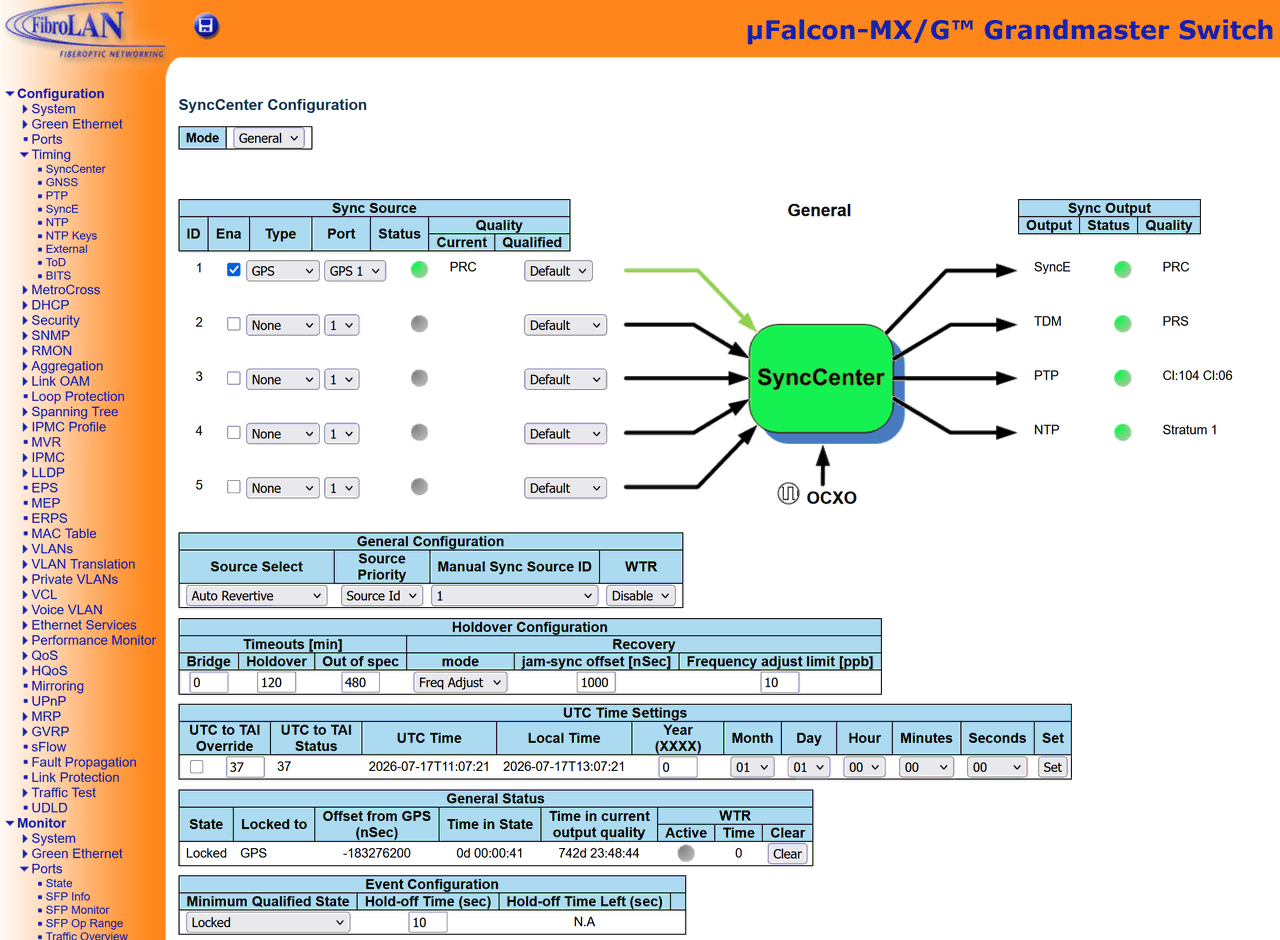
The FibroLAN device has been configured to obtain time synchronization from GNSS system, as shown below.
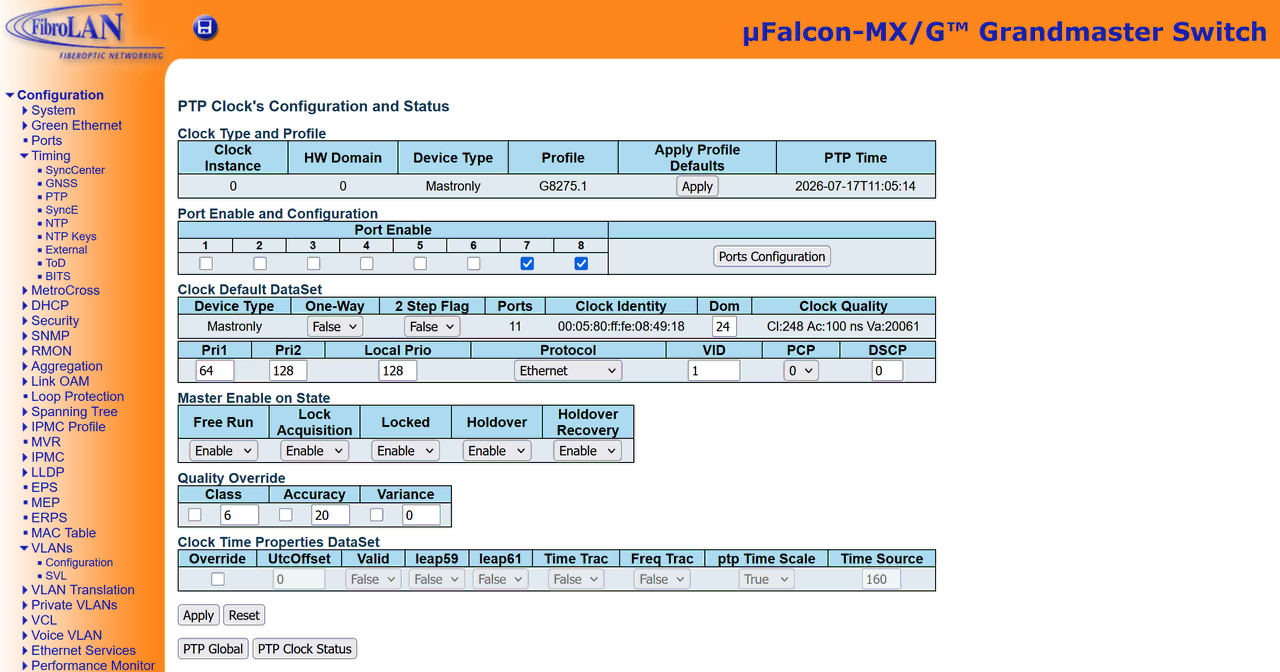
The device is further configured (as can be seen in the figure below):
- to provide PTP time service on ports 7 and 8,
- to use Ethernet (layer 2) as a transport protocol for PTP,
- with the PTP Priority1 parameter (Pri1) set to 64, to clearly indicate that it is a preferred time source within the network (default being 128 with lower values indicating preference),
Furthermore, note that the Dom field (identifying PTP Domain) is set to 24 – this value needs to be consistent in all devices intended to synchronize using this PTP GM.
Amarisoft Callbox S-Plane configuration
To synchronize the software Amarisoft Callbox gNB to the external PTP time source with precision sufficient for O-RAN fronthaul operation we need to synchronize NIC hardware clock to PTP GM and then synchronize system real-time clock to NIC hardware clock.
The PTP synchronization of NIC hardware clock is provided by linuxptp package. It can easily be installed using Fedora package manager:
|
The service is configured by editing /etc/ptp4l.conf file, which should include a configuration similar to the following:
|
Please note that the domainNumber is set to 24 (in accordance with PTP GM configuration) and time_stamping field indicates hardware synchronization. Additionally, there is a section with the same name as our fronthaul interface (its presence will enable PTP operation on this interface) providing additional (interface specific) configuration – in this case indicating that PTP synchronization should use Layer 2 transport.
If there is a need to provide additional command line parameters when starting the ptp4l service, they can be provided in /etc/sysconfig/ptp4l file.
Having configured the PTP service, we need to start it and ensure that it will start automatically after reboots: systemctl enable --now ptp4l
As the service is now running, we can use journalctl -fu ptp4l command to monitor its activity. We should observe decreasing values of rms and max fields indicating improving synchronization between NIC and PTP GM. The values should be as small as possible, below 90 ns. Significantly changing or high values indicate problems with synchronization.
|
With the NIC hardware clock synchronized to PTP GM, we need to synchronize gNB system real-time clock to NIC clock. For this purpose, we use a phc2sys service, which is also part of linux-ptp package. Its configuration file /etc/sysconfig/phc2sys should include the following options:
|
They will allow the service to autoconfigure with ptp4l, use PTP domain 24 (as defined in PTP GM and ptp4l service), update the system real-time clock and provide logs for monitoring.
Similarly to ptp4l service – starting the phc2sys service and configuring it to autostart can be done by command: systemctl enable --now phc2sys, after which we can verify results of synchronization by using command: journalctl -fu phc2sys
|
As before, we should observe decreasing values of the offset field, which should follow constraints similar to rms/max fields of ptp4l service log. Additionally, there should be “s2” indicator (locked state) present, confirming synchronization between NIC and OS clocks.
As the system real-time clock is now synchronized using ptp4l/phc2sys, disable any Network Time Protocol synchronization services to prevent conflicts – e.g. chronyd service: systemctl disable --now chronyd
Benetel RAN650 RU S-Plane configuration
If the PTP GM is configured as described before, the RU synchronization should happen automatically. The synchronization process should detect the PTP GM and enter SLAVE state.
You can observe synchronization progress using tail -F /var/log/pcm4l command and confirm if RU is in locked sync state (cat /var/syncmon/sync-state returns 0).
|
Benetel RAN650 Radio Unit configuration
In this example we are going to configure RAN650 RU manually, without using O-RAN Management Plane (M-Plane). To do so, we connect to RU by means of SSH protocol, using its default 10.10.0.100 IP address. For help with first login into RU, please contact Benetel Support.
|
Following the successful login, we use ip link command to display network interfaces of the RU and note a MAC address of eth0 (its fronthaul interface), as it will be requited during gNB configuration.
Most of RU configuration parameters required for successfully connecting to an Amarisoft Callbox gNB can be found in /etc/ru_config.cfg file. Changes made in this file require reboot to take effect and are persistent across reboots. To edit the file use vi /etc/ru_config.cfg command.
First we are going to configure parameters required for establishing U/C-Plane eCPRI communication:
- c_plane_du_mac, u_plane_du_mac
MAC addresses of DU (in our case Callbox gNB) interfaces for respectively C-Plane and U-Plane communication. In our example we use the same interface for both, so the address will be the same – the address of fhaul1 interface (e.g. 50:7c:6f:2c:f4:18).
- compression=static_compressed
Enables a statically configured 9-bit Block Floating-Point Compression (BF9) of U/C-Plane data, which is required for all MIMO configurations except MIMO 2x2. The static mode is required for Amarisoft gNB compatibility. - u_plane_du_vlan_uplink, u_plane_du_vlan_downlink, c_plane_du_vlan
Allow us to define VLAN ID for RU to use for respectively U-Plane Uplink/Downlink and C-Plane communication. With our default configuration utilizing a shared U/C-Plane VLAN, all these parameters are set to 3, which we have already taken into account when configuring OS VLAN interface,
- cplane_per_symbol_timing
Controls logical content of eCPRI messages, allowing it use timing reference information per slot or per symbol. Should be kept at the default (false) value for compatibility reasons.
Having configured DU-RU communication-related settings, we proceed with configuration of parameters related to specifics of our intended 5G NR cell. As we are (see parameters section) configuring a TDD MIMO 4x4 cell of 100 MHz radio bandwidth, with a center frequency of 3950.40 MHz, we are will use the following parameters of /etc/ru_config.cfg file:
- mimo_mode
Controls support for various MIMO modes. In our case we set it to 1_2_3_4_4x4 to allow the intended 4x4 mode of operation.
- prach_format
Allows selection between short and long Physical Random Access Channel preamble format. We keep the default short value, as the short format is the preferred choice for both small cells and TDD mode of operation.
- centre_frequency_hz
Selects the center frequency for the cell to use. Should be provided precisely in Hz. In our case that results in 3950400000 value. To easily obtain a frequency based on an ARFCN value a tool such as https://5g-tools.com/5g-nr-arfcn-calculator/ can be used.
- bandwidth_hz
Controls the radio bandwidth used by the cell in Hz. Refer to comment in configuration file to check which values are allowed. In our case we use the default 100000000 (100 MHz).
- tdd_pattern1, tdd_pattern2
Two fields that describe the TDD structure of communication within a 5G NR frame, by specifying a sequence of downlink (D), uplink (U) and special/flexible slots (S). Ensure the configuration corresponds to you planned TDD radio cell configuration and the configuration of gNB.
The default configuration of tdd_pattern1: DDDD tdd_pattern_2: DDDSUU (giving priority to downlink transmission) will be used in our case.
- special_slots_symbols
Describes the sequence of symbols within special/flexible (S) slots. Downlink (D), uplink (U) and Guard (G) symbols can be specified. Once again, we use the default DDDDDDGGGGUUUU for this parameter.
- tx_power_dbm
Controls the output power in dBm. In case of RAN650 n77u the maximum is 35 dBm which can be reduced by as much as 20 dB, resulting in minimum possible setting of 15 dBm. The value must be written with 6 digits after the decimal dot (e.g. 24.000000).
Amarisoft CallBox gNB configuration
Amarisoft Callbox gNB implementation is capable of interfacing with O-RAN RU using S72 driver – it allows the gNB to perform the role of O-RAN CU and DU elements and use 10 Gigabit Ethernet Interface as fronthaul eCPRI connection to RU.
In the following description we assume that an Amarisoft Callbox software containing the S72 driver has been installed in /root directory of an operating system prepared as previously described. The initial configuration is assumed to be default, post-install one.
We are going to base our gNB configuration on the example gnb-sa.cfg included in Callbox installation, so the first step is to copy (or link) this file as a current configuration (by default /root/enb/config/enb.cfg – the example file is in the same directory).
To use the s72 driver instead of the default Software Defined Radio board, we need to edit the new enb.cfg file and replace its rf_driver section as shown below:
|
The name field indicates the driver to use (s72), while rf_ports subsection provides the configuration necessary for communication with a specific RU:
- transport
Selects the transport protocol to use for communication with RU. Configure transport as ”ethernet” to use Layer 2 eCPRI transport.
- bind_interface
The name of the VLAN interface to be used for U/C-Plane communication. In tour example fhaul1.3 VLAN interface has been configured for this role.
- remote_addr
The address of the connected RU. As we are using Layer 2 transport, it is a MAC address of its fronthaul interface (eth0, as we noted earlier).
- max_pdu_size
The maximum eCPRI message size in bytes. As our NIC and network devices support a maximum MTU of 9216 B we can use a maximum value supported by the s72 driver here: 9000.
- t1a_min_cp_dl, t1a_max_cp_dl
|
Timing values describing a profile of an RU, used by a gNB to take into account time required by operations performed by RU – they should be set according to RU specification (specific model and firmware version). The values included in the example are for Benetel RAN650 n77u V2.1.0. Misconfiguration will cause the messages exchanged between gNB and RU to be rejected as arriving too early or too late to be used.
Next, replace rf_ports section with one specific to s72 driver, as shown below:
|
As we have only one radio device used in our setup, the rf_ports section consists of a single (s72) subsection providing additional configuration necessary for its integration with the gNB:
- rtc_id
Identifier of the particular RU. Set to default value of 0.
- ud_comp_hdr
Selects compression method to use. Only static mode (where both gNB and RU need to be specifically configured to use a particular algorithm) is supported. As described before, for compatibility with RAN650 RU we select value 0x91 indicating BF9 compression.
- port_mapping_dl, port_mapping_ul, port_mapping_prach
Describes mapping between RU physical antennas and logical RU port identifiers for downlink (port_mapping_dl), uplink (port_mapping_ul) and PRACH channel (port_mapping_prach).
The array size corresponds to a number of antennas gNB is configured to utilize for the specific communication direction (downlink and uplink). The PRACH array size is the same as the size of uplink array.
Specific values should be taken from the RU documentation and they depend on selected MIMO mode.
Alternatively, in case of RAN650 RU, they can be obtained directly from the RU, after its mimo_mode parameter has been configured and the RU restarted. The information can be found in the /etc/eaxc.xml file: each of array positions corresponds to an “<antenna antenna-id=…>” node, while values for downlink, uplink and PRACH can be found in “<ru-port-id>” elements of “<eaxc-id type=”downlink>”, “<eaxc-id type=”uplink>” and “<eaxc-id type=”prach>” sub-nodes respectively.
- gen_prb0
The 100 MHz MIMO 4x4 SCS 30 kHz mode of operation allows continuous reservations of up to 273 Physical Resource Blocks (PRBs), while the standard message format has only a single byte (values 0-255) for describing the number of continuously assigned PRBs. To prevent the necessity of using two allocation messages (allocation fragmentation), setting gen_prb0 parameter to true allows gNB to use the value of 0 to indicate an allocation of all 273 PRBs (full grant).
- tx_gain_offset
Sets the TX digital gain, which should be set high, but low enough to prevent saturation. Generally it can be left on its default value of -14 for less than 8 TX antennas and -17 dB for 8 or more TX antennas, however its correct setting is expected to be RU model-dependent.
Having the above, driver-related configuration prepared, we can proceed to configure parameters describing a 5G NR cell.
First, set the correct values of the following preprocessor directives, which define variables which can be used in multiple places in the configuration file:
- NR_TDD set to 1 to indicate TDD mode,
- FR2 set to 0, as we are using n77 band belonging to an FR1 frequency band,
- NR_TDD_CONFIG set to 2, as it corresponds to TDD pattern definition consistent with the TDD pattern configured on the RU. Take care to edit the definition of this parameter in conditional section corresponding to FR1 not FR2,
- NR_BANDWIDTH set to 100, indicating a 100 MHz radio bandwidth. As has been the case with NR_TDD_CONFIG – edit the definition in the correct conditional section,
- N_ANTENNA_DL set to 4, indicating that 4 antennas are to be used for downlink communication,
- N_ANTENNA_UL set to 4, indicating the same number of antennas will be used for uplink.
- USE_SRS optionally set to 1, to enable Sounding Reference Signal (SRS) function, which is necessary to use uplink MIMO. Without it the cell will use only 1 MIMO layer for uplink, regardless of the number of assigned uplink antennas.
The above definitions are used as a conditions in other preprocessor directives, controlling which blocks of configuration file are actually used or as values directly provided to various configuration parameters.
Regardless of the optional use of the above definitions in our configuration file, below is the list of parameters, which need to be configured for the gNB to operate correctly RAN650 RU.
- nr_cell_defaults section – setting common values for all cells of the gNB:
- bandwidth
radio bandwidth in MHz – in our case 100, consistent with the value of bandwidth_hz RU parameter.
- n_antenna_dl
number of antennas used for downlink transmission – in this example 4, consistent with mimo_mode of the RU.
- n_antenna_ul
number of antennas used for uplink transmission – in this example 4, consistent with mimo_mode of the RU.
- ss_pbch_block_power
this parameter informs the gNB of the power at which RU will transmit the reference signal (SSB block power), used by UEs to estimate path loss and perform power control procedures. Such information must be explicitly provided here when using O-RAN split 7.2 due to relocation of low-level PHY functions to the RU. The value depends on the number of factors (total RU TX power, number independent radio chains, cell radio bandwidth, SCS) and can be calculated using tools such as https://5g-tools.com/5g-nr-ssb-sss-epre-power-calculator/. The calculated value may require finetuning, depending on specifics of the employed propagation environment.
Incorrect selection of the value will lead to incorrect operation of UE power control mechanism results in their erratic behavior or inability to connect (initiated but unfinished RRC session establishment procedures).
In our case, with the configured 24 dBm power, MIMO 4x4 operation, 100 MHz BW and 30 kHz SCS, the calculated value for this parameter is -11.
- nr_cell_list section – providing cell-specific configuration:
- band
specifies 5G NR frequency band of the cell. In our case it is n77 band, corresponding with capabilities of a RAN650 RU n77u model.
- dl_nr_arfcn
a center frequency of the cell, in a 5G NR ARFCN format. The ARFCN value converted to frequency in Hz must match exactly the information entered in centre_frequency_hz parameter of RU. In our case we use ARFCN of 663360, corresponding to a frequency of 3950.40 MHz.
The values of frequency, band and ARFCN can be calculated using a number of tools, for example https://5g-tools.com/5g-nr-arfcn-calculator/
- subcarrier_spacing
frequency width of subcarriers – an important parameter impacting both frequency-domain and time-domain frame structure, as well as transmission characteristics of a network cell. We use a 30 kHz value – a popular choice for n77 frequency band.
- tdd_ul_dl_config section – describing TDD organization of uplink and downlink:
- pattern1
Ensure values provided here correspond to these configured in tdd_pattern_1 and tdd_pattern_2 parameters of your RU (as defined in its /etc/ru_config.cfg file):
- dl_slots and ul_slots parameter values must correspond to total number of respectively D and U slots configured in tdd_pattern_1 and ttd_pattern_2 RU parameters,
- dl_symbols and ul_symbols parameter values must correspond to the number of respectively D and U symbols configures in special_slots_symbols RU parameter.
The default RAN650 RU configuration described before (pattern1: DDDD, pattern2: DDDSUU, special_slot_symbols: DDDDDDGGGGUUUU) corresponds to dl_slots: 7, dl_symbols: 6, ul_symbols: 4, ul_slots: 2. Period of 5 ms is recommended.
- prach section – setting Physical Random Access Channel parameters:
- prach_config_index
an identifier describing a set of PRACH parameters – consult the documentation of the RU and use a value compatible with your TDD pattern/periodicity defined in tdd_ul_dl_config section (RACH opportunity assignment must correspond with an uplink slot) and with a short PRACH preamble of type B4. In our case a value of 159 fulfills these requirements.
Startup and verification of operation
With the above configuration prepared, the gNB and other Callbox elements (5G Core, IMS, etc.) can be started by starting an lte service: systemctl start lte
As the lte service executes Callbox elements (including gNB) in virtual terminals created by the screen command, when the service is running (which can be verified using systemctl status lte command), we can use screen -x lte to access their interactive prompts.
The environment invoked by using screen command displays a numbered list of virtual terminals at the bottom of the screen. The currently displayed terminal can be selected by using Ctlr+A,1 (press Ctrl+A followed by pressing 1). The Ctrl+A,D sequence will allow us to leave screen environment.
To verify gNB operation we need to select terminal named ENB (most often it is a terminal number 1). If the gNB started successfully, information about radio band/frequency and number of RX/TX antennas used by our cell will be displayed. In case of any formal configuration errors, appropriate messages will also be displayed here.
|
The ENB terminal provides us with interactive prompt (enb) of the gNB process, which we can use to request additional information about the 5G NR cell by issuing command: cell and cell phy.
|
The above results confirm our configuration: a 5G NR (RAT) cell, in n77 band (BAND), 100 MHz bandwidth (BW) at 663360 ARFCN with 30 kHz Subcarrier Spacing (SCS), using 4 antennas in uplink and downlink (ANT). There is also information about network (PLMN) and gNB (gNB_ID) identifier, as well as information about ARFCN (calculated by gNB) on which System Synchronization Block, crucial in network detection/ue registration process, is transmitted (SSB ARFCN).
Overall configuration and statistics of radio driver operation, can be displayed using rf_info command. As we are using s72 driver, it should display its configuration we provided in enb.cfg file (e.g. fronhaul interface/address and configured RU timing profile), as well as statistics of eCPRI traffic exchanged between gNB and RU over the fronthaul network.
|
Crucial information regarding the correctness of eCPRI communication between gNB and RU can be obtained using command t s72.
|
The command displays a trace showing the total number of received, valid eCPRI messages (total) also divided into eCPRI type1 and eCPRI type3 messages. These values should remain constant, barring reconfiguration of the system or errors in communication. Such errors can be caused by a number of conditions and are counted in remaining columns:
- error – type3 (proprietary data) messages containing data errors,
- inv – malformed messages,
- miss – incomplete OFDM symbols,
- late / early – messages which arrived outside the allowed time window,
- lost – unexpectedly (without associated control information) received messages,
- skip – discontinuous frame numbers,
- past – frame numbers lower than currently expected.
Even a relatively small number of errors in fronthaul communication will result in degradation of communication performance , while a high, persistent error count clearly indicates a critical error in configuration (e.g. consistent number of MIMO layers between gNB and RU), loss of time synchronization or processing performance issues. These problems can be located at gNB, RU or fronthaul network devices.
Similar information can also be obtained for RU. After connecting to RU using SSH and logging in, a kpi.sh command will display a trace of RU fronthaul timing statistics (similar to the trace provided by t s72 command of a gNB).
|
The trace shows a total number of received (RX_TOTAL) and transmitted (TX_TOTAL) eCPRI messages, including both valid and invalid ones. RX_ON_TIME and RX_ON_TIME_C columns show number of respectively user and control plane messages received within expected time window. Messages which arrived outside the expected time window are counted in RX_EARLY and RX_LATE columns for user plane and RX_EARLY_C and RX_LATE_C columns for control plane messages. RX_CORRUPT column shows number of received messages which do not follow configured compression settings.
As in case of gNB eCPRI trace, incidental errors can occur, but consistent increase of error counters indicates either configuration or performance issue which needs to be corrected.
If remaining elements of the Callbox system, such as the network core with its UE database, are configured, Commercial-of-the-Shelf (COTS) UEs should be able to connect using our described gNB-RU configuration. A number of such devices have been verified to operate correctly – starting from phones/tablets, through network devices such as routers and ending with 5G modems intended for embedded use: Samsung Galaxy S23+, Samsung Galaxy Tab S8 Ultimate 5G, Google Pixel 7, CrossCall Core-Z5, OnePlus 11, Milesight UF31-554AE, CPX801, Advantech ICR-4400, Mikrotik RB953GS + RM502Q-AE module, Raspberry Pi + SIM8262E module, and Amarisoft Simbox UE emulator. Such a range of UE types and models allow us to confirm the compatibility of the system with general COTS UE devices.
Of course, the performance of various UEs will likely be different, depending on their capabilities, such as support for higher-order modulations (e.g. 1024-QAM) or uplink MIMO. Below is an example UE trace (gNB command prompt, t command) for Samsing Galaxy S23+ phone (support up to 256-QAM and no uplink MIMO support), showing simultaneous uplink/downlink transmission exceeding, respectively 100 Mbps and 1.1 Gbps.
|
This trace shows a number of important information regarding UE connection with the 5G NR cell, such as: its identifier (UE_ID), reported downlink channel quality indicator (cqi) and modulation/coding scheme used (mcs), number of MIMO streams used (rank indicator, ri), as well as number of retransmissions (retx) and correctly transmitted blocks (txok). For uplink, there is modulation/coding scheme information (mcs), UE signal to noise ratio (snr) and retx/txok counters. For both uplink and downlink there are also bitrate field showing current throughput.
LLS-C1 Architecture Setup
In this architecture, the RU is directly connected to the Callbox's E810 NIC by a fiber link and the Callbox acts as the PTP Boundary Clock, providing clock and synchronization information to the RU. The Callbox itself is PTP synchronized to an external time source – for example the Fibrolan µFalcon-MX/G, acting as PTP Gandmaster for the setup.
The simplest form of LLS-C1 architecture, where the Callbox uses its Realtime Clock as a time source and acts as PTP Grandmaster itself is strongly discouraged – in most cases such a setup will not allow the RU to obtain a synchronization lock.
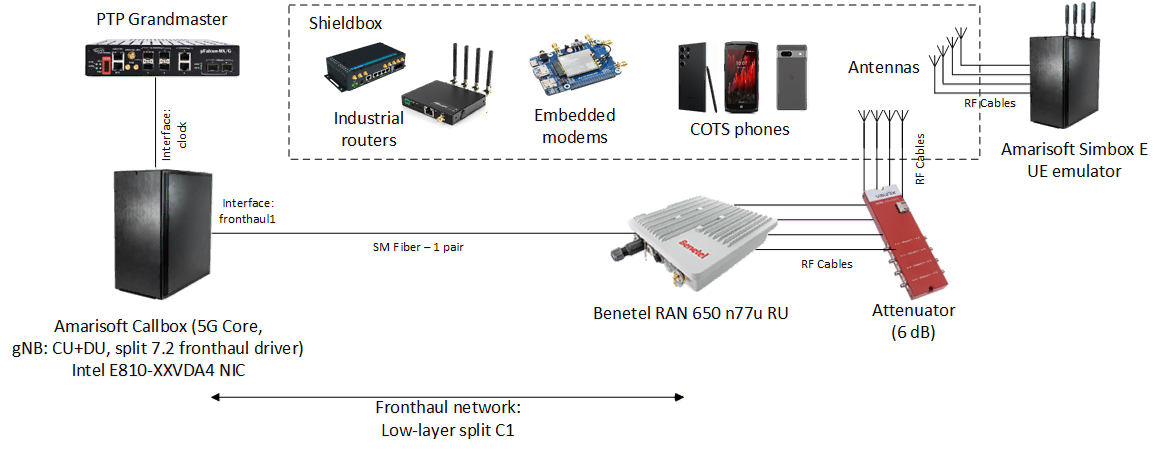
This scenario requires configuration of PTP on the Callbox machine to be extended to include an additional network interface (named clock in the example below), but otherwise employs the same configuration as previously described LLS-C3 test setup.
|
Appendix A: Benetel RAN650 n77u configuration file – ru_config.cfg
|