
NR SA SUL(Supplementary Uplink)
The purpose of this tutorial is to show you how to configure and test SUL. The fundamental idea behind SUL is well illustrated in 3GPP 38.300 as shown below.
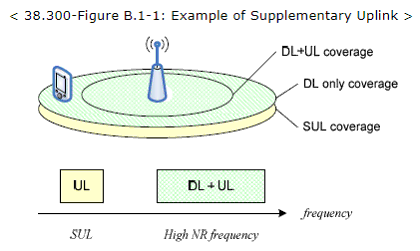
As shown above, usually cell coverage for DL+UL gets smaller because UL coverage within the same band is not as large as DL coverage due to weak UE TX power comparing to gNB TX power. To compensate this, UL frequeny of much lower band. (NOTE : UL coverage of lower frequency tend to larger because lower frequency tend to have larger coverage by physics).
Implementation of SUL in Amarisoft callbox can be illustrated as below. (NOTE : Pay attention to terminologies in this diagram because the same terminology will be used in the comments in the configuration section.)
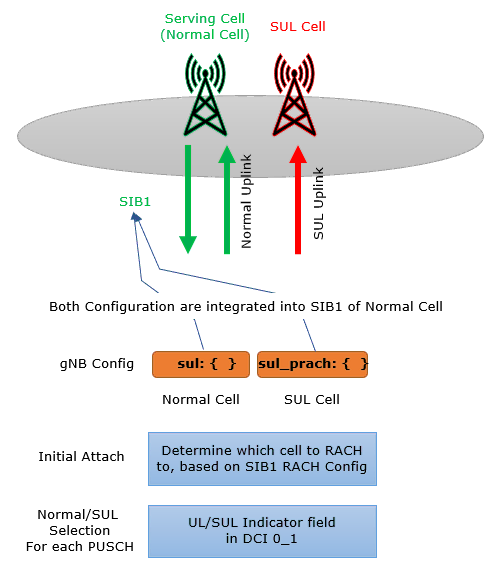
Amarisoft Callbox support SUL for both TDD and FDD.
Table of Contents
Introduction
Supplementary Uplink (SUL) is a critical feature introduced in 3GPP Rel-15 NR (New Radio) specifications to address uplink coverage limitations encountered in 5G networks, particularly in the context of higher frequency bands. In conventional NR deployments, the uplink (UL) signal range is often more constrained than the downlink (DL) due to the inherent disparity between the transmission power capabilities of User Equipment (UE) and gNodeB (gNB). SUL mitigates this challenge by enabling the use of an additional, typically lower-frequency, uplink carrier alongside the primary uplink carrier. This architectural approach leverages the superior propagation characteristics and larger coverage area of lower-frequency bands, thereby enhancing the overall uplink coverage and reliability. The SUL mechanism is particularly significant in scenarios where service continuity and robust uplink performance are required at the cell edge or in challenging radio environments. In practical deployments, such as those using the Amarisoft Callbox platform, SUL can be configured for both Time Division Duplex (TDD) and Frequency Division Duplex (FDD) modes, facilitating flexible testing and validation of SUL features in a controlled environment. Understanding the architectural concepts, configuration methodology, and operational principles of SUL is essential for network engineers, system integrators, and researchers aiming to optimize 5G performance and ensure seamless user experience across diverse deployment scenarios.
-
Context and Background
- SUL is defined in 3GPP TS 38.300 as a solution to uplink coverage gaps caused by the power imbalance between UE and gNB transmitters, especially in high-frequency NR bands.
- It introduces an additional uplink path using a supplementary, lower-frequency carrier to extend UL reach and improve radio link reliability.
- The feature is supported by commercial NR platforms such as Amarisoft Callbox, enabling real-world configuration and validation of SUL scenarios.
-
Relevance and Importance of This Tutorial
- Addresses a key challenge in 5G NR deployments: limited uplink coverage in higher frequency bands.
- Provides hands-on guidance for configuring and testing SUL on Amarisoft Callbox, a widely used platform for 5G experimentation and validation.
- Enables users to understand the architectural principles and practical aspects of deploying SUL in both TDD and FDD environments.
-
Learning Outcomes
- Gain a deep understanding of the architectural and operational fundamentals of SUL in 5G NR.
- Acquire practical skills in configuring SUL features using Amarisoft Callbox.
- Develop the ability to perform testing and validation of SUL scenarios, interpret results, and troubleshoot configuration issues.
- Understand the terminology and key parameters involved in SUL configuration, as referenced in 3GPP specifications and Amarisoft documentation.
-
Prerequisite Knowledge and Skills
- Familiarity with 5G NR architecture, including gNB, UE, and the radio interface.
- Understanding of duplexing modes (TDD/FDD) and RF propagation characteristics.
- Experience with Amarisoft Callbox or similar 5G test platforms.
- Basic knowledge of 3GPP technical specifications, especially TS 38.300 and related standards.
Summary of the Tutorial
This tutorial outlines the test procedures for validating Supplementary Uplink (SUL) operation in NR Standalone (SA) FDD mode using Amarisoft Callbox and UEsim. The methodology includes detailed setup, configuration, test execution, and log analysis steps.
-
Test Setup
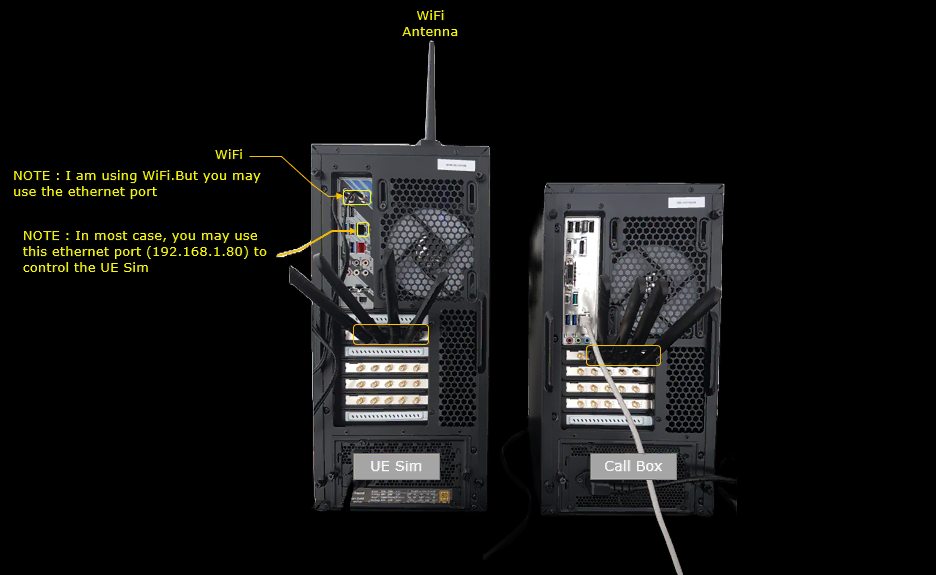
- The test uses an Amarisoft Callbox (gNB) and UEsim (UE) with a single SDR, as shown in the referenced setup diagram.
-
Key Configuration Parameters
- Important parameters in the gNB and UE configurations include:
- sul: Supplementary uplink configuration in the cell, including cell_id, prach_index, prach_rsrp_threshold, and channel selection for pucch, pusch, srs.
- channels_prach_on_sul, pusch_switch_snr_threshold, and pusch_switch_hysteresis: For dynamic switching and channel configuration.
- serve_as_sul: Indicates SUL cell role.
- sul_prach: RACH configuration specific to SUL operation, such as msg1_frequency_start, msg1_fdm, root_sequence_index, zero_correlation_zone_config, restricted_set_config.
- sul_support: Indicates SUL support on the UE side.
-
Test 1: SUL-FDD
- Objective: To verify SUL operation in NR SA FDD mode.
- gNB Configuration:
- Use and modify gnb-sa-sul-fdd.cfg, based on gnb-sa.cfg.
- Set NR_TDD to 0 to enable FDD mode.
- Configure both normal and SUL cells in the cell configuration section:
- For the normal cell: Set band, DL frequency, and SUL section (including cell_id, prach_index, prach_rsrp_threshold, pusch_switch_snr_threshold, and channels).
- For the SUL cell: Set serve_as_sul to true and configure sul_prach with the necessary RACH parameters.
- Default cell configuration (nr_cell_default): Optionally set force_full_bsr to ensure UL data is scheduled for easier verification in logs.
- Core Network Configuration: Use the default mme-ims.cfg as is.
- UEsim Configuration:
- Use and modify ue-nr-sa-sul-fdd.cfg, based on ue-nr-sa.cfg.
- Set NR_TDD to 0 for FDD operation.
- Configure two cells:
- Normal cell: Band and frequency to match gNB.
- SUL cell: Band and frequency to match SUL cell on gNB.
- Set cell_index to 0 (camp on normal cell), and sul_support to true to indicate SUL capability.
-
Test Execution Procedure
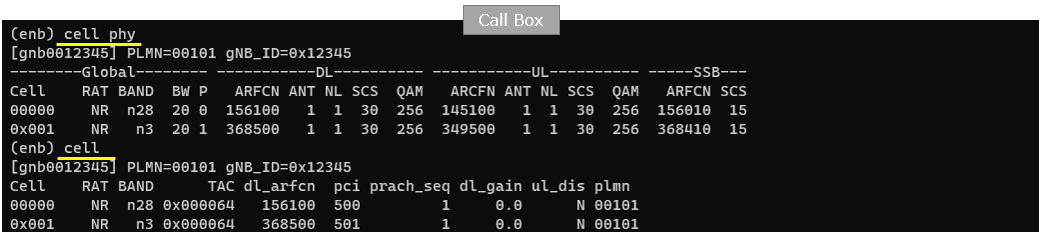
- Verify intended cell configuration with cell phy and cell commands.
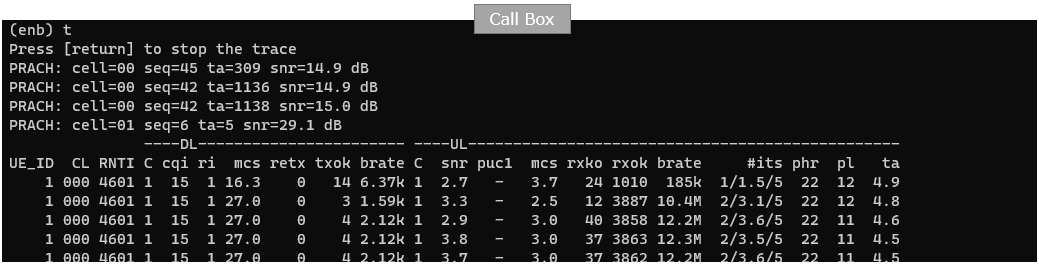
- Power on the UE in UEsim. Ensure both normal and SUL cells are detectable; confirm cabling and antennas are properly connected.
- Confirm UE attachment and throughput measurement. Ensure UE first camps on the normal cell and RACH is triggered to cell 01 (normal cell).
-
Log Analysis
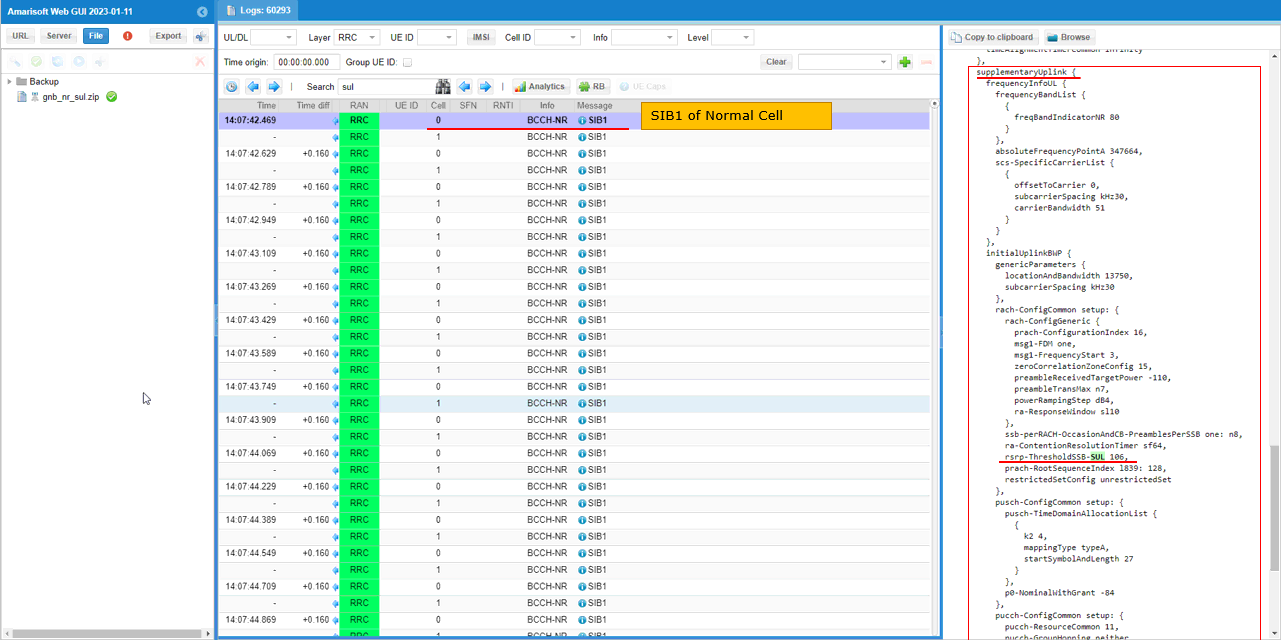
- Check SUL configuration in SIB1 of the normal cell, especially the supplementaryUplink IE and rsrp-ThresholdSSB-SUL parameter.
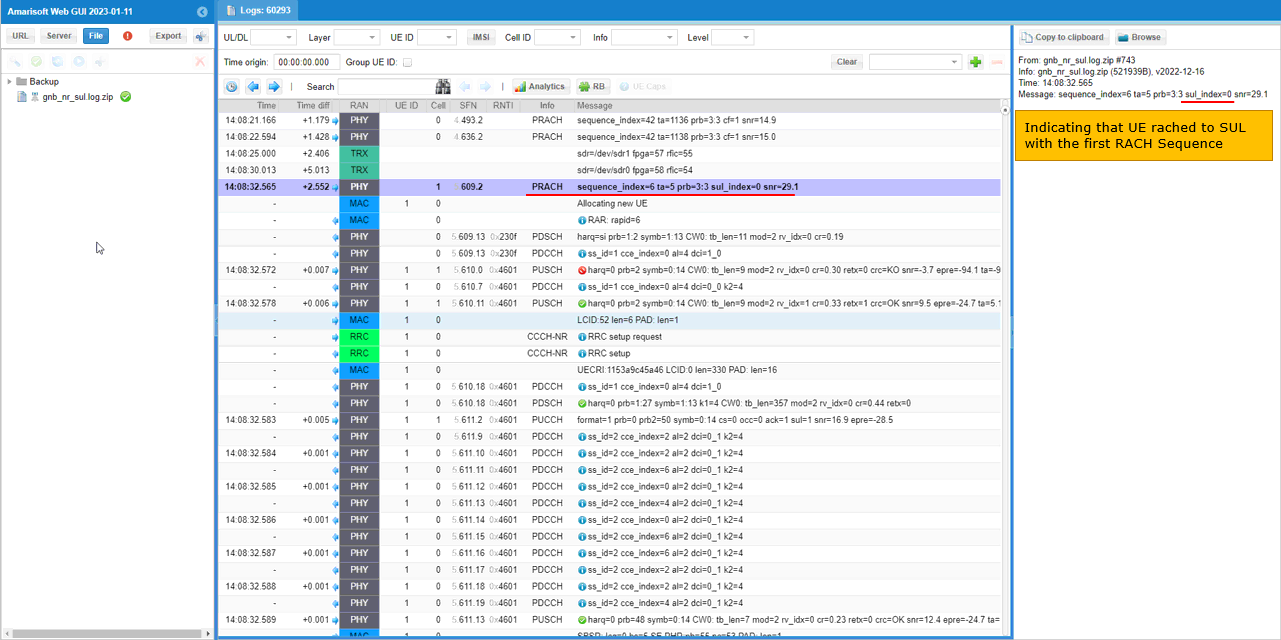
- Inspect PRACH logs to confirm UE uplink connection to SUL cell; verify sul_index field and the target cell in logs.
- Review RB maps to determine which uplink channels (PUCCH, PUSCH, SRS) are using the normal or SUL cell. For PUSCH, check the sul field in the log for SUL usage.
- Verify gNB scheduling of uplink for normal or SUL cell by checking the sul_ind field in DCI messages (sul_ind=0 for normal, sul_ind=1 for SUL).
The tutorial provides a step-by-step procedure for both configuration and validation of SUL-FDD operation, emphasizing the importance of matching configuration between gNB and UE, and verifying correct operation through log analysis. This ensures that supplementary uplink is correctly established and utilized in the test environment.
Test Setup
Test setup for this tutorial is as shown below.
Key Configuration Parameters
Followings are important configuration parameters for this tutorial. You may click on the items for the descriptions from Amarisoft documents.
- sul : In this link, you will get the descriptions for all the configurations listed below.
- cell_id
- prach_index
- prach_rsrp_threshold
- channels
- pucch
- pusch
- srs
- channels_prach_on_sul
- pusch_switch_snr_threshold
- pusch_switch_hysteresis
- serve_as_sul
- sul_prach : In this link, you will get the descriptions for all the configurations listed below.
- msg1_frequency_start
- msg1_fdm
- root_sequence_index
- zero_correlation_zone_config
- restricted_set_config
- sul_support
Test 1 : SUL-FDD
This test is to test SUL operation in NR SA FDD
Configuration
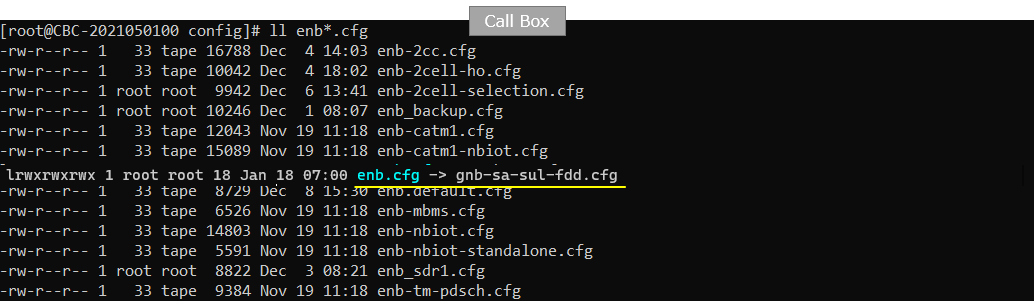
I used the gnb-sa-sul-fdd.cfg on gNB which is copied and modified from gnb-sa.cfg
For the corenetwork, I used the default configuration (mme-ims.cfg) as it is.
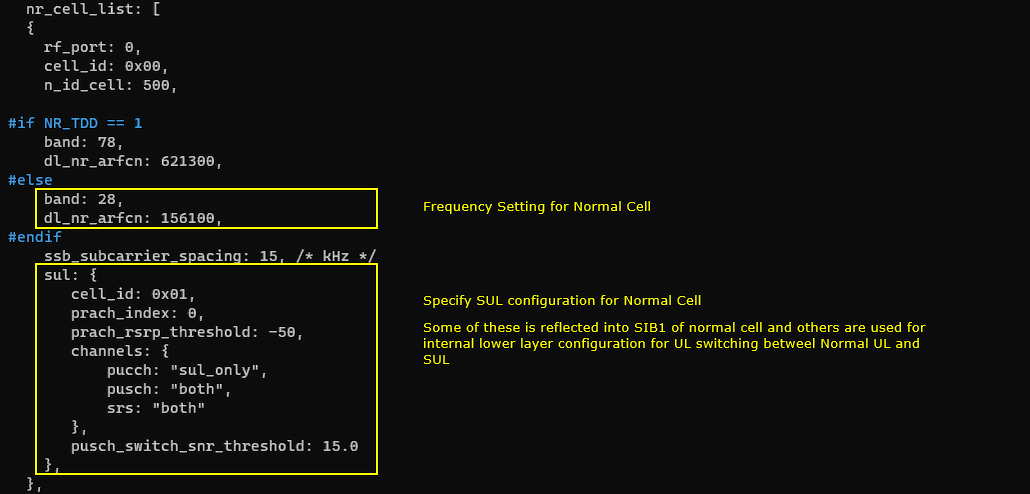
In gnb-sa-sul-fdd.cfg , the configuration is done as follows.
In this test, I set NR_TDD to 0 which indicates that FDD will be used.

Here goes the important part of SUL configuration. In cell configuration for normal cell, you need to configure the details of sul in addition to the basic band and DL frequency (dl_nr_arfcn). In sul configuration, you would set various parameters like cell_id, prach_index, prach_rsrp_threshold, pusch_switch_snr_threshold and channels. With channels parameter, you can specify the channel selection (i.e, selection between normal cell and sul cell) for pucch, pusch, srs. Some of these parameters are required to configure SIB1 and some others are for Amarisoft gNB's internal settings.
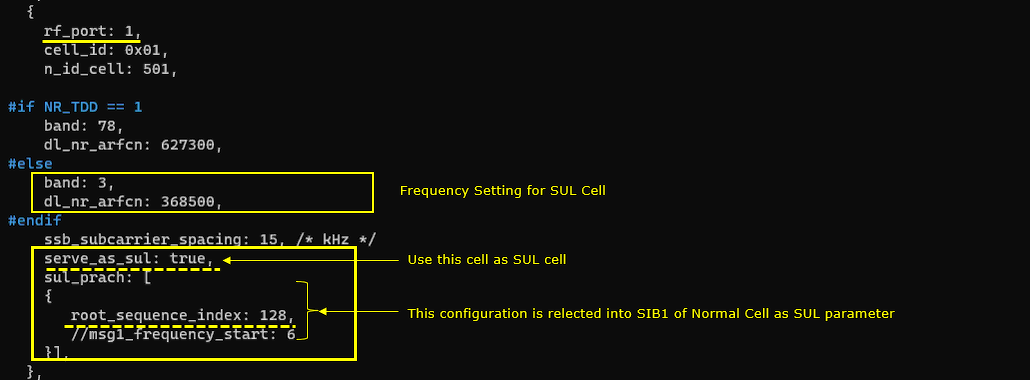
Now we need to configure the SUL cell. In SUL cell configuration as well, we need to configure a few specific parameters for SUL operation like serve_as_sul and sul_prach. Within sul_prach parameter, you can specify the details of rach configuration which will be populated into SIB1 of normal cell for SUL configuration.
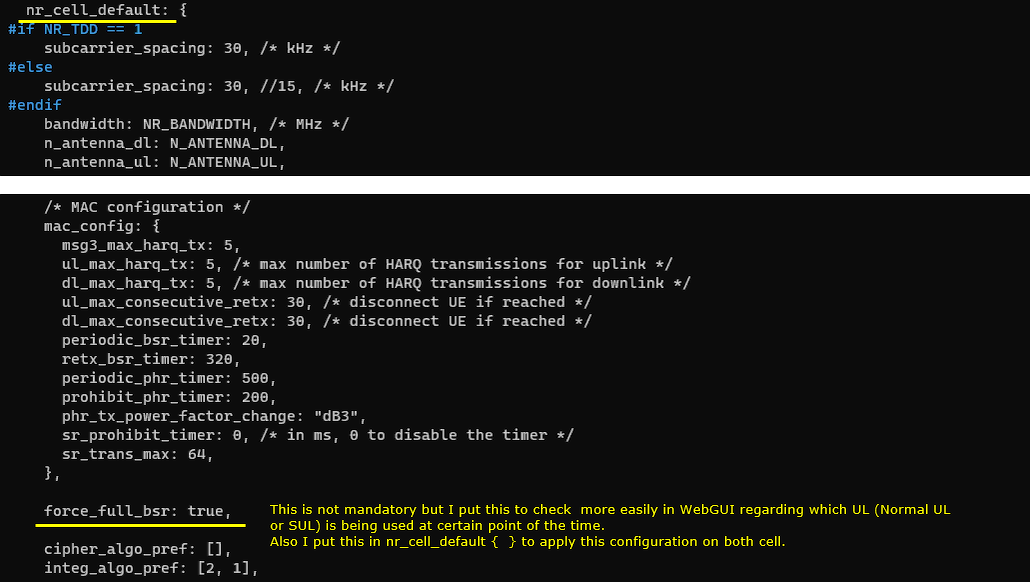
For the detaul cell configuration (nr_cell_default), you don't need to set any specific parameters but I forced gNB to schedule UL in every possible slots (force_full_bsr) to flow the UL data all the time because this is easier to verify SUL operation from log analysis.
For the DUT, I used Amarisoft UEsim as configured here.
I used the ue-nr-sa-sul-fdd.cfg on UEsim which is copied and modified from ue-nr-sa.cfg
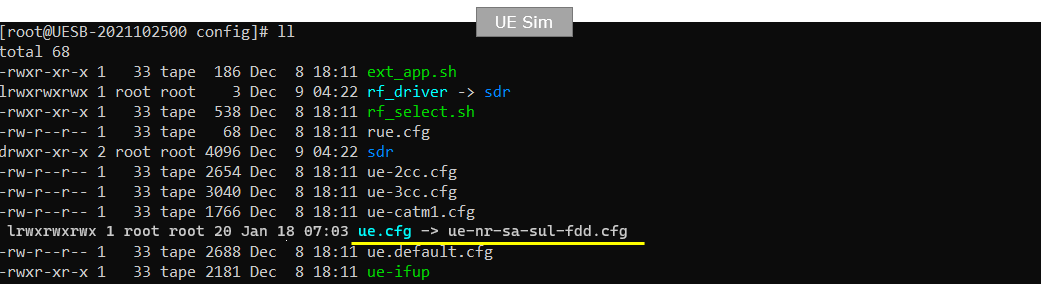
In ue-nr-sa-sul-fdd.cfg , the configuration is done as follows.
First, I set NR_TDD to 0 which indicates that FDD will be used for this test.

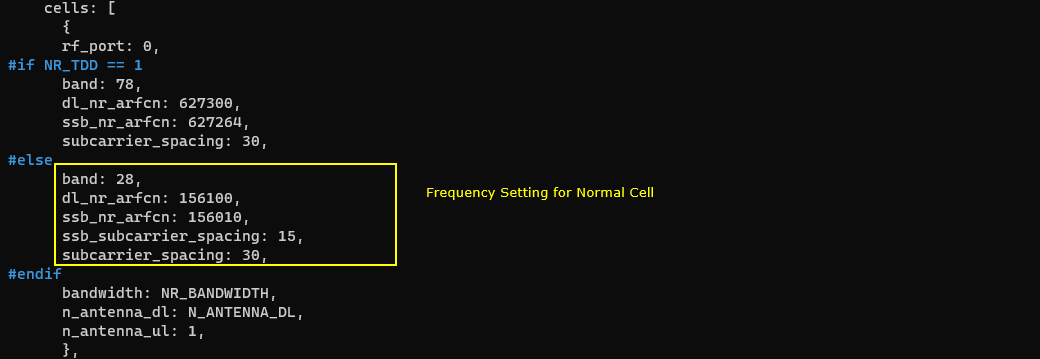
For the cell configuration, I also need to configure two cells : one for normal cell and the other for SUL cell.
First set the band and frequency setting for the normal cell. Just let these parameters match to the band and frequency settings of gNB.
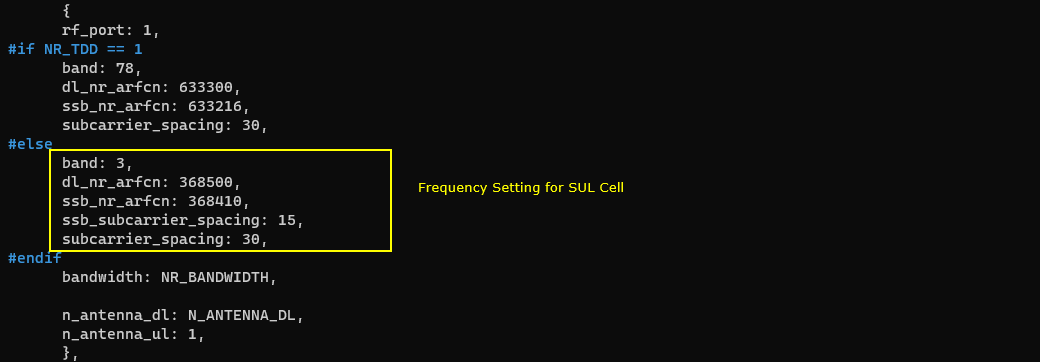
Then set the band and frequency setting for the SUL cell. Just let these parameters match to the band and frequency settings of SUL cell of gNB.
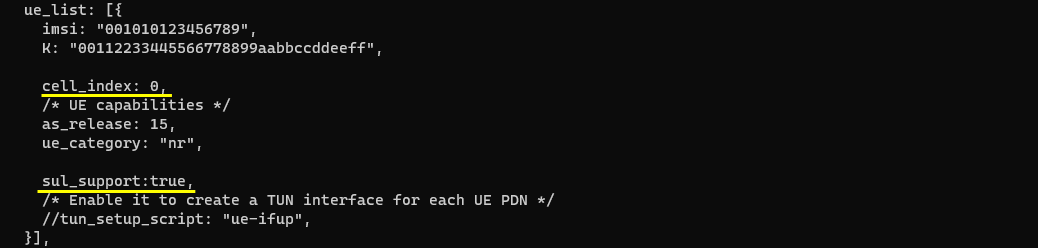
Now you have two important parameters to set on UEsim side. cell_index here is used to set the cell which UE is supposed to camp on to. Here cell_index is set to 0 which corresponds to the normal cell. Then set sul_support to true to indicates that the UE is SUL capable.
Perform the Test
Check if the cell is configured as intended. Check out the output of 'cell phy' and cell command.
Power on UE on UE sim. (

Confirm that the UE completes the attach and check the throughput. Make it sure that UE camp onto normal cell first with PRACH to cell 01(Normal Cell)
Log Analysis
First make it sure that all the SUL configuration is properly configured in SIB1 of normal cell.
There is a long list of IE named supplementaryUplink in the SIB1 of normal cell. rsrp-ThresholdSSB-SUL is determined by prach_rsrp_threshold in the configuration.
The first thing you need to check in the log is PRACH. If UE uplink is connected to SUL cell, you see the sul_index field in PRACH log. You can also confirm on the PRACH sent to SUL cell by checking [Cell] column in the log.
You can easily check whether each of UL channel (PUCCH, PUSCH, SRS) is going thorugh normal cell or SUL cell by checking RB map. (NOTE: In case of PUSCH, you can also confirm whether it goes through normal cell or SUL cell by checking sul field of PUSCH log for example, Message: harq=10 prb=2 symb=0:14 CW0: tb_len=20 mod=2 rv_idx=0 cr=0.56 retx=0 crc=OK snr=4.4 epre=-25.0 ta=5.2
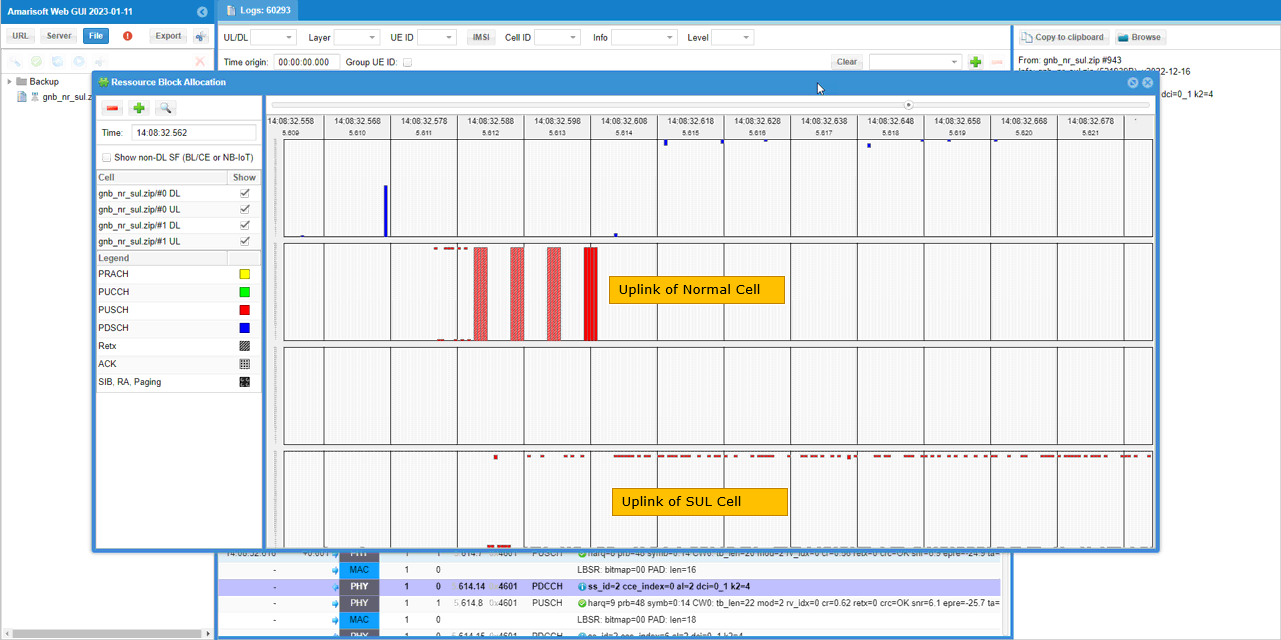
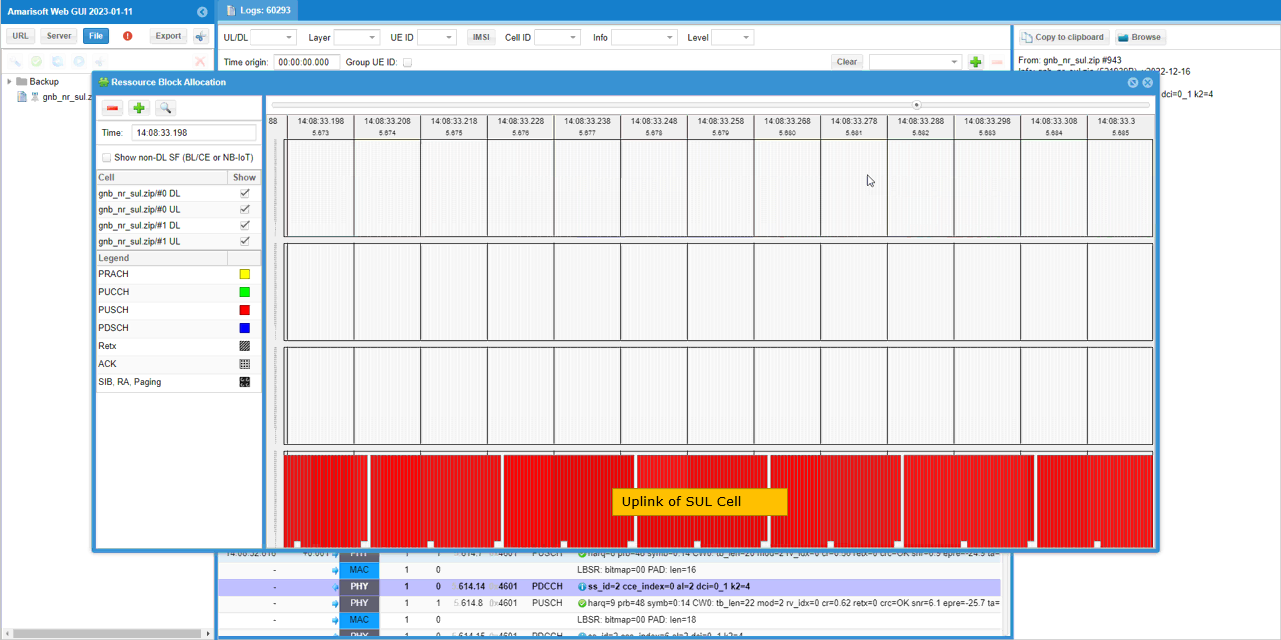
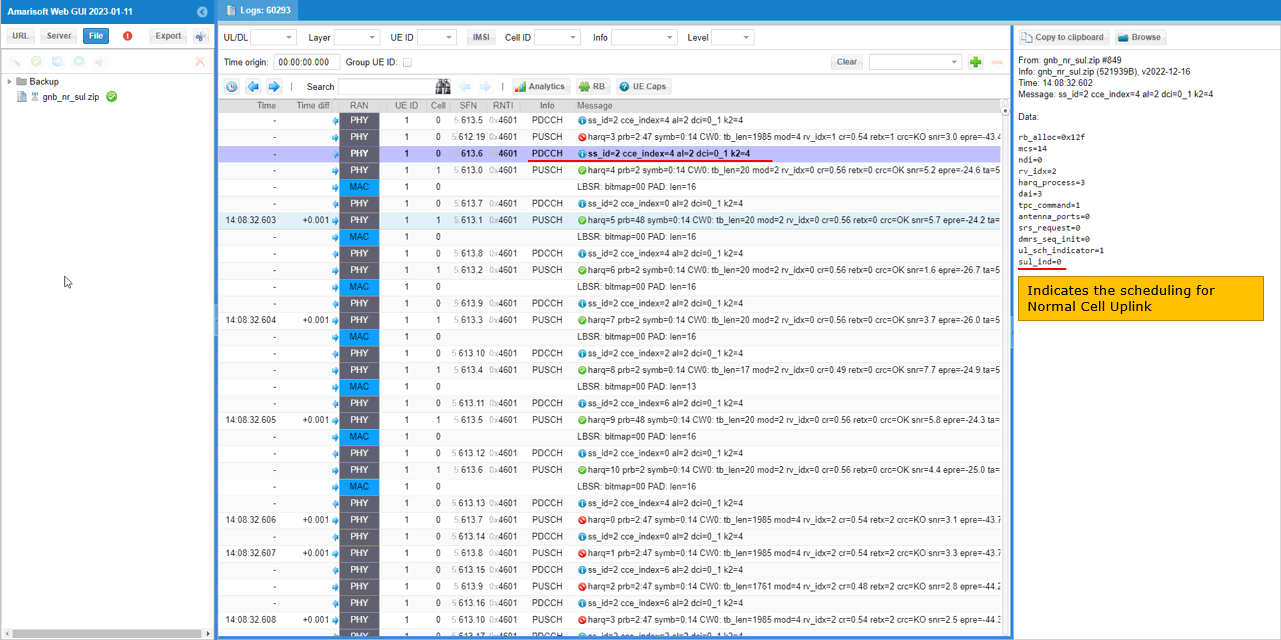
You can check whether gNB schedules Uplink to normal cell or SUL cell by checking sul_ind field of DCI message.
For example, sul_ind=0 indicates that this scheduling is for normal cell (non SUL cell)
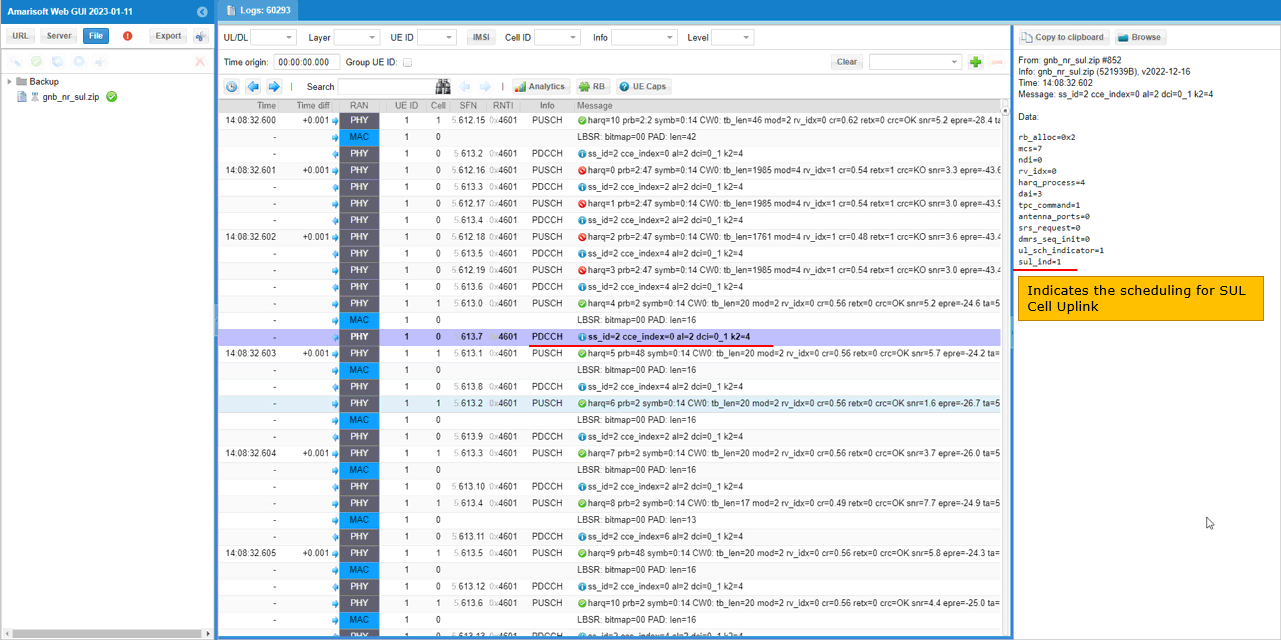
For another example, sul_ind=1 indicates that this scheduling is for SUL cell.
RRC / NAS Signaling
SIB1 (SA) for Normal Cell (non-SUL cell)
: This is the SIB1 sent by Normal Cell gNB to configure SUL. (
{
message c1: systemInformationBlockType1: {
cellSelectionInfo {
q-RxLevMin -70,
q-QualMin -20
},
cellAccessRelatedInfo {
plmn-IdentityInfoList {
{
plmn-IdentityList {
{
mcc {
0,
0,
1
},
mnc {
0,
1
}
}
},
trackingAreaCode '000064'H,
cellIdentity '001234500'H,
cellReservedForOperatorUse notReserved
}
}
},
connEstFailureControl {
connEstFailCount n1,
connEstFailOffsetValidity s30,
connEstFailOffset 1
},
servingCellConfigCommon {
downlinkConfigCommon {
frequencyInfoDL {
frequencyBandList {
{
freqBandIndicatorNR 28
}
},
offsetToPointA 38,
scs-SpecificCarrierList {
{
offsetToCarrier 0,
subcarrierSpacing kHz30,
carrierBandwidth 51
}
}
},
initialDownlinkBWP {
genericParameters {
locationAndBandwidth 13750,
subcarrierSpacing kHz30
},
pdcch-ConfigCommon setup: {
commonSearchSpaceList {
{
searchSpaceId 1,
controlResourceSetId 0,
monitoringSlotPeriodicityAndOffset sl1: NULL,
monitoringSymbolsWithinSlot '10000000000000'B,
nrofCandidates {
aggregationLevel1 n0,
aggregationLevel2 n0,
aggregationLevel4 n4,
aggregationLevel8 n0,
aggregationLevel16 n0
},
searchSpaceType common: {
dci-Format0-0-AndFormat1-0 {
}
}
}
},
searchSpaceSIB1 0,
searchSpaceOtherSystemInformation 1,
pagingSearchSpace 1,
ra-SearchSpace 1
},
pdsch-ConfigCommon setup: {
pdsch-TimeDomainAllocationList {
{
mappingType typeA,
startSymbolAndLength 40
}
}
}
},
bcch-Config {
modificationPeriodCoeff n4
},
pcch-Config {
defaultPagingCycle rf128,
nAndPagingFrameOffset oneT: NULL,
ns one
}
},
uplinkConfigCommon {
frequencyInfoUL {
frequencyBandList {
{
freqBandIndicatorNR 28
}
},
absoluteFrequencyPointA 143264,
scs-SpecificCarrierList {
{
offsetToCarrier 0,
subcarrierSpacing kHz30,
carrierBandwidth 51
}
}
},
initialUplinkBWP {
genericParameters {
locationAndBandwidth 13750,
subcarrierSpacing kHz30
},
rach-ConfigCommon setup: {
rach-ConfigGeneric {
prach-ConfigurationIndex 16,
msg1-FDM one,
msg1-FrequencyStart 3,
zeroCorrelationZoneConfig 15,
preambleReceivedTargetPower -110,
preambleTransMax n7,
powerRampingStep dB4,
ra-ResponseWindow sl10
},
ssb-perRACH-OccasionAndCB-PreamblesPerSSB one: n8,
ra-ContentionResolutionTimer sf64,
rsrp-ThresholdSSB-SUL 106,
prach-RootSequenceIndex l839: 1,
restrictedSetConfig unrestrictedSet
},
pusch-ConfigCommon setup: {
pusch-TimeDomainAllocationList {
{
k2 4,
mappingType typeA,
startSymbolAndLength 27
}
},
p0-NominalWithGrant -84
},
pucch-ConfigCommon setup: {
pucch-ResourceCommon 11,
pucch-GroupHopping neither,
p0-nominal -90
}
},
timeAlignmentTimerCommon infinity
},
supplementaryUplink {
frequencyInfoUL {
frequencyBandList {
{
freqBandIndicatorNR 80
}
},
absoluteFrequencyPointA 347664,
scs-SpecificCarrierList {
{
offsetToCarrier 0,
subcarrierSpacing kHz30,
carrierBandwidth 51
}
}
},
initialUplinkBWP {
genericParameters {
locationAndBandwidth 13750,
subcarrierSpacing kHz30
},
rach-ConfigCommon setup: {
rach-ConfigGeneric {
prach-ConfigurationIndex 16,
msg1-FDM one,
msg1-FrequencyStart 3,
zeroCorrelationZoneConfig 15,
preambleReceivedTargetPower -110,
preambleTransMax n7,
powerRampingStep dB4,
ra-ResponseWindow sl10
},
ssb-perRACH-OccasionAndCB-PreamblesPerSSB one: n8,
ra-ContentionResolutionTimer sf64,
rsrp-ThresholdSSB-SUL 106,
prach-RootSequenceIndex l839: 128,
restrictedSetConfig unrestrictedSet
},
pusch-ConfigCommon setup: {
pusch-TimeDomainAllocationList {
{
k2 4,
mappingType typeA,
startSymbolAndLength 27
}
},
p0-NominalWithGrant -84
},
pucch-ConfigCommon setup: {
pucch-ResourceCommon 11,
pucch-GroupHopping neither,
p0-nominal -90
}
},
timeAlignmentTimerCommon ms500
},
ssb-PositionsInBurst {
inOneGroup '80'H
},
ssb-PeriodicityServingCell ms20,
ss-PBCH-BlockPower -60
},
ue-TimersAndConstants {
t300 ms1000,
t301 ms1000,
t310 ms1000,
n310 n1,
t311 ms30000,
n311 n1,
t319 ms1000
}
}
}
SIB1 (SA) for SUL cell
: This is the SIB1 sent by Normal Cell gNB
{
message c1: systemInformationBlockType1: {
cellSelectionInfo {
q-RxLevMin -70,
q-QualMin -20
},
cellAccessRelatedInfo {
plmn-IdentityInfoList {
{
plmn-IdentityList {
{
mcc {
0,
0,
1
},
mnc {
0,
1
}
}
},
trackingAreaCode '000064'H,
cellIdentity '001234501'H,
cellReservedForOperatorUse notReserved
}
}
},
connEstFailureControl {
connEstFailCount n1,
connEstFailOffsetValidity s30,
connEstFailOffset 1
},
servingCellConfigCommon {
downlinkConfigCommon {
frequencyInfoDL {
frequencyBandList {
{
freqBandIndicatorNR 3
}
},
offsetToPointA 38,
scs-SpecificCarrierList {
{
offsetToCarrier 0,
subcarrierSpacing kHz30,
carrierBandwidth 51
}
}
},
initialDownlinkBWP {
genericParameters {
locationAndBandwidth 13750,
subcarrierSpacing kHz30
},
pdcch-ConfigCommon setup: {
commonSearchSpaceList {
{
searchSpaceId 1,
controlResourceSetId 0,
monitoringSlotPeriodicityAndOffset sl1: NULL,
monitoringSymbolsWithinSlot '10000000000000'B,
nrofCandidates {
aggregationLevel1 n0,
aggregationLevel2 n0,
aggregationLevel4 n4,
aggregationLevel8 n0,
aggregationLevel16 n0
},
searchSpaceType common: {
dci-Format0-0-AndFormat1-0 {
}
}
}
},
searchSpaceSIB1 0,
searchSpaceOtherSystemInformation 1,
pagingSearchSpace 1,
ra-SearchSpace 1
},
pdsch-ConfigCommon setup: {
pdsch-TimeDomainAllocationList {
{
mappingType typeA,
startSymbolAndLength 40
}
}
}
},
bcch-Config {
modificationPeriodCoeff n4
},
pcch-Config {
defaultPagingCycle rf128,
nAndPagingFrameOffset oneT: NULL,
ns one
}
},
uplinkConfigCommon {
frequencyInfoUL {
frequencyBandList {
{
freqBandIndicatorNR 3
}
},
absoluteFrequencyPointA 347664,
scs-SpecificCarrierList {
{
offsetToCarrier 0,
subcarrierSpacing kHz30,
carrierBandwidth 51
}
}
},
initialUplinkBWP {
genericParameters {
locationAndBandwidth 13750,
subcarrierSpacing kHz30
},
rach-ConfigCommon setup: {
rach-ConfigGeneric {
prach-ConfigurationIndex 16,
msg1-FDM one,
msg1-FrequencyStart 3,
zeroCorrelationZoneConfig 15,
preambleReceivedTargetPower -110,
preambleTransMax n7,
powerRampingStep dB4,
ra-ResponseWindow sl10
},
ssb-perRACH-OccasionAndCB-PreamblesPerSSB one: n8,
ra-ContentionResolutionTimer sf64,
prach-RootSequenceIndex l839: 1,
restrictedSetConfig unrestrictedSet
},
pusch-ConfigCommon setup: {
pusch-TimeDomainAllocationList {
{
k2 4,
mappingType typeA,
startSymbolAndLength 27
}
},
p0-NominalWithGrant -84
},
pucch-ConfigCommon setup: {
pucch-ResourceCommon 11,
pucch-GroupHopping neither,
p0-nominal -90
}
},
timeAlignmentTimerCommon infinity
},
ssb-PositionsInBurst {
inOneGroup '80'H
},
ssb-PeriodicityServingCell ms20,
ss-PBCH-BlockPower -60
},
ue-TimersAndConstants {
t300 ms1000,
t301 ms1000,
t310 ms1000,
n310 n1,
t311 ms30000,
n311 n1,
t319 ms1000
}
}
}