NR SA Radio Link Quality Test
This tutorial is a kind of Qualitative test rather than exact quantitavie test. So don't pay attention to the exact numbers... just try to get general understandings on radio link quality over the air link between UE and Callbox. It will also shows how handy the WebGUI would be for this kind of quick check. You would notice that the range of distance between UE and Callbox is pretty wide. Personally to me, the coverage for simple connection with low throughput is the widest with Amarisoft callbox comparing to other lab test equipment.
Table of Contents
Introduction
In the realm of mobile communications testing, understanding the quality and coverage of the radio link between a User Equipment (UE) device and a test system such as a Callbox is crucial for evaluating device performance under various conditions. A Callbox, such as the Amarisoft solution referenced in this tutorial, is a highly flexible software-defined radio test platform that emulates cellular network components, enabling controlled and repeatable lab testing for UE devices. This tutorial emphasizes a qualitative approach to evaluating radio link coverage rather than focusing on exact quantitative metrics. By utilizing the WebGUI interface provided by the Callbox, testers can efficiently observe and assess signal quality, connection stability, and coverage area in real time. The architectural setup typically involves the UE communicating wirelessly with the Callbox, which acts as a base station, with the environment and distance between devices being variable parameters. Key concepts such as signal degradation, attach procedures, and throughput limitations are explored, highlighting how different test scenarios—particularly those with varying distances—impact the connection. While the Amarisoft Callbox demonstrates broad coverage for simple connectivity and protocol verification, the tutorial also outlines the limitations regarding high-throughput testing, where closer proximity or direct RF connections may be required. This foundational understanding is essential for researchers, engineers, and QA professionals aiming to optimize device performance, validate protocol implementations, and ensure robust connectivity in a controlled lab environment.
-
Context and Purpose
- This tutorial provides a high-level, practical overview of radio link coverage testing between UE and Callbox using qualitative assessment methods.
- Focuses on leveraging the WebGUI for rapid, visual evaluation of signal quality and connection robustness.
- Designed for scenarios where quick checks and general understanding of over-the-air link performance are more valuable than precise quantitative measurements.
-
Relevance and Importance
- Offers insight into the practical coverage limits of lab test equipment, specifically the Amarisoft Callbox, compared to other solutions.
- Highlights the suitability of wide coverage testing for protocol verification and low-throughput scenarios.
- Clarifies the constraints for high-throughput testing, emphasizing the necessity of close proximity or conductive setups for accurate performance evaluation.
-
Key Learning Outcomes
- Gain a qualitative understanding of radio link coverage between UE and Callbox in a controlled environment.
- Learn to utilize WebGUI features for efficient, real-time observation and troubleshooting.
- Distinguish appropriate test setups for protocol function testing versus high-throughput scenarios.
- Develop the ability to interpret practical signal degradation and connection stability as a function of distance and test configuration.
-
Prerequisite Knowledge and Skills
- Basic understanding of cellular network architecture and UE-to-base station communication principles.
- Familiarity with test equipment such as Callboxes (Amarisoft or similar) and their operational interfaces.
- Experience with general lab test procedures and interpreting wireless signal quality indicators.
- Optional: Prior exposure to WebGUI-based monitoring and control tools.
Summary of the Tutorial
This tutorial demonstrates low layer radio link quality testing using a callbox and a UE (Device Under Test - DUT). It focuses on three primary test methodologies:
-
Radio Link Quality Change with Distance
- The test is conducted by establishing a connection between the DUT and the callbox. No complex IP layer setup is required; the default SIM card and configuration files are used.
- The DUT is physically moved farther away from and closer to the callbox.
-
During movement, the following parameters are monitored using the callbox WebGUI:
- Uplink SNR (Signal-to-Noise Ratio)
- Data Rate (noted as spiky due to the use of ping traffic)
- CQI (Channel Quality Indicator) values
- Only uplink radio link quality is directly measured via the callbox; downlink quality can be inferred from CQI reports from the UE.
- It is observed that uplink SNR remains stable across the test range, and there are no significant drops in downlink signal quality, although CQI fluctuation increases with movement.
-
Initial Attach Success Check with Distances
- The test involves powering the DUT off and on at various distances (1 m, 2 m, 4 m, 6 m) from the callbox, then observing attach success and radio quality.
- SNR, DL retx (downlink retransmission), and UL rxko (uplink reception knockout) rates are observed for each distance.
- Results show SNR generally increases as the DUT is closer, but some variation is noted (e.g., 2 m SNR lower than 4 m due to test variability).
- DL retx and UL rxko rates remain similar across the different distances under low throughput conditions.
- The test is performed once per distance for a quick check, not for statistical analysis.
-
UL SNR Change with UL Rx Power
- The test procedure involves adjusting the uplink receiver gain (rx_gain) on the callbox to vary the received power (EPRE).
- The effect on UL SNR is monitored as UL EPRE is decreased by reducing rx_gain.
- It is observed that while EPRE decreases in accordance with rx_gain changes, SNR remains stable within a relatively wide range of EPRE reduction.
Key Configuration and Setup Notes:
- Standard callbox and UE setup with default configuration file (gnb-sa.cfg), default MME, and IMS settings.
- No modifications to the default physical layer or core network configuration are required for these tests.
The overall methodology emphasizes practical, low-layer testing by observing radio link quality metrics under physical changes to the test environment (distance and rx_gain), using simple tools and default system configurations.
Test Setup
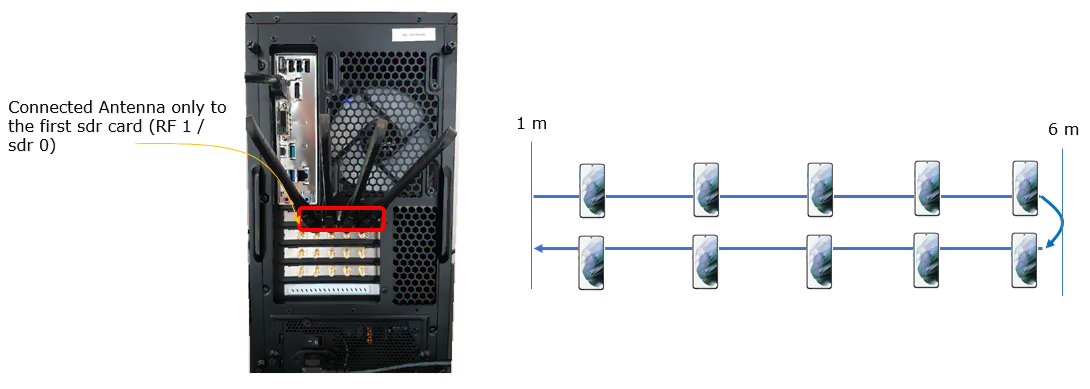
Test setup for this tutorial is as shown below. This is just for low layer testing, you may not need any complicated IP layer setup.
- SIM Card used in this tutorial is the one delivered with the system as it is.
- If you want to change the configuration, The tutorial Configuration Guide would help
Configuration
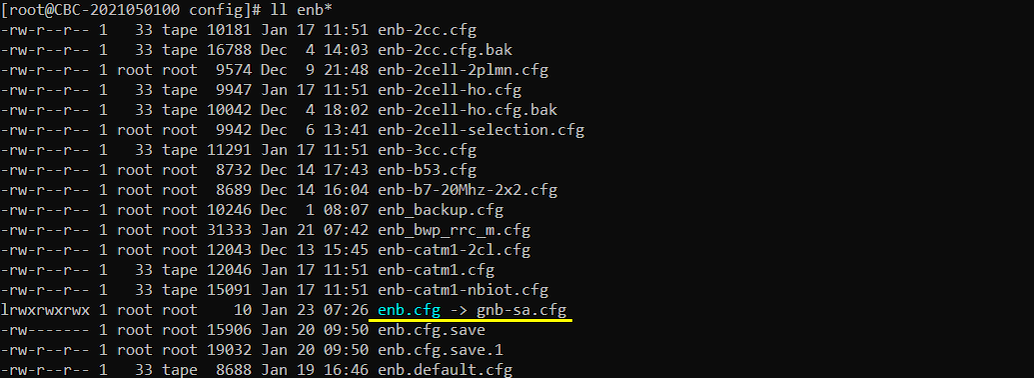
I have used gnb-sa.cfg which is installed by default without any modification.
I am using the default mme, ims config as shown below.

Perform the Test
The way I perform the test in this tutorial is pretty much different from the case of other tutorials. In this test, you don't need to do much in terms of the operation of the equipment. Just establishing the connection is all that is required and the remaining part is just to move around with the UE (DUT). In this test, I moved the device farther away and closer to the callbox and observed various signal qualities in WebGUI.
Radio Link Quality Change with Distance
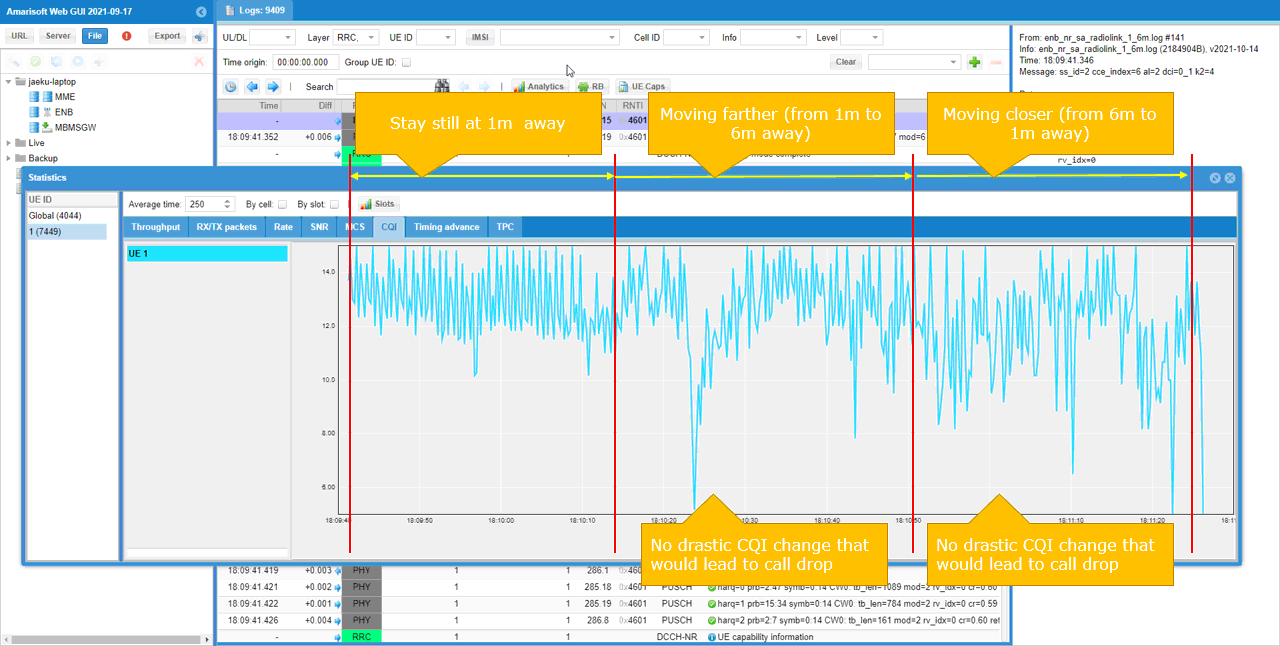
In this test, I checked UL SNR, Data Rate, CQI value as I move DUT farther away from the Callbox and move closer to the Callbox. I noticed that overall signal quality (UL SNR) remain in relatively good condition across the entire range of the test.
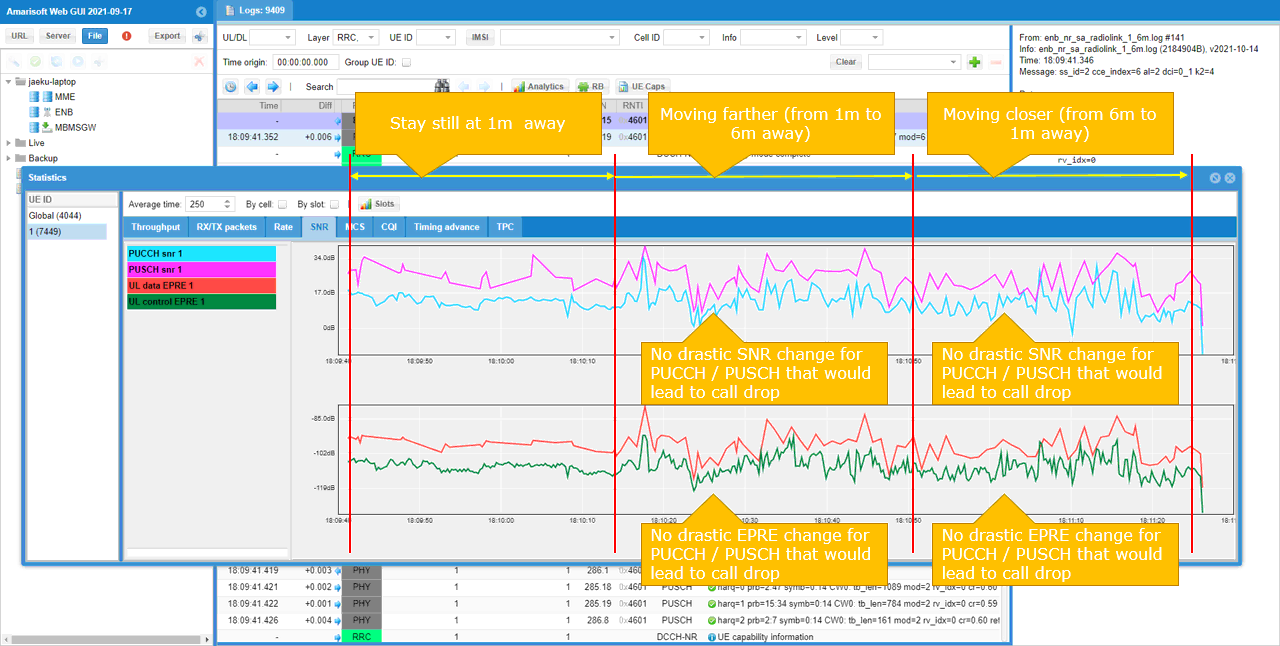
The throughput in this test looks very spiky. It is because the throughput generated in this test is ping. It is just to maintain the call connection with the minimum throughput demand.
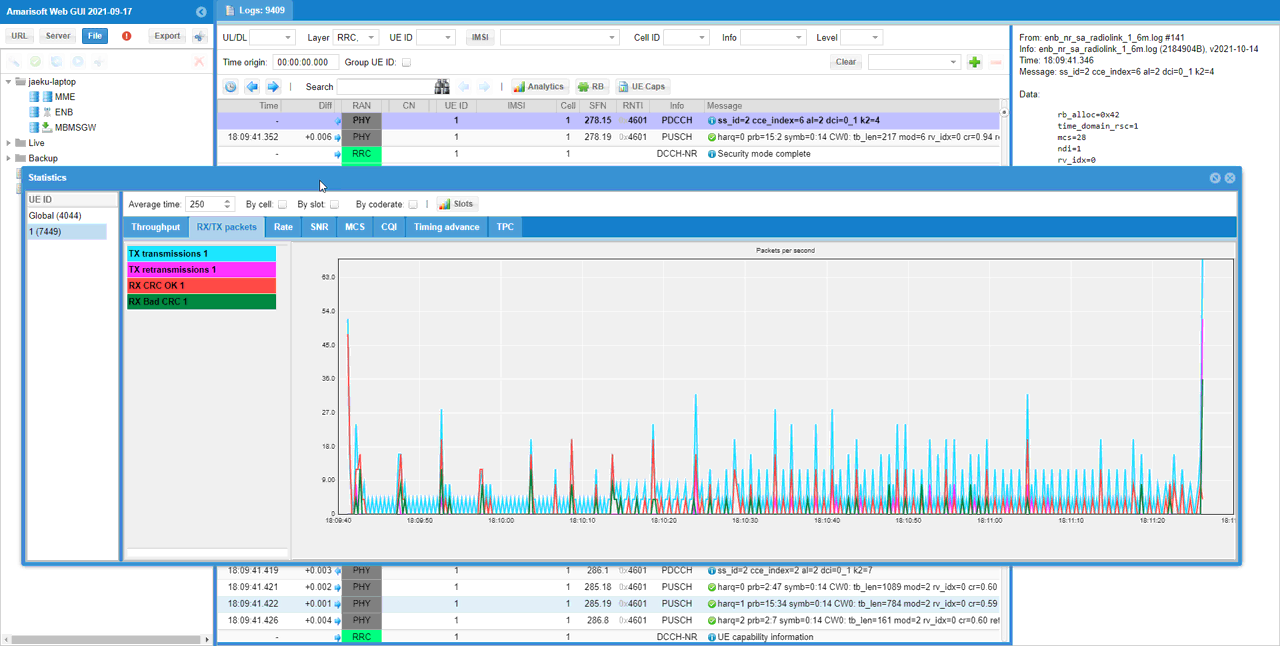
Since I am analyzing the signal quality from callbox, I can do analysis of the signal quality with direct measurement only for uplink and no direct measurement for downlink. But we can at least get some indirect indicator for downlink signal quality by checking CQI report from UE. The observed result is that there is no significant drops for dowlink signal quality to cause call drop but fluctuation seems wider when the DUT is moving.
Initial Attach Success Check with Distances
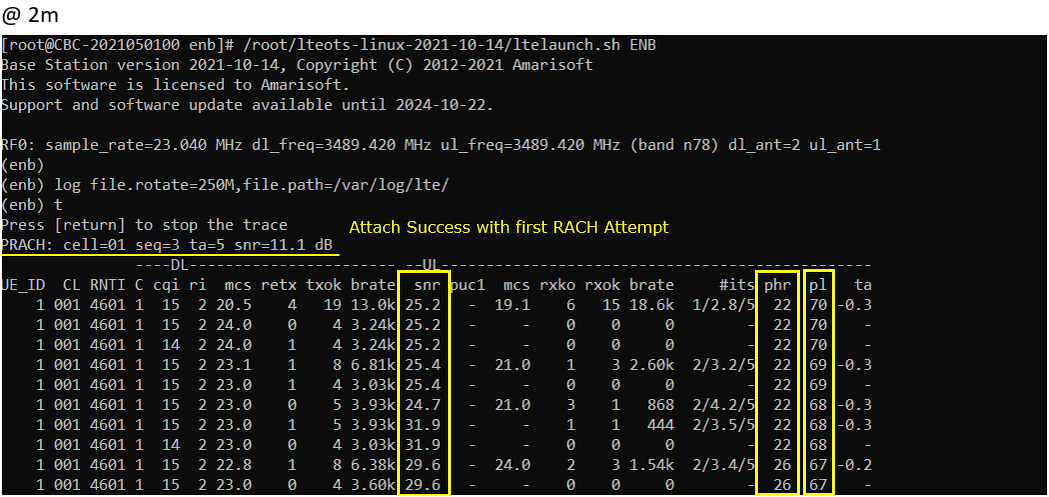
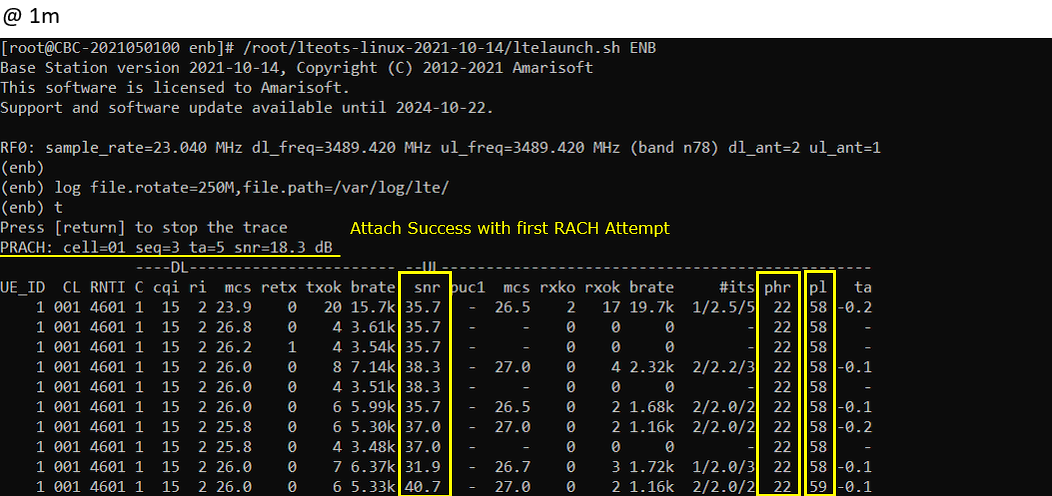
In this test, I tried initial attach (Power Off and Power On UE) at various distances.
At the distance 6 m away from the callbox, SNR is observed relatively lower. However DL retx and UL rxko rate is not much different from other cases. (

At the distance 4 m away from the callbox, SNR is much higher comparing to the case of 6 m distance. However DL retx and UL rxko rate is not much different from other cases.

At the distance 2 m away from the callbox, SNR is much higher comparing to the case of 6 m distance. but it is lower than 4m case (this is a counter intuitive but it may just be test variation). DL retx and UL rxko rate is not much different from other cases.
At the distance 1 m away from the callbox, SNR is higher comparing to any other cases which is as expected.
UL SNR Change with UL Rx Power
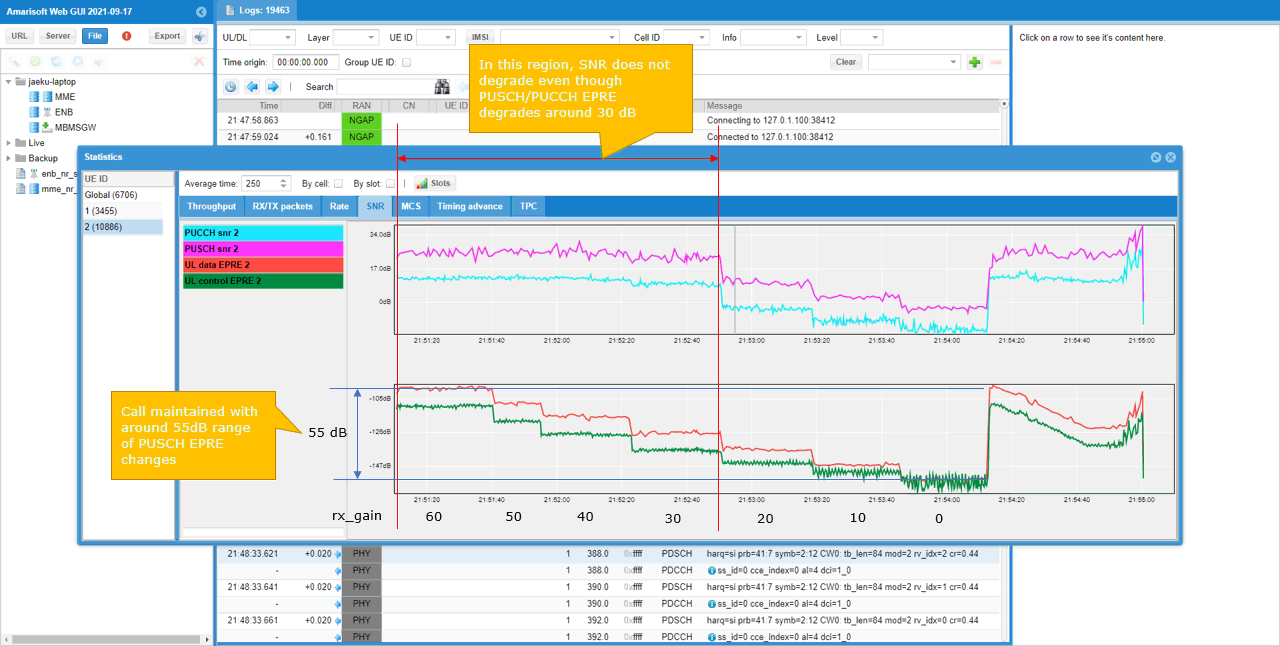
In this test, I changed UL EPRE by changing rx_gain on callbox and check how UL SNR changes at different UL EPRE. EPRE drops strictly according to rx_gain drops, but SNR does stay same (no drop) within relatively wide range of EPRE drop.