
LTE NB WUS (Wake Up Signal)
This tutorial is to show you how to configure and test LTE NB WUS (Wake Up Signal). Wake Up Signal is a kind of energy saving technology being used in LTE and NR. WUS is employed for Idle mode operation in LTE and is employed for connected mode in NR.
When it is used for Idle mode, WUS is used as a precursor for monitoring Paging Channel. When WUS is configured by eNB and the configuration is broadcasted by SIB, UE monitors WUS first without monitoring Paging. UE start monitor Paging only when it detects WUS. In this way, UE can save energy for waking up and monitors Paging signal by removing the unnecessary wake up.
Table of Contents
Introduction
Wake Up Signal (WUS) is an advanced energy-saving mechanism integrated into modern cellular technologies such as LTE (Long Term Evolution) and NR (New Radio, 5G). Designed to optimize power consumption in User Equipment (UE), WUS enables devices to reduce unnecessary activation of their receivers, thereby extending battery life while maintaining network responsiveness. Architecturally, WUS operates by transmitting a short, low-power signal ahead of the conventional paging process. In LTE, particularly within NB-IoT (Narrowband Internet of Things), WUS is utilized during idle mode, allowing the UE to remain in a deep sleep state until a WUS is detected, at which point it transitions to monitor the Paging Channel. This feature is configured by the eNodeB (eNB) and the parameters are broadcast via System Information Blocks (SIBs). In contrast, within 5G NR systems, WUS serves a similar purpose but is also applicable in connected mode, further enhancing energy efficiency. The significance of WUS lies in its ability to dramatically reduce power consumption for IoT and low-data-rate devices, making massive IoT deployments more feasible and cost-effective. In the broader telecommunications ecosystem, WUS facilitates the scaling of battery-powered devices, supports longer device lifecycles, and aligns with the evolving standards of energy-efficient wireless communication. This tutorial focuses on the practical aspects of configuring and testing WUS specifically within LTE NB using the Amarisoft Callbox, offering learners a detailed exploration of both the theoretical and hands-on components of WUS technology.
-
Context and Background
- Wake Up Signal (WUS) is a power-saving technology defined in LTE and 5G NR standards, targeting efficient UE operation in both idle and connected modes.
- WUS is particularly relevant for NB-IoT applications, where devices often remain inactive for prolonged periods and require optimized energy management.
- The feature is supported in Amarisoft Callbox from release 2022-12-22 onwards, with ongoing improvements in subsequent software versions.
-
Relevance and Importance of the Tutorial
- Demonstrates how to configure and validate WUS, a critical feature for modern, low-power IoT deployments over LTE NB.
- Provides practical insights into leveraging network-side and device-side configurations for maximizing energy efficiency.
- Equips engineers and network operators with the knowledge to deploy energy-efficient NB-IoT solutions using industry-standard tools.
-
Learning Outcomes
- Understand the operational principles and architectural components behind WUS in LTE NB.
- Gain hands-on experience with configuring WUS parameters on the Amarisoft Callbox.
- Learn how to test and validate WUS functionality from both network and UE perspectives.
- Develop the ability to analyze and troubleshoot WUS behavior in real-world NB-IoT scenarios.
-
Prerequisite Knowledge
- Familiarity with LTE and NB-IoT architecture and terminology.
- Basic understanding of paging procedures and idle/connected mode operations in cellular networks.
- Experience with Amarisoft Callbox or similar cellular network test equipment is recommended.
- General knowledge of wireless communication protocols and device power management strategies.
Summary of the Tutorial
This tutorial demonstrates the test procedures for verifying Wake Up Signal (WUS) functionality in an NB-IoT (Narrowband Internet of Things) environment using a callbox and UEsim setup. The procedures cover test setup, configuration, execution, and log analysis for WUS in a single cell scenario.
- Test Setup
- The setup consists of a callbox (acting as gNB/eNB) and a UEsim. A diagram illustrates the connections and components used.
- Key Configuration Parameters
- Essential configuration parameters are identified for both eNB and UEsim. References are provided for detailed descriptions.
- eNB config (notably, wus_config and its sub-parameters like time_offset, max_num_rep, num_po, num_drx_cycles_relaxed)
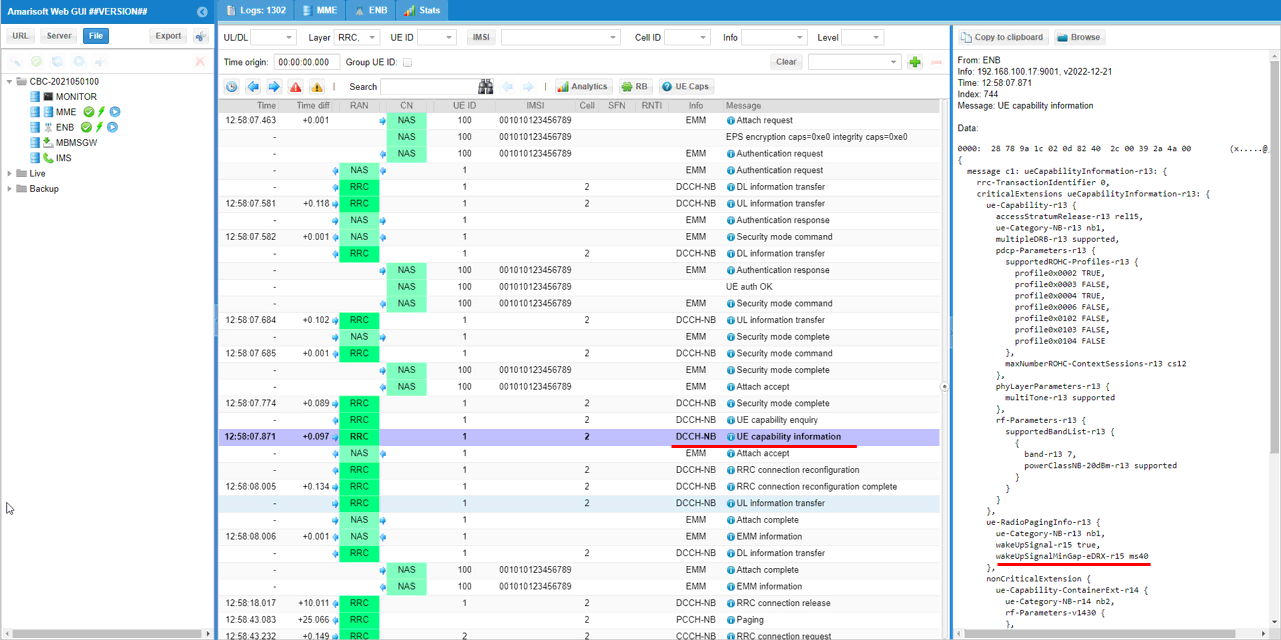
- UESim config (such as wus_support and wus_edrx_min_time_offset)
- Essential configuration parameters are identified for both eNB and UEsim. References are provided for detailed descriptions.
- Test 1: WUS with Single Cell
-
Configuration Steps
- Use enb-nbiot-wus.cfg on the callbox, modified from a reference configuration.
- Use mme-ims.cfg and ue_db-ims.cfg as-is for MME and UE database.
- Configure UEsim with ue-nbiot-wus.cfg, adapted from a reference UE configuration.
Note: If using a commercial UE as DUT, ensure it supports UE-assistance-information for release-preference. - Specific configuration files (enb-nbiot-wus.cfg, sib2_nb_wus2.asn, ue-nbiot-wus.cfg) are set up as shown in the included screenshots.
-
Test Execution Procedure
- Run the LTE service on the callbox and verify cell status using the 'cell' command.
- Optionally, enable BCCH logging for a few seconds to capture SIB messages, then disable it.
- Start trace logging on the callbox.
- Power on the UE on UEsim, or turn on the commercial UE if used as DUT.
- Wait for the UE to complete initial attach. Monitor logs for idle mode indication.
- Once the UE is idle, trigger the sending of WUS and Paging message.
- Verify the UE's IP address from the logs.
- Ping the UE from the callbox to validate connectivity and WUS response.
-
Log Analysis
- Analyze trace logs to confirm correct WUS signaling and message flow. Sample logs and screenshots are provided for reference.
-
Configuration Steps
The entire procedure ensures that the WUS feature is properly configured, triggered, and validated via network simulation and log analysis, providing a comprehensive approach for functional verification in an NB-IoT environment.
Test Setup
Test setup for this tutorial is as shown below.
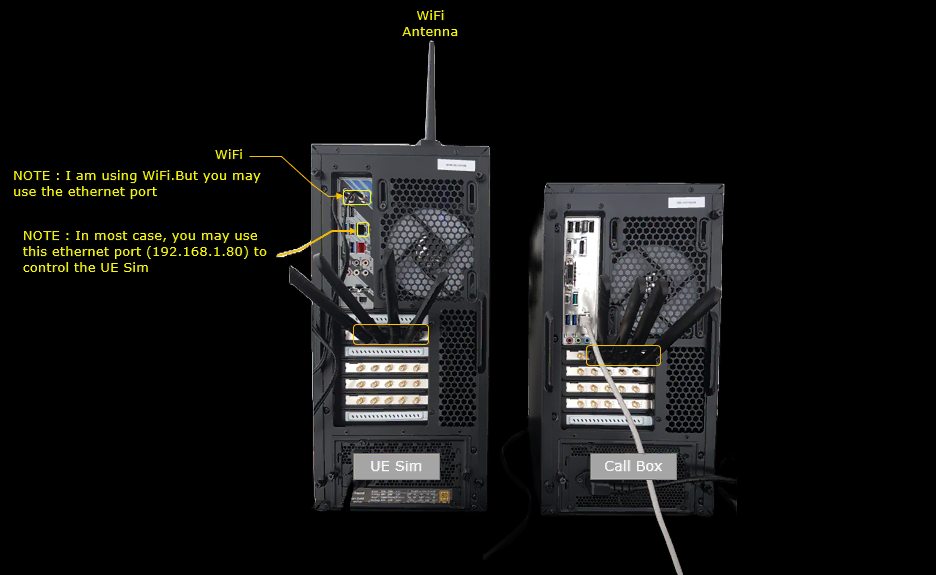
Key Configuration Parameters
Followings are important configuration parameters for this tutorial. You may click on the items for the descriptions from Amarisoft documents.
- eNB config
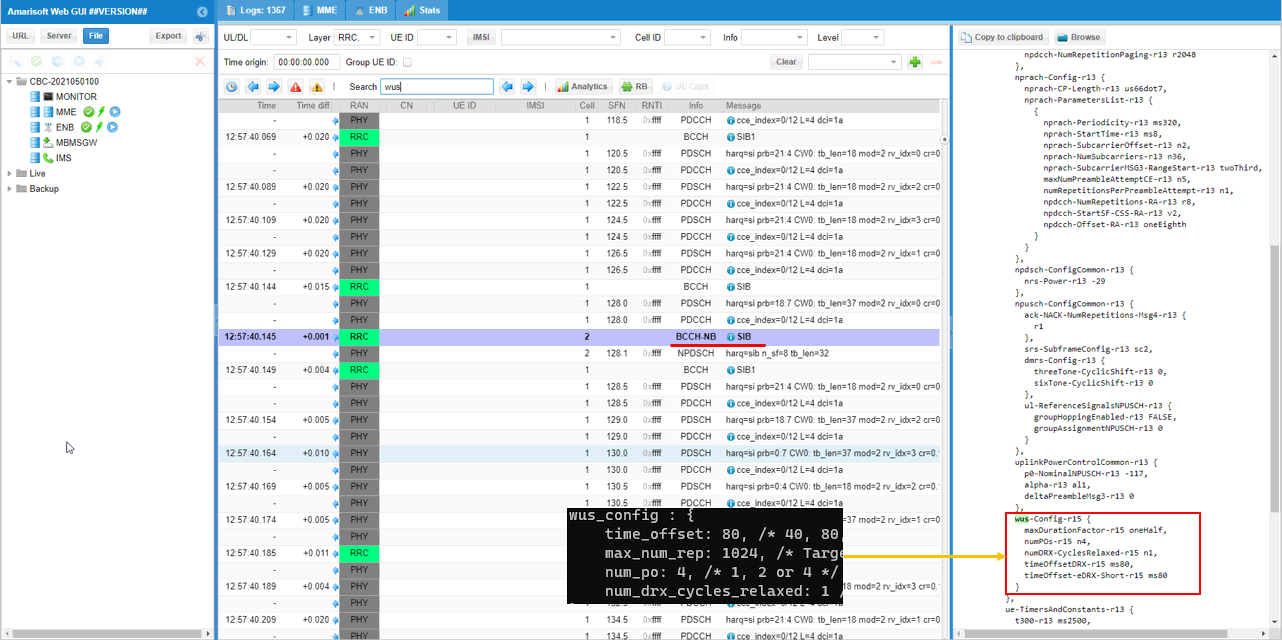
- wus_config : In this link, you can find the descriptions for all the parameters below.
- time_offset
- max_num_rep
- num_po
- num_drx_cycles_relaxed
- UESim Config
Test 1 : WUS with Single Cell
Configuration
The configuration shown here is common configuration for all the subtests belonging to Test 1 and I will not show this configuration repeatedly for every subtest.
I have used enb-nbiot-wus.cfg which is copied and modified from enb-nbiot.cfg on Callbox (gNB)
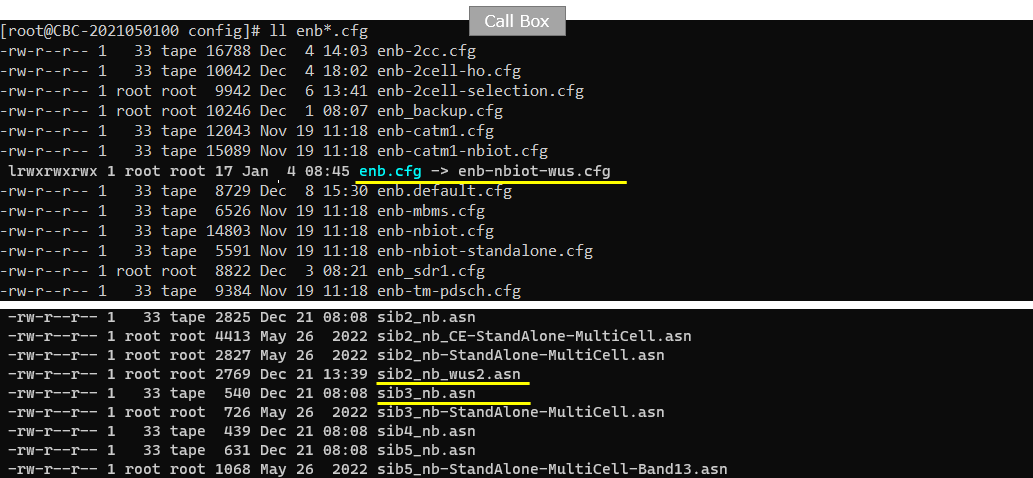
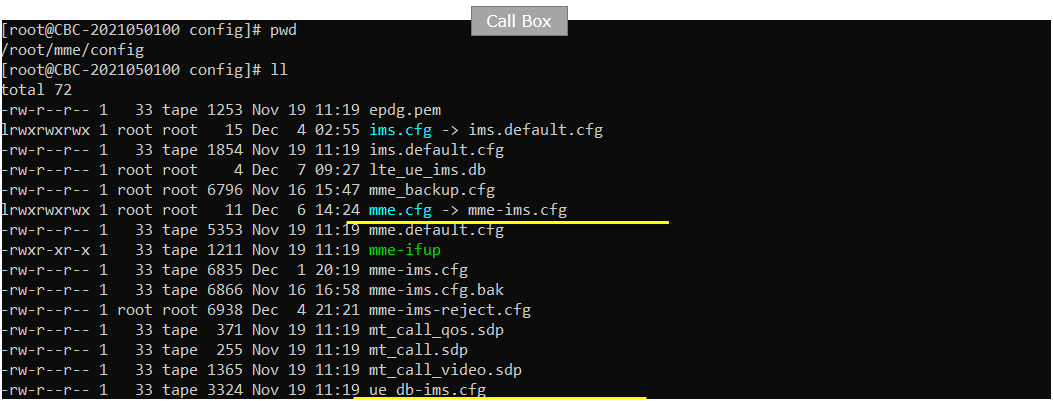
I am using mme-ims.cfg and ue_db-ims.cfg as they are.
On UEsim, I used ue-nbiot-wus.cfg which has been copied and modified from ue-nbiot.cfg (
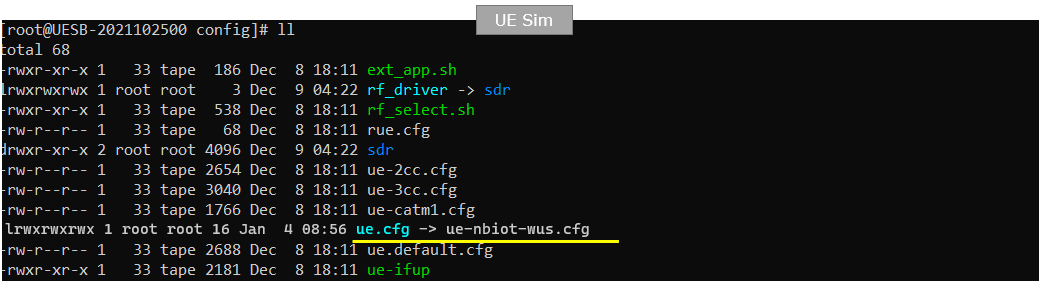
enb-nbiot-wus.cfg is configured as follows.

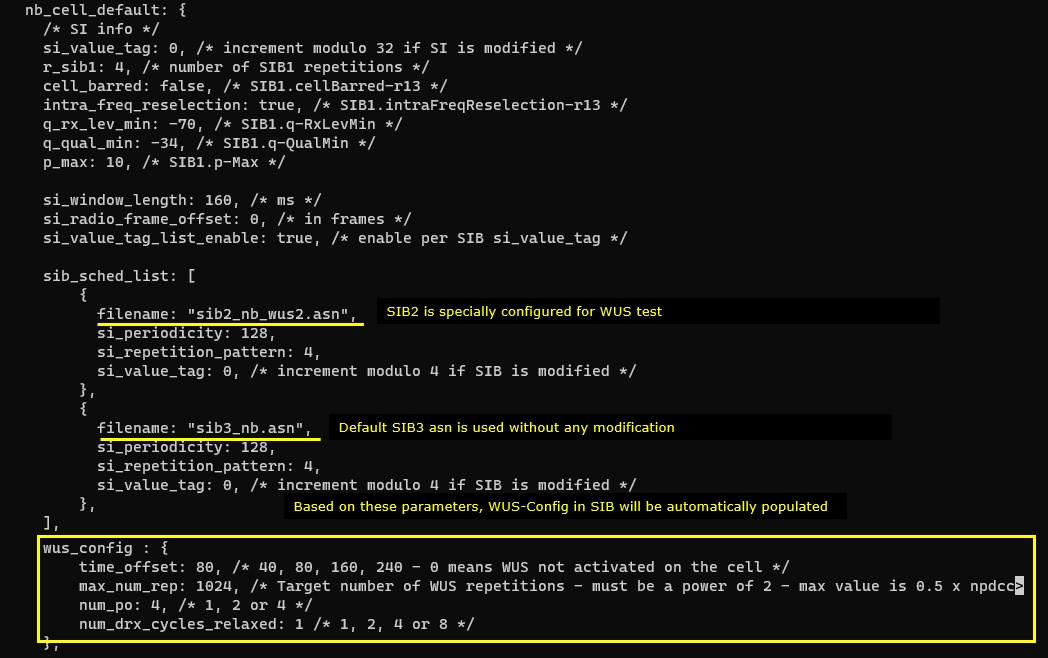
sib2_nb_wus2.asn is configured as follows.
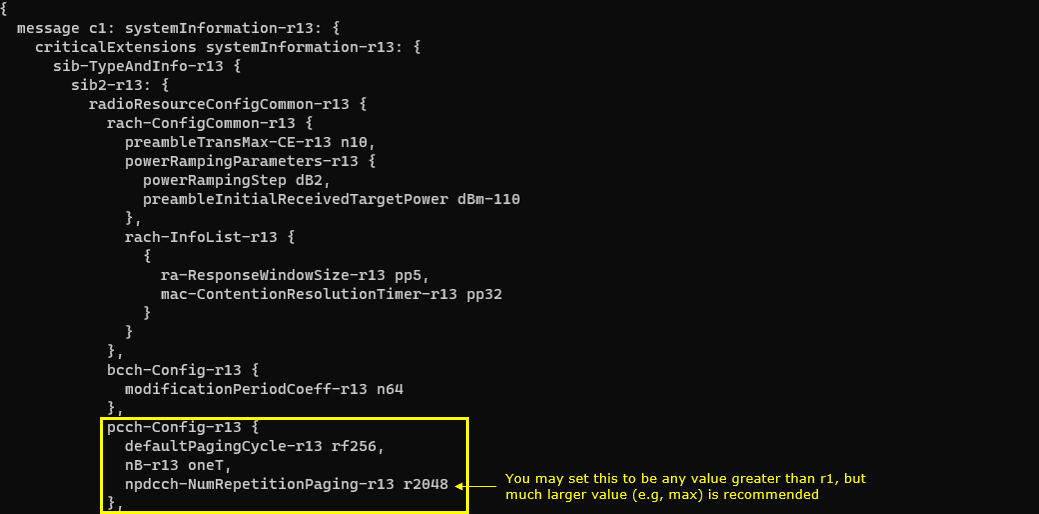
ue-nbiot-wus.cfg is configured as shown below. (
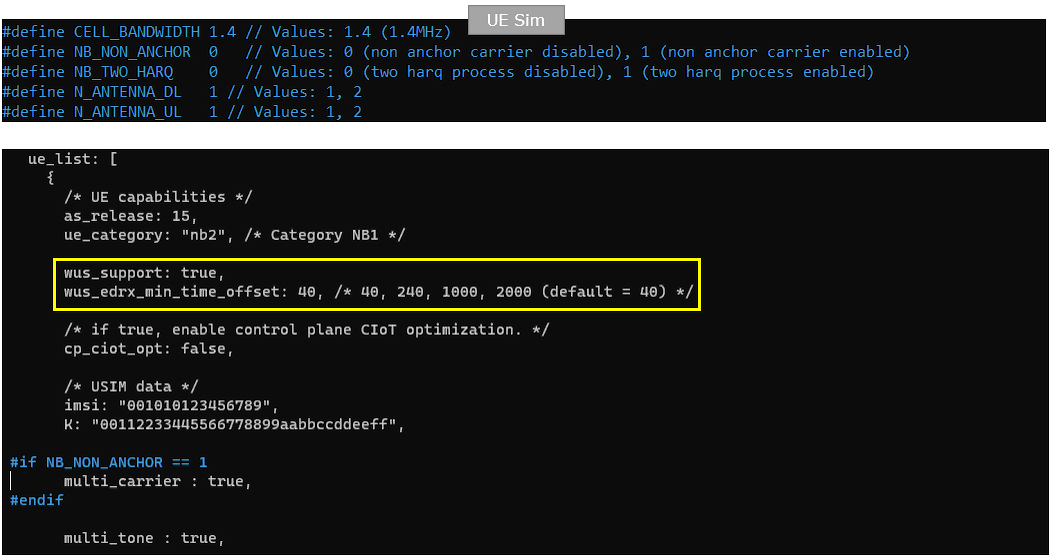
Perform the Test
Run lte service on callbox and check 'cell' command.
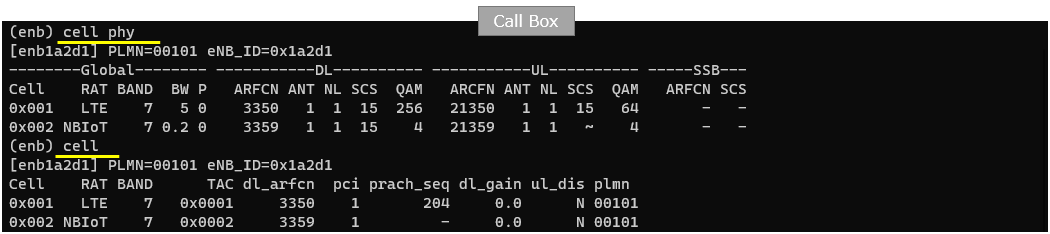
This is not the mandatory process.. but I did this to collect SIB message in the log for a few seconds at the beginning. I did bcch=1 and after a few seconds did bcch=0.

Now start trace logging.

Power on UE on UEsim (If your DUT is a commercial phone, turn on the phone)

Wait until the DUT complete the initial attach.
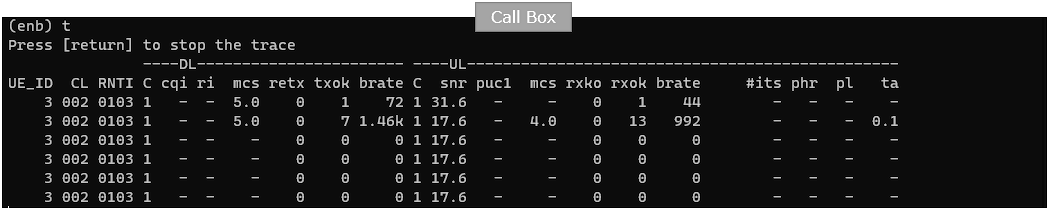
If you don't see any furrther 't' output is getting printed, it is highly likely that UE got into idle mode. Now it is good time to send WUS (Wake Up Signal) and Paging message.
Before you try ping, double check UE IP as shown below.

Do ping from callbox to UE as shown below.

Log Analysis
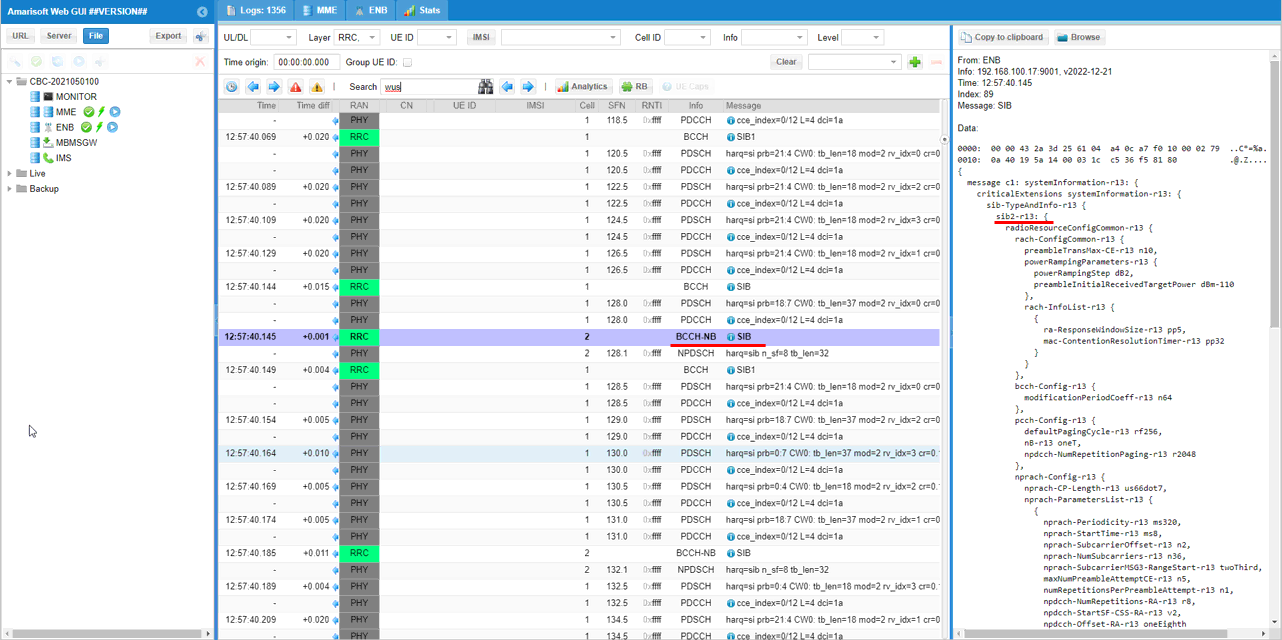
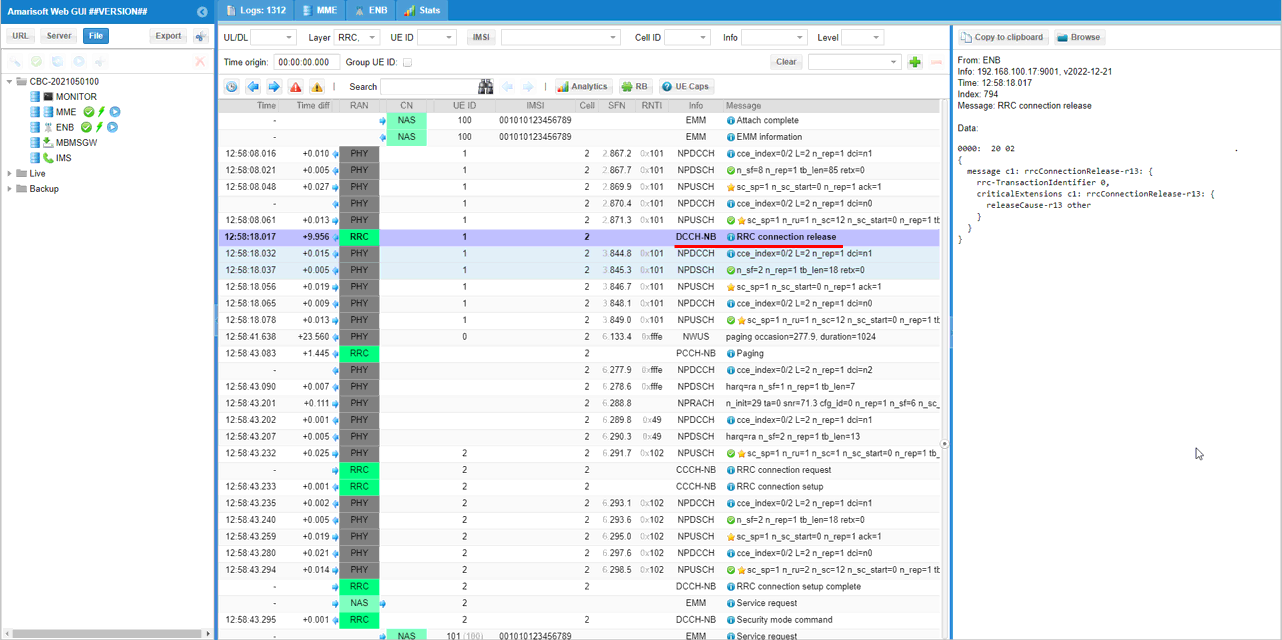
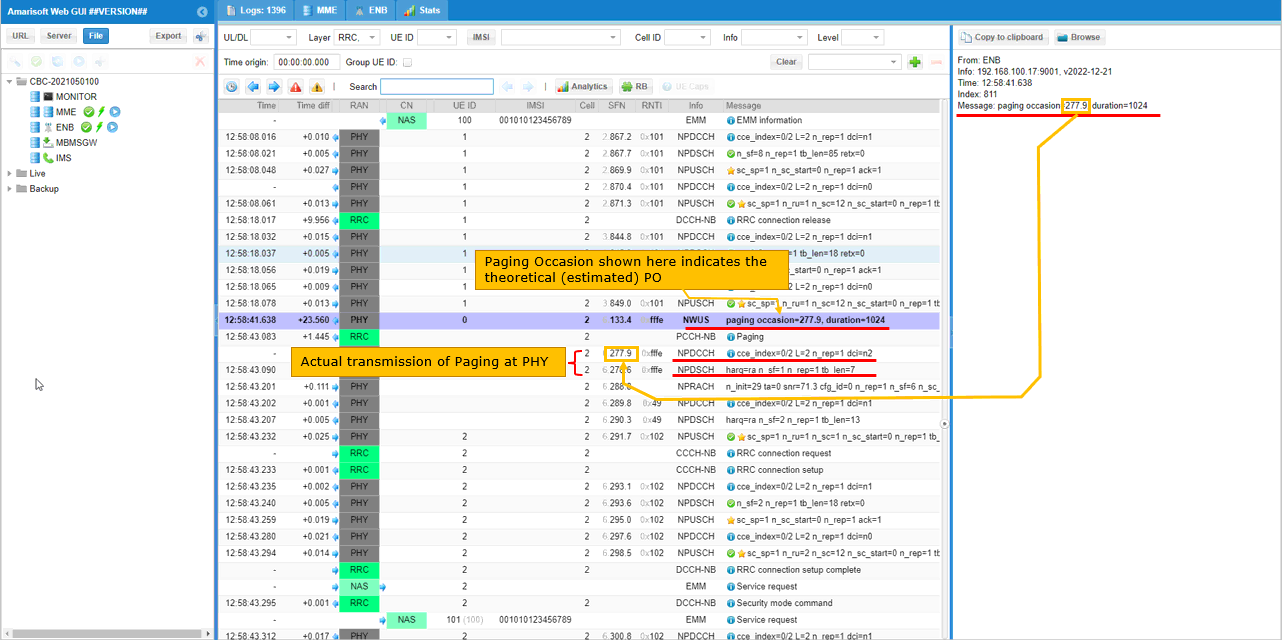
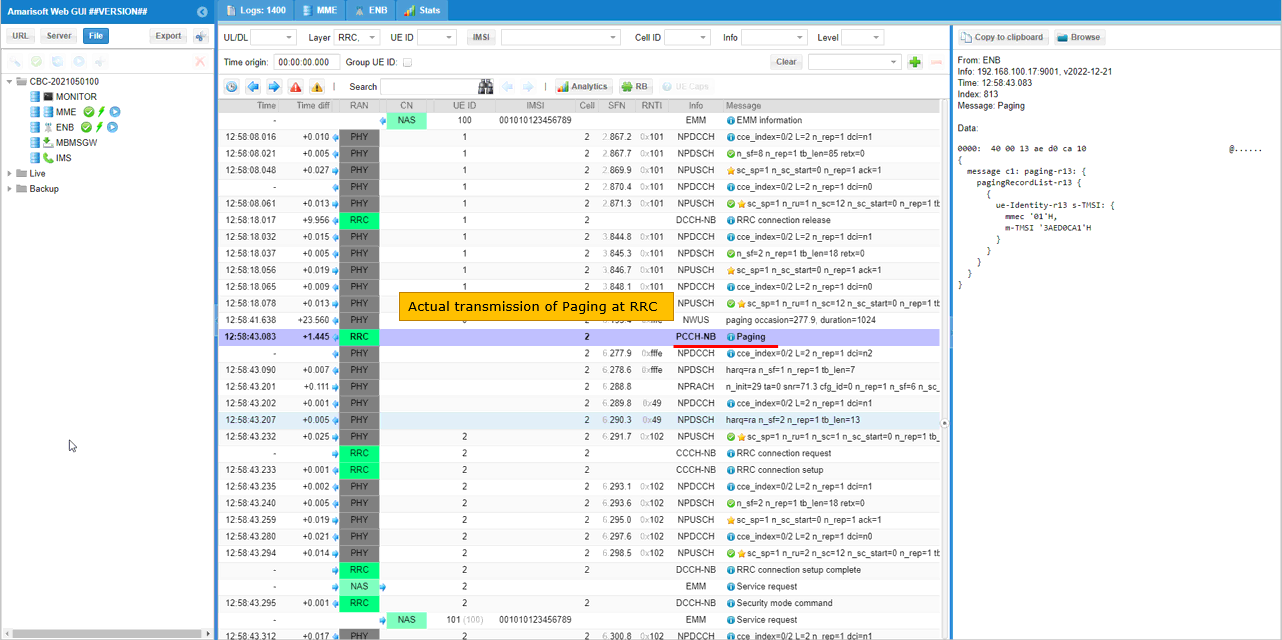
Following is the log snapshot that are involved in WUS (Wake Up Signal)
RRC / NAS Signaling
SIB2 (LTE)
: This is SIB2 containing ephemeris
{
message c1: systemInformation-r13: {
criticalExtensions systemInformation-r13: {
sib-TypeAndInfo-r13 {
sib2-r13: {
radioResourceConfigCommon-r13 {
rach-ConfigCommon-r13 {
preambleTransMax-CE-r13 n10,
powerRampingParameters-r13 {
powerRampingStep dB2,
preambleInitialReceivedTargetPower dBm-110
},
rach-InfoList-r13 {
{
ra-ResponseWindowSize-r13 pp5,
mac-ContentionResolutionTimer-r13 pp32
}
}
},
bcch-Config-r13 {
modificationPeriodCoeff-r13 n64
},
pcch-Config-r13 {
defaultPagingCycle-r13 rf256,
nB-r13 oneT,
npdcch-NumRepetitionPaging-r13 r2048
},
nprach-Config-r13 {
nprach-CP-Length-r13 us66dot7,
nprach-ParametersList-r13 {
{
nprach-Periodicity-r13 ms320,
nprach-StartTime-r13 ms8,
nprach-SubcarrierOffset-r13 n2,
nprach-NumSubcarriers-r13 n36,
nprach-SubcarrierMSG3-RangeStart-r13 twoThird,
maxNumPreambleAttemptCE-r13 n5,
numRepetitionsPerPreambleAttempt-r13 n1,
npdcch-NumRepetitions-RA-r13 r8,
npdcch-StartSF-CSS-RA-r13 v2,
npdcch-Offset-RA-r13 oneEighth
}
}
},
npdsch-ConfigCommon-r13 {
nrs-Power-r13 -29
},
npusch-ConfigCommon-r13 {
ack-NACK-NumRepetitions-Msg4-r13 {
r1
},
srs-SubframeConfig-r13 sc2,
dmrs-Config-r13 {
threeTone-CyclicShift-r13 0,
sixTone-CyclicShift-r13 0
},
ul-ReferenceSignalsNPUSCH-r13 {
groupHoppingEnabled-r13 FALSE,
groupAssignmentNPUSCH-r13 0
}
},
uplinkPowerControlCommon-r13 {
p0-NominalNPUSCH-r13 -117,
alpha-r13 al1,
deltaPreambleMsg3-r13 0
},
wus-Config-r15 {
maxDurationFactor-r15 oneHalf,
numPOs-r15 n4,
numDRX-CyclesRelaxed-r15 n1,
timeOffsetDRX-r15 ms80,
timeOffset-eDRX-Short-r15 ms80
}
},
ue-TimersAndConstants-r13 {
t300-r13 ms2500,
t301-r13 ms2500,
t310-r13 ms200,
n310-r13 n6,
t311-r13 ms10000,
n311-r13 n5
},
freqInfo-r13 {
ul-CarrierFreq-r13 {
carrierFreq-r13 21359,
carrierFreqOffset-r13 v0
},
additionalSpectrumEmission-r13 1
},
timeAlignmentTimerCommon-r13 sf1920
}
}
}
}
}