LTE IMS CallFlow Modifier
This tutorial shows how to show how to utilize the configuration callflow_modifier. callflow_modifier allow you to send a specific SIP message in response to a specified method (e.g, INVITE, REGISTER etc) with a specific code (e.g, 403). This is a handy tool to modify a response to a method (message) and see how the DUT respond to the signaling modification.
Table of Contents
- LTE IMS CallFlow Modifier
- Introduction
- Summary of the Tutorial
- Test Setup
- Key Configuration Parameters
- Test 1 : CallFlow Modifier - REGISTER
- Configuration
- Perform the test
- Log Analysis
- Sub Test 1 : Reject REGISTER, ttl 1
- Sub Test 2 : Ignore REGISTER
- Sub Test 3 : Ignore REGISTER , ttl 1
- Sub Test 4 : Ignore REGISTER , tts 1
- Sub Test 5 : Block LTE Registration
- Sub Test 6 : Blacklisting
- Sub Test 7 : Service Outage with UE backoff
- Sub Test 8 : Service Outage with Network Timer
- Sub Test 9 : 504 HSS Timeout
- Sub Test 10 : 404 User Unknown
- Sub Test 11 : 302 Redirect
- Sub Test 12 : 401 Wrong Password
- Sub Test 13 : 400 Bad Request
- Sub Test 14 : 423 Interval Too Brief
- Test 2 : CallFlow Modifier - MO INVITE
- Test 3 : CallFlow Modifier - SUBSCRIBE
Introduction
The configuration of SIP (Session Initiation Protocol) message flows is a fundamental aspect of testing and validating IMS (IP Multimedia Subsystem) behavior in modern telecommunications networks. The callflow_modifier is a powerful configuration tool designed to alter and control SIP signaling exchanges within test environments, such as those provided by the Amarisoft Callbox platform. By leveraging the callflow_modifier, engineers and testers can intercept incoming SIP methods—such as INVITE, REGISTER, or others—and programmatically modify the response message, including the ability to set custom SIP response codes (e.g., 403 Forbidden). This capability is crucial for simulating complex and real-world scenarios where the Device Under Test (DUT) must be validated for compliance, robustness, and correct signaling behavior in response to atypical or negative responses. The callflow_modifier operates independently of the underlying Radio Access Technology (RAT), making it applicable across LTE, NR (5G), and VoWiFi deployments, and thus ensuring broad utility in IMS/SIP protocol validation. This flexibility is significant in the context of converged networks, where devices and services must seamlessly interoperate across multiple RATs and handle diverse SIP transactions. By programmatically controlling SIP responses, the callflow_modifier facilitates advanced network simulations, troubleshooting, and regression testing, playing a vital role in the broader ecosystem of telecom protocol development, certification, and quality assurance.
-
Context and Architecture
- IMS/SIP Overview: The IP Multimedia Subsystem (IMS) leverages SIP for signaling in voice, video, and messaging services across LTE, NR, and Wi-Fi networks.
- Amarisoft Callbox Platform: A versatile test system that supports end-to-end IMS/SIP scenarios in multi-RAT environments, allowing detailed signaling manipulation.
- callflow_modifier Functionality: Intercepts specified SIP methods and enables custom response generation, supporting extensive test coverage for protocol handling.
-
Relevance and Importance
- Enables validation of DUT behavior under non-standard or error conditions by injecting tailored SIP responses.
- Facilitates detection of protocol stack weaknesses, improper error handling, or interoperability issues.
- Essential for regression testing, troubleshooting, and network feature validation across all supported RATs.
-
Tutorial Learning Outcomes
- Understand the role of callflow_modifier in SIP/IMS protocol testing.
- Learn how to configure and use callflow_modifier to manipulate SIP signaling flows.
- Gain insights into interpreting DUT responses to customized SIP message exchanges.
-
Prerequisite Knowledge and Skills
- Familiarity with SIP protocol fundamentals and IMS architecture.
- Basic understanding of Amarisoft Callbox operation and configuration.
- Experience with telecom protocol testing and interpreting signaling traces is beneficial.
Summary of the Tutorial
This tutorial demonstrates advanced IMS (IP Multimedia Subsystem) protocol testing using Amarisoft's callflow_modifier feature. It covers a variety of test procedures for manipulating IMS/SIP signaling messages under different scenarios, focusing on REGISTER, INVITE, and SUBSCRIBE message flows. The procedures also include configuration, execution, and analysis of the test cases, with detailed steps for each test and subtest scenario.
-
Test Setup and Configuration:
- The basic test setup uses the default SIM card and Amarisoft system-provided configurations unless otherwise specified.
- Key configuration parameters include impi, impu, domain, and various callflow_modifier attributes (such as method, code, log, stop, custom_headers, ttl, tts, etc.).
- Test scenarios are controlled using specific IMS and UE database configuration files, which are copied and modified from the system defaults.
-
Test 1: CallFlow Modifier - REGISTER
- Purpose: To manipulate the network's response to SIP REGISTER messages from the UE by applying custom rules through callflow_modifier.
-
High-level Procedure:
- Configure the IMS and UE database files to apply callflow_modifier rules for selected IMPUs.
- Power on the UE, ensure IMS bearer establishment, and attempt registration.
- Analyze the IMS log for expected behavior (e.g., 403 Forbidden or other customized SIP responses).
-
Subtests:
-
Sub Test 1: Reject REGISTER, ttl 1
Simulates a one-time registration rejection by setting ttl to 1, causing only the initial REGISTER to be rejected with 403, with subsequent attempts following normal flow. -
Sub Test 2: Ignore REGISTER
Simulates a silent drop by consuming the REGISTER message without any response, forcing the UE to trigger its retransmission and backoff logic. -
Sub Test 3: Ignore REGISTER, ttl 1
Drops only the first REGISTER silently (using ttl: 1), after which normal network processing resumes for subsequent retries. -
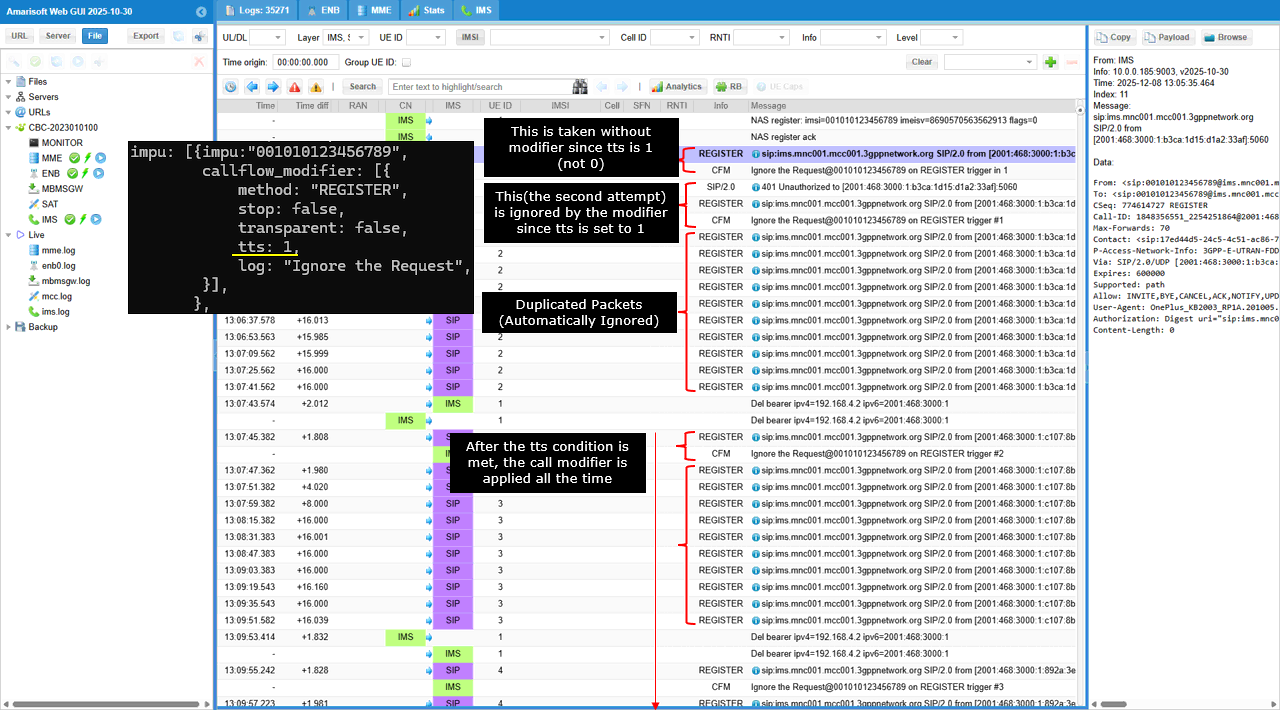
Sub Test 4: Ignore REGISTER, tts 1
Skips blocking for the first REGISTER, then drops the second (credentialed) REGISTER silently, simulating network failure during authentication. -
Sub Test 5: Block LTE Registration
Specifically blocks REGISTER attempts coming from the LTE access network, returning 403 and a custom warning in the SIP response. -
Sub Test 6: Blacklisting
Rejects REGISTER messages based on the device IMEI, simulating device blacklisting with a 403 response and custom warning. -
Sub Test 7: Service Outage with UE Backoff
Returns 503 Service Unavailable for REGISTER, causing the UE to back off and retry after longer intervals. -
Sub Test 8: Service Outage with Network Timer
Injects a Retry-After header with 503 responses, instructing the UE to retry registration specifically after the indicated timer (e.g., 30 seconds). -
Sub Test 9: 504 HSS Timeout
Simulates HSS/database outage by forcing persistent 504 Server Time-out responses to REGISTER, with custom warning headers. -
Sub Test 10: 404 User Unknown
Simulates a provisioning failure by returning 404 Not Found for REGISTER, with a warning indicating the IMPU is not found. -
Sub Test 11: 302 Redirect
Forces a 302 Moved Temporarily response with a Contact header, instructing the UE to redirect registration attempts to a backup server. -
Sub Test 12: 401 Wrong Password
Forces a 401 Unauthorized response upon credentialed REGISTER (using tts to skip the initial challenge), simulating failed authentication. -
Sub Test 13: 400 Bad Request
Forces a 400 Bad Request response on REGISTER to test UE handling of malformed or non-compliant requests. -
Sub Test 14: 423 Interval Too Brief
Forces a 423 response with Min-Expires header to test UE compliance with minimum registration interval policies.
-
Sub Test 1: Reject REGISTER, ttl 1
-
Test 2: CallFlow Modifier - MO INVITE
- Purpose: To manipulate the handling of outgoing SIP INVITE messages (e.g., for VoLTE call barring).
-
High-level Procedure:
- Configure the IMS and UE database files to apply callflow_modifier for INVITE messages, targeting specific IMPUs or patterns.
- Register the UE for IMS, then initiate a VoLTE call to trigger INVITE.
- Observe and analyze the logs to confirm the expected rejection (e.g., 403 Forbidden with custom Reason header).
-
SubTest 1: Skipping 180 Ringing
- Configures the server to skip sending the 180 Ringing response for specific calls, using skip: true for INVITE.RINGING and stop: false to allow callflow to proceed. Logging confirms the omission of 180 Ringing while the call completes normally.
-
Test 3: CallFlow Modifier - SUBSCRIBE
- Purpose: To manipulate the handling of SUBSCRIBE requests by returning customized SIP responses.
-
High-level Procedure:
- Apply callflow_modifier rules in the IMS and UE database configurations for specific IMPUs, setting actions for SUBSCRIBE method (e.g., return 403 Forbidden, inject custom warning headers).
- Trigger SUBSCRIBE from the UE and observe the IMS/SIP logs for the expected customized response.
-
Sub Test 1: Too Short Interval
- Simulates IMS-enforced subscription timer policy by injecting 423 Interval Too Brief response and setting a Min-Expires header (e.g., 600s). This tests whether the UE adapts and retries with a compliant timer. The Warning header is also injected for explicit feedback.
Throughout the procedures, the methodology emphasizes:
- Modifying behavior via callflow_modifier in configuration files for specific SIP methods and user/device attributes.
- Systematic validation by analyzing IMS/SIP logs to confirm expected triggers, responses, and UE behavior changes.
- SIM Card used in this tutorial is the one delivered with the system as it is.
- If you want to change the configuration, The tutorial Configuration Guide would help
Test Setup
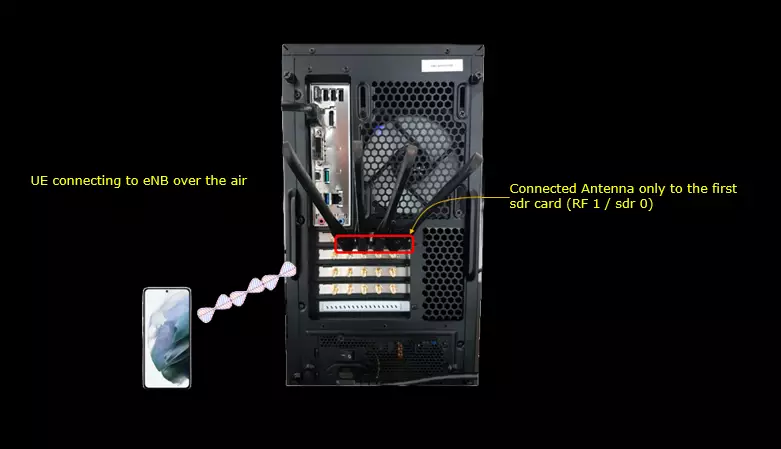
Test setup for this tutorial is as shown below.
Key Configuration Parameters
Followings are important configuration parameters for this tutorial. You may click on the items for the descriptions from Amarisoft documents.
Test 1 : CallFlow Modifier - REGISTER
The purpose of this test is to apply callflow_modifier to REGISTER message. I want to modify the signaling message from IMS/SIP Server in various different way in response to REGISTER message.
Configuration
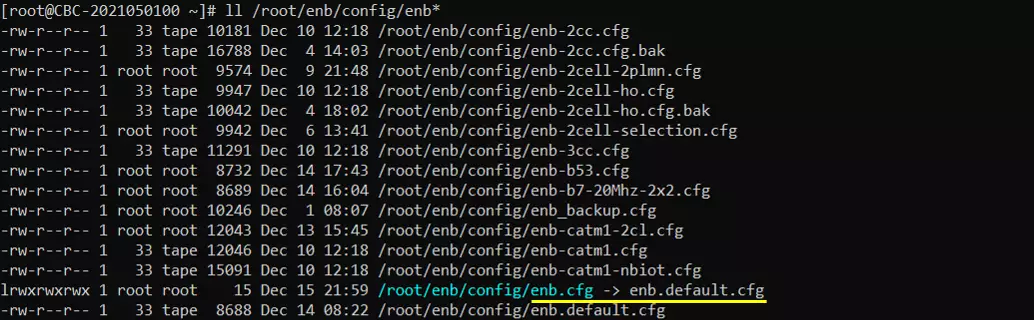
I used the enb.default.cfg (LTE default configuration) as it is without changing any contents in it.
I also used the default configuration mme-ims.cfg for mme as well.

For this test, the test configuration is made only in ims configuration and ue_db for ims. For ims configuration, ims-register-callmod.cfg is used, which is copied and modified from ims.default.cfg and ue_db-ims-register-callmod.cfg is used, which is copied and modified from ue_db-ims.cfg
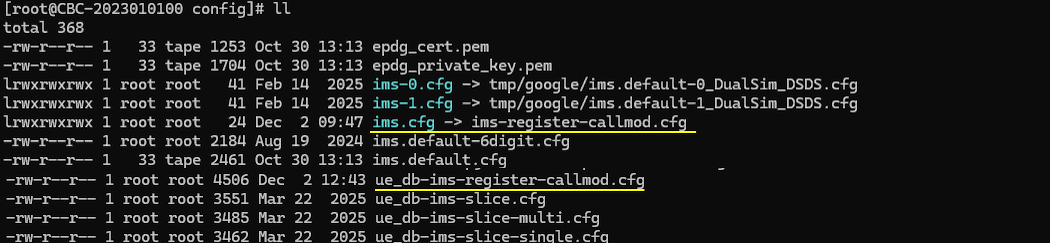
In ms-register-callmod.cfg , the only modification is made to include ue_db-ims-register-callmod.cfg instead of the default ue db.
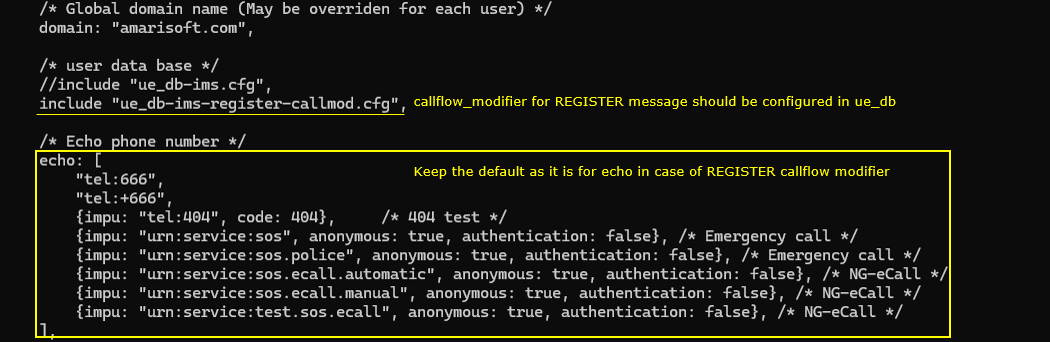
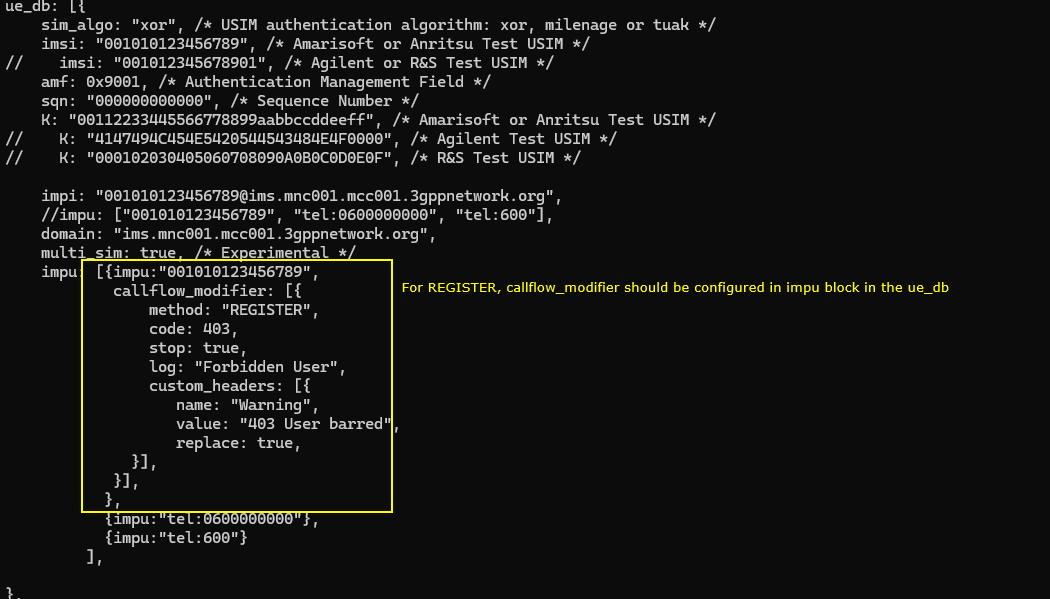
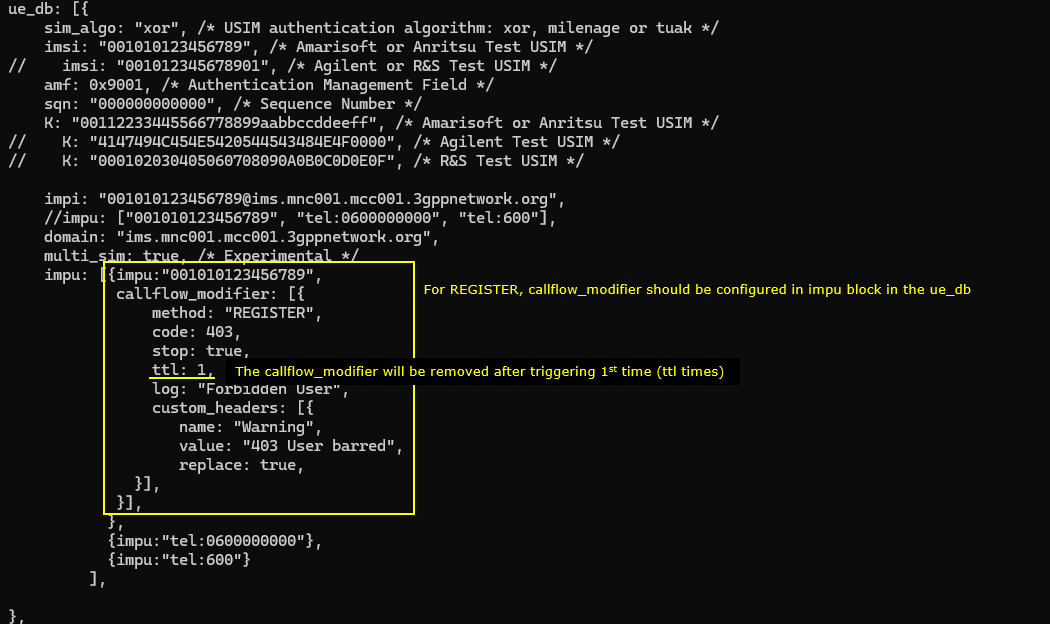
In ue_db-ims-register-callmod.cfg , callflow_modifer for REGISTER message is configured in the impu block. You should add the parameter for a specific impu which you want to apply the modification to
The configuration says tthat the modifier is set to act on the REGISTER method. The configuration instructs the system to return a 403 response for any REGISTER sent by this IMPU. The processing stops after applying this rule, and the system logs the message “Forbidden User” when the modification is triggered. A custom SIP header named Warning is also added to the response, and its value is set to “403 User barred”, replacing any existing Warning header. This entire modifier applies only to the IMPU "001010123456789", meaning only this user’s REGISTER messages will receive the modified response.
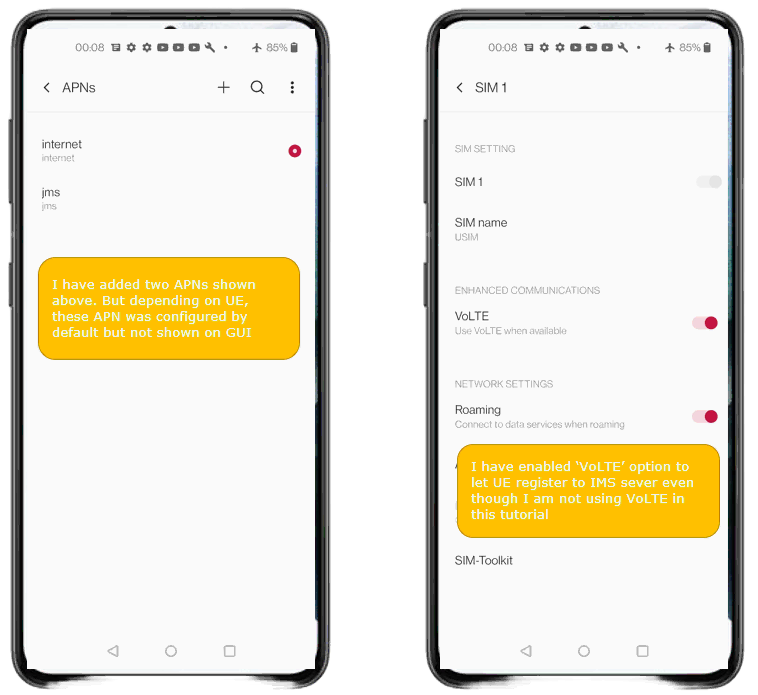
Since this is for IMS/SIP related test, make it sure that APN setting and VoLTE settings are enabled on your UE.
Perform the test
Check out the cell phy output and see if everything is configured as intended. This test does not require any specific cell phy configuration. Any configuration is OK as long as your DUT support it.

Now power on UE and wait for the UE to complete the initial attach to the network.

Then check if the ims bearer is established and IP for the ims is allocated. In this case, the ip 192.168.4.2 and 2001:468:3000:1:: are assigned for the UE for IMS.

Now check if UE registration status in ims. Here you notice that UE is registerred to core network (mainly for SMS over SG) but did not get registerred to IMS server(This is intended status for this test because it is expected for the UE get rejected for IMS registration). If UE is successfully registerred to IMS server, you should see SIP biding information.

Log Analysis
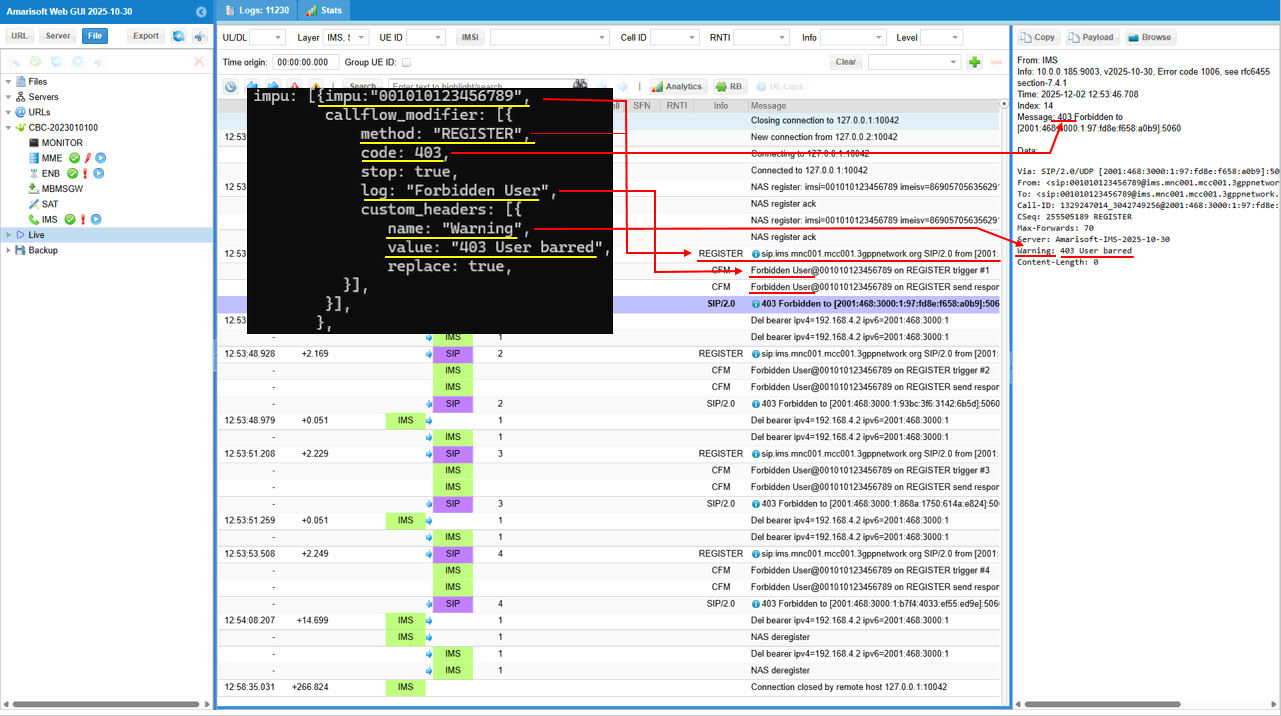
Take a look into the IMS log and you will notice that 403 Forbidden message is sent out in response to REGISTER message.
It shows what happens in the IMS log when the UE sends a REGISTER request. As soon as the REGISTER appears in the SIP trace, the callflow_modifier defined for this IMPU is immediately triggered. You can see the REGISTER message from the UE, and right after that the system injects the “Forbidden User” log entries, which come directly from the configuration. The SIP stack then responds with 403 Forbidden, exactly matching the behavior defined in the modifier. On the right side, the SIP message details confirm the modified response: a 403 status, the custom Warning: 403 User barred header, and the Amarisoft server tag. The entire sequence shows the UE’s REGISTER request, the modifier being activated, and the resulting 403 response being returned exactly as configured.
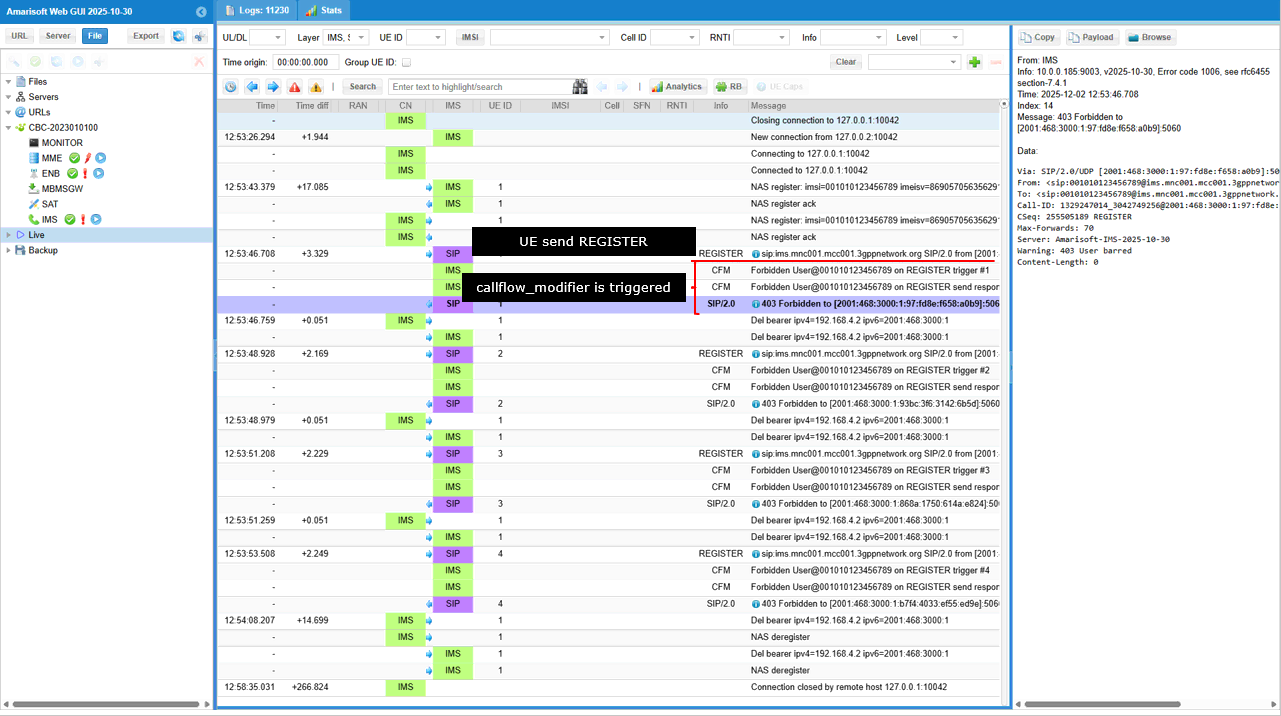
Following shows the detailed mapping between what you configured in the configuration file and what you see in the ims log. It shows how each parameter in the callflow_modifier configuration directly appears in the IMS/SIP log. The configuration forces the REGISTER method to return a 403 response, and in the log you can see the SIP stack sending 403 Forbidden exactly as specified by code: 403. The log: "Forbidden User" entry becomes the visible log message “Forbidden User” in the event trace. The custom header section, which inserts a Warning header with the value "403 User barred", appears exactly the same in the SIP message shown on the right side of the GUI. In short, every field in the configuration—response code, log message, and custom Warning header—shows up in the corresponding parts of the actual SIP response displayed in the IMS logs, demonstrating direct one-to-one mapping between configuration and observed signaling.
Sub Test 1 : Reject REGISTER, ttl 1
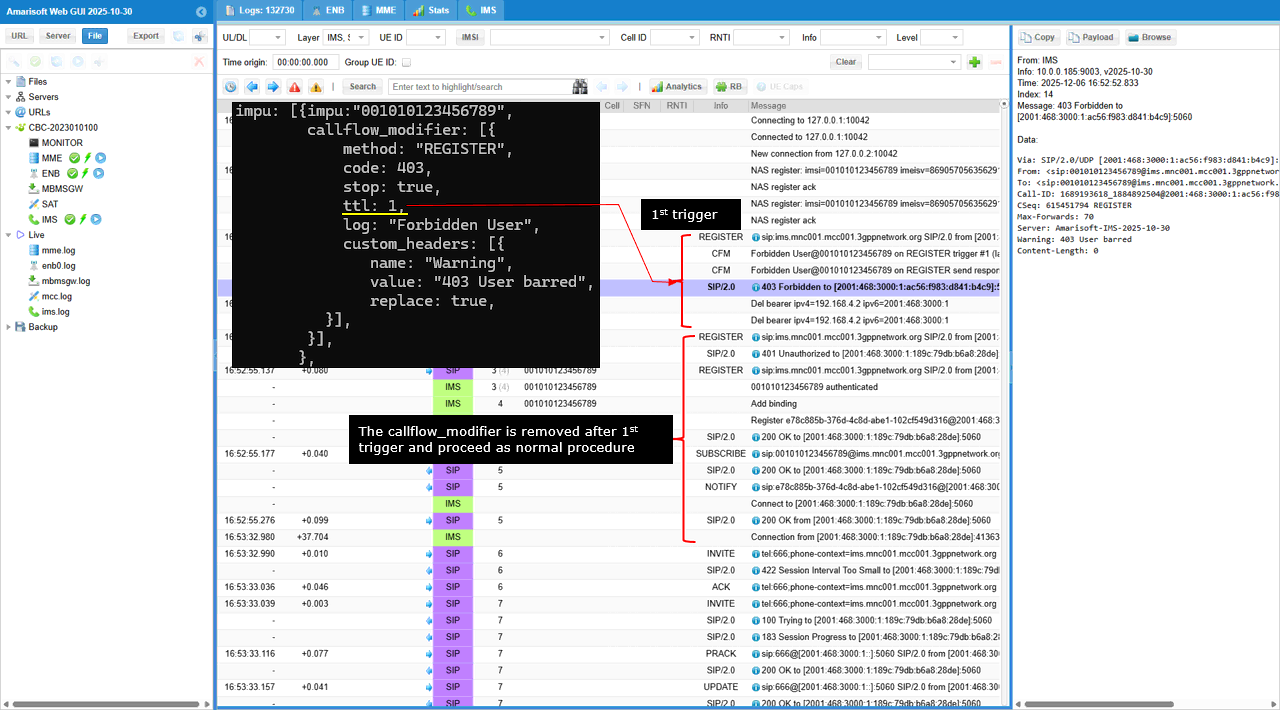
This test is designed to simulate a transient network rejection scenario where the IMS core explicitly denies the initial registration request with a "403 Forbidden" status code. By setting the Time To Live (ttl) parameter to 1, the test ensures that this rejection is a one-time event, effectively "barring" the user only for the first attempt and remove the restriction for subsequent retries. This allows testers to verify how the User Equipment (UE) handles authorization failures and whether it correctly attempts to re-register or halts operations after receiving a fatal error response accompanied by a custom "User barred" warning header.
As shown below the first registration attempt fails as expected, but the modifier is then automatically removed, and then allows the subsequent registration retry from the UE to proceed through the normal authentication flow (receiving a 401 challenge and eventually a 200 OK). This creates a controlled transient failure to verify that the UE correctly retries the connection rather than permanently giving up after a single administrative rejection.
Sub Test 2 : Ignore REGISTER
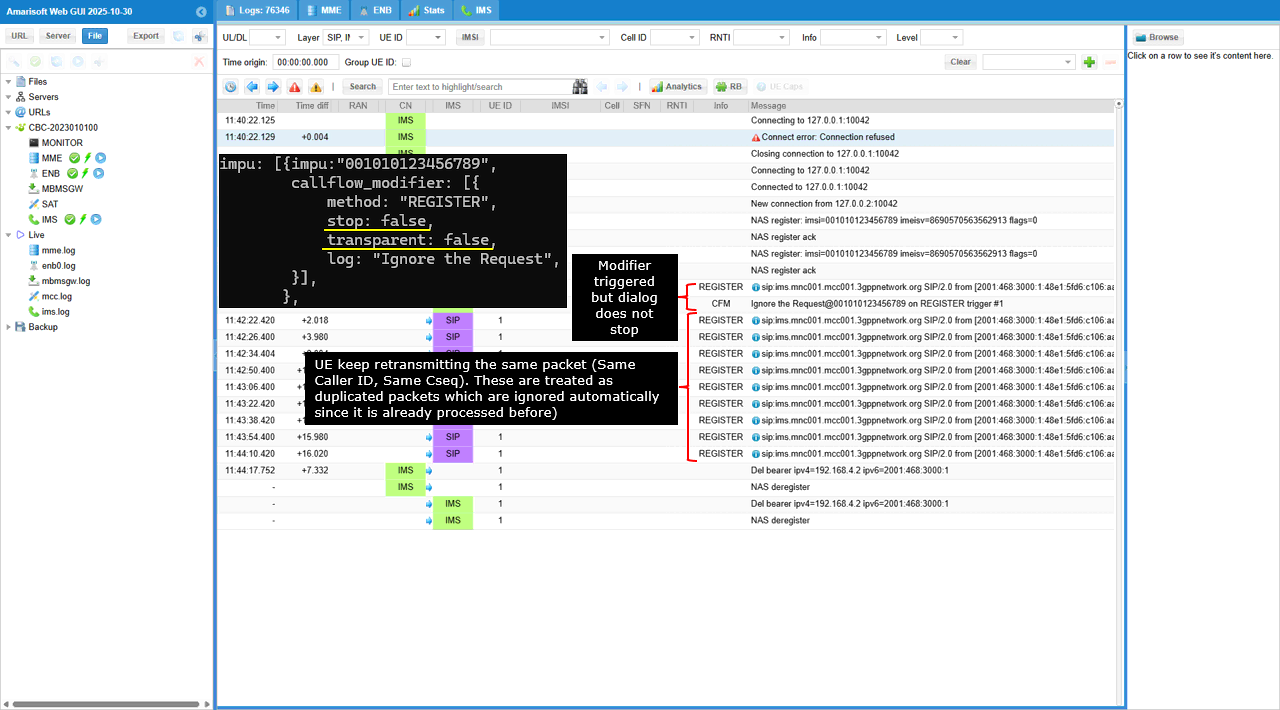
This test is designed to simulate a Request Timeout or Silent Drop scenario where the network intentionally ignores the UE's registration attempts. By setting transparent to false and omitting a response code, the system intercepts the REGISTER message and sends nothing back, forcing the UE to assume the packet was lost. This triggers the UE's internal retransmission mechanism, allowing testers to verify that the device correctly executes its exponential backoff logic (retrying at increasing intervals) and eventually handles the lack of connectivity.
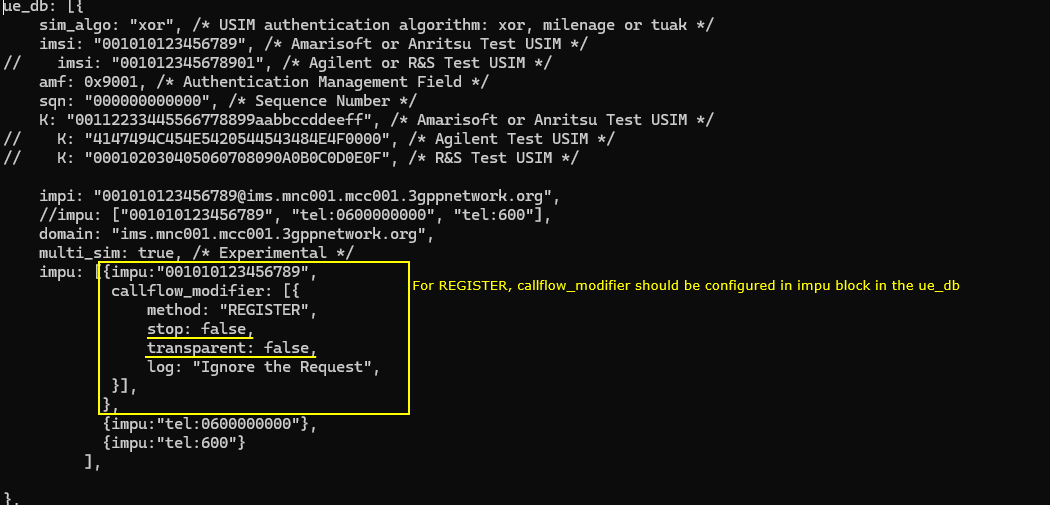
This log demonstrates a "silent drop" behavior where the network intercepts the UE's registration request and deliberately provides no response, effectively mimicking a timeout. The transparent: false setting ensures the message is consumed internally rather than forwarded, while the absence of a response code means the UE is left waiting indefinitely. As the UE attempts to recover by retransmitting the request, the network tool identifies these subsequent messages as duplicate packets containing the same Call-ID and Command Sequence (CSeq). Because these duplicates belong to an already-processed transaction, they are automatically ignored by the system without re-triggering the modifier logic.
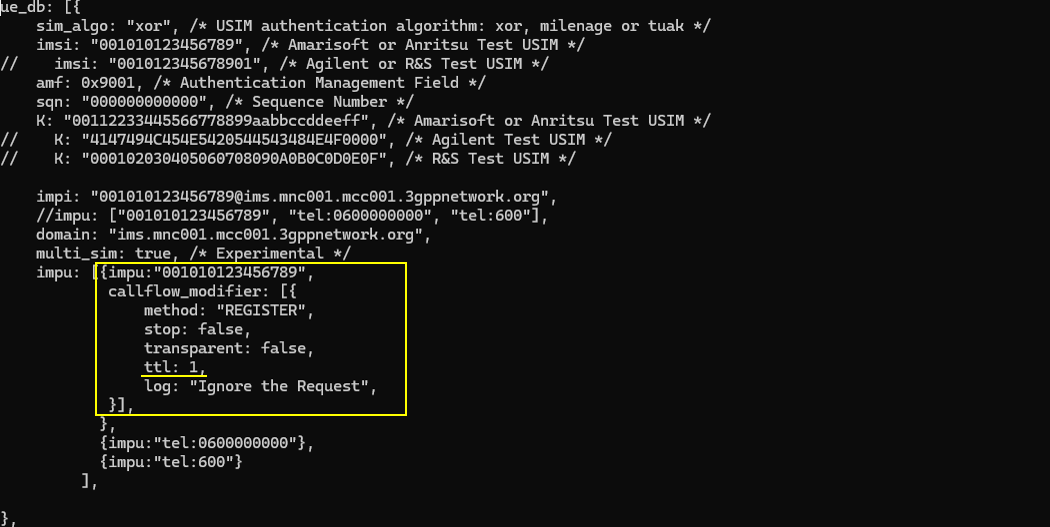
Sub Test 3 : Ignore REGISTER , ttl 1
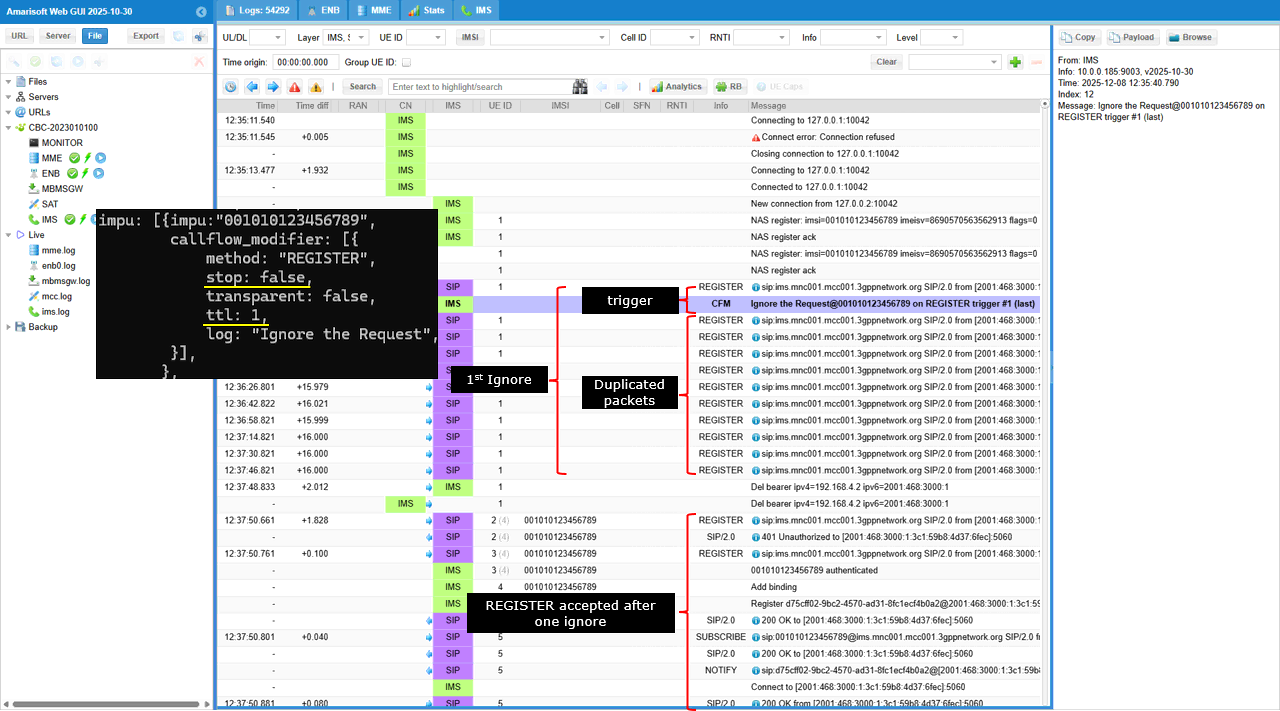
This test is designed to simulate a transient network failure or temporary packet loss by deliberately ignoring only the very first registration attempt from the UE. By setting the Time To Live (ttl) parameter to 1, the system ensures that the "silent drop" behavior applies exclusively to the initial REGISTER message, after which the modifier is automatically removed. This setup allows you to verify that the UE effectively handles the timeout by initiating a retransmission which, unlike the first attempt, will be successfully received and processed by the network.
This test demonstrates the UE successfully recovering from a simulated temporary network timeout. The sequence begins when the network intercepts the initial REGISTER message and silently drops it without sending a response while logging "Ignore the Request". Crucially, the log entry is tagged with "trigger #1 (last)," indicating that the ttl: 1 parameter caused the blocking rule to expire immediately after this single execution. Following this, the log displays a series of duplicate REGISTER packets, which represent the UE attempting to retransmit the lost message; these are ignored by the tool as they belong to the originally blocked transaction. Eventually, the UE initiates a completely fresh registration attempt that is treated as a new transaction, and because the blocking modifier has expired, the IMS core processes this request normally, issuing a 401 Unauthorized challenge and eventually granting access with a 200 OK.
Sub Test 4 : Ignore REGISTER , tts 1
This test is designed to simulate a silent network failure specifically during the authentication phase of the registration process. By utilizing the Time To Start (tts) parameter set to 1, the system intentionally skips the first registration attempt, allowing the UE to successfully reach the IMS core and receive the standard "401 Unauthorized" challenge. However, when the UE responds with its second, authenticated REGISTER message containing the required credentials, the modifier activates and silently drops the packet because transparent is set to false with no response code defined. This setup forces the UE to experience a timeout only after the initial handshake, validating that the device correctly handles packet loss during credential exchange by retransmitting the authenticated request rather than abandoning the session.
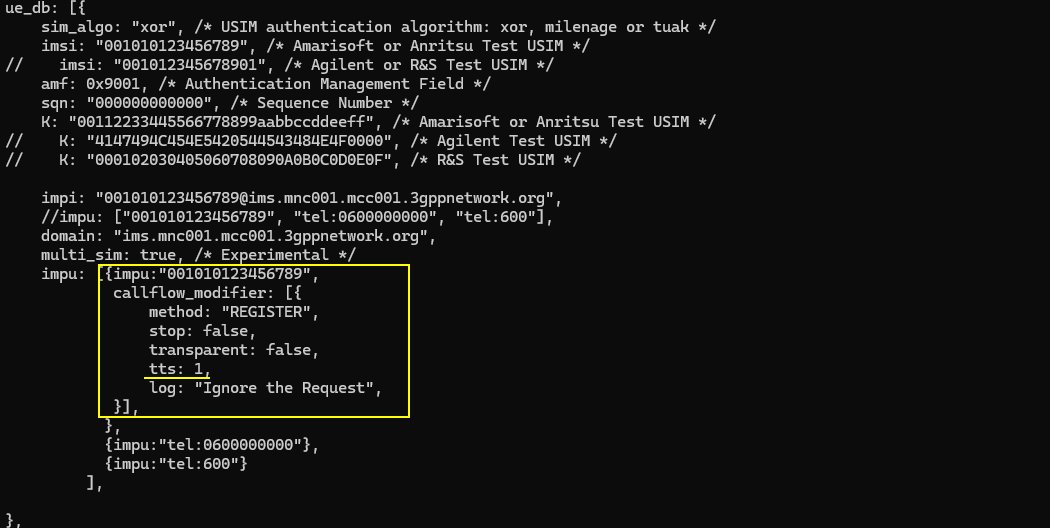
This log demonstrates a scenario where the network permanently blocks the user's registration attempts immediately following the initial handshake. The presence of the tts: 1 parameter initially pauses the blocking logic, allowing the first unauthenticated REGISTER message to proceed normally and trigger a standard 401 Unauthorized challenge from the IMS core. However, once the UE responds with the second, authenticated REGISTER message, the "Time To Start" condition is met, causing the modifier to activate and silently drop the request. Crucially, unlike previous test scenarios that included a ttl (Time To Live) to expire the rule, this configuration lacks such a limit; consequently, the blocking behavior remains permanently active for all subsequent transactions. This is confirmed by the log showing that when the UE eventually attempts a completely fresh registration (marked as "trigger #2"), it is once again intercepted and silently ignored, effectively locking the user out indefinitely.
Sub Test 5 : Block LTE Registration
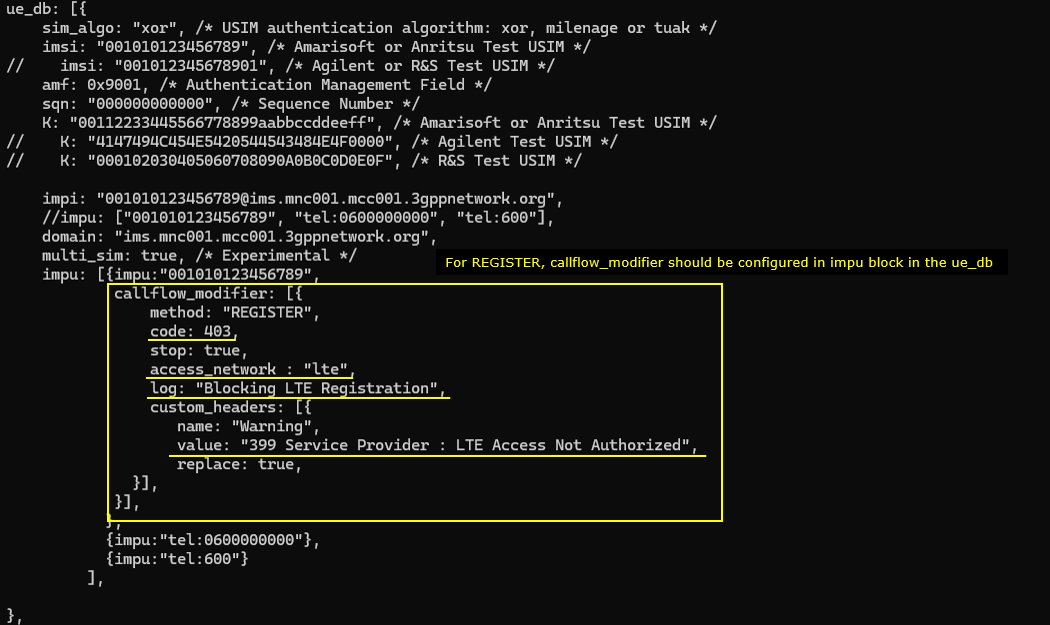
This test simulates an unauthorized access scenario to validate that the User Equipment correctly processes a permanent 403 Forbidden rejection for IMS registration over LTE and ceases further attempts or initiates the appropriate fallback mechanisms.
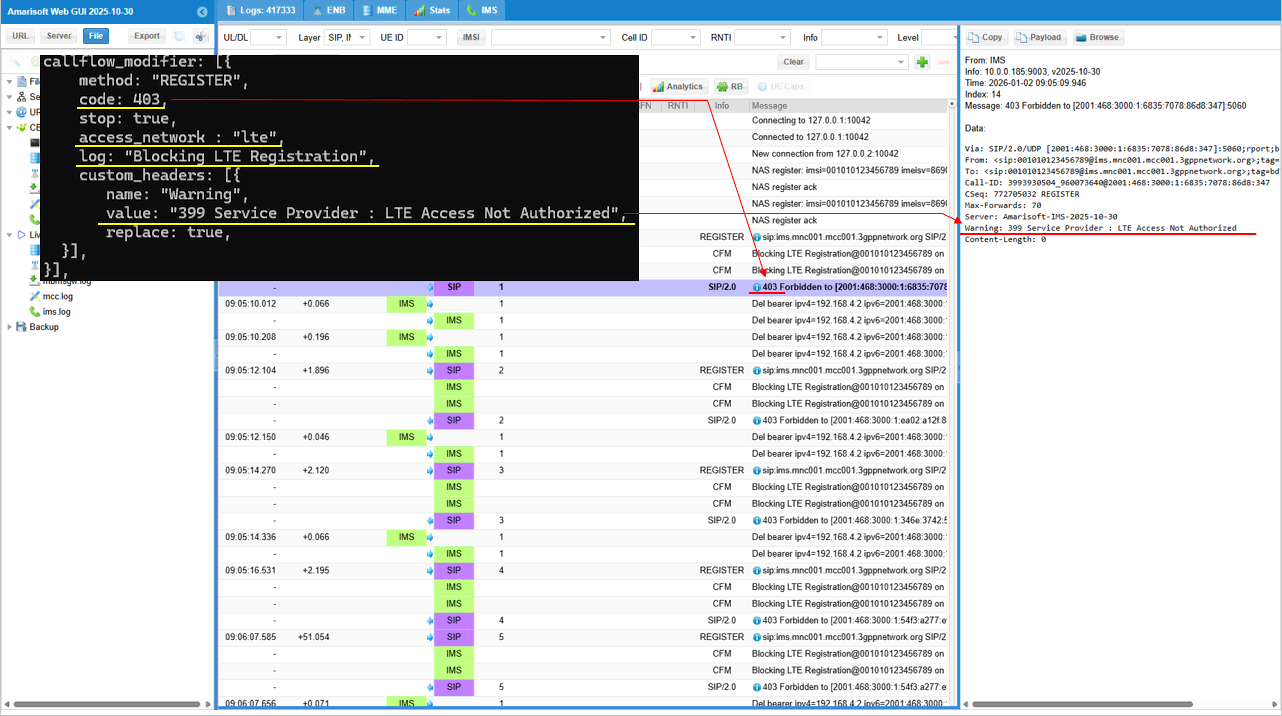
Inside the impu block, the highlighted callflow_modifier is configured to intercept SIP REGISTER requests originating from an lte access network and immediately block them by responding with a 403 Forbidden status code (code: 403) and halting further processing (stop: true). It also aids debugging and compliance testing by writing a specific log message ("Blocking LTE Registration") and injecting a custom SIP header (Warning: 399 Service Provider : LTE Access Not Authorized) to reflect the specific cause of the denial.
This shows the runtime validation of the callflow_modifier configuration, confirming that the network correctly identifies and blocks IMS REGISTER requests originating from the LTE access network (verified by the 3GPP-E-UTRAN-FDD value in the P-Access-Network-Info header). It demonstrates the specific trigger where the REGISTER message elicits the "Blocking LTE Registration" log and a 403 Forbidden response, resulting in a visible loop where the UE repeatedly tears down the IMS bearer (Del bearer) and re-attempts registration despite the permanent rejection.
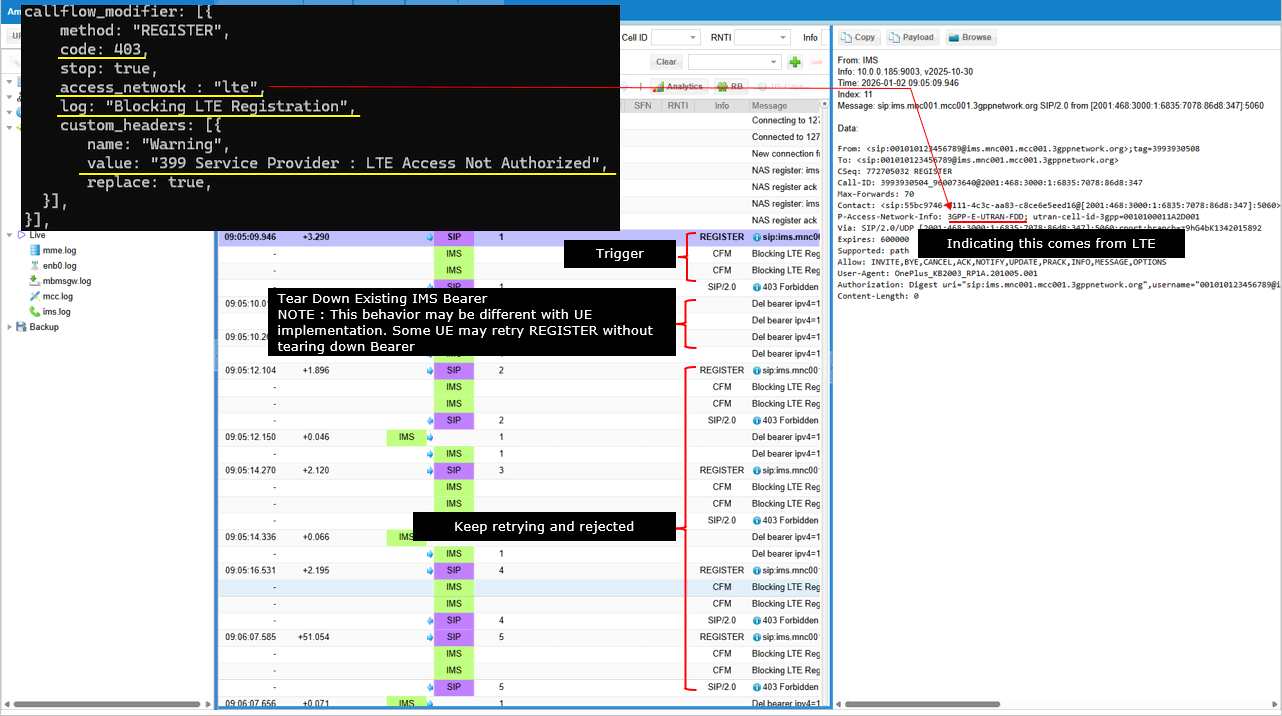
This confirms that SIP REGISTER requests originating from the LTE network (indicated by the 3GPP-E-UTRAN-FDD value in the P-Access-Network-Info header) are correctly identified and blocked. Upon triggering the rule, the system generates the custom "Blocking LTE Registration" log message
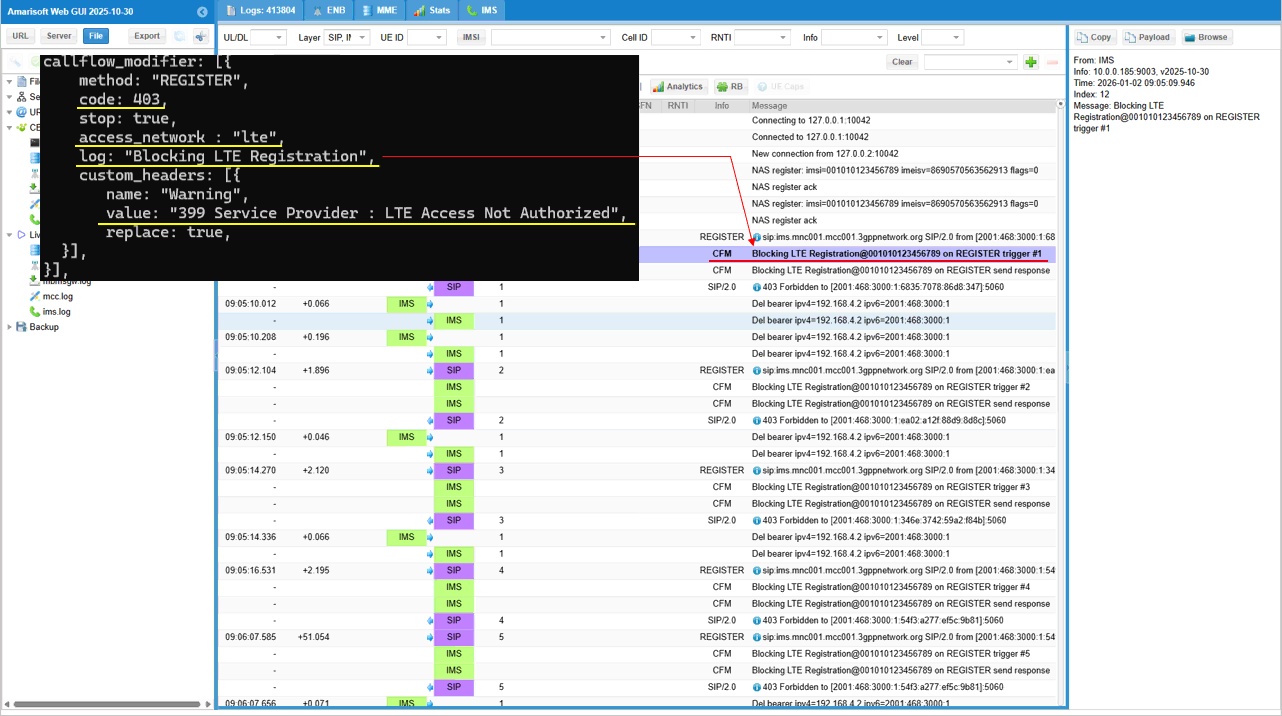
This details the validation of the SIP response content to ensure it matches the 3GPP test requirements. It confirms that the code: 403 and custom_headers settings were correctly applied, resulting in a 403 Forbidden SIP message that carries the specific Warning: 399 Service Provider : LTE Access Not Authorized header, which is critical for verifying that the UE can parse this custom text and potentially display the correct "Network Busy" or "Unauthorized" message on the device screen.
Sub Test 6 : Blacklisting
This test verifies the IMS network's capability to detect and blacklist a specific device based on its IMEI during the SIP REGISTER phase by rejecting the request with a 403 Forbidden status code and a custom warning header indicating the device is barred.
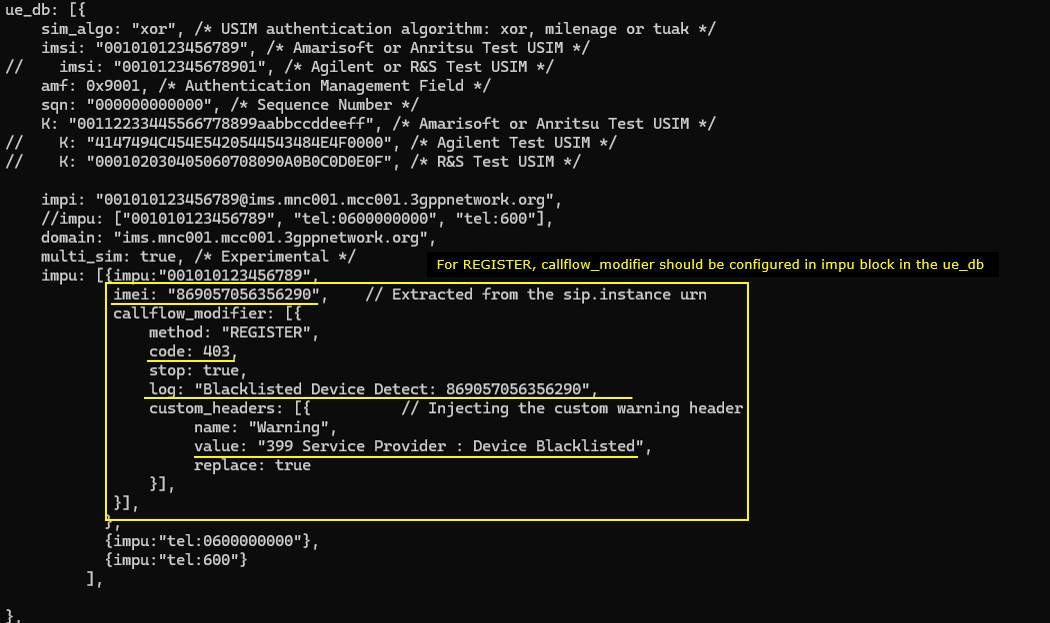
This configuration establishes a specific IMS registration policy for a UE identified by the IMEI "869057056356290" and it is designed to simulate a device blacklisting scenario. Using the callflow_modifier specifically configured within the impu block for this device, the system intercepts SIP REGISTER methods and forces a rejection with a SIP 403 Forbidden response (code: 403) while setting stop: true to cease further processing; it also ensures specific diagnostic feedback by logging the event as "Blacklisted Device Detect" and injecting a custom "Warning" header into the response with the value "399 Service Provider : Device Blacklisted".
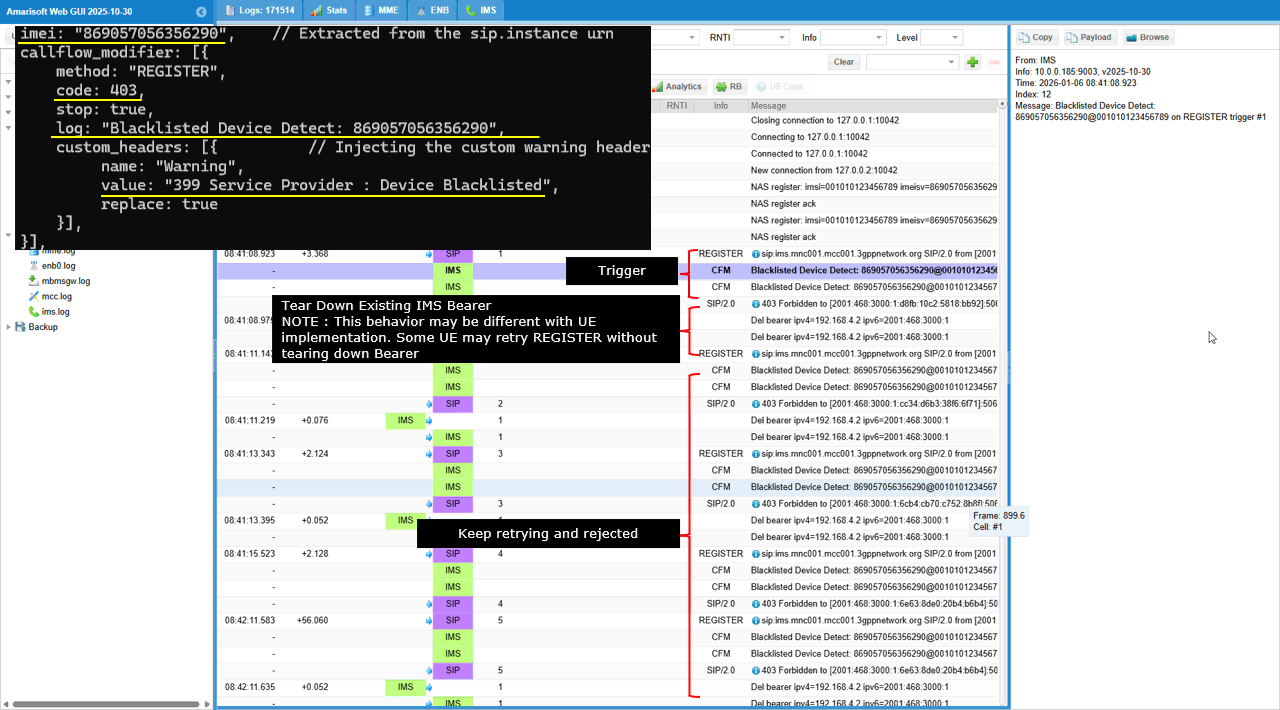
This log captures the enforcement of the device blacklist policy where the IMS network repeatedly intercepts SIP REGISTER requests from the UE (IMEI "869057056356290") and rejects them with a 403 Forbidden response. The highlighted sections show the network logging the "Blacklisted Device Detect" event upon each trigger, sending the rejection. Upon the reception of the rejection, UE subsequently tearing down the IMS bearer ("Del bearer...")
This demonstrates the hardware identification mechanism, showing how the IMS core parses the SIP REGISTER message to locate the device's unique identifier. This indicates the +sip.instance parameter in the Contact header - specifically the URN <urn:gsma:imei:86905705-635629-0> - directly to the configured imei in the callflow_modifier block, confirming that the blacklist logic is triggered by matching this specific extracted value.
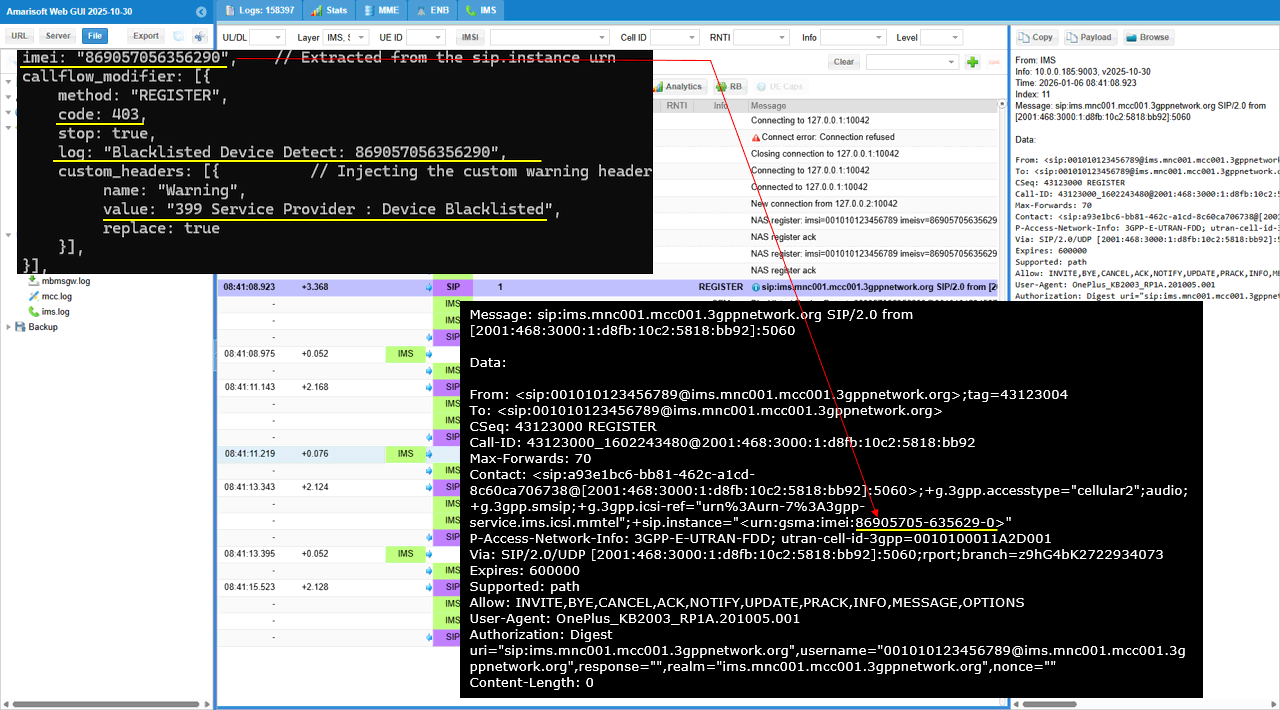
The log parameter in the configuration defines a custom text string—"Blacklisted Device Detect: 869057056356290" - that serves as a debug marker for this specific rule. In the real log, this exact string appears as a "CFM" (Control Flow Message) or system event entry immediately when the logic is triggered.
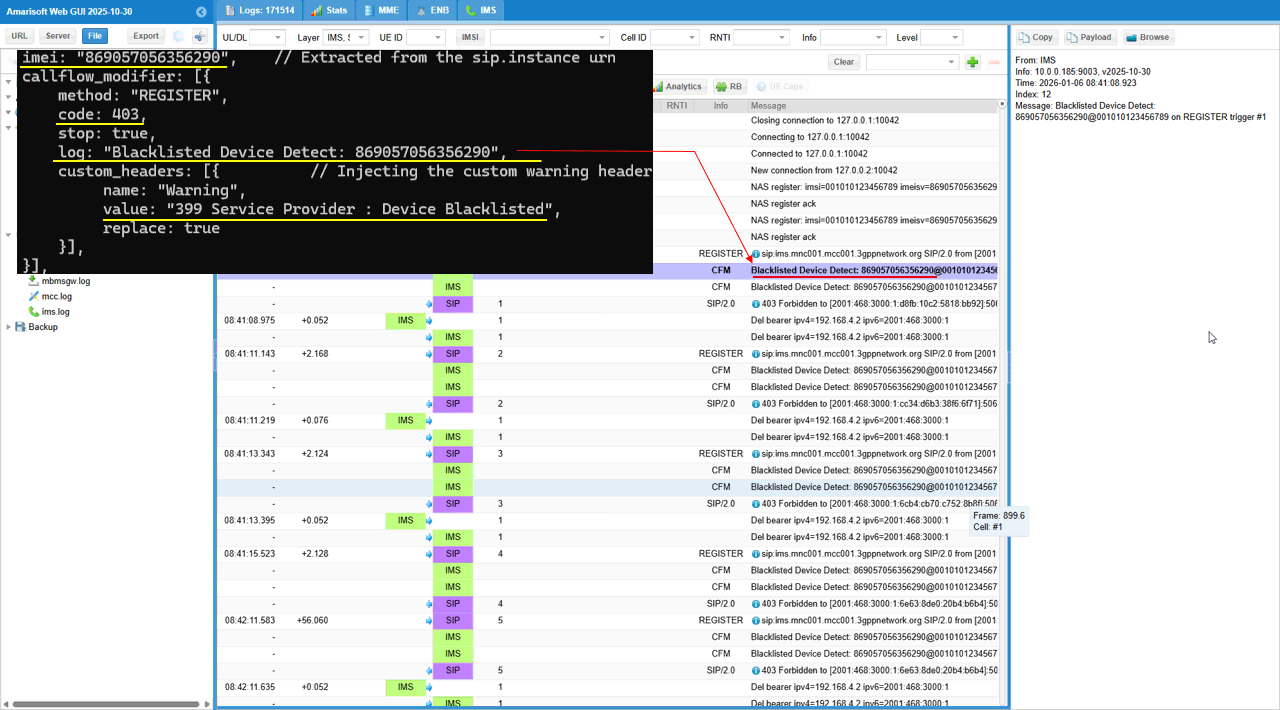
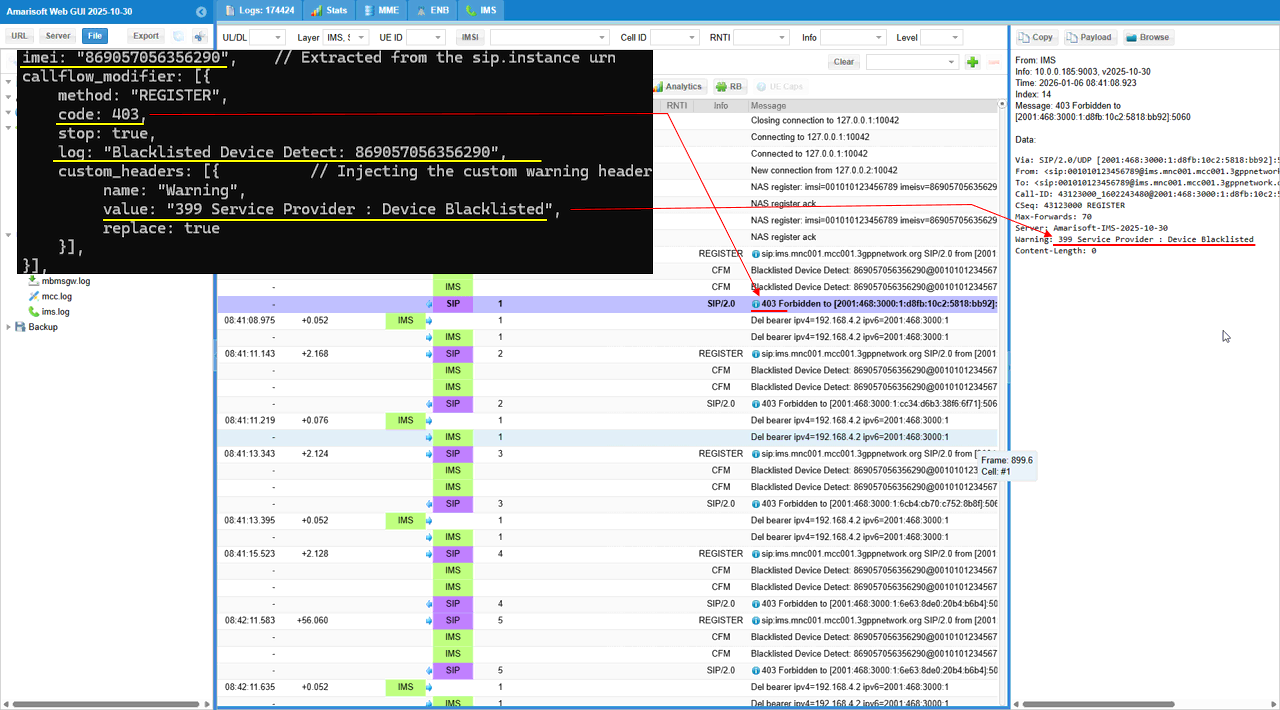
In this log capture, the log parameter specifically triggers a system event labeled "Blacklisted Device Detect: 869057056356290" that appears as a Control Flow Message (CFM) in the trace. Additionally, the custom_headers block is reflected in the SIP signaling, as the defined "Warning" header and its "Device Blacklisted" value are visible within the decoded SIP 403 Forbidden response message sent to the user equipment.
Sub Test 7 : Service Outage with UE backoff
This test simulates a temporary service outage scenario to verify that the User Equipment correctly handles a SIP 503 Service Unavailable rejection during IMS registration, typically by treating the failure as temporary and initiating a retry mechanism rather than interpreting it as a permanent denial.
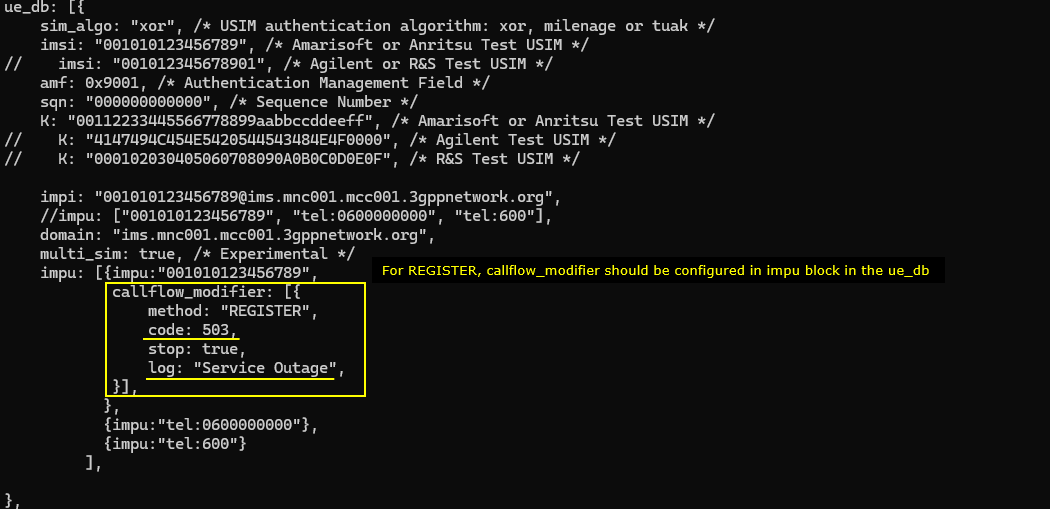
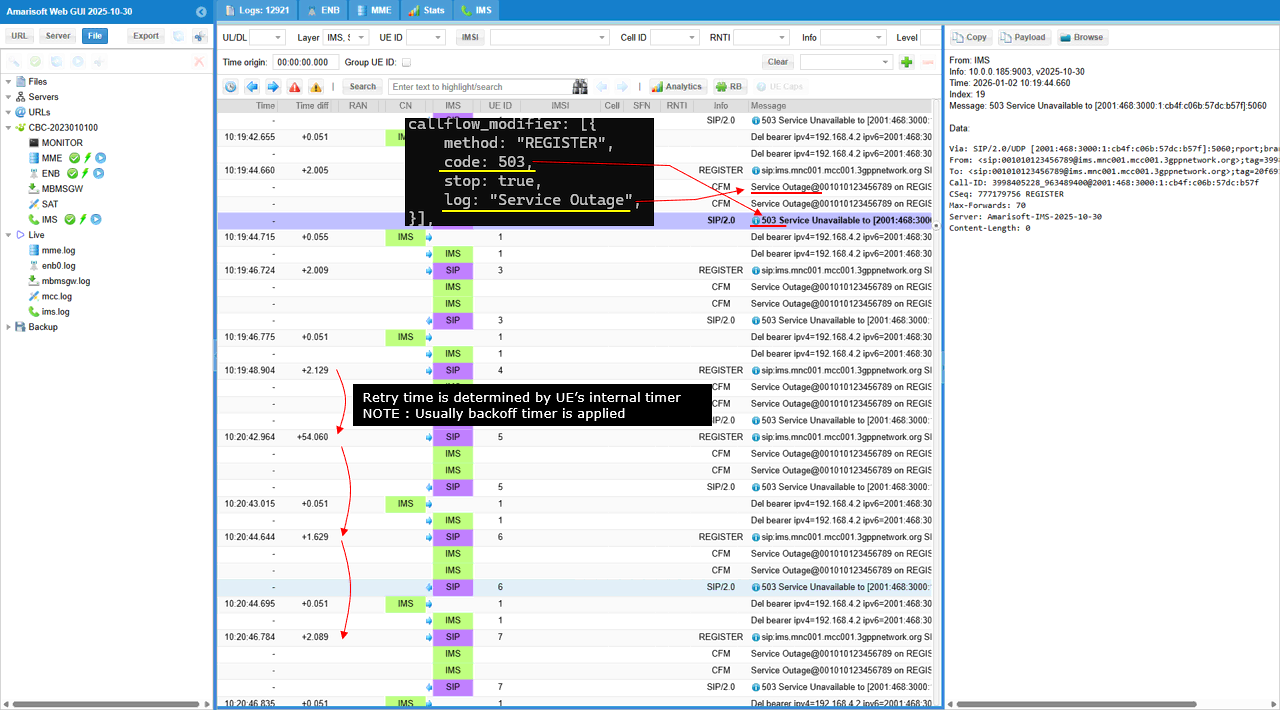
The callflow_modifier is set to intercept REGISTER requests and immediately respond with a SIP 503 Service Unavailable status code (code: 503). This setup, marked by the custom log entry "Service Outage", is typically used to verify how the User Equipment behaves when the network is temporarily overloaded or undergoing maintenance, which usually triggers a different retry mechanism (such as backing off for a duration) compared to a permanent 403 rejection.
This log illustrates the enforcement of a simulated service outage policy where the IMS network intercepts SIP REGISTER requests and rejects them with a temporary failure status. The flow shows the system triggering the custom "Service Outage" log event and sending a 503 Service Unavailable response. In this specific UE, it delete bearer and reestablish the bearer before retrying, but it seems this kind of bearer tear down seems to be UE specific. Some other UE does not tear down the bearer.
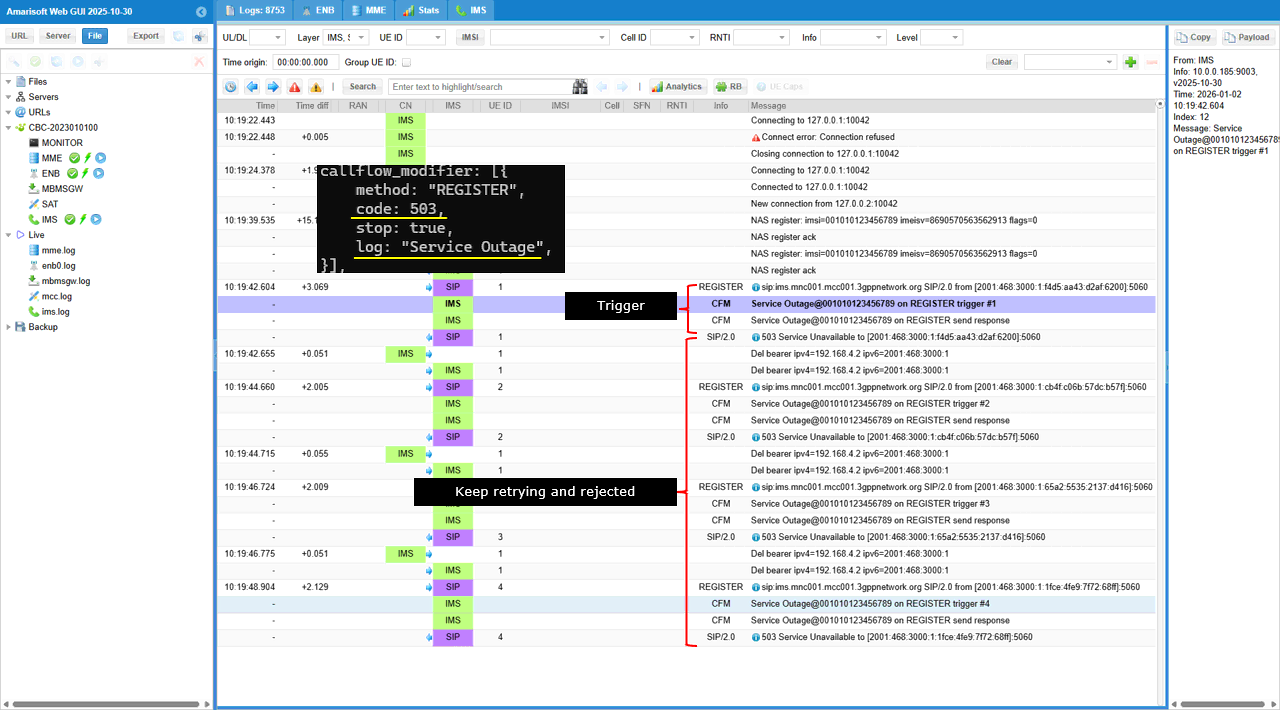
This log explicitly validates the configuration logic by linking the callflow_modifier parameters directly to the trace output: the log: "Service Outage" setting generates the specific "CFM" (Control Flow Message) event "Service Outage@..." immediately upon trigger detection, while the code: 503 parameter is directly responsible for the subsequent SIP/2.0 503 Service Unavailable response sent to the UE. The log timestamps reveal a distinct change in the User Equipment's behavior, where the retry interval dramatically increases from a rapid cadence to a significant pause of approximately 54 seconds between the fourth and fifth attempts (10:19:48 to 10:20:42). This behavior confirms that the UE is utilizing a backoff algorithm to progressively delay subsequent requests after receiving repeated 503 Service Unavailable rejections, effectively reducing signaling congestion during the simulated outage.
Sub Test 8 : Service Outage with Network Timer
This test verifies that the User Equipment adheres to network-provided flow control instructions by respecting the "Retry-After" header value (30 seconds) received in a 503 Service Unavailable response instead of using its default internal backoff timer.
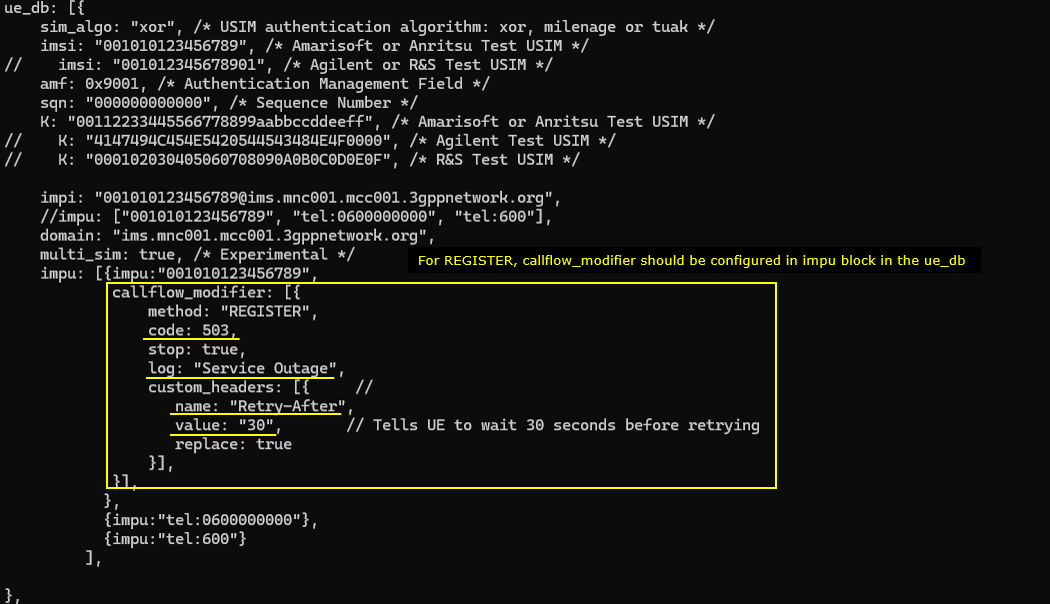
This configuration refines the service outage simulation for the subscriber "001010123456789". It rejects SIP REGISTER with status code 503 (code: 503). It also controls the retry behavior after the rejection. The configuration injects a custom_header named "Retry-After" with value "30". This overrides the UE’s internal backoff logic. As a result, the UE is instructed to wait exactly 30 seconds before the next REGISTER attempt. The log setting "Service Outage" makes this event clearly traceable in the system logs.
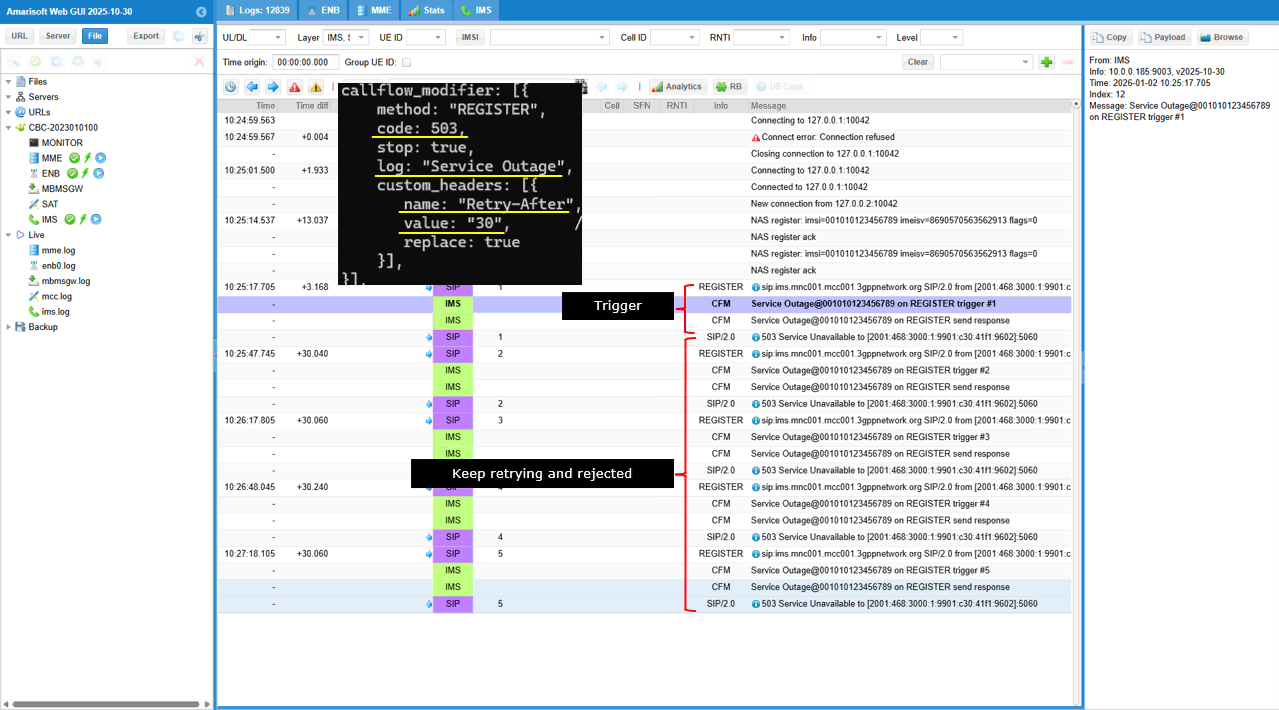
This log shows an IMS service outage test that is driven by a callflow_modifier for method "REGISTER". The modifier forces code 503 and stop: true, so every REGISTER is rejected immediately. It also inserts custom_headers with name "Retry-After" and value "30" with replace: true, so the wait instruction is always included. In the message list, each UE REGISTER is followed by a CFM entry like “Service Outage@001010123456789 on REGISTER trigger #1”, and the same pattern repeats with trigger #2, #3, and so on. After each trigger, the IMS sends “SIP/2.0 503 Service Unavailable” as the response. The UE keeps retrying, but every attempt is rejected again, so the log becomes a repeating cycle of REGISTER → trigger → 503 response
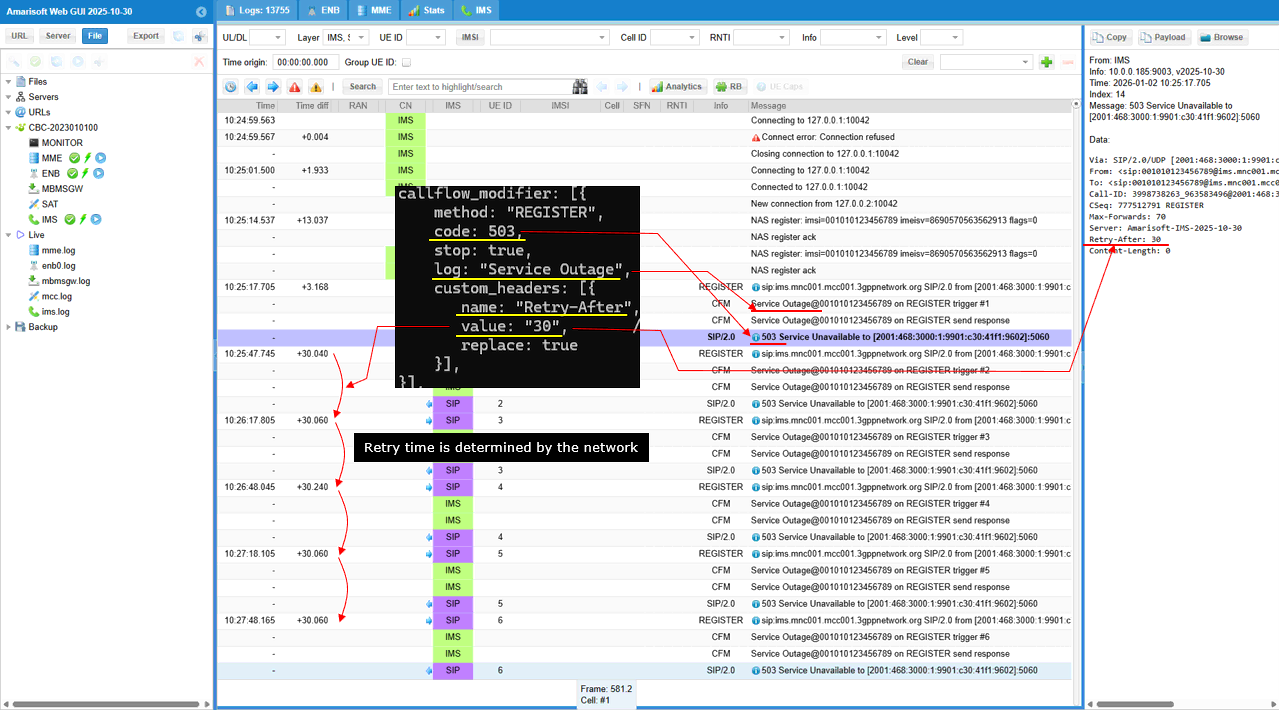
This log shows an IMS registration outage scenario controlled by a callflow_modifier. The modifier applies to SIP method "REGISTER" and forces a rejection with code 503 while stop is set to true. It also adds a custom header named "Retry-After" with value "30" and replace is true, so the header is always present in the response. In the message list, each UE REGISTER is followed by a SIP/2.0 "503 Service Unavailable" response. In the message details pane, the response explicitly includes "Retry-After: 30" along with "Server: Amarisoft-IMS". The "Time diff" column shows near-constant gaps around 30 seconds (+30.040, +30.060, +30.240) between successive REGISTER attempts. This indicates the UE follows the network-provided retry timer instead of using its own exponential backoff, and the event is tracked with the "Service Outage" log tag and trigger counters.
Sub Test 9 : 504 HSS Timeout
The purpose of this test is to simulate an HSS/database outage during IMS registration for a specific subscriber and verify how the UE and the IMS core behave when REGISTER is consistently rejected. By forcing a 504 response and adding a clear Warning header, you can confirm the UE’s retry behavior, error handling, and any fallback logic
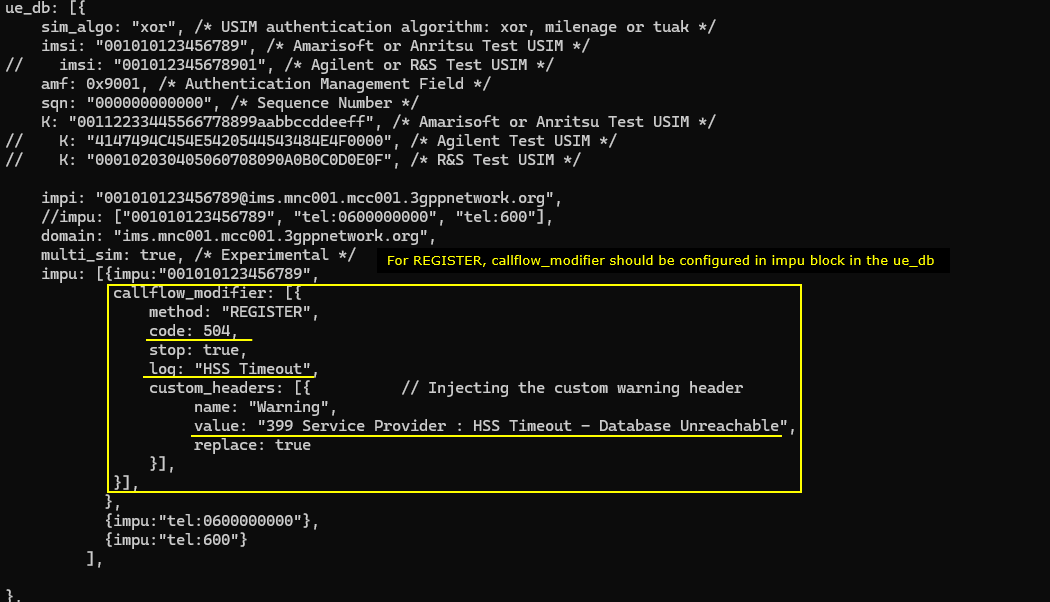
In the configuration, the modifier forces the network side to respond with code: 504 and stop: true. This makes every REGISTER attempt fail immediately, so the UE cannot progress to a normal registration state. The log tag is set to "HSS Timeout", so the failure cause is easy to filter and trace in the Amarisoft logs. A custom SIP header is also injected using custom_headers. The header name is "Warning", and the value is "399 Service Provider : HSS Timeout - Database Unreachable". The replace: true setting ensures this Warning header is always present and overwrites any existing one, so the message clearly communicates the intended failure reason.
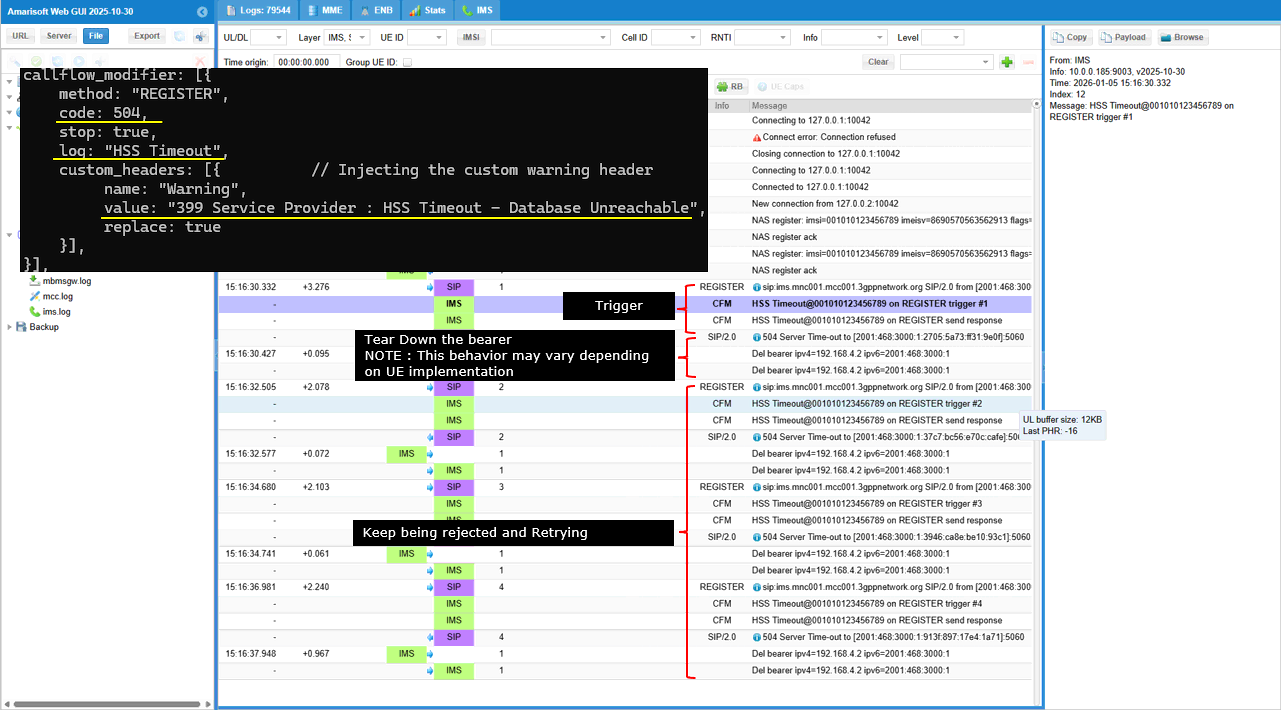
This log shows an IMS REGISTER failure simulation that emulates an HSS timeout condition. The callflow_modifier is applied to method "REGISTER" and forces code 504 with stop: true, so the core immediately rejects every registration attempt. The log tag is "HSS Timeout", so each failure is recorded as a CFM event like “HSS Timeout@001010123456789 on REGISTER trigger #n”. The SIP response line confirms the network sends “SIP/2.0 504 Server Time-out”, and the Warning header is injected with the value “399 Service Provider : HSS Timeout - Database Unreachable” to make the root cause explicit. After the first rejection, the trace shows bearer release entries such as “Del bearer ipv4=…”, meaning the UE tears down the IMS bearer as part of its failure handling. The UE then retries REGISTER again, but it keeps being rejected with the same trigger → 504 pattern, so the log becomes a repeating cycle of retry attempts and forced timeout responses.
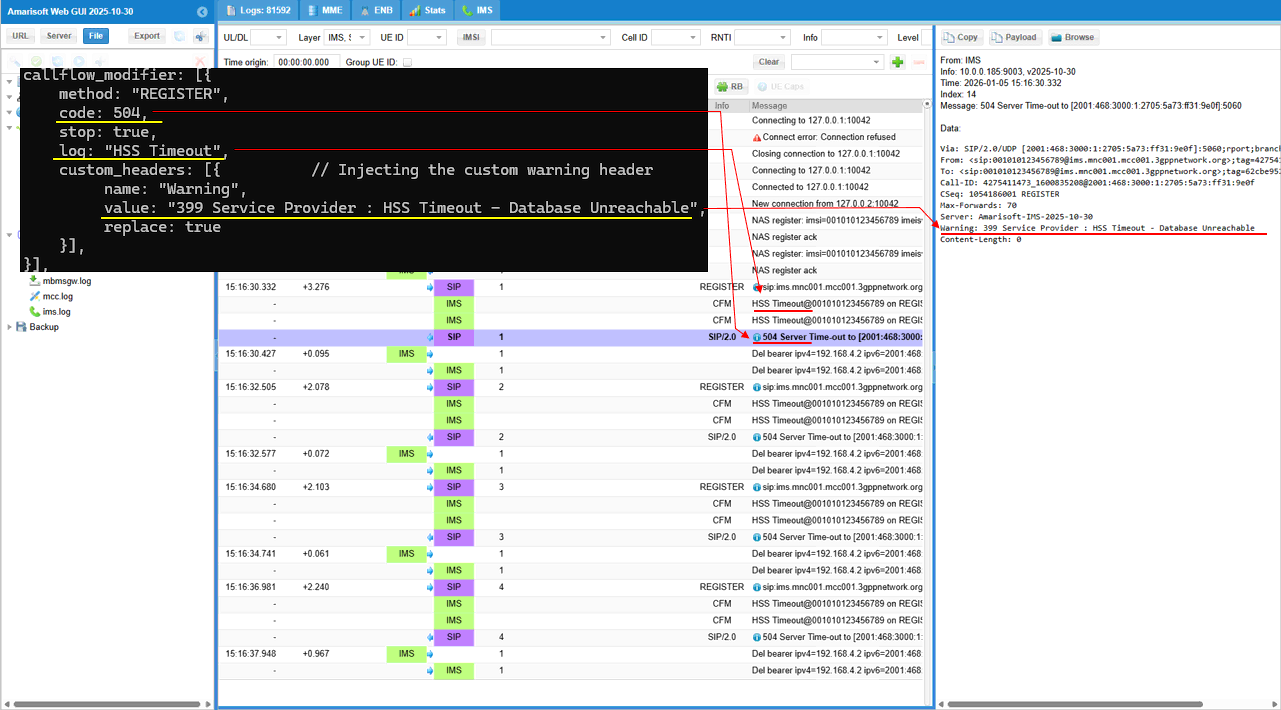
This log shows the detailed mapping between the configuration and the log print. The log tag "HSS Timeout" is generated as a CFM entry on each attempt, and the corresponding SIP response line appears as “504 Server Time-out”. In the SIP payload details, the response headers include “Server: Amarisoft-IMS” and the injected warning information. The line “Warning: 399 Service Provider : HSS Timeout - Database Unreachable” is present, which confirms that the custom header injection is working and that the failure reason is explicitly communicated to the UE
Sub Test 10 : 404 User Unknown
The purpose of this test is to emulate a subscriber provisioning failure during IMS registration and verify the UE’s behavior when the network reports “user not found” instead of a temporary outage
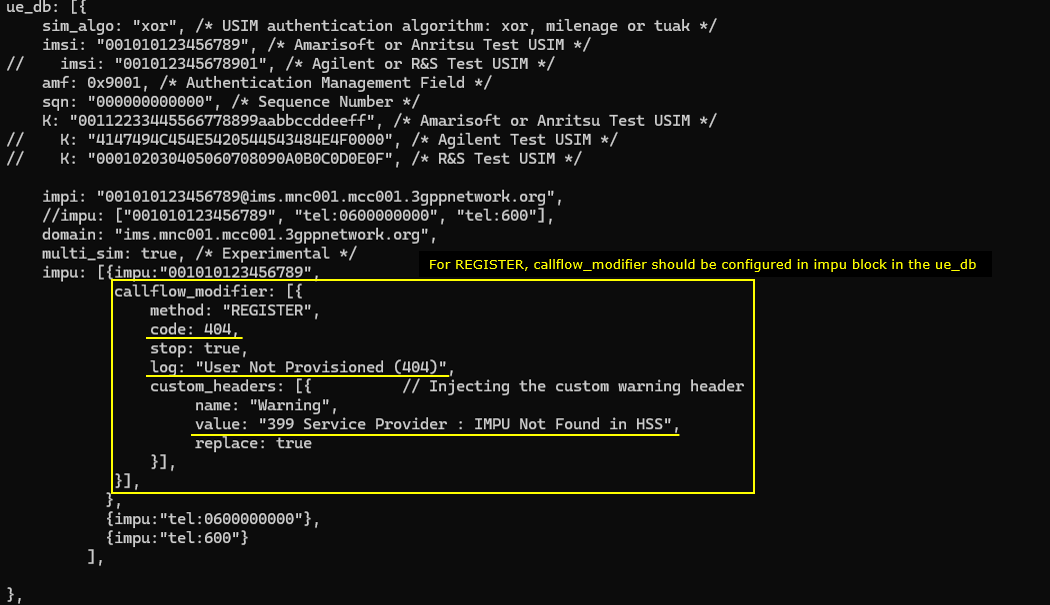
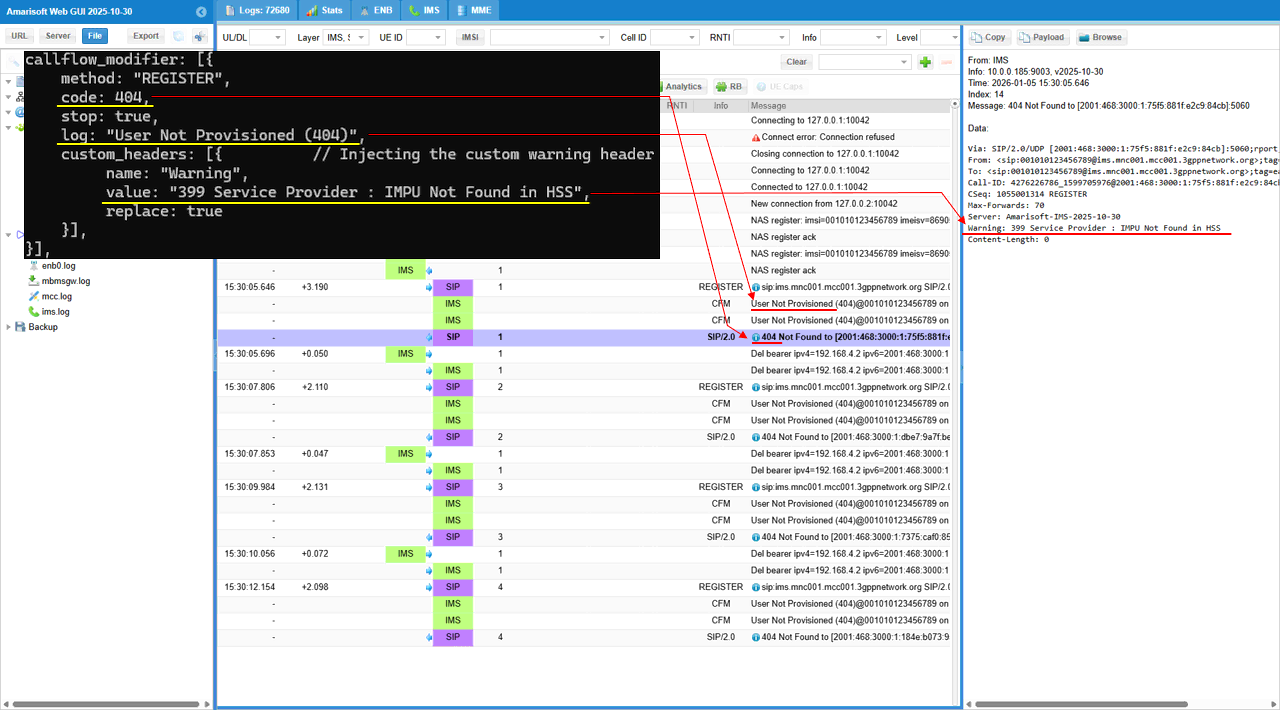
This configuration simulates an “IMS user not provisioned” case for the subscriber by forcing IMS REGISTER to fail at the SIP layer. The modifier sets method to "REGISTER" and returns code 404 with stop: true, so the registration procedure is terminated immediately and never reaches a successful state. The log label is set to "User Not Provisioned (404)", so each failed attempt is clearly tagged in the system logs. A custom Warning header is injected with name "Warning" and value "399 Service Provider : IMPU Not Found in HSS", and replace: true ensures this message is always present in the SIP response. As a result, the UE receives a deterministic failure that looks like an HSS provisioning problem rather than a transient timeout, and you can verify UE handling and network logging for an unprovisioned subscriber scenario.
This log shows an IMS registration failure that is intentionally forced to look like a provisioning error. The callflow_modifier applies to method "REGISTER" and returns code 404 with stop: true, so each REGISTER attempt is rejected immediately. In the message list, every REGISTER triggers a CFM entry labeled “User Not Provisioned (404)@001010123456789 on REGISTER trigger #n”, and then the IMS sends the SIP response “SIP/2.0 404 Not Found”. After the rejection, this specific UE tears down the IMS bearer as part of its error handling. The UE then retries REGISTER again and the same trigger → 404 response pattern repeats, so the log becomes a cycle of retry attempts followed by consistent “User Not Provisioned” failures.
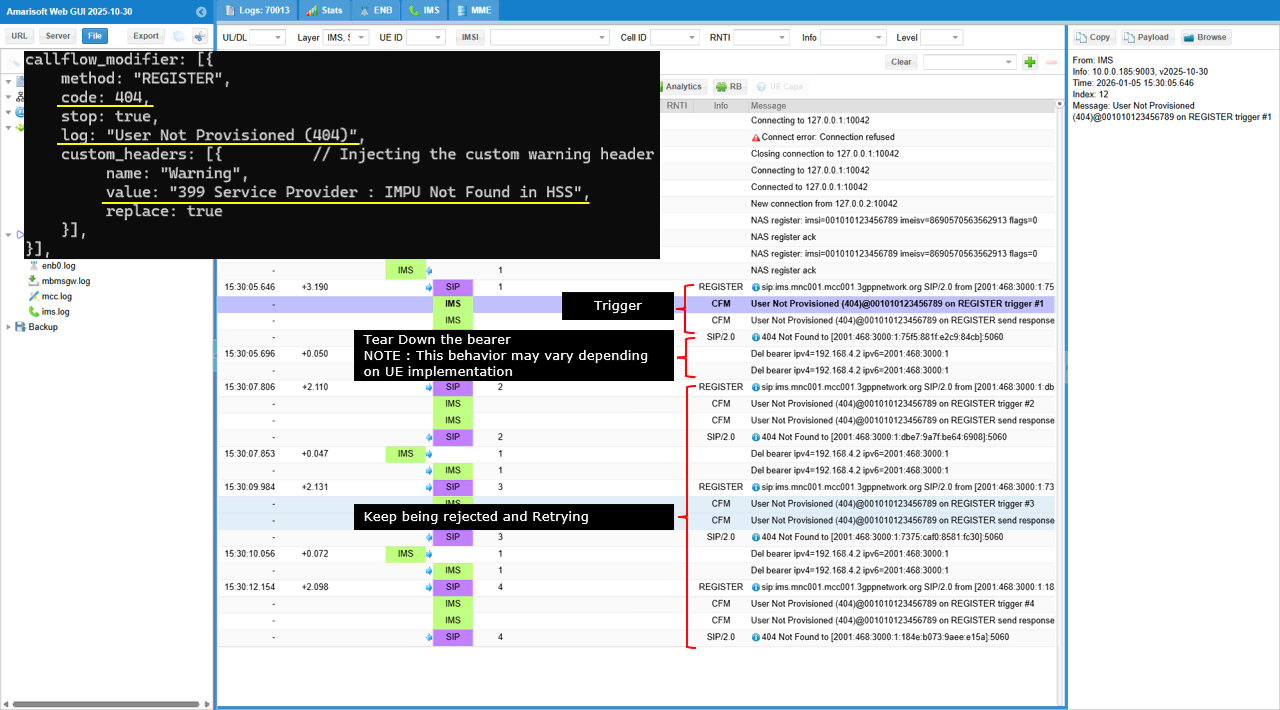
This shows a one-to-one mapping between what you configured in callflow_modifier and what appears in the log and SIP payload. The configuration sets method: "REGISTER", so the affected message in the trace is the IMS REGISTER line. The configuration sets code: 404 with stop: true, so the response in the message list becomes SIP/2.0 404 Not Found and the REGISTER flow ends immediately after the trigger. The configuration sets log: "User Not Provisioned (404)", so the CFM lines are printed as User Not Provisioned (404)@001010123456789 on REGISTER trigger #n, which is the explicit log tag you defined plus the trigger counter. The configuration injects custom_headers with name: "Warning" and value: "399 Service Provider : IMPU Not Found in HSS", so the SIP details pane shows the exact header line Warning: 399 Service Provider : IMPU Not Found in HSS. The replace: true setting explains why that Warning line is always present and consistent across attempts.
Sub Test 11 : 302 Redirect
The purpose of this test is to verify that the UE correctly follows a network-driven redirect during REGISTER and attempts registration again toward the backup IMS address
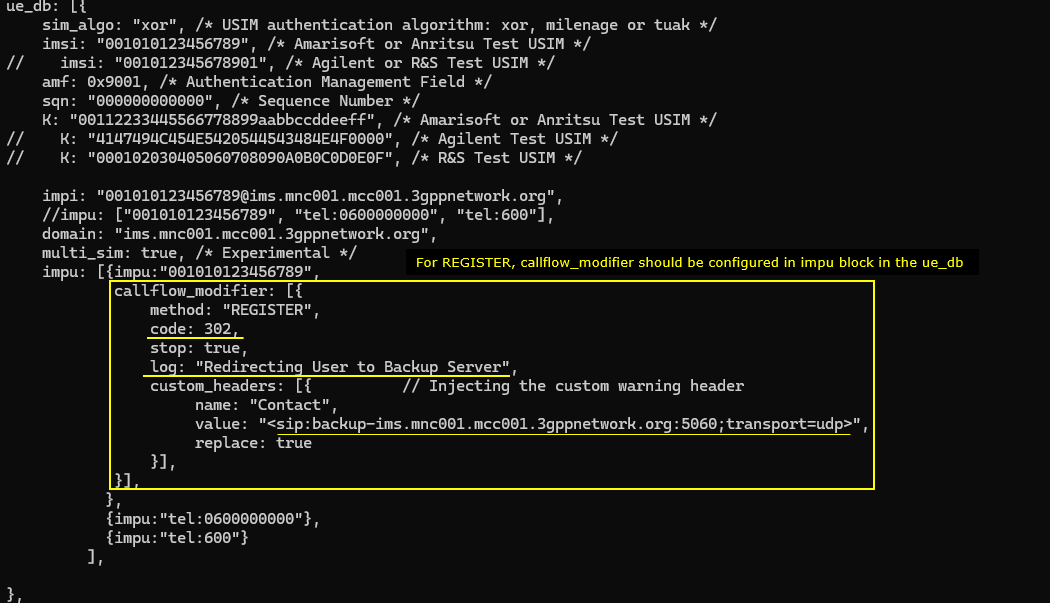
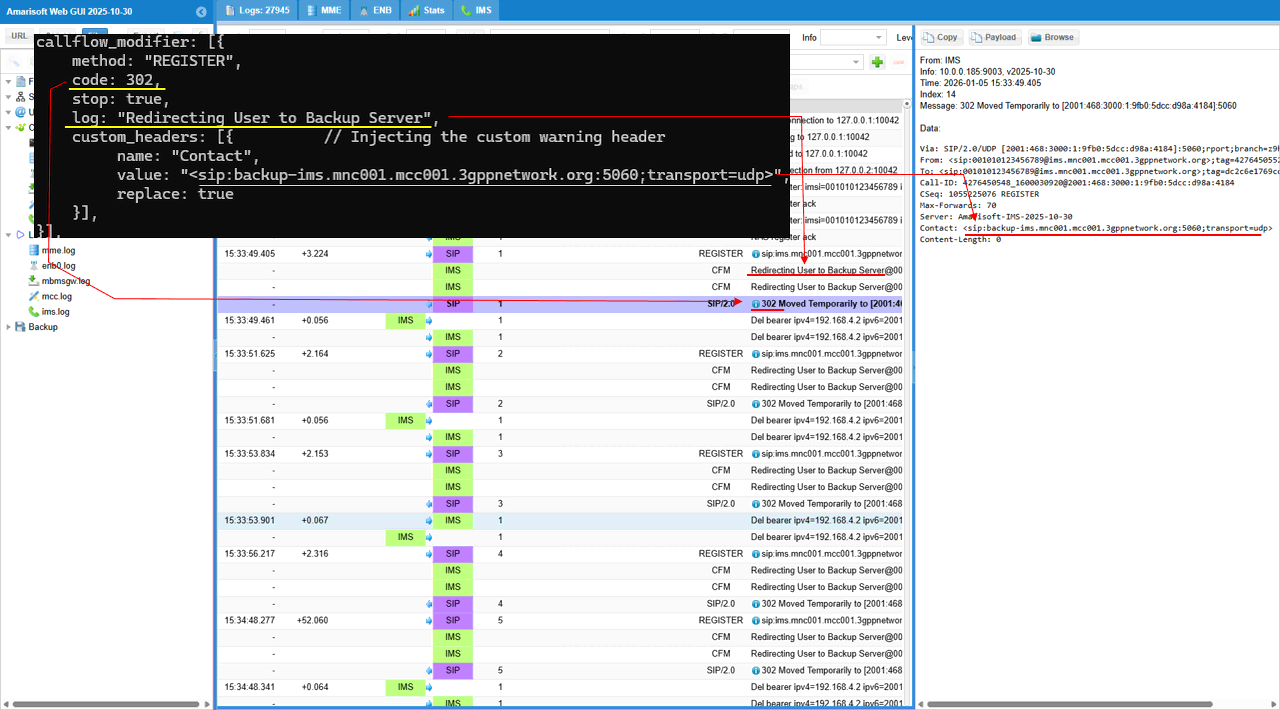
This configuration simulates an IMS registration redirection scenario for a specific IMPU. It applies a callflow_modifier to the SIP REGISTER method and forces a 302 response with stop: true, so the initial registration attempt is not processed any further on the current server. The log text is set to "Redirecting User to Backup Server", so each redirect event is clearly printed with a dedicated tag in the trace. It also injects a Contact header that points to <sip:backup-ims.mnc001.mcc001.3gppnetwork.org:5060;transport=udp>, and replace: true ensures the UE always receives this exact target.
This log shows an IMS REGISTER redirection that is forced by the callflow_modifier. The configuration sets method "REGISTER" and returns code 302 with stop: true, so the IMS server does not proceed with normal registration processing. When the UE sends REGISTER, the trace prints a CFM entry with the tag "Redirecting User to Backup Server@001010123456789 on REGISTER trigger #1". The IMS then sends a SIP/2.0 "302 Moved Temporarily" response as shown in the message list. The Contact header is injected by the configuration, so the redirection target is explicitly provided to the UE as the backup IMS URI. After the redirect, the trace shows bearer release lines such as “Del bearer …”, meaning the UE tears down the IMS bearer before trying again. The UE continues to retry, and each new REGISTER attempt repeats the same trigger → 302 response pattern with increasing trigger counters, so you can clearly see the redirection behavior is deterministic and driven by the configured Contact header.
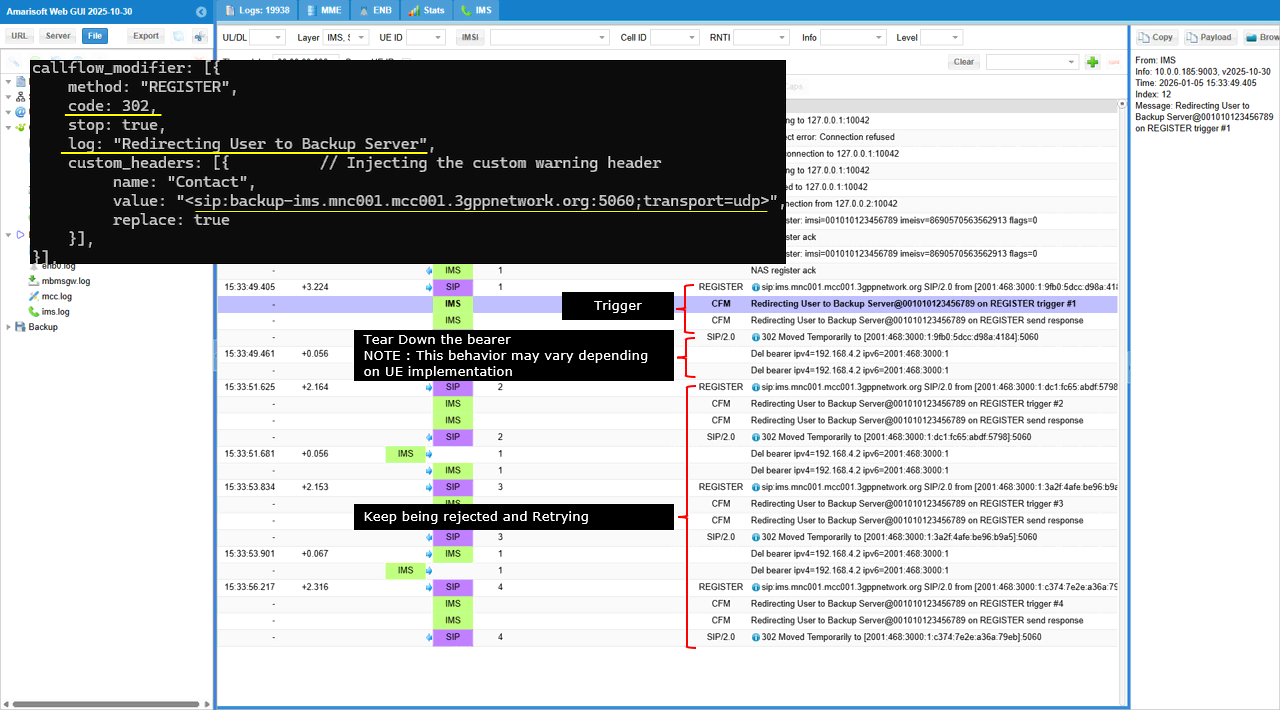
This shows the direct mapping from the callflow_modifier configuration to the printed log line and the SIP 302 payload. The configuration sets code: 302 with stop: true, so the response that appears in the message list is SIP/2.0 302 Moved Temporarily, and the server does not continue normal registration handling after sending it. The configuration sets log: "Redirecting User to Backup Server", so the CFM log entry is printed with that exact text, including the subscriber identity and the trigger counter, like Redirecting User to Backup Server@001010123456789 on REGISTER trigger #1. The configuration injects custom_headers with name: "Contact" and the backup URI value, and replace: true, so the SIP details pane shows the header line Contact: <sip:backup-ims.mnc001.mcc001.3gppnetwork.org:5060;transport=udp> exactly as configured.
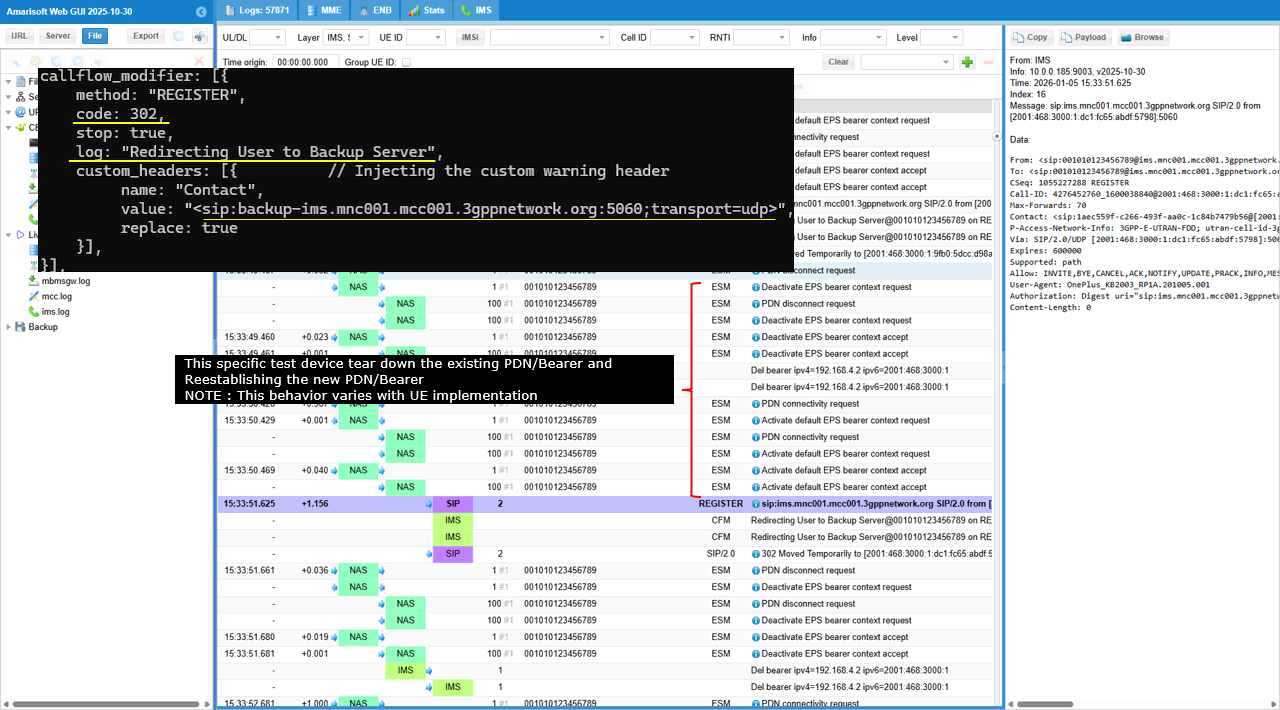
The behavior shown below varies depending on UE implementation. Some UEs treat a REGISTER redirect as an IMS access point change. They assume the current IMS connection is no longer valid, so they tear down the IMS PDN / default bearer and then re-establish it before trying REGISTER again. In logs, this shows up as PDN disconnect + Deactivate EPS bearer + new PDN connectivity + Activate default bearer, and then the next REGISTER. Other UEs treat the redirect as signaling-layer only. They keep the same bearer and IP address, and they only reset the transport. If they are using TCP, they may close the TCP connection (or it gets closed after the 302), then reconnect TCP and send a new REGISTER toward the Contact target. In logs, you mainly see TCP disconnect/reconnect and repeated REGISTER, without PDN/bearer teardown. The common point is the same. The network sends 302 with a Contact URI. The UE must choose how “deep” it resets its IMS path. Some reset PDN/bearer. Some reset only the transport session.
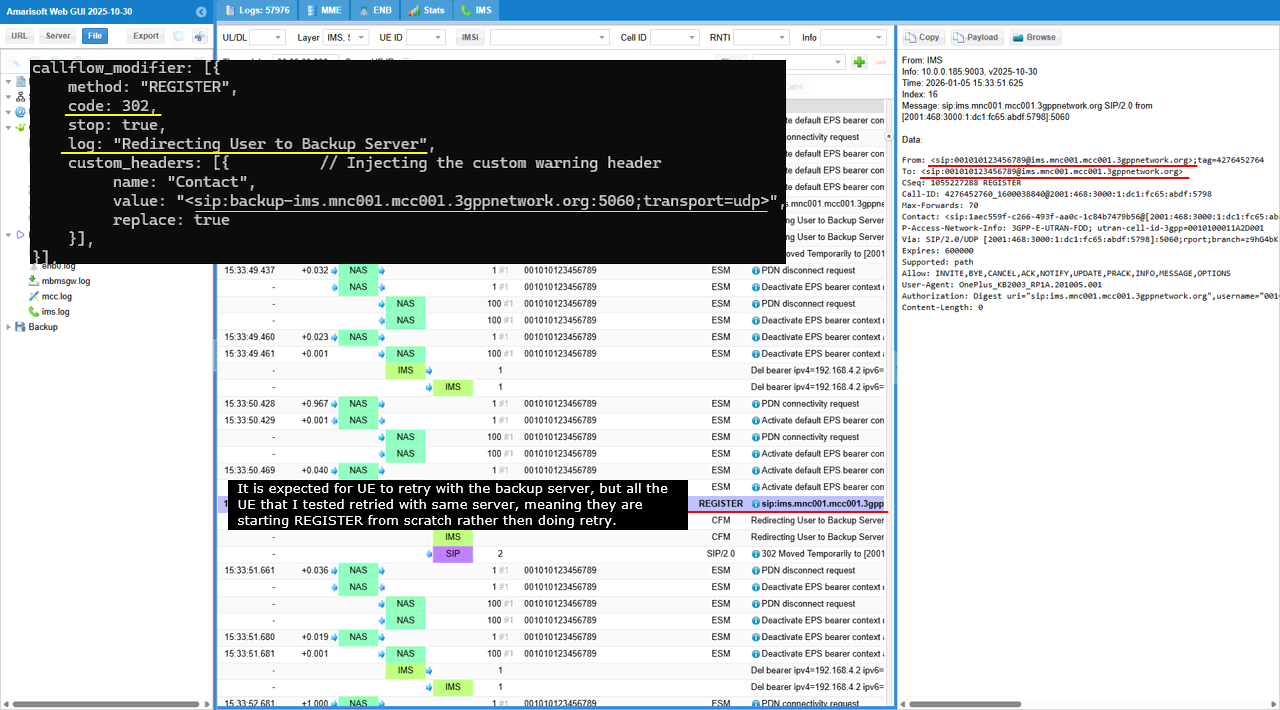
In this log, the configuration injects a 302 and a Contact header that points to sip:backup-ims.mnc001.mcc001.3gppnetwork.org:5060;transport=udp. So the expected UE behavior is: receive 302, then send the next REGISTER toward the backup URI in Contact.
NOTE : For the two UEs that I tried, none of them acted as expected. In the REGISTER line shown in the trace, the Request-URI is still sip:ims.mnc001.mcc001.3gppnetwork.org, and the SIP “To” header also remains on the same home domain. That means this UE is not applying the redirect destination as the next-hop server. Instead, it is effectively restarting registration against the original IMS entry point. In some implementations, the UE may still tear down and rebuild the IMS PDN, but it does not change the SIP proxy target. So it looks like “start over” rather than “retry to backup”.
Sub Test 12 : 401 Wrong Password
This test is used to verify UE behavior and network logging when the user enters a wrong IMS password and authentication fails after the UE retries with credentials.
This configuration simulates an IMS authentication failure during REGISTER for a specific IMPU. The callflow_modifier applies to method "REGISTER" and forces a 401 response with stop: true, so the registration cannot complete. The tts: 1 setting skips the first generic REGISTER and targets the next REGISTER that includes credentials, so the failure is injected at the “password check” stage rather than at the initial challenge stage. The log tag is set to "Wrong Password", so each injected failure is clearly labeled in the trace. A Warning header is added with value "399 Service Provider : Authentication Failed - Bad Credentials", and replace: true ensures that message is always present in the SIP response.
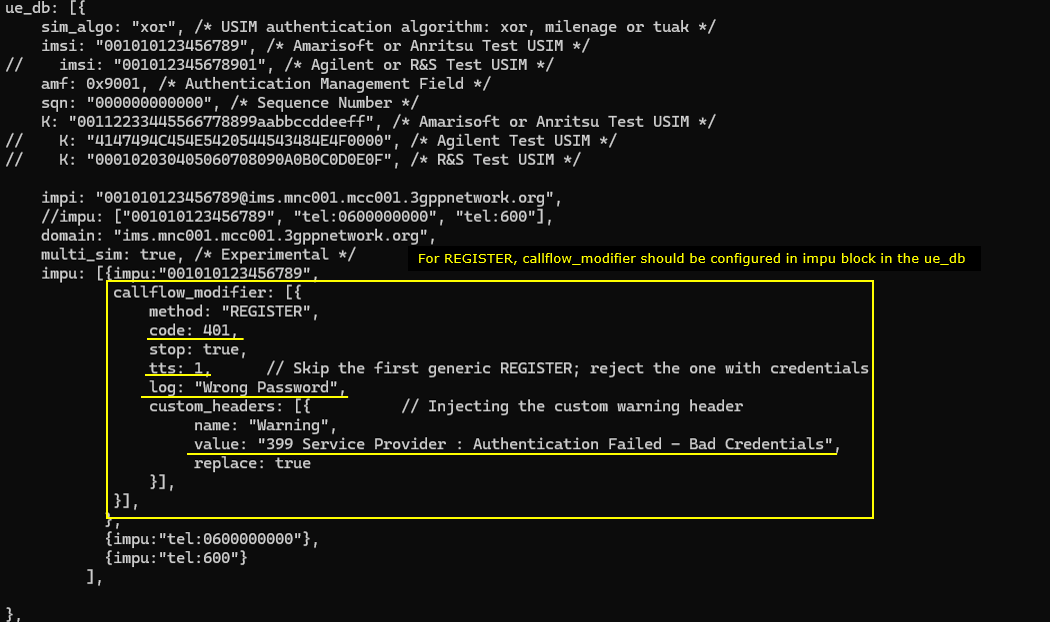
This log shows a forced IMS authentication failure that is applied starting from the second REGISTER because tts is set to 1. The first REGISTER is treated as the generic attempt, so it is not blocked by the modifier. The next REGISTER is the one that carries credentials after the normal 401 challenge flow, and that is where the trigger starts. In the message list you can see the CFM log line printed as Wrong Password@001010123456789 on REGISTER trigger #1, followed by the SIP response SIP/2.0 401 Unauthorized. The same pattern repeats again later as trigger #2, which confirms the modifier is consistently rejecting the credentialed REGISTER attempts.
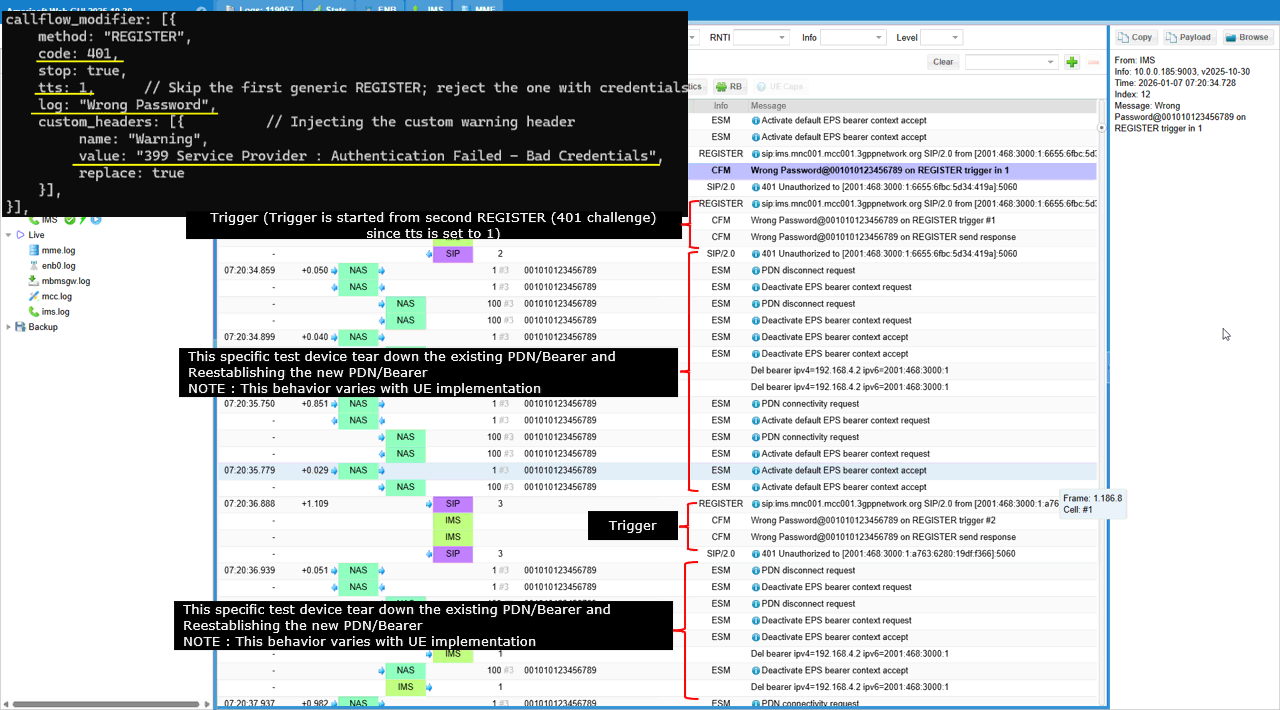
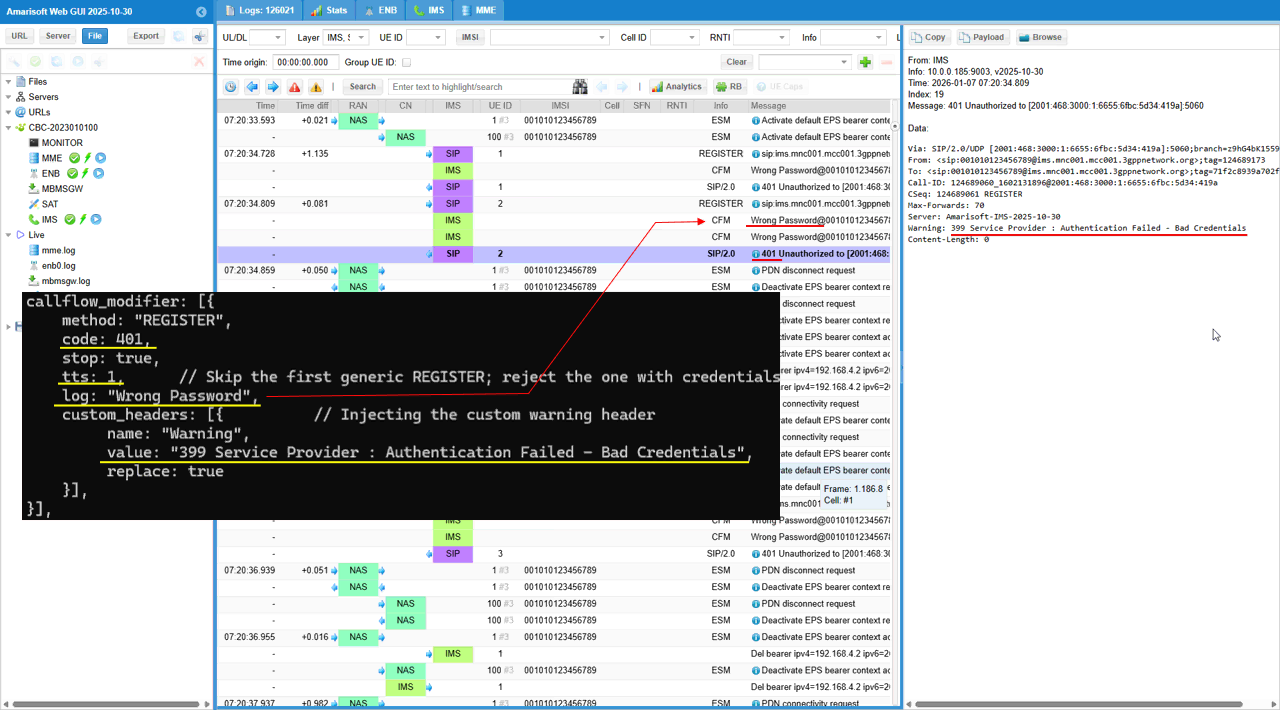
This shows the exact mapping between the “Wrong Password” configuration and the 401 log/payload output. The callflow_modifier is configured for method "REGISTER" with code: 401 and stop: true, so the REGISTER attempt is terminated with a 401 Unauthorized response. The tts: 1 setting shifts the injection point so the first generic REGISTER is skipped and the rejection is applied to the following REGISTER that includes credentials. The log: "Wrong Password" line is reflected in the message list as CFM entries like Wrong Password@001010123456789 on REGISTER trigger #n, which makes the failure easy to identify. The custom header injection is also visible in the SIP details pane. The response includes Warning: 399 Service Provider : Authentication Failed - Bad Credentials, which matches the configured Warning header value. This confirms that the failure code, the trigger labeling, and the SIP warning text are all directly driven by the callflow_modifier settings.
Sub Test 13 : 400 Bad Request
The purpose of this test is to verify how the UE reacts when the network reports a hard protocol error on REGISTER, and to confirm that the core-side logging and SIP payload clearly indicate a malformed or non-compliant request scenario.
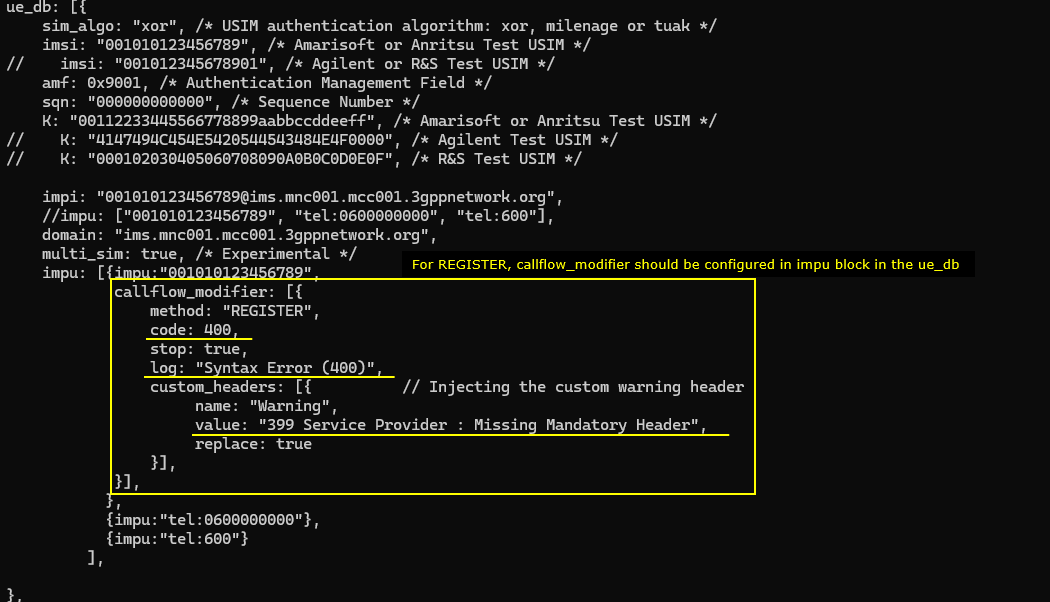
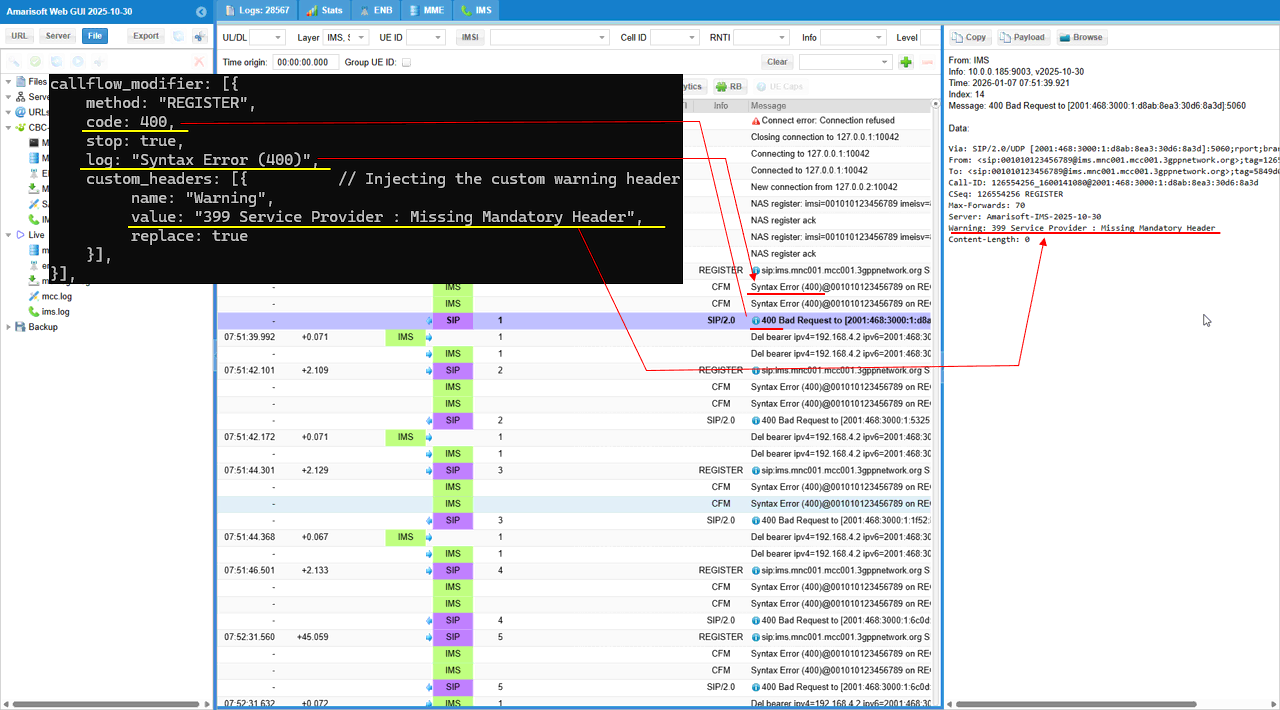
This configuration simulates a SIP protocol formatting failure during IMS registration. The callflow_modifier applies to method "REGISTER" and forces a 400 response with stop: true, so the IMS server rejects the request as a syntax or request-format error. The log tag is set to "Syntax Error (400)", so each injected failure is printed with a clear label in the trace. A Warning header is injected with value "399 Service Provider : Missing Mandatory Header", and replace: true ensures the same diagnostic text is always included in the SIP response
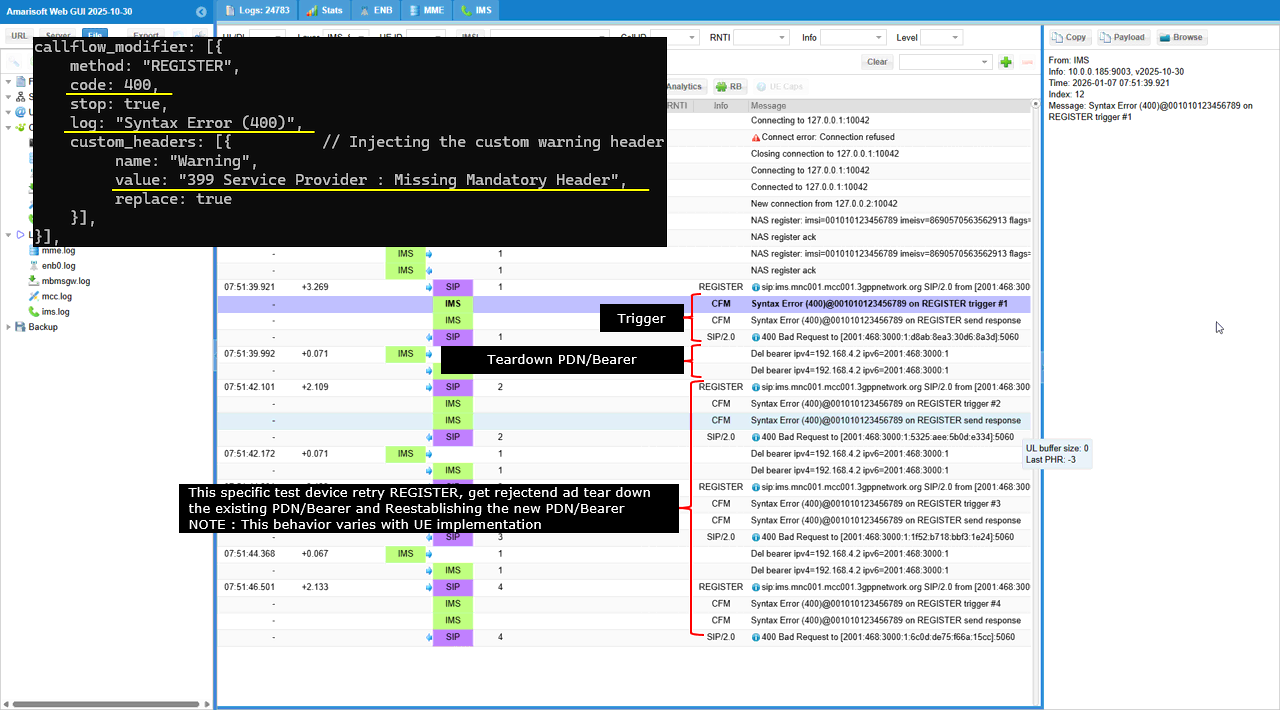
This log shows a forced SIP 400 failure on IMS REGISTER that is driven by the callflow_modifier. The configuration sets method "REGISTER" and returns code 400 with stop: true, so each REGISTER attempt is rejected immediately. In the message list, the trigger is printed as Syntax Error (400)@001010123456789 on REGISTER trigger #1, and the IMS sends SIP/2.0 400 Bad Request as the response. The same pattern repeats for trigger #2, #3, and #4, which confirms the injection is applied consistently on every attempt.
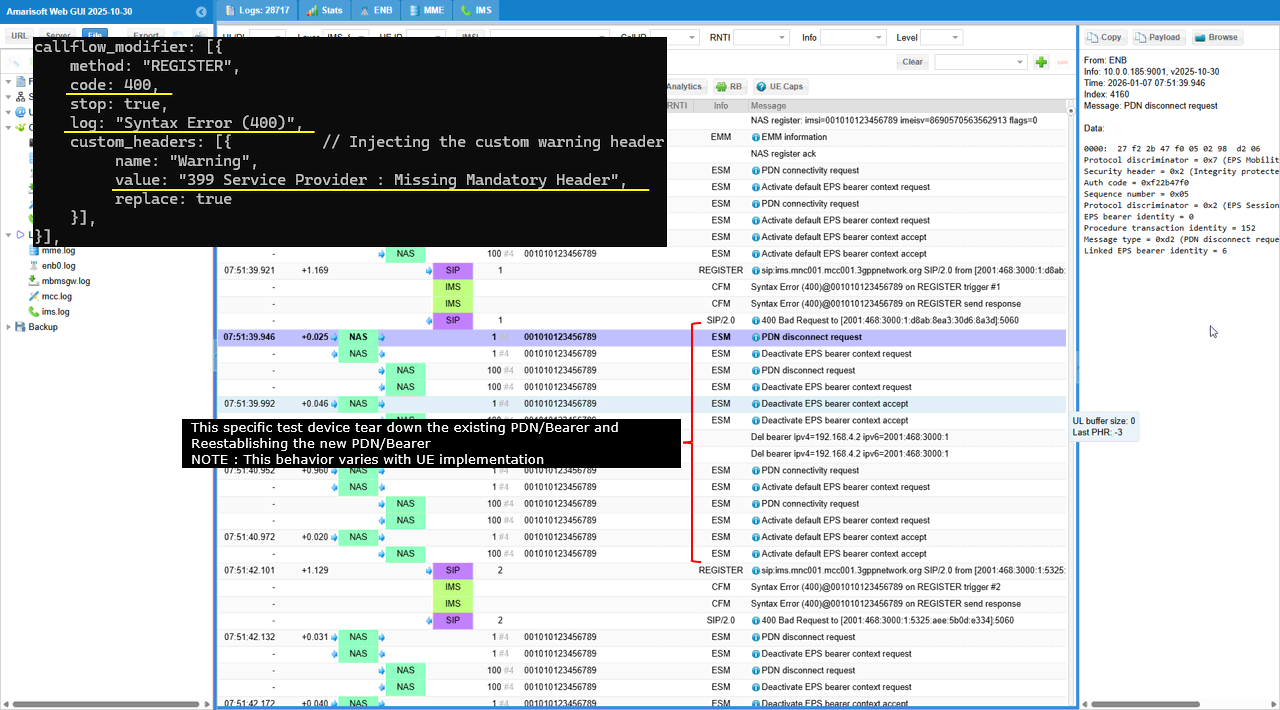
NOTE : After each 400 rejection, this specific UE tears down the IMS PDN/bearer. You can see bearer release lines like Del bearer ipv4=..., and then the UE comes back with another REGISTER attempt. So the observed behavior is REGISTER → trigger → 400 Bad Request → bearer teardown → retry REGISTER, and the cycle continues
This screenshot shows the exact mapping between the 400 “Syntax Error” configuration and what appears in the IMS log and SIP payload. The callflow_modifier is set for method "REGISTER", so the affected transaction is the REGISTER request shown in the message list. The configuration forces code: 400 with stop: true, so the response line becomes SIP/2.0 400 Bad Request and the REGISTER procedure stops at that point. The configuration sets log: "Syntax Error (400)", so the CFM log entry prints the same text as Syntax Error (400)@001010123456789 on REGISTER trigger #n. The configuration injects a Warning header with value "399 Service Provider : Missing Mandatory Header", so the SIP details pane shows the matching header line Warning: 399 Service Provider : Missing Mandatory Header. The replace: true field explains why the Warning line is consistently present and identical across retries.
This log shows what this specific UE does after it got rejected with 400. The UE sends the PDN disconnect request first, meaning the teardown is UE-driven. The network then reacts by sending Deactivate EPS bearer context request, and the UE responds with Deactivate EPS bearer context accept, which completes the bearer release and is reflected by bearer deletion lines. After the PDN/bearer is cleared, the UE starts a fresh IMS setup with PDN connectivity request, and the network rebuilds the default bearer using Activate default EPS bearer context request/accept. Once the bearer is re-established, the UE attempts REGISTER again and the same 400 rejection sequence repeats, showing a repeatable cycle of REGISTER failure followed by UE-driven PDN teardown and re-establishment.
Sub Test 14 : 423 Interval Too Brief
The purpose is to verify that the UE follows the Min-Expires requirement by increasing its requested expires value or delaying the next registration attempt according to the network’s minimum interval policy.
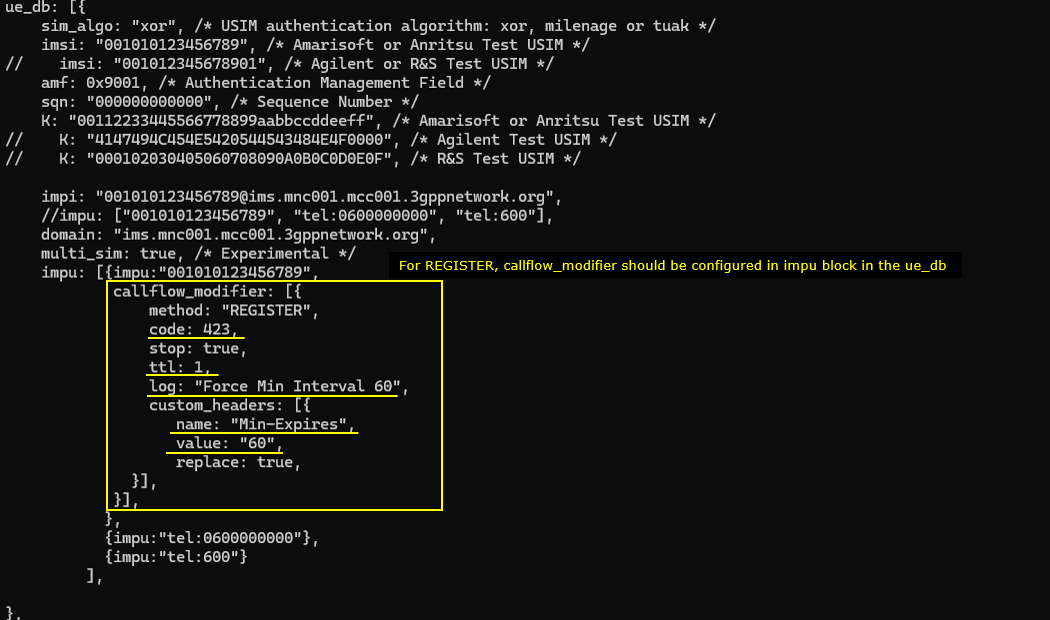
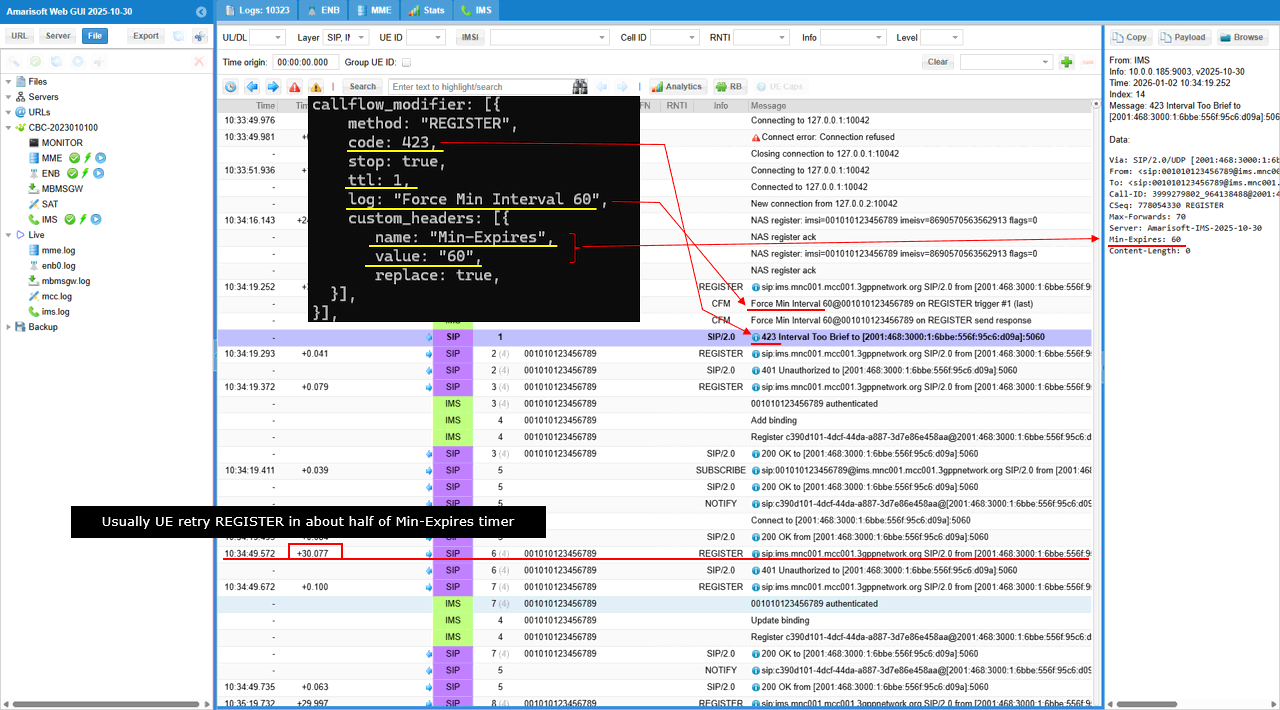
This configuration simulates a registration “interval too brief” condition for IMS REGISTER. The callflow_modifier forces the REGISTER transaction to return code: 423 with stop: true, so the request is rejected immediately. The ttl: 1 setting limits the injection to a single occurrence, so only the first matching REGISTER is forced into this error and the later retries can proceed normally. The log tag is set to "Force Min Interval 60", so the event is clearly identifiable in the trace. A custom header is injected with name: "Min-Expires" and value: "60", and replace: true ensures the UE receives an explicit minimum registration interval of 60 seconds
This log shows a one-time “interval too brief” rejection on IMS REGISTER that is driven by the callflow_modifier. The UE sends an initial REGISTER, and the network triggers the modifier and prints Force Min Interval 60@001010123456789 on REGISTER trigger #1 (last). The IMS then replies with SIP/2.0 423 Interval Too Brief, which matches the configured code: 423. Because ttl: 1 is set, this is the last forced occurrence, so the modifier is not applied again after this point. The UE then adjusts its behavior based on the network requirement and sends a subsequent REGISTER. The later flow proceeds into the normal authentication and registration sequence, including 401 Unauthorized, the credentialed REGISTER, and then 200 OK, showing that the second REGISTER is no longer blocked and is effectively aligned with the network’s minimum interval policy indicated by the Min-Expires setting.
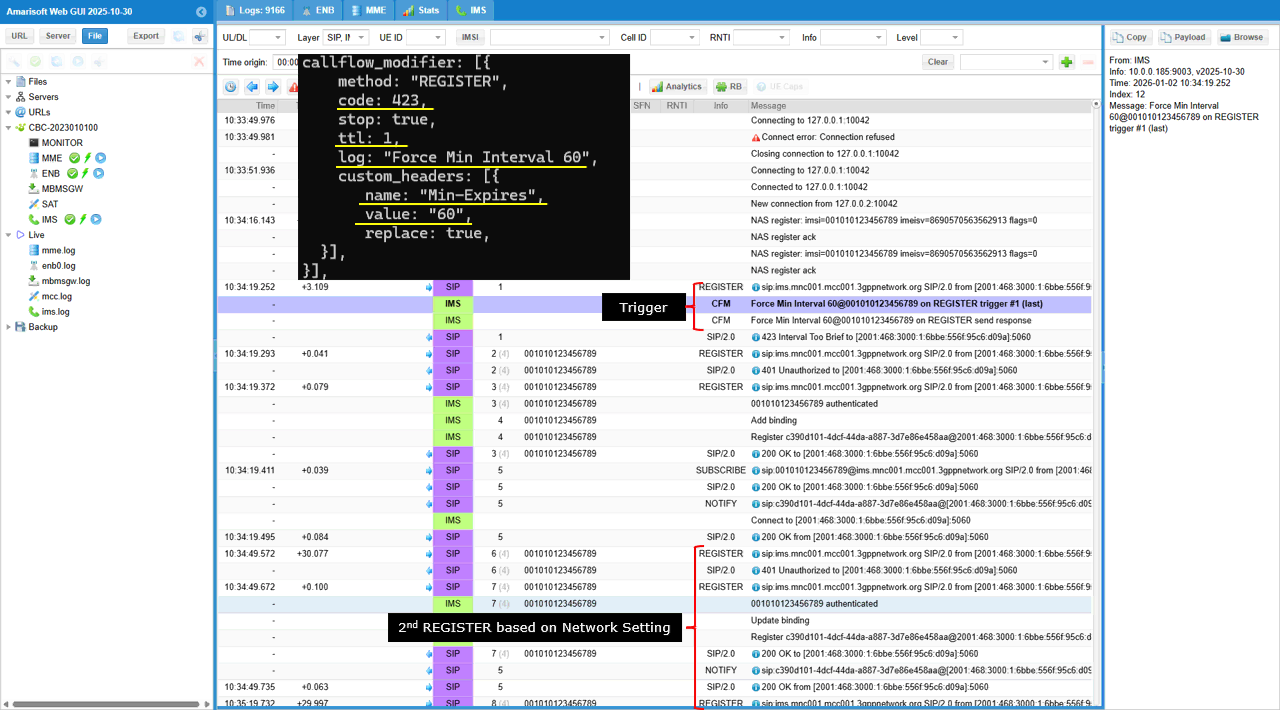
This shows the full mapping from the 423 configuration to the UE retry timing seen in the log. The callflow_modifier is applied to method "REGISTER" and forces code: 423 with stop: true, so the first REGISTER attempt is rejected as 423 Interval Too Brief. The log string "Force Min Interval 60" appears as the CFM trigger line, which proves the rejection is injected by the configured modifier. The custom header Min-Expires is set to "60" with replace enabled, and the SIP payload pane shows Min-Expires: 60, so the UE receives an explicit minimum interval requirement from the network. Because ttl: 1 is used, this forced 423 happens only once and is marked as the last trigger. After receiving the 423 and the Min-Expires value, the UE waits before retrying REGISTER. In the time column, the next REGISTER occurs about 30 seconds later, which is roughly half of the 60-second Min-Expires value, and this matches the common UE behavior of retrying after a backoff that is a fraction of the Min-Expires timer rather than waiting the full interval.
Test 2 : CallFlow Modifier - MO INVITE
Configuration
The purpose of this test is to apply callflow_modifier to INVITE message. I want to modify the signaling message from IMS/SIP Server in various different way in response to INVITE message.
I used the enb.default.cfg (LTE default configuration) as it is without changing any contents in it.
I also used the default configuration for mme as shown below. Since this test is to send / receive SMS via IMS, ims.cfg and ue_db-ims.cfg is important configurations. Unless your DUT(UE) requires any specific configuration, the default configuration (i.e, ims.default.cfg and ue_db-ims.cfg) would work.

For this test, the test configuration is made only in ims configuration and ue_db for ims. For ims configuration, ims-invite-callmod.cfg is used, which is copied and modified from ims.default.cfg

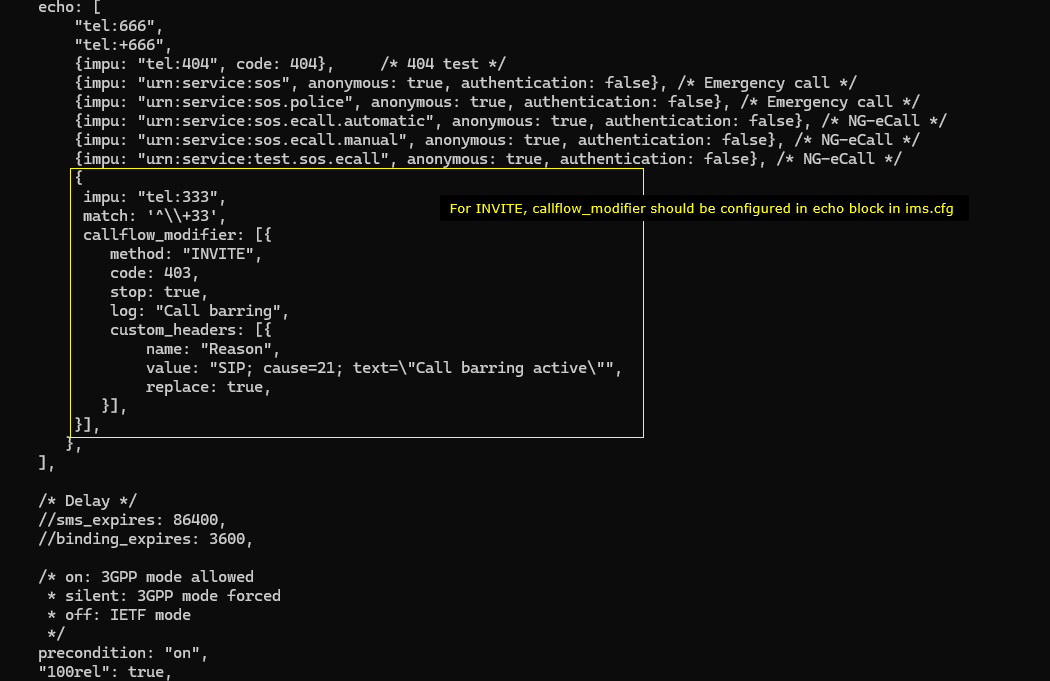
In ims-invite-callmod.cfg file, callflow_modifier is configured for a specific impu in echo block.
The configuration says that the modifier is tied to the IMPU "tel:333" and activates when the incoming request matches the pattern ^\+\+33. Once triggered, it modifies any INVITE addressed to this IMPU. The configuration forces the INVITE to receive a 403 response, stops further processing after applying the modification, and generates a log entry labeled “Call barring.” It also inserts a custom SIP Reason header into the response, with the value set to SIP; cause=21; text="Call barring active", overwriting any existing Reason header. This configuration ensures that when someone attempts to call this IMPU, the INVITE is rejected with a 403 and the SIP message contains the precise Reason header defined here.
I did following configuration on UE side. First make sure that UE has 'ims' APN configured. In most of UE, the 'internet' and 'ims' APN would be configured by default. But for some UE, you may need to manually configure 'ims' APN. In addition, you may need to enable 'VoLTE' option because the UE may not initiate IMS registration if VoLTE is not turned on.
Perform the test
Check out the cell phy output and see if everything is configured as intended. This test does not require any specific cell phy configuration. Any configuration is OK as long as your DUT support it.
Now power on UE and wait for the UE to complete the initial attach to the network.

Then check if the ims bearer is established and IP for the ims is allocated. In this case, the ip 192.168.4.2 and 2001:468:3000:1:: are assigned for the UE for IMS.

Now check if UE registration status in ims. Here you notice that UE is registerred to core network (mainly for SMS over SG) and SIP registration is completed which is indicated by SIP Binding information. UE should be in this state to send INVITE for this test.

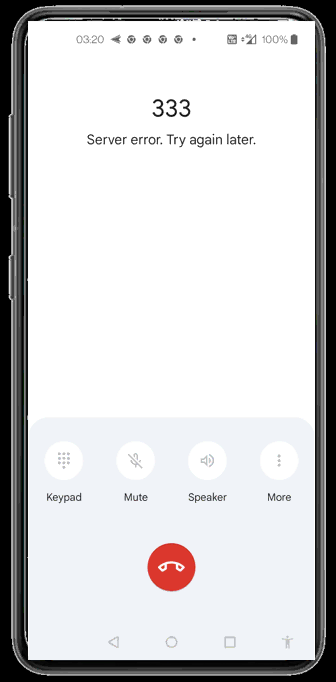
Now make a VoLTE call from UE to send the INVITE message. The INVITE message gets rejected by 403 and you will see an indicator of rejection on UE as shown below. In this specific UE, you see the message "Server error. Try again later" but the specific message would vary depending on UE implmentation.
Log Analysis
Check out if UE completes the SIP registration. This is a precodition for this test. Without completion of SIP registration, UE would not be allowed to send INVITE (i.e, making a call)
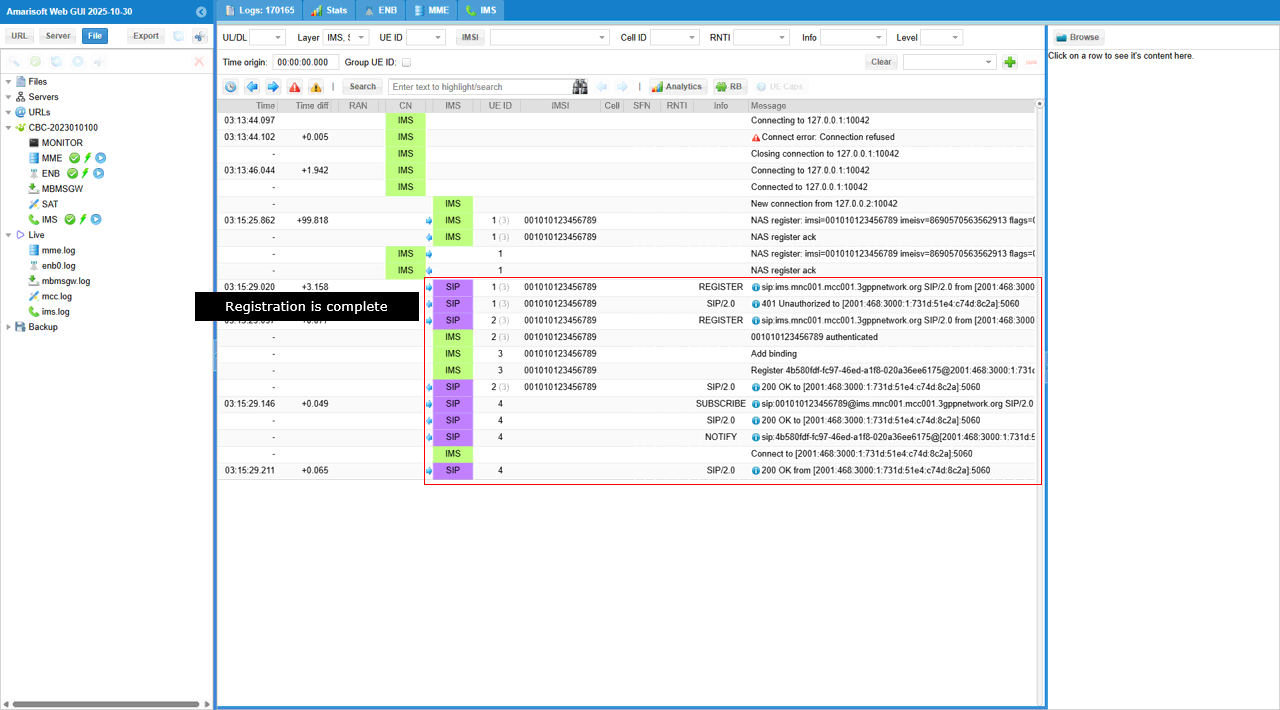
When you try to make a call (i.e, letting UE send INVITE message), you would see the message rejected as shown below.
It shows what happens in the IMS log when the UE attempts to place a call by sending an INVITE to tel:333. As soon as the INVITE appears in the SIP trace, the system immediately triggers the callflow_modifier that was configured for this IMPU. You can see the INVITE from the UE, followed instantly by the modified response entries labeled Call barring, which are generated according to the configuration. The SIP stack then returns a 403 Forbidden to the UE, and this rejection appears clearly in the SIP/2.0 rows. The sequence shows the UE’s INVITE, the callflow modifier being activated, the inserted call-barring log messages, and finally the 403 response sent back to the UE exactly as defined in the configuration.
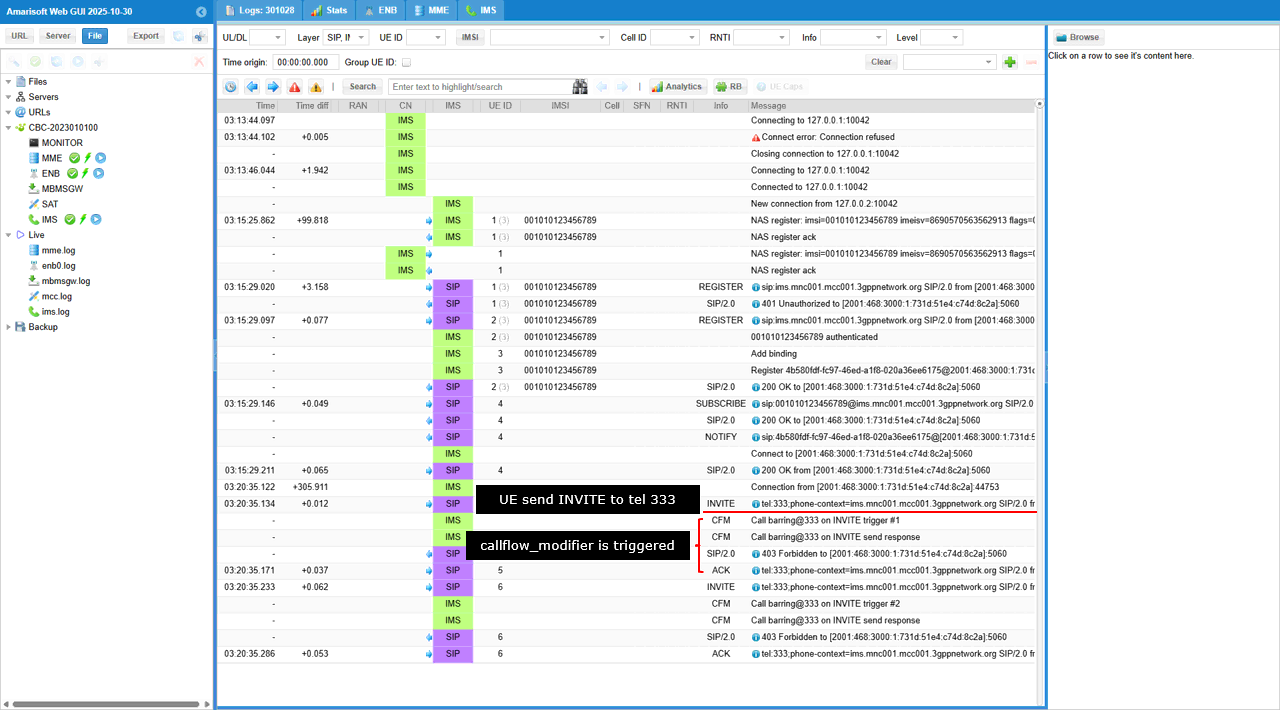
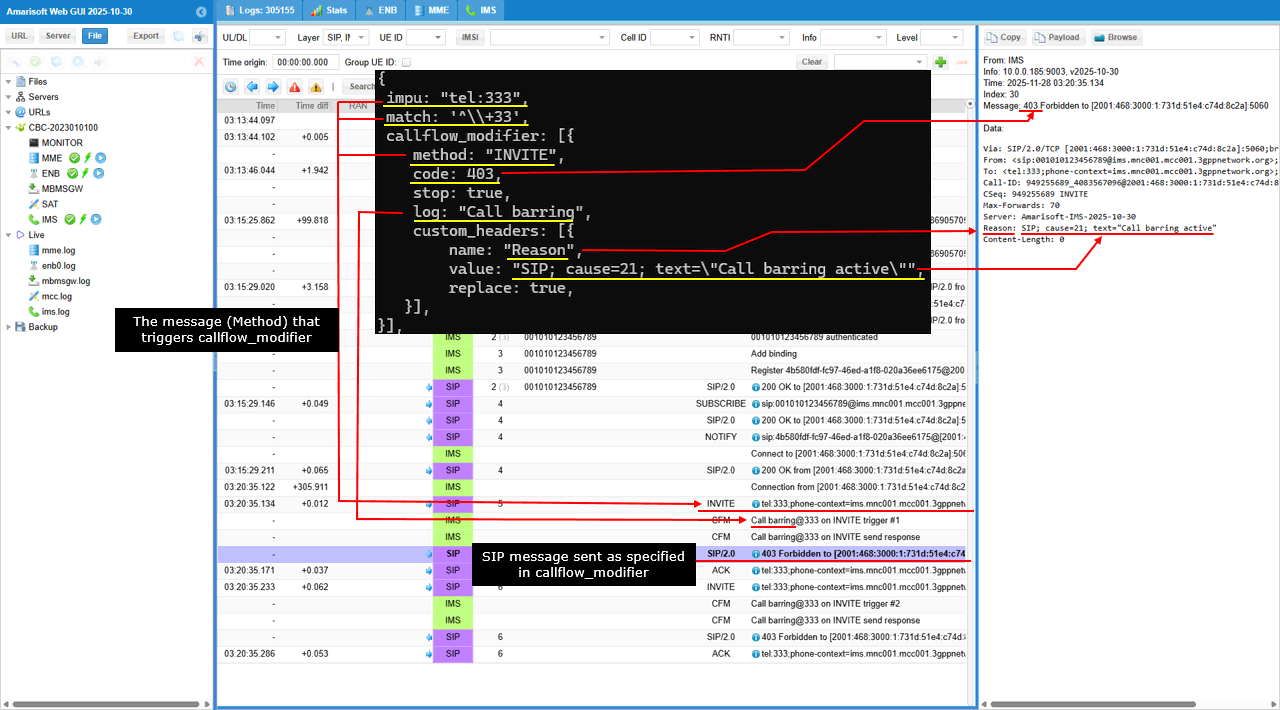
The following shows how each parameter in the callflow_modifier configuration for an INVITE request is mapped directly to the SIP/IMS logs in the Amarisoft Web GUI. The configuration specifies that when the incoming SIP message matches an INVITE, Amarisoft IMS/SIP server should force a 403 response. In the log view, you can see the INVITE request coming from the UE and immediately afterward the SIP stack returns 403 Forbidden, exactly as dictated by the code: 403 field.
The log: "Call barring" entry in the configuration becomes the visible event log text “Call barring” next to the INVITE handling line. The custom_headers section defines a Reason header with the value SIP; cause=21; text="Call barring active", and this appears exactly in the SIP response shown on the right side of the GUI. The expanded SIP message clearly shows the Reason: header with the same content that was defined in the configuration.
SubTest 1 : Skipping 180 Ringing
Purpose of this test is to show how to let IMS/SIP server skip 180 Ringing for a specific call.
For this subtest, I used mme configuration ims-invite-callmod-180skip.cfg which is copied and modified from ims-invite-callmod.cfg
The callfolow_modifier are specified as below.
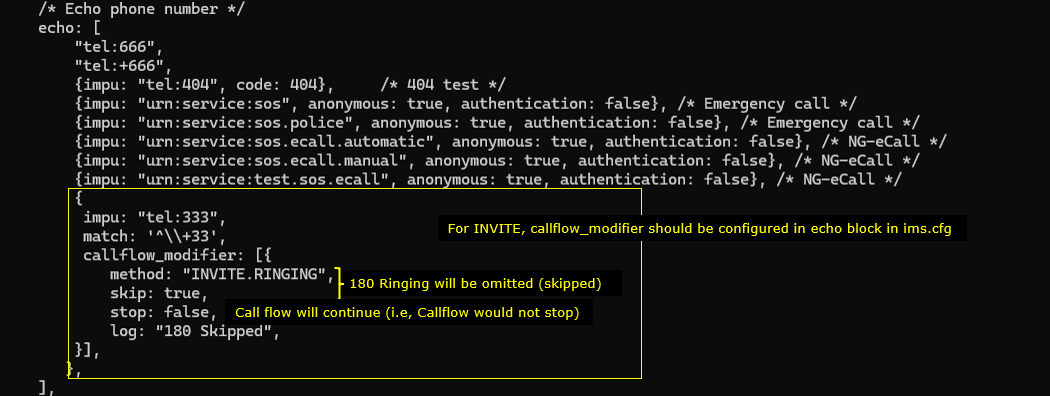
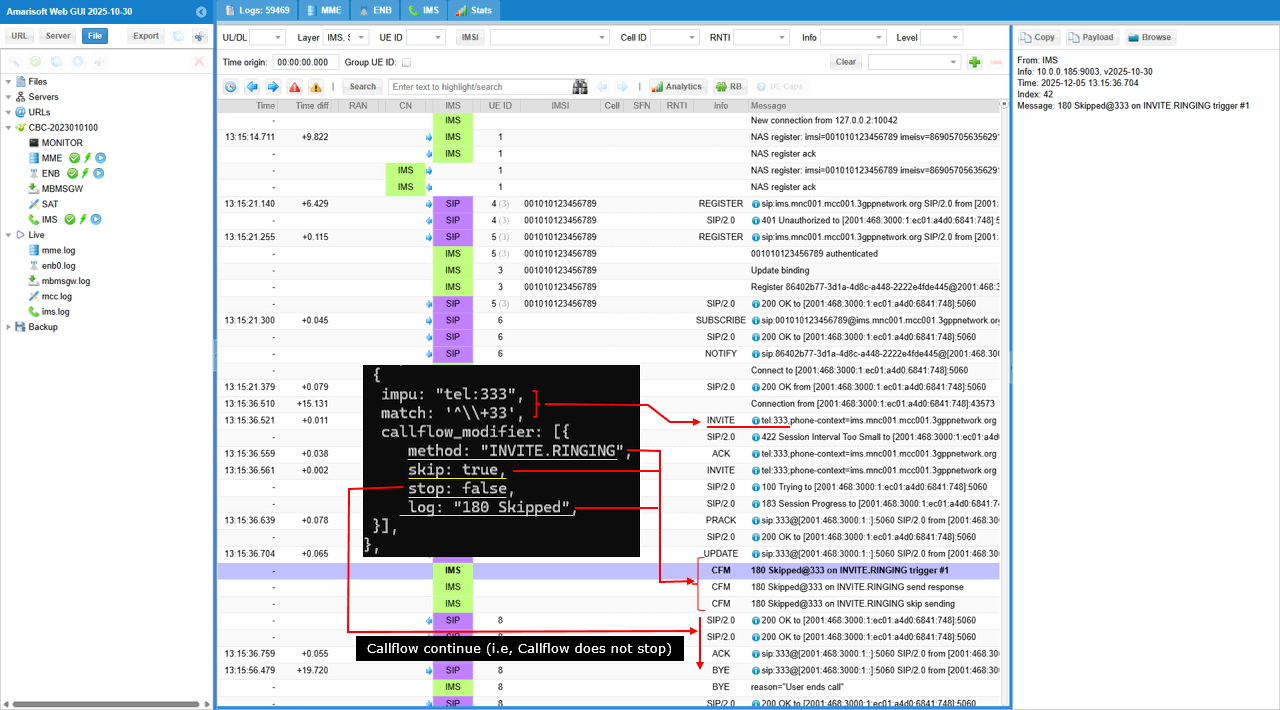
This configuration makes the test call to tel:333 proceed without any 180 Ringing message, while still allowing the call setup to complete normally.
Inside this rule, an INVITE-related callflow modifier is defined. The modifier is applied to the SIP method INVITE.RINGING, which corresponds to the server’s normal generation of 180 Ringing.
The field skip: true instructs the IMS/SIP server to omit sending the 180 Ringing response for this call. Even though the response is skipped, the field stop: false ensures that the callflow continues as usual, meaning the server will proceed to the next step (typically sending 200 OK later). A log message labeled “180 Skipped” is generated to indicate that the Ringing response was intentionally bypassed.
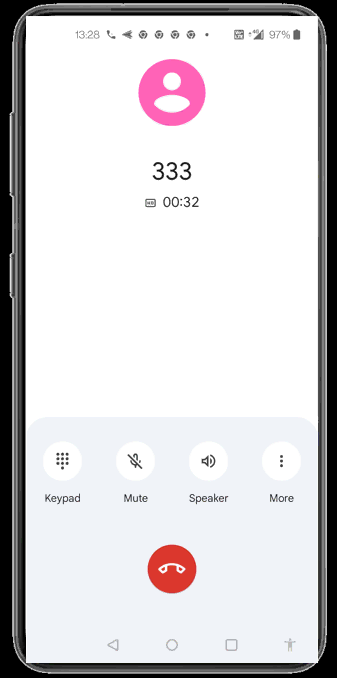
Then run the test with the ims-invite-callmod-180skip.cfg and make a call to the specified impu (dial 333) in this case. The call should go through without any problem.
Now check out the log and confirm the call process went as expected (The call should go through without any problem since 180 Rining is an optional signaling message).
The log demonstrating that the call proceeds normally even though the 180 Ringing message is intentionally skipped. After the IMS registration sequence, the UE sends an INVITE toward tel:333. The configuration for this destination includes a callflow modifier that matches numbers beginning with +33 and instructs the system to skip the INVITE.RINGING stage. When the INVITE arrives, the system detects this rule and logs “180 Skipped” to indicate that the 180 Ringing response will not be generated. Despite omitting this message, the callflow continues without interruption, as indicated by stop: false in the configuration.
The log shows the event “180 Skipped @333 on INVITE.RINGING trigger #1,” confirming that the modifier was applied exactly when the INVITE reached the ringing phase. The surrounding SIP messages also verify that no 180 response appears in the sequence. Instead, the server moves directly from processing the INVITE to sending the 200 OK later in the flow. The absence of 180 does not affect continuity: the UE sends ACK, subsequent SIP messages proceed normally, and the call completes as expected. The red annotations highlight the correlation between the configuration and the specific log points where the skipping action occurs, clearly showing that the call remains functional even when the optional ringing indication is removed.
Test 3 : CallFlow Modifier - SUBSCRIBE
The purpose of this test is to apply callflow_modifier to SUBSCRIBE message. I want to modify the signaling message from IMS/SIP Server in various different way in response to SUBSCRIBE message.
Configuration
I used the enb.default.cfg (LTE default configuration) as it is without changing any contents in it.
I also used the default configuration mme-ims.cfg for mme as well.
For this test, the test configuration is made only in ims configuration and ue_db for ims. For ims configuration, ims-subscribe-callmod-403.cfg is used, which is copied and modified from ims.default.cfg and ue_db-ims-subscribe-callmod-403.cfg is used, which is copied and modified from ue_db-ims.cfg
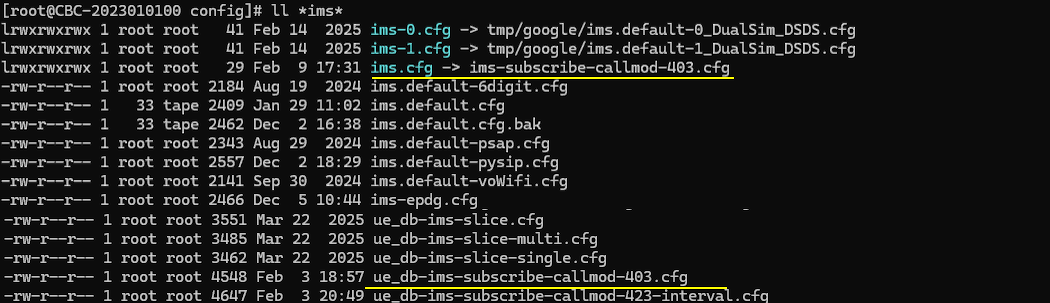
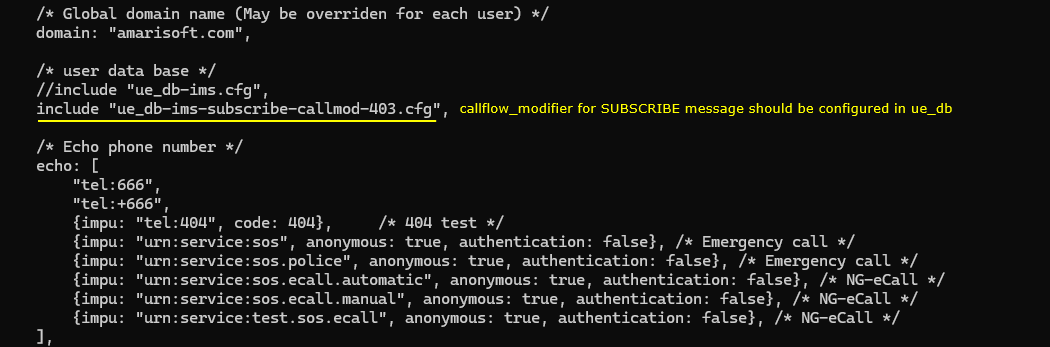
In ims-subscribe-callmod-403.cfg , the only modification is made to include ue_db-ims-subscribe-callmod-403.cfg instead of the default ue db.
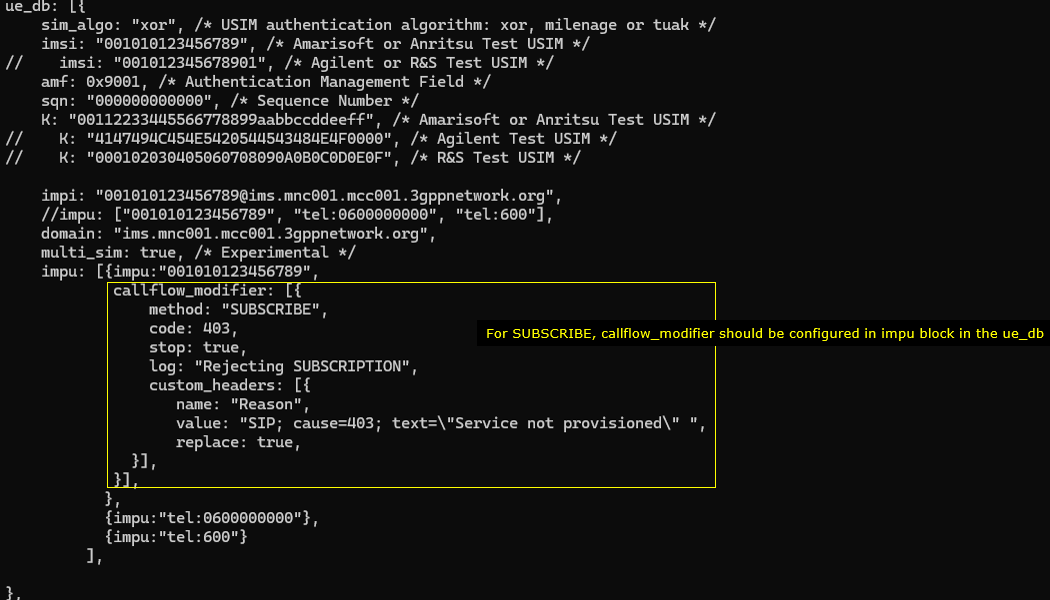
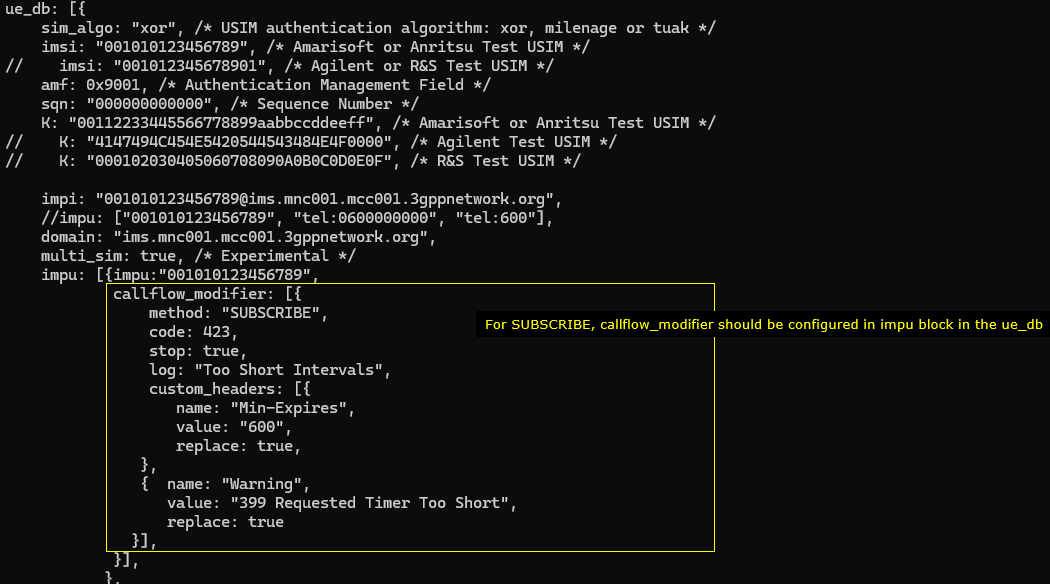
In ue_db-ims-subscribe-callmod-403.cfg , callflow_modifer for REGISTER message is configured in the impu block. You should add the parameter for a specific impu which you want to apply the modification to
The configuration says tthat the modifier is set to act on the SUBSCRIBE method. The configuration instructs the system to return a 403 response for any SUBSCRIBE sent by this IMPU. The processing stops after applying this rule, and the system logs the message “Forbidden User” when the modification is triggered. A custom SIP header named Warning is also added to the response, and its value is set to “403 User barred”, replacing any existing Warning header. This entire modifier applies only to the IMPU "001010123456789", meaning only this user’s SUBSCRIBE messages will receive the modified response.
Perform the test
Check out the cell phy output and see if everything is configured as intended. This test does not require any specific cell phy configuration. Any configuration is OK as long as your DUT support it.
Now power on UE and wait for the UE to complete the initial attach to the network.
Then check if the ims bearer is established and IP for the ims is allocated. In this case, the ip 192.168.4.2 and 2001:468:3000:1:: are assigned for the UE for IMS.
Now check if UE registration status in ims. Here you notice that UE is registerred to core network (mainly for SMS over SG) but did not get registerred to IMS server(This is intended status for this test because it is expected for the UE get rejected for IMS registration). If UE is successfully registerred to IMS server, you should see SIP biding information.
Log Analysis
This log shows that UE sends a SUBSCRIBE request (Event: reg) toward ims.mnc001.mcc001.3gppnetwork.org to establish or refresh the registration event subscription. At this point the server-side rule callflow_modifier is configured to intercept method="SUBSCRIBE" and force a failure with code=403 while stop=true, so the SUBSCRIBE handling is terminated on purpose. The IMS then generates a SIP/2.0 403 Forbidden response for that SUBSCRIBE, and it also adds a custom Reason header indicating cause=403 with text "Service not provisioned", which explains why the subscription is rejected. As a result, the “Trigger” point in the trace is the UE’s SUBSCRIBE, and the “Rejection” point is the IMS returning 403 based on the provisioning policy, not because of registration failure.
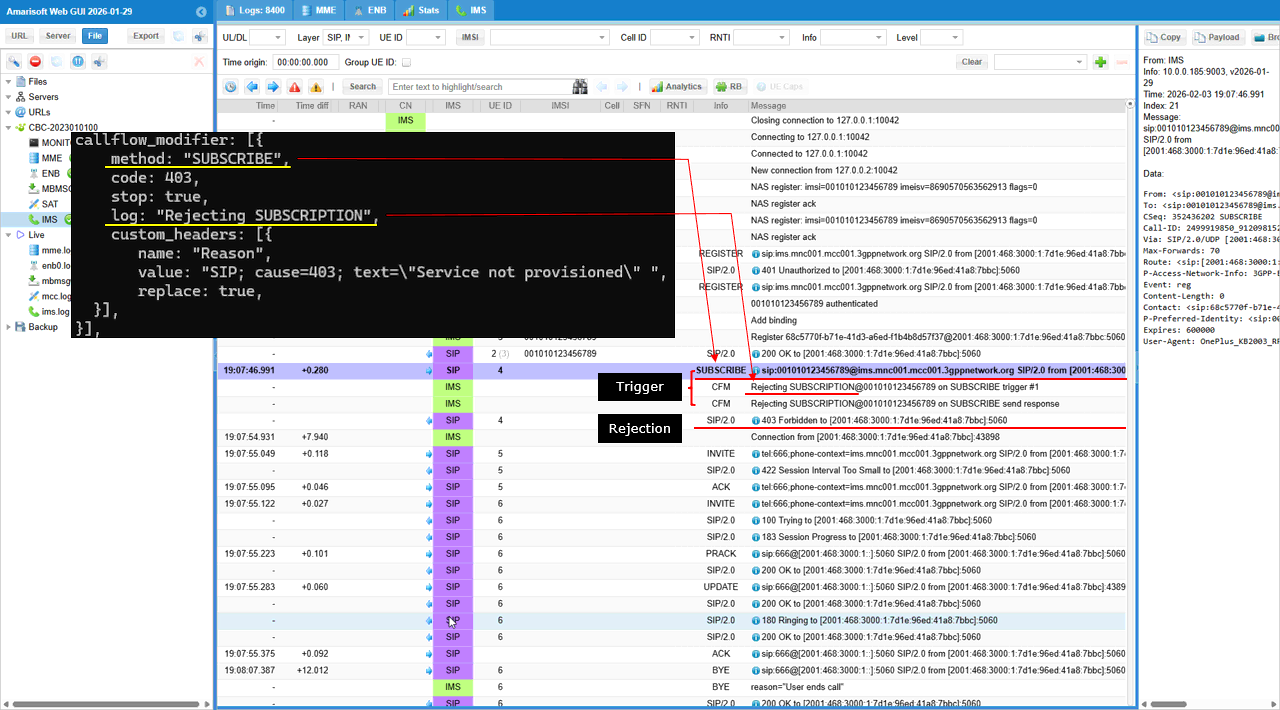
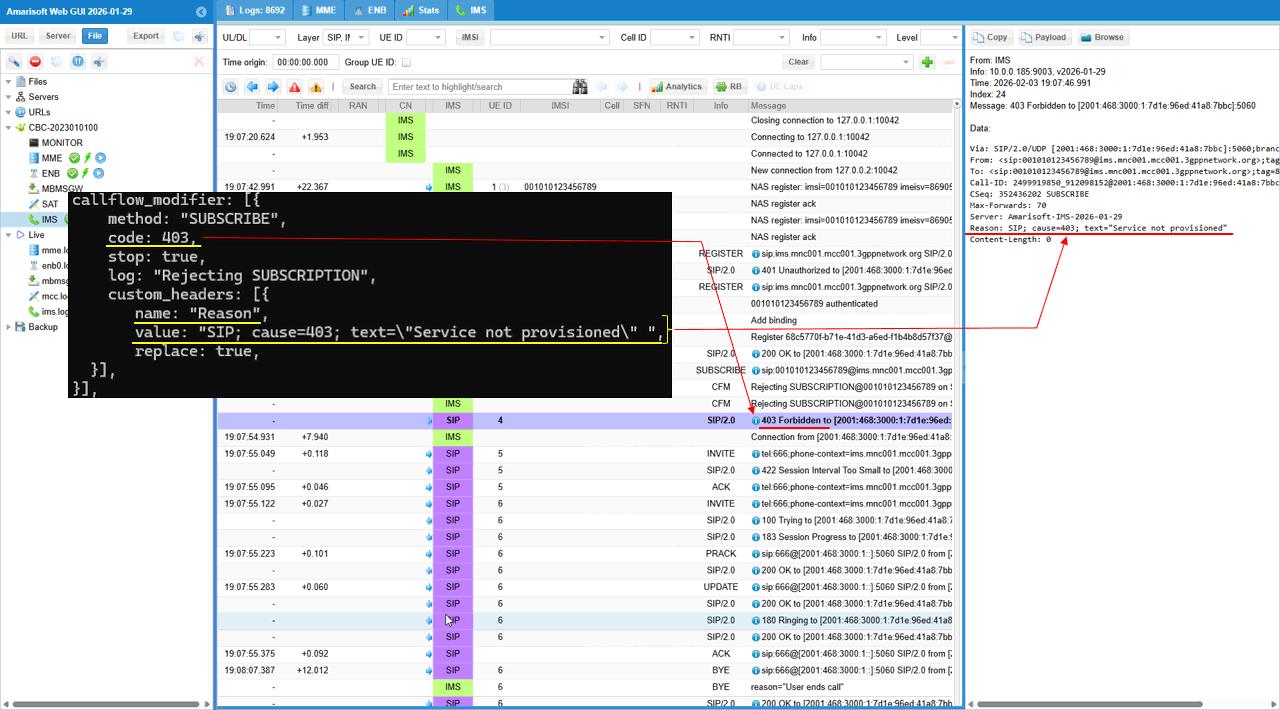
This shows the detailed mapping between the configuration and trace log. The custom_headers: [{ name: "Reason", value: "SIP; cause=403; text=\"Service not provisioned\"", replace: true }] maps directly to the 403 response in the trace log. The rejection code 403 maps as 403 Forbidden and the custom_header name: "Reason", value: "SIP; cause=403; text=\"Service not provisioned\"" is placed in the contents of the rejection message.
Sub Test 1 : Too Short Inverval
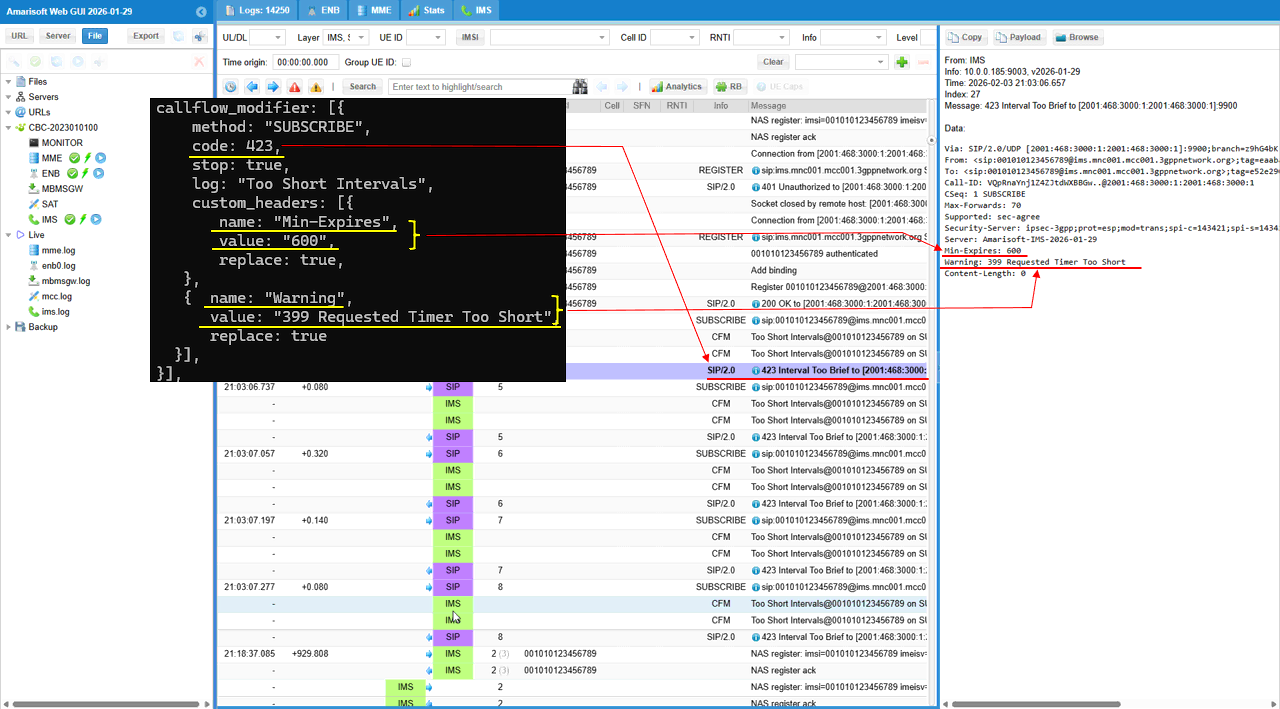
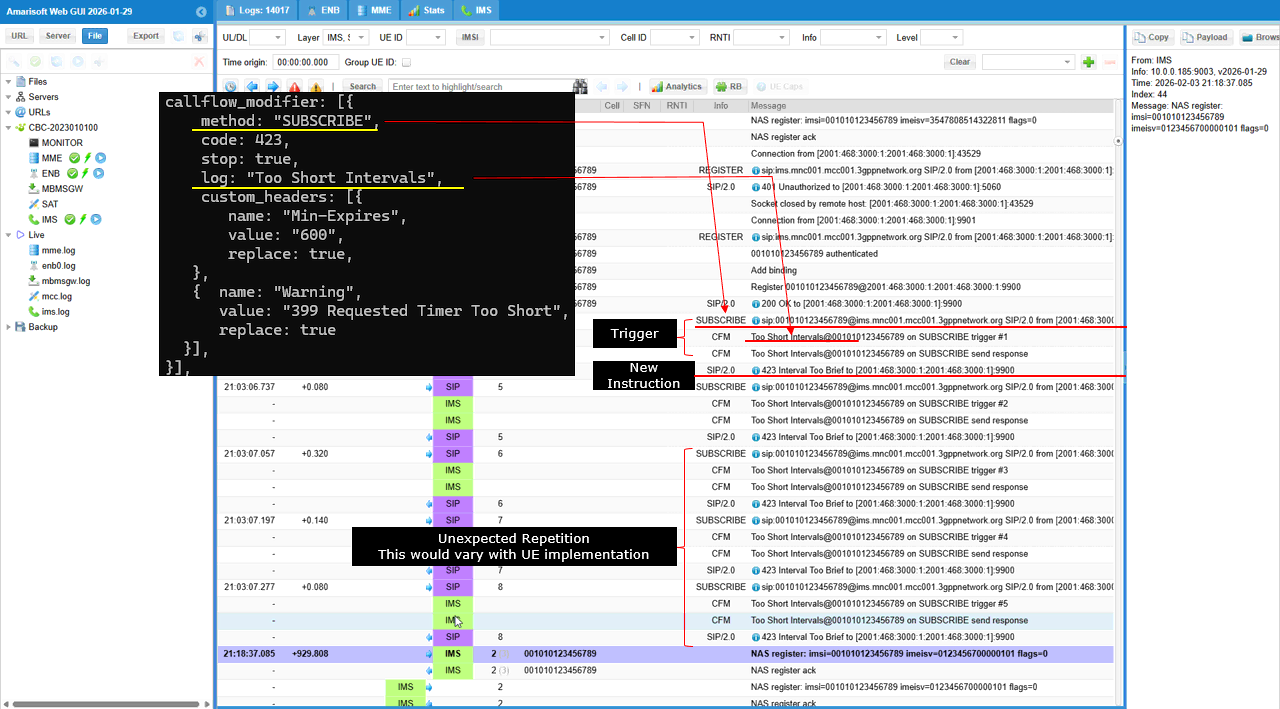
This test is designed to simulate an IMS subscription timer policy where the IMS core controls the UE’s SUBSCRIBE refresh interval by enforcing a minimum value. By configuring callflow_modifier for method="SUBSCRIBE" inside the UE’s impu block in ue_db, the IMS can intercept the UE’s SUBSCRIBE and respond with 423 Interval Too Short whenever the UE requests an interval shorter than what the network wants to allow. The key behavior is the header mapping: the modifier injects Min-Expires: 600, which tells the UE the minimum acceptable subscription duration, and it adds Warning: 399 Requested Timer Too Short to make the reason explicit. This allows testers to verify that the UE reads Min-Expires, increases its requested Expires/refresh interval to ≥ 600 seconds, and then re-attempts the SUBSCRIBE with a compliant timer, confirming correct UE timer adaptation rather than handling a permanent service denial.
When the UE sends SUBSCRIBE (the “Trigger”), the IMS matches callflow_modifier.method="SUBSCRIBE" and forces code=423, so the trace shows SIP/2.0 423 Interval Too Brief. The trace text “Too Short Intervals” maps to log:"Too Short Intervals", confirming the modifier rule is the one generating the response. The “New Instruction” is carried by the injected headers: Min-Expires: 600 tells the UE the minimum allowed interval, and Warning: 399 Requested Timer Too Short explains why. The repeated SUBSCRIBE/423 loop indicates the UE is retrying without converging to ≥600s, which is UE-implementation dependent.
This shows the mapping details between the configuration and the log print. The custom_headers.name="Min-Expires", value="600" becomes Min-Expires: 600 in the 423 response, which tells the UE “your requested interval is too short, use at least 600 seconds”. In the same response, custom_headers.name="Warning", value="399 Requested Timer Too Short" becomes Warning: 399 Requested Timer Too Short, which explains the reason in a UE-friendly way