
GNU Radio
The purpose of this tutorial is to show how to integrate Amarisoft SDR card into GNU Radio so that you can read IQ data from Amarisoft SDR card and process it with various processing blocks/libraries provided by GNU Radio. There is no built in GNU Radio library for Amarisoft SDR card. You need to build your own interface into GNU radio. This requires a special driver on Amarisoft and GNU Radio development installation.
Table of Contents
- GNU Radio
- Introduction
- Summary of the Tutorial
- What is the final goal ?
- GNU Radio Install
- Manual Installation
- Step 1 - Install build dependencies
- Step 2 - Create directories and templates
- Step 3 - Copy files from built-in locations to the GNU radio library directories
- Step 4 - Register shared libraries with the dynamic linker
- Step 5 - Build
- Step 6 - Create Python Symlink
- Step 7 - Verify
- Step 8 - Implement Proper Amarisoft Block and Rebuild
- Verification
- Status Check of the Installation
- Installation by Intallation Package
- Directory Structure
Introduction
Software Defined Radio (SDR) has revolutionized the field of wireless communications by enabling flexible, programmable, and cost-effective radio systems. Amarisoft SDR cards are powerful hardware solutions widely used in research, prototyping, and deployment of 4G/5G networks, offering high performance and robust signal processing capabilities. GNU Radio, an open-source development toolkit, serves as a flexible platform for building software radio systems by providing a comprehensive suite of signal processing blocks and a graphical workflow environment. However, due to the diversity of SDR hardware and the lack of standardized interfaces, direct integration between proprietary SDR cards such as Amarisoft and open-source projects like GNU Radio is not natively supported. This tutorial addresses the technical challenge of bridging this gap by detailing the process of building a custom interface, installing required drivers, and configuring both Amarisoft SDR hardware and GNU Radio for seamless IQ data exchange. The integration not only empowers engineers and researchers to harness the advanced capabilities of Amarisoft SDR with the versatility of GNU Radio, but also promotes rapid experimentation, testing, and the development of next-generation wireless solutions. This process involves understanding the architectural components of both systems, managing real-time data streams, and ensuring compatibility at the driver and software application layers, thereby highlighting the interdisciplinary nature of modern SDR-based system development.
-
Context and Background
- Amarisoft SDR cards are advanced radio transceivers designed for LTE and 5G development, offering high precision IQ sampling and robust RF performance.
- GNU Radio provides a modular, extensible framework for digital signal processing, used extensively in academia, research, and industry.
- There is no out-of-the-box compatibility or built-in driver for Amarisoft SDR cards in GNU Radio, necessitating custom integration.
-
Relevance and Importance
- Integrating Amarisoft SDR with GNU Radio extends the utility of both platforms, enabling users to leverage GNU Radio’s processing libraries with high-quality hardware.
- This workflow supports advanced prototyping, data analysis, and real-time signal experimentation in wireless communication research and development.
- Bridging proprietary and open-source technologies fosters innovation and accelerates the development cycle for wireless applications.
-
Learning Outcomes
- Understand the architectural differences and integration challenges between proprietary SDR hardware and open-source SDR frameworks.
- Learn how to install and configure Amarisoft drivers and GNU Radio development environments for interoperability.
- Develop practical skills for creating custom interfaces to read and process IQ data streams from Amarisoft SDR within GNU Radio.
- Gain experience in troubleshooting, validating, and optimizing SDR data workflows for experimental wireless communications.
-
Prerequisites
- Familiarity with Linux-based operating systems and basic command-line operations.
- Understanding of digital signal processing concepts and IQ data representation.
- Experience with GNU Radio installation and workflow design.
- Basic knowledge of software development and driver installation procedures.
- Access to Amarisoft SDR hardware and associated licensing.
Summary of the Tutorial
This tutorial details the complete process for integrating the Amarisoft SDR library into GNU Radio as a custom out-of-tree (OOT) module, verifying the integration through end-to-end testing, and configuring and running the SDR spectrum analysis using GNU Radio Companion (GRC). The following summarizes the key test procedures, methodologies, setup, and verification steps described in the content.
-
Integration Goal and Verification:
-
The final objective is to integrate Amarisoft SDR support into GNU Radio by building a custom OOT module. The integration is considered successful when:
- GNU Radio Companion detects and loads the Amarisoft source and sink blocks from the GRC block library.
- The ‘Amarisoft SA Source’ block acquires live IQ data from the SDR device via libsdr.
- The ‘Amarisoft Freq Sink’ block processes the IQ samples and displays the resulting spectrum in the GNU Radio GUI.
- Visual confirmation is achieved when these custom blocks appear as a new “Amarisoft� category in the GRC block panel and function as expected in a flowgraph.
-
The final objective is to integrate Amarisoft SDR support into GNU Radio by building a custom OOT module. The integration is considered successful when:
-
Test Procedure: Simple Spectrum Verification Pipeline
-
Flowgraph Creation:
- A minimal flowgraph is constructed in GRC using two custom blocks: Amarisoft SA Source (for IQ sampling) and Amarisoft Freq Sink (for spectrum visualization).
-
The source block is configured with key parameters:
- Device path (e.g., /dev/sdr1)
- Center frequency (variable: center_freq)
- Sample rate (variable: samp_rate, e.g., 30.72 Msps)
- RF bandwidth, RX gain, and read block size
-
The sink block is set up to process and display the incoming IQ samples:
- Uses parameters such as center frequency, sample rate, FFT size, averaging alpha, Y axis limits, update interval, and read block size
- Groups samples for FFT, applies windowing, computes FFT, averages across frames, and produces a power spectrum
- Variables ‘samp_rate’ and ‘center_freq’ are defined for easy parameter management and consistency across blocks.
-
Execution and Validation:
- After configuring and connecting the blocks, the flowgraph is executed in GRC.
- The Amarisoft SA Source begins capturing IQ samples, which are streamed to the Amarisoft Freq Sink.
- The frequency sink processes and displays the real-time spectrum. Successful, continuous spectrum visualization confirms the SDR integration.
-
Flowgraph Creation:
-
GNU Radio & Module Installation Procedures
-
Prerequisites:
- Install development tools and all GNU Radio dependencies using:
-
Out-of-Tree Module Creation:
- Create a new project directory, initialize a GNU Radio OOT module, and add custom blocks as needed.
-
Building and Installation:
- Enter the module directory and build with Amarisoft SDK integration:
- For code-only changes, ‘make’, ‘sudo make install’, and ‘sudo ldconfig’ are typically sufficient. Re-run ‘cmake’ if you change build scripts, add new files, or modify dependencies.
-
Prerequisites:
-
Module Verification Procedures
- Confirm shared libraries are visible:
- Test Python bindings:
- Sanity check the SDR device interface using a test script:
- Run a real spectrum analyzer flowgraph in Python to verify the processing chain:
-
Directory and File Structure Inspection
- The project maintains a clear separation between the source tree (development), build tree (compilation outputs), install tree (runtime libraries and descriptors), and required system-level dependencies (SDK headers, shared libraries, linker configuration, and Python symlinks).
- The directory structure is extensively documented, detailing the location and purpose of all key files and directories for both development and deployment.
In summary, the test methodology involves installing all required dependencies and development tools, building and installing a GNU Radio OOT module that integrates Amarisoft SDR support, verifying the setup through a series of library and Python import checks, and ultimately validating the signal processing chain via a live spectrum analyzer flowgraph that connects the custom source and sink blocks within GNU Radio Companion. The successful display of a real-time spectrum confirms that the integration is fully functional.
What is the final goal ?
The final goal in this tutorial is to integrate the Amarisoft SDR library into GNU Radio as a custom out-of-tree module and confirm that the integration works end to end. This means GNU Radio should be able to load the Amarisoft-based source and sink blocks, communicate with the Amarisoft SDR device through libsdr, expose the blocks to Python and GNU Radio Companion, and run a real flowgraph successfully. In this example, the final verification is that the custom Amarisoft source captures live IQ data, the custom spectrum sink processes the samples, and the resulting spectrum is displayed correctly in the GNU Radio GUI.
Architecture / Data Flow
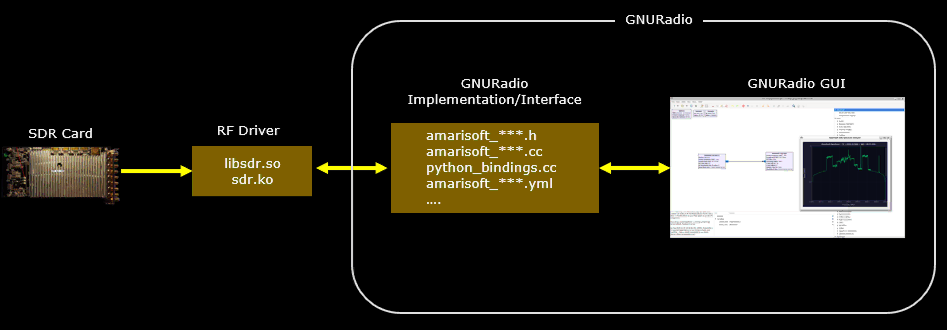
This diagram illustrates the overall architecture of the Amarisoft SDR integration with GNU Radio. The system is composed of three main layers: the SDR hardware layer, the driver and library layer, and the GNU Radio integration layer.
At the lowest level is the SDR hardware, represented by the SDR card. This device captures RF signals from the air and converts them into digital IQ samples. However, GNU Radio does not communicate directly with the hardware. Instead, it interacts through the driver and library layer.
The driver and library layer contains the SDR driver (sdr.ko) and the user-space library (libsdr.so). The kernel driver provides low-level control of the hardware device, while the shared library exposes a higher-level API that applications can call. Functions such as opening the device, configuring the RF parameters, starting the receiver, and reading IQ samples are provided through this library interface.
Above this layer is the GNU Radio implementation layer. This is the custom out-of-tree module developed in the project. It acts as a bridge between GNU Radio and the Amarisoft SDR library. The C++ implementation files (amarisoft_*.cc and amarisoft_*.h) implement the GNU Radio blocks and call the libsdr API to obtain data from the SDR hardware. The Python binding file (python_bindings.cc) exposes these C++ blocks to Python using pybind11 so they can be used inside GNU Radio flowgraphs. The YAML block definition files (amarisoft_*.yml) describe the blocks to GNU Radio Companion so they appear in the graphical block library.
At the top of the architecture is the GNU Radio GUI layer. GNU Radio Companion loads the block definitions and allows the user to build flowgraphs visually. When the flowgraph runs, the Amarisoft source block receives IQ samples from the SDR through the driver and library layer, and the sink block processes and visualizes the signal, such as displaying the RF spectrum.
Overall, the architecture separates hardware access, driver interaction, signal processing implementation, and user interface. This layered design allows the SDR hardware to be integrated cleanly into the GNU Radio processing framework while still using the Amarisoft SDK and drivers for device control.
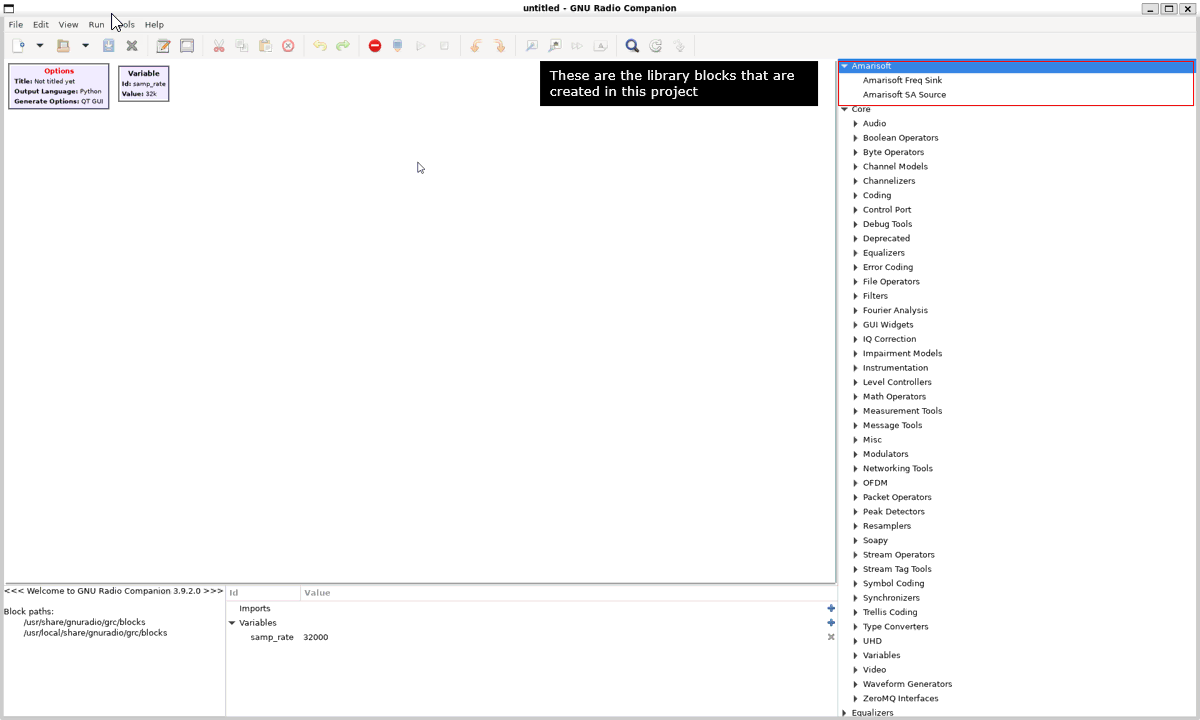
Integrated Blocks in GNU Radio GUI
This screen shows that the Amarisoft library has been successfully integrated into GNU Radio. After the module is built and installed, GNU Radio Companion automatically detects the block description files located in the GRC blocks directory. Based on those definitions, the new block category Amarisoft appears in the block library panel.
Under this category, the two custom blocks created in this project are visible: 'Amarisoft SA Source' and 'Amarisoft Freq Sink'. The source block is responsible for acquiring IQ samples from the Amarisoft SDR device through the 'libsdr' interface, while the frequency sink block processes the incoming samples and displays the spectrum using the custom FFT-based visualization widget.
The appearance of these blocks in the GNU Radio Companion block library confirms that the out-of-tree module has been correctly installed, the Python bindings are working, and the GRC block definition files are properly recognized. At this point, the custom Amarisoft blocks can be dragged into a flowgraph and used like any native GNU Radio block.
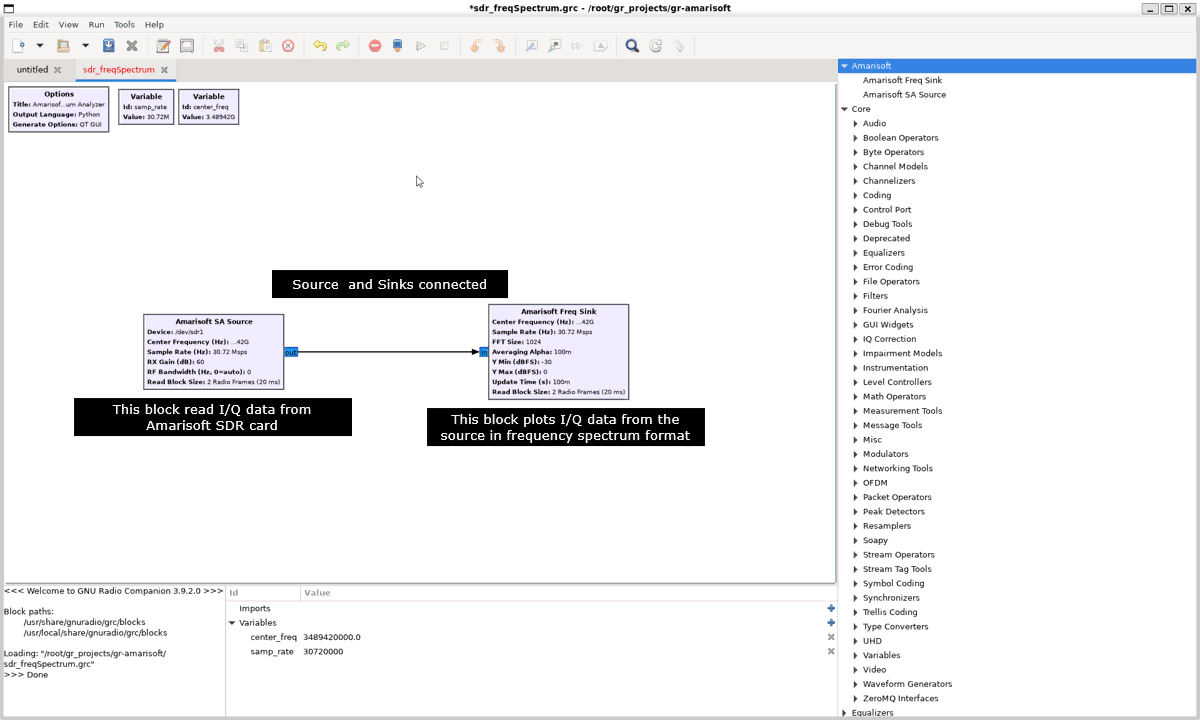
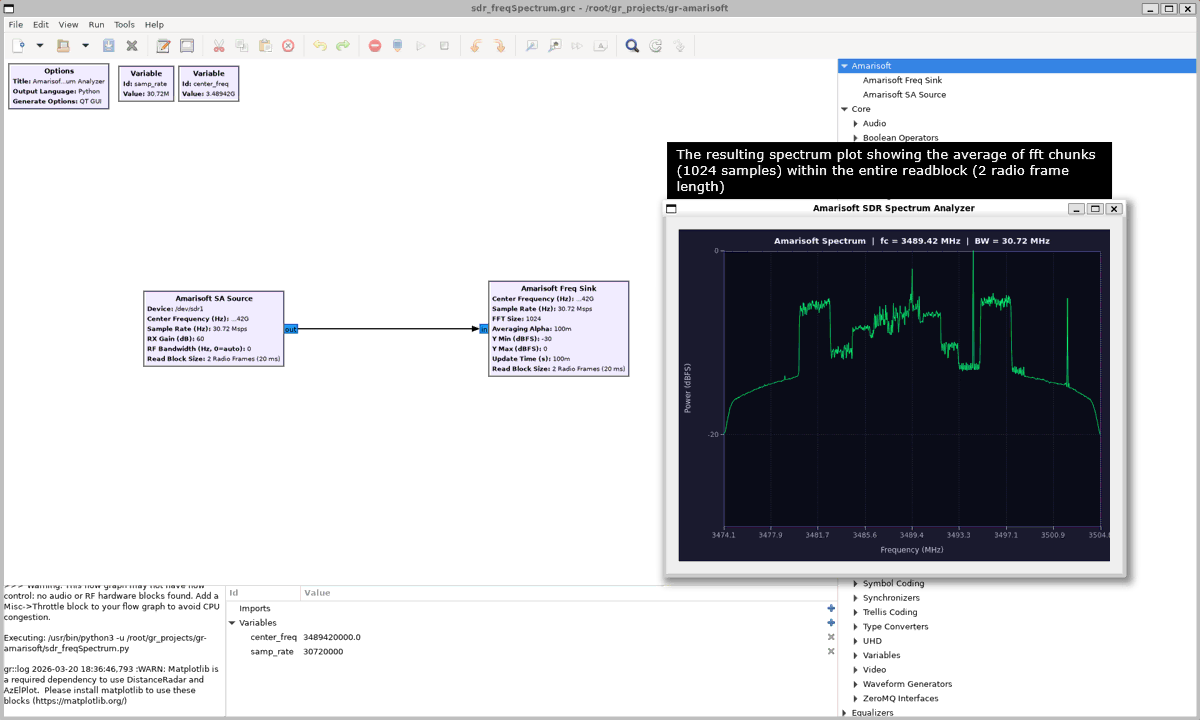
This flowgraph shows the simplest verification pipeline for the Amarisoft GNU Radio module. The Amarisoft SA Source block reads complex IQ samples directly from the Amarisoft SDR device using the libsdr interface. The source block is configured with parameters such as device path, center frequency, sample rate, RF bandwidth, gain, and read block size. These parameters determine how the SDR hardware captures the radio signal.
The output of the source block is connected directly to the Amarisoft Freq Sink block. The frequency sink receives the incoming IQ stream and processes it to produce a frequency-domain representation of the signal. Internally the block groups samples into FFT chunks, applies windowing, computes the FFT, performs averaging across multiple frames, and converts the result into a power spectrum.
The connection between the two blocks forms a complete signal processing chain. The SDR hardware captures the radio signal, the source block delivers the IQ samples to GNU Radio, and the sink block analyzes the signal and displays the spectrum. This simple two-block pipeline is used to confirm that the Amarisoft SDR integration works correctly and that the custom GNU Radio blocks operate as intended.
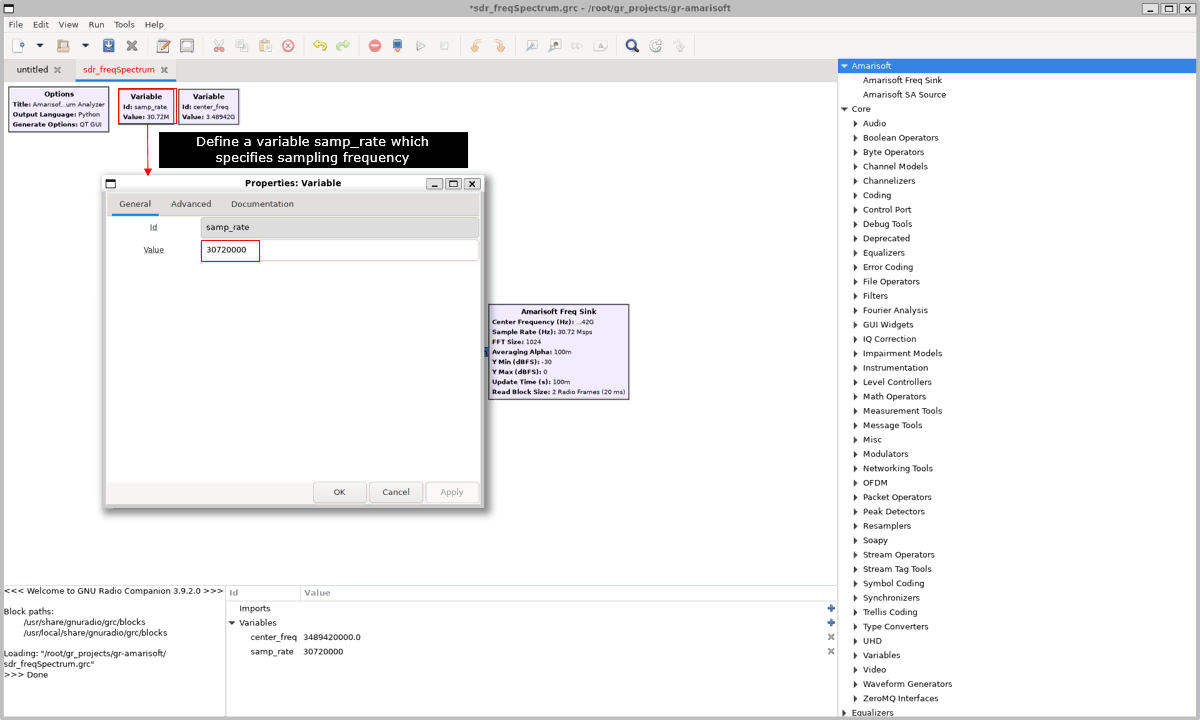
In this step a variable named 'samp_rate' is created in the flowgraph. This variable defines the sampling frequency used by the SDR source and other blocks in the signal processing chain. The value is set to 30,720,000 samples per second, which corresponds to a 30.72 Msps sampling rate commonly used in LTE and many SDR applications.
Defining the sampling rate as a variable allows the same value to be reused by multiple blocks in the flowgraph. Instead of manually entering the sampling rate in each block, the blocks reference 'samp_rate'. This keeps the configuration consistent and makes it easier to change the sampling rate later by modifying a single variable.
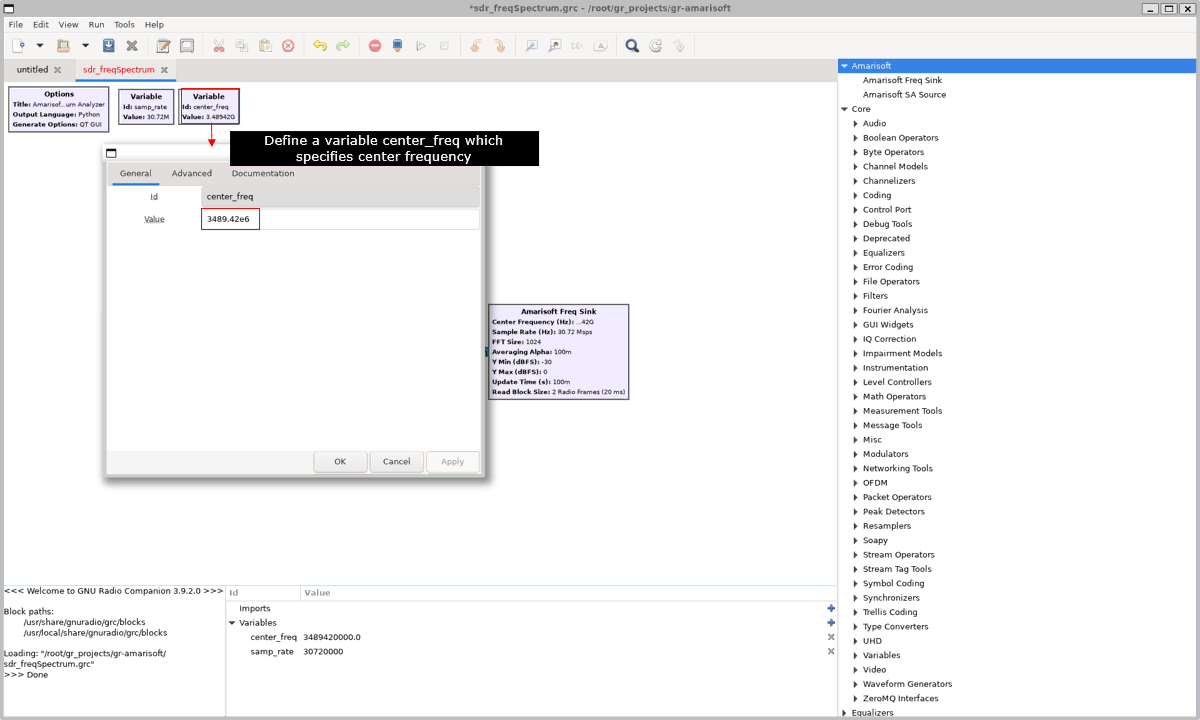
In this step a variable named center_freq is created in the flowgraph. This variable defines the center frequency that the SDR receiver will tune to. The value is set to 3489.426e6, which corresponds to 3.489426 GHz.
This frequency represents the middle of the radio spectrum that the SDR hardware will capture. The Amarisoft SA Source block uses this value to configure the RF tuner of the SDR device. All received IQ samples will therefore represent signals around this center frequency.
Defining the center frequency as a variable makes the flowgraph easier to manage. Multiple blocks can reference center_freq, and the tuning frequency can be changed simply by modifying this single variable instead of editing each block individually.
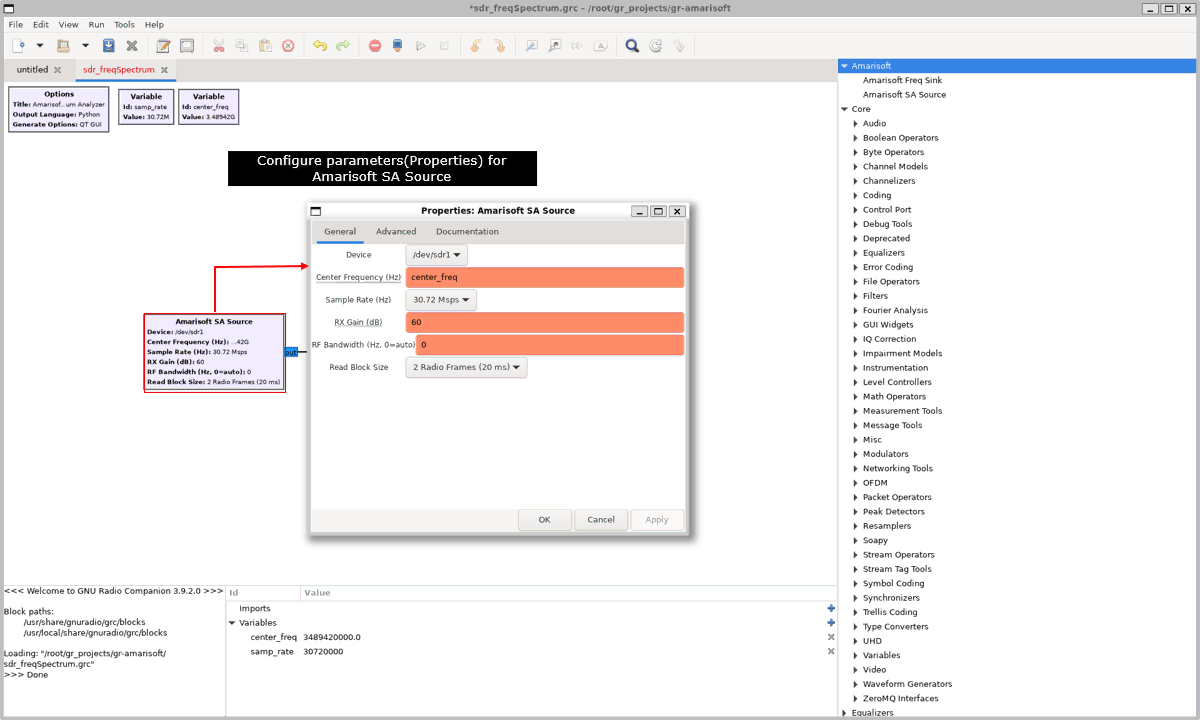
In this step the properties of the Amarisoft SA Source block are configured. This block is responsible for receiving IQ samples directly from the Amarisoft SDR device through the libsdr interface.
The Device parameter specifies the SDR hardware interface. In this example the device path is set to /dev/sdr1, which tells the block which SDR device to open.
The Center Frequency parameter determines the RF frequency that the receiver will tune to. The value is linked to the variable center_freq defined earlier, so the SDR hardware will capture signals around that frequency.
The Sample Rate parameter specifies how fast the SDR captures IQ samples. In this configuration the value is set to 30.72 Msps, which matches the samp_rate variable defined in the flowgraph.
The RX Gain parameter controls the receiver amplification applied to the incoming RF signal. Increasing this value amplifies weaker signals but may also increase noise or cause saturation if set too high.
The RF Bandwidth parameter controls the analog bandwidth of the SDR receiver. When the value is set to 0, the hardware automatically selects a bandwidth that matches the sampling rate.
The Read Block Size parameter determines how much data the SDR driver reads at a time from the hardware. In this example the value is set to 2 radio frames, which corresponds to approximately 20 milliseconds of IQ samples. This value affects buffering behavior and how frequently the GNU Radio processing pipeline receives new data.
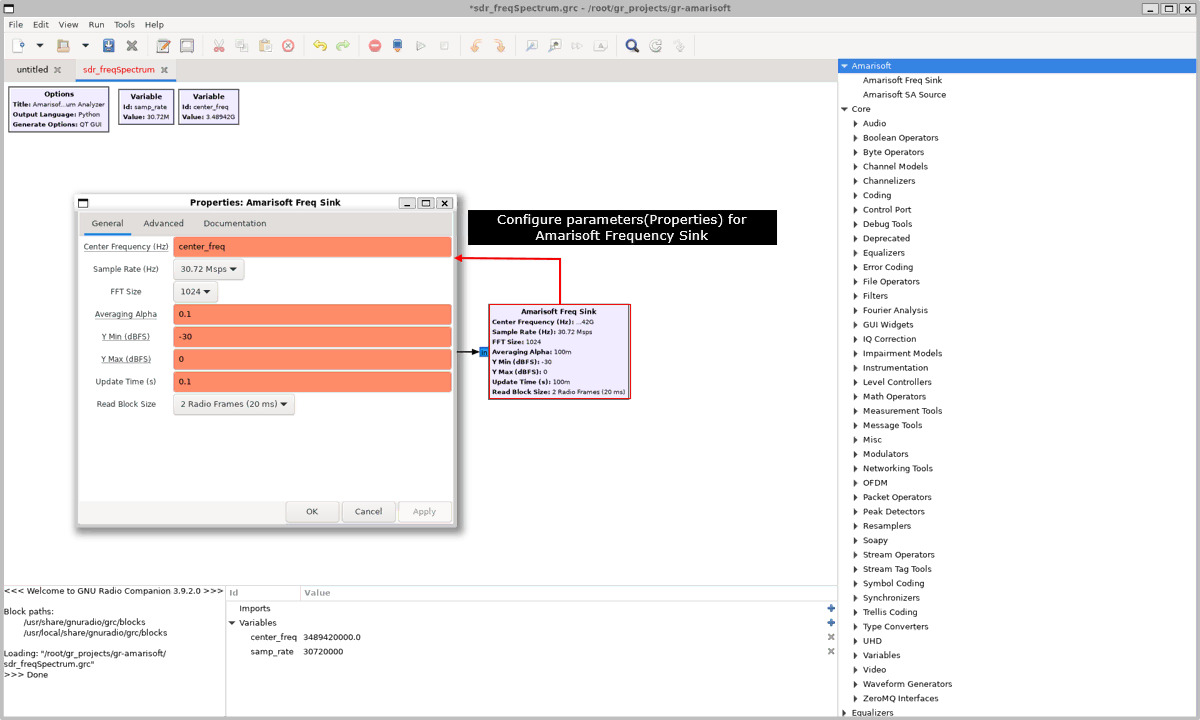
In this step the parameters of the Amarisoft Freq Sink block are configured. This block receives the IQ samples coming from the Amarisoft SA Source block and converts them into a frequency-domain spectrum display.
The Center Frequency parameter specifies the RF center frequency used for the spectrum display. The value is linked to the variable center_freq so the spectrum axis is aligned with the actual tuning frequency of the SDR receiver.
The Sample Rate parameter defines the sampling rate of the incoming IQ data. It is set to 30.72 Msps, which matches the sampling rate used by the source block. This ensures that the frequency axis of the FFT spectrum is calculated correctly.
The FFT Size parameter determines how many samples are used for each FFT calculation. In this example the size is set to 1024. A larger FFT size provides higher frequency resolution but requires more processing time.
The Averaging Alpha parameter controls the smoothing of the spectrum display. It defines the coefficient used for the IIR averaging filter applied across successive FFT frames. A smaller value produces a smoother but slower updating spectrum.
The Y Min and Y Max parameters define the vertical range of the spectrum display in dBFS. These values determine how the signal power levels are mapped to the display scale.
The Update Time parameter determines how frequently the spectrum plot is refreshed on the screen. This controls the responsiveness of the visualization.
The Read Block Size parameter specifies how many radio frames are processed at a time. In this example the value is set to two radio frames, which corresponds to approximately 20 milliseconds of samples. This parameter affects how frequently the sink receives new data chunks for FFT processing.
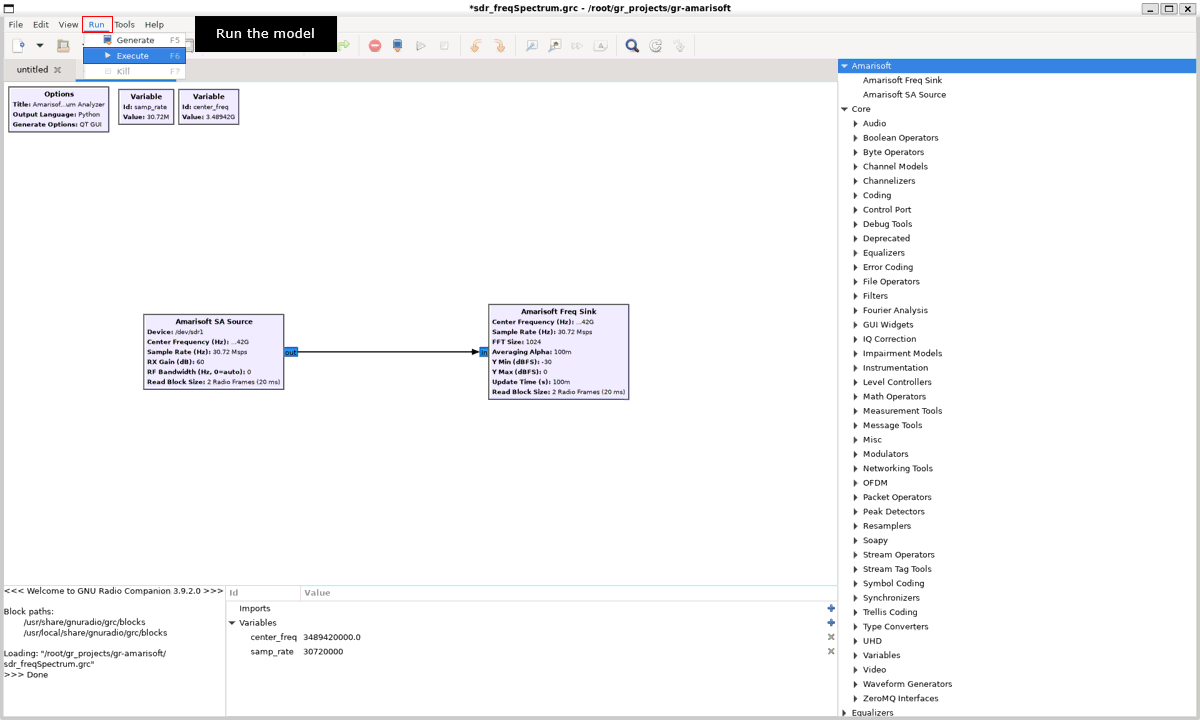
After configuring the blocks and connecting the source and sink, the flowgraph can be executed. In GNU Radio Companion this is done by selecting Run → Execute from the menu or pressing the Run button. When the model starts, GNU Radio generates the corresponding Python script from the flowgraph and launches the signal processing pipeline.
During execution, the Amarisoft SA Source block opens the SDR device and begins capturing IQ samples from the configured center frequency and sampling rate. The data stream is then passed to the Amarisoft Freq Sink block, which processes the incoming samples using FFT analysis and displays the spectrum in the GUI. If the configuration is correct and the SDR device is accessible, the spectrum window appears and updates continuously with the received radio signals.
After running the flowgraph, the Amarisoft SDR Spectrum Analyzer window appears and displays the frequency spectrum of the received signal. The Amarisoft SA Source block continuously captures IQ samples from the SDR device at the configured center frequency and sampling rate. These samples are streamed to the Amarisoft Freq Sink block, which processes the data to generate the spectrum display.
The sink block groups the incoming samples into FFT chunks of 1024 samples. For each chunk, the block applies a window function, computes the FFT, converts the result into power values, and shifts the spectrum so that the center frequency appears in the middle of the display. The block also performs averaging across multiple FFT results to stabilize the spectrum and reduce rapid fluctuations.
The spectrum shown in the window therefore represents the average power distribution of the received radio signal around the configured center frequency. The horizontal axis represents frequency and spans the bandwidth determined by the sampling rate, while the vertical axis represents signal power in dBFS. As new IQ samples arrive from the SDR device, the spectrum plot updates continuously to reflect the current RF environment.
GNU Radio Install
The most important thing to remember in terms of GNU is that you need to install GNU Radio development package because we need to implement and integrate our own block. There can be a system dependency as well (e.g, type of linux distribution, OS version etc). What I have tried in this tutorial is with Amarisoft Callbox PC on
Manual Installation
The first step is to run the following commands :
Step 1 - Install build dependencies
This step installs the basic development environment required for compiling software on Fedora. The command 'sudo dnf groupinstall "Development Tools"' instructs the Fedora package manager to install a predefined group of packages used for software development. This group includes essential tools such as 'gcc', 'g++', 'make', 'gdb', 'autoconf', and other build utilities. These tools are required when compiling programs from source code, which is the typical workflow when building GNU Radio modules or other custom software. After running this command, the system becomes ready to build C/C++ projects and compile libraries that depend on standard Linux development tools.
|
sudo dnf groupinstall "Development Tools" |
The next step installs GNU Radio and all the development libraries required to build and extend GNU Radio modules. The command uses 'dnf install' to install the GNU Radio runtime, its development headers, and the common dependencies needed for compiling custom blocks. These packages include compilers such as 'gcc' and 'g++', build tools like 'cmake' and 'make', Python development components ('python3-devel', 'python3-pip', 'numpy'), and several DSP-related libraries such as 'boost', 'gsl', 'fftw', 'volk', and 'mpir'. It also installs additional support libraries including 'cppunit' for testing, 'zeromq' for messaging, and the Qt5 development libraries required for GNU Radio Companion graphical components. The 'pybind11-devel' package is included to support Python bindings for C++ blocks. After this installation completes, the system contains everything necessary to compile GNU Radio out-of-tree modules and integrate custom Python or C++ DSP code.
|
sudo dnf install \ gnuradio gnuradio-devel \ cmake git gcc gcc-c++ make \ python3 python3-devel python3-pip \ boost-devel gsl-devel fftw-devel \ volk-devel mpir-devel cppunit-devel \ zeromq-devel log4cpp-devel \ qt5-qtbase-devel qwt-qt5-devel \ pybind11-devel numpy sudo dnf install gmp-devel python3-qt5 |
An out-of-tree module means a GNU Radio module that is developed outside the main GNU Radio source tree.
In practice, GNU Radio itself is the main framework. Your own block or library is kept in a separate project directory. You build it independently, and then GNU Radio loads it as an extension.
The idea is simple. Instead of modifying GNU Radio core files directly, you create your own module such as `gr-myproject`. Inside that module, you put your custom blocks, Python code, C++ code, YAML files, and build scripts. After building and installing it, your new block appears in GNU Radio Companion as if it were part of GNU Radio.
This approach is preferred because it keeps your custom code separate from the GNU Radio main codebase. That makes development easier, upgrades safer, and maintenance much cleaner. If GNU Radio is updated later, you usually do not need to re-edit GNU Radio itself. You only rebuild your own module against the new version.
So conceptually, it works like this. GNU Radio provides the engine. Your out-of-tree module plugs into that engine as an add-on.
Step 2 - Create directories and templates
The command shown below create the main directories required for the installation and build process. The command 'mkdir -p ~/gr_projects' creates the root workspace directory where GNU Radio out-of-tree projects will be stored. The command 'mkdir -p ~/gr_projects/gr-amarisoft' creates the specific project directory for the Amarisoft GNU Radio module. This is where the source tree will be copied and where the module will later be configured and built. The command 'sudo mkdir -p /usr/local/include/amarisoft_sdk' creates the system include directory used to store the Amarisoft SDR SDK header files such as 'libsdr.h'. These header files are required during compilation so that the GNU Radio module can call the Amarisoft SDR library correctly.
|
mkdir -p ~/gr_projects sudo mkdir -p /usr/local/lib64/amarisoft sudo mkdir -p /usr/local/include/amarisoft_sdk |
Now we are going to create template contents within gr-amarisoft directory using the following set of commands. This sequence creates a new GNU Radio out-of-tree module and adds a custom processing block.
First, the command moves to the working directory where GNU Radio modules are organized. This is just setting up the workspace.
Then gr_modtool newmod amarisoft creates a new module named amarisoft. This generates the full directory structure needed for development. It includes folders for source code, Python bindings, CMake files, and examples.
Next, cd gr-amarisoft moves into the newly created module directory so further modifications apply to this module.
Finally, gr_modtool add -t sync --lang cpp amarisoft_sa creates a new block inside the module. The type sync means the block has a fixed input-to-output ratio. The language cpp means the implementation will be in C++. The block name amarisoft_sa becomes the class and file name for the block.
As a result, you now have a ready-to-build GNU Radio module with a template C++ block where you can implement your own signal processing logic.
|
cd ~/gr_projects gr_modtool newmod amarisoft cd gr-amarisoft gr_modtool add -t sync --lang cpp amarisoft_sa |
This commands will lead you to a sequence of installation as shown below.
|
[root@CBU-SOPHIA-TEST ~]# cd ~/gr_projects gr_modtool newmod amarisoft cd gr-amarisoft gr_modtool add -t sync --lang cpp amarisoft_sa Creating out-of-tree module in ./gr-amarisoft... Done. Use 'gr_modtool add' to add a new block to this currently empty module. GNU Radio module name identified: amarisoft Language: C++ Block/code identifier: amarisoft_sa Please specify the copyright holder: amarisoft Enter valid argument list, including default arguments:
Add Python QA code? [Y/n] Y Add C++ QA code? [y/N] N Adding file 'lib/amarisoft_sa_impl.h'... Failed to run clang-format: %s [Errno 2] No such file or directory: 'clang-format' Adding file 'lib/amarisoft_sa_impl.cc'... Failed to run clang-format: %s [Errno 2] No such file or directory: 'clang-format' Adding file 'include/gnuradio/amarisoft/amarisoft_sa.h'... Failed to run clang-format: %s [Errno 2] No such file or directory: 'clang-format' Adding file 'python/amarisoft/bindings/docstrings/amarisoft_sa_pydoc_template.h'... Adding file 'python/amarisoft/bindings/amarisoft_sa_python.cc'... Adding file 'python/amarisoft/qa_amarisoft_sa.py'... Editing python/amarisoft/CMakeLists.txt... Adding file 'grc/amarisoft_amarisoft_sa.block.yml'... Editing grc/CMakeLists.txt... |
Once this is done, you will see a set of template contents are created under the gr-amarisoft as shown below. The directory now contains multiple subfolders and files that define the full development environment for the module.
The apps directory is used for executable test applications or utilities.
The cmake directory contains helper scripts for the build system. These are used by CMake to configure and compile the module.
The main CMakeLists.txt is the top-level build configuration file. It controls how the entire module is compiled and linked.
The docs directory is for documentation. You can place notes or API descriptions here.
The examples directory is for sample flowgraphs or usage examples. This helps verify the block behavior.
The grc directory contains XML/YAML definitions so the block can appear in GNU Radio Companion GUI.
The include directory holds public header files. These define the interface of your block.
The lib directory contains the actual C++ implementation of the block. This is where the signal processing logic is written.
The python directory provides Python bindings. This allows the block to be used in Python-based flowgraphs.
The MANIFEST.md lists files included in the module distribution.
So this structure means the module is fully scaffolded. You can now implement the algorithm in lib, expose interfaces in include, and test it through python or GRC.
|
[root@CBU-SOPHIA-TEST gr-amarisoft]# ll total 12 drwxr-xr-x 1 root root 28 Mar 23 14:40 apps drwxr-xr-x 1 root root 62 Mar 23 14:40 cmake -rw-r--r-- 1 root root 5558 Mar 27 03:32 CMakeLists.txt drwxr-xr-x 1 root root 74 Mar 27 03:32 docs drwxr-xr-x 1 root root 12 Mar 23 14:40 examples drwxr-xr-x 1 root root 92 Mar 27 03:39 grc drwxr-xr-x 1 root root 16 Mar 23 14:40 include drwxr-xr-x 1 root root 106 Mar 27 03:39 lib -rw-r--r-- 1 root root 729 Mar 27 03:32 MANIFEST.md drwxr-xr-x 1 root root 18 Mar 27 03:32 python |
Step 3 - Copy files from built-in locations to the GNU radio library directories
This step installs the Amarisoft SDR library and header files into standard system locations so that GNU Radio can find and link them.
First, the command copies the shared library file libsdr.so into /usr/local/lib64/amarisoft. This makes the compiled SDR driver available to the system linker.
Then, the command copies all header files from the kernel directory into /usr/local/include/amarisoft_sdk. These header files define the API functions and data structures that your GNU Radio block will use.
So the flow is simple. The library provides the actual implementation. The header files provide the interface definition. Both must be placed in standard paths so the compiler and linker can locate them.
|
cp /root/trx_sdr/libsdr.so /usr/local/lib64/amarisoft cp /root/trx_sdr/kernel/*.h /usr/local/include/amarisoft_sdk/ |
After this step, /usr/local/lib64/amarisoft contains the shared object file. This is what gets linked at runtime.
At the same time, /usr/local/include/amarisoft_sdk contains multiple header files such as sdr.h, libsdr.h, flags.h, and csr.h. These are included in your C++ code during compilation.
So this step connects your custom GNU Radio module to the Amarisoft SDR backend. Without this, your block cannot call msdr_read, msdr_write, or other SDR APIs.
|
[root@CBU-SOPHIA-TEST ~]# ll /usr/local/lib64/amarisoft/ total 600 -rwxr-xr-x 1 root root 612776 Mar 27 04:00 libsdr.so [root@CBU-SOPHIA-TEST ~]# ll /usr/local/include/amarisoft_sdk/ total 104 -rw-r--r-- 1 root root 60458 Mar 27 04:03 csr.h -rw-r--r-- 1 root root 10762 Mar 27 04:03 flags.h -rw-r--r-- 1 root root 19919 Mar 23 14:08 libsdr.h -rw-r--r-- 1 root root 10616 Mar 27 04:03 sdr.h |
Step 4 - Register shared libraries with the dynamic linker
This step tells the Linux dynamic linker where to search for shared libraries.
The first command writes /usr/local/lib64/amarisoft into a linker configuration file. This means the system will search this directory when an application needs Amarisoft-specific shared libraries such as libsdr.so.
The second command writes /usr/local/lib64 into another linker configuration file. This ensures the general local 64-bit library directory is also part of the linker search path.
Finally, sudo ldconfig refreshes the linker cache. This is the step that makes the new settings active. Without this, the library files may exist in the correct directory, but the system may still fail to locate them at runtime.
So the overall purpose is simple. You are registering the Amarisoft library path with the operating system. This allows your GNU Radio module or any other application to load the shared library automatically without manually setting LD_LIBRARY_PATH every time.
|
echo "/usr/local/lib64/amarisoft" | sudo tee /etc/ld.so.conf.d/amarisoft.conf echo "/usr/local/lib64" | sudo tee /etc/ld.so.conf.d/usr-local-lib64.conf sudo ldconfig |
Then verifies that the system dynamic linker can successfully locate the SDR shared library.
The command ldconfig -p prints the list of all shared libraries currently registered in the linker cache. The output is then filtered with grep libsdr to show only entries related to the SDR library.
The result shows two locations where libsdr.so is available. One is the original file under /root/trx_sdr/libsdr.so. The other is the installed copy under /usr/local/lib64/amarisoft/libsdr.so.
The important point is that the library under /usr/local/lib64/amarisoft appears in the linker cache. This confirms that the configuration in /etc/ld.so.conf.d and the ldconfig update worked correctly.
At this stage the system linker knows where the Amarisoft SDR library is located. Any program compiled against libsdr.so can now load it automatically at runtime without specifying a manual library path.
|
[root@CBU-SOPHIA-TEST ~]# ldconfig -p | grep libsdr libsdr.so (libc6,x86-64) => /root/trx_sdr/libsdr.so libsdr.so (libc6,x86-64) => /usr/local/lib64/amarisoft/libsdr.so |
Step 5 - Build
The commands shown below build and install the 'gr-amarisoft' GNU Radio out-of-tree module with the additional path information required for the Amarisoft SDR library. The command 'cd /root/gr_projects/gr-amarisoft' moves into the root directory of the OOT module. 'mkdir -p build && cd build' creates the build directory if it does not already exist and then enters it. 'cmake .. -DSDR_SAG_ROOT=/usr/local/lib64 -DLIBSDR_HDR=/usr/local/include/amarisoft_sdk/libsdr.h' generates the build files from the parent 'CMakeLists.txt' and also tells CMake where to find the external Amarisoft SDR library directory and the 'libsdr.h' header file. 'make -j$(nproc)' compiles the module using all available CPU cores. 'sudo make install' installs the compiled module into the system so GNU Radio can use it. 'sudo ldconfig' updates the shared library cache so that the newly installed libraries and linked dependencies can be found correctly at runtime.
|
cd /root/gr_projects/gr-amarisoft mkdir -p build && cd build cmake .. -DSDR_SAG_ROOT=/usr/local/lib64 -DLIBSDR_HDR=/usr/local/include/amarisoft_sdk/libsdr.h make -j$(nproc) sudo make install sudo ldconfig |
You would have build as shown below (in this specific example, there are some warnings but you can ignore it as for now). The GNU Radio out-of-tree module was configured, built, and installed successfully. The log shows that CMake found the main compiler, Python, Boost, Volk, and pybind11 dependencies, then generated the build files and compiled the amarisoft module into a shared library and Python binding. The warnings shown are mostly template-level or development warnings, so they do not block the build in this stage. In the end, the module library, header files, Python package, and GRC block definition were all installed into /usr/local, which means the basic amarisoft GNU Radio module scaffold is now ready for further implementation.
|
-- The CXX compiler identification is GNU 13.3.1 -- The C compiler identification is GNU 13.3.1 -- Detecting CXX compiler ABI info -- Detecting CXX compiler ABI info - done -- Check for working CXX compiler: /usr/bin/c++ - skipped -- Detecting CXX compile features -- Detecting CXX compile features - done -- Detecting C compiler ABI info -- Detecting C compiler ABI info - done -- Check for working C compiler: /usr/bin/cc - skipped -- Detecting C compile features -- Detecting C compile features - done -- Performing Test CMAKE_HAVE_LIBC_PTHREAD -- Performing Test CMAKE_HAVE_LIBC_PTHREAD - Success -- Found Threads: TRUE -- Found PkgConfig: /usr/bin/pkg-config (found version "1.9.5") -- Checking for module 'gmp' -- Found gmp, version 6.2.1 -- Found GMP: /usr/lib64/libgmpxx.so -- Using GMP. -- Found MPLIB: /usr/lib64/libgmpxx.so CMake Warning (dev) at /usr/share/cmake/Modules/CMakeFindDependencyMacro.cmake:76 (find_package): Policy CMP0167 is not set: The FindBoost module is removed. Run "cmake --help-policy CMP0167" for policy details. Use the cmake_policy command to set the policy and suppress this warning.
Call Stack (most recent call first): /usr/lib64/cmake/gnuradio/GnuradioConfig.cmake:28 (find_dependency) CMakeLists.txt:30 (find_package) This warning is for project developers. Use -Wno-dev to suppress it.
-- Found Boost: /usr/lib64/cmake/Boost-1.81.0/BoostConfig.cmake (found suitable version "1.81.0", minimum required is "1.81.0") found components: date_time program_options system regex thread unit_test_framework -- Found Volk: Volk::volk -- User set python executable /usr/bin/python3 CMake Warning (dev) at /usr/lib64/cmake/gnuradio/GrPython.cmake:21 (find_package): Policy CMP0148 is not set: The FindPythonInterp and FindPythonLibs modules are removed. Run "cmake --help-policy CMP0148" for policy details. Use the cmake_policy command to set the policy and suppress this warning.
Call Stack (most recent call first): /usr/lib64/cmake/gnuradio/GnuradioConfig.cmake:37 (include) CMakeLists.txt:30 (find_package) This warning is for project developers. Use -Wno-dev to suppress it.
-- Found PythonInterp: /usr/bin/python3 (found version "3.12") CMake Warning (dev) at /usr/lib64/cmake/gnuradio/GrPython.cmake:27 (find_package): Policy CMP0148 is not set: The FindPythonInterp and FindPythonLibs modules are removed. Run "cmake --help-policy CMP0148" for policy details. Use the cmake_policy command to set the policy and suppress this warning.
Call Stack (most recent call first): /usr/lib64/cmake/gnuradio/GnuradioConfig.cmake:37 (include) CMakeLists.txt:30 (find_package) This warning is for project developers. Use -Wno-dev to suppress it.
-- Found PythonLibs: /usr/lib64/libpython3.12.so (found suitable exact version "3.12.0") -- Performing Test HAVE_VISIBILITY_HIDDEN -- Performing Test HAVE_VISIBILITY_HIDDEN - Success -- Performing Test HAVE_WARN_SIGN_COMPARE -- Performing Test HAVE_WARN_SIGN_COMPARE - Success -- Performing Test HAVE_WARN_ALL -- Performing Test HAVE_WARN_ALL - Success -- Performing Test HAVE_WARN_NO_UNINITIALIZED -- Performing Test HAVE_WARN_NO_UNINITIALIZED - Success -- Found Git: /usr/bin/git -- Could NOT find Doxygen (missing: DOXYGEN_EXECUTABLE) -- Using install prefix: /usr/local -- Building for version: 1.0.0.0 / 1.0.0 -- No C++ unit tests... skipping <string>:3: SyntaxWarning: invalid escape sequence '\W' -- Could NOT find Doxygen (missing: DOXYGEN_EXECUTABLE) -- PYTHON and GRC components are enabled -- Python checking for pygccxml - not found CMake Warning (dev) at /usr/share/cmake/pybind11/FindPythonLibsNew.cmake:98 (find_package): Policy CMP0148 is not set: The FindPythonInterp and FindPythonLibs modules are removed. Run "cmake --help-policy CMP0148" for policy details. Use the cmake_policy command to set the policy and suppress this warning.
Call Stack (most recent call first): /usr/share/cmake/pybind11/pybind11Tools.cmake:50 (find_package) /usr/share/cmake/pybind11/pybind11Common.cmake:188 (include) /usr/share/cmake/pybind11/pybind11Config.cmake:250 (include) /usr/lib64/cmake/gnuradio/GrPybind.cmake:3 (find_package) python/amarisoft/bindings/CMakeLists.txt:25 (include) This warning is for project developers. Use -Wno-dev to suppress it.
-- Found PythonInterp: /usr/bin/python3 -- Found PythonLibs: /usr/lib64/libpython3.12.so -- Performing Test HAS_FLTO -- Performing Test HAS_FLTO - Success -- Found pybind11: /usr/include (found version "2.11.1") <string>:3: SyntaxWarning: invalid escape sequence '\W' -- Configuring done (1.2s) -- Generating done (0.0s) CMake Warning: Manually-specified variables were not used by the project:
LIBSDR_HDR SDR_SAG_ROOT
-- Build files have been written to: /root/gr_projects/gr-amarisoft/build [ 12%] Building CXX object lib/CMakeFiles/gnuradio-amarisoft.dir/amarisoft_sa_impl.cc.o [ 25%] Generating __init__.pyc [ 37%] Generating __init__.pyo [ 37%] Built target pygen_apps_9a6dd283c3de653fbca500f9721f634f [ 50%] Copying amarisoft docstring templates as pybind headers ... [ 50%] Built target copy_module_for_tests [ 50%] Built target pygen_python_amarisoft_26dca8907b011ee407f3f1f7fcad2ccc [ 50%] Built target amarisoft_docstrings /root/gr_projects/gr-amarisoft/lib/amarisoft_sa_impl.cc:14:78: note: ‘#pragma message: set the following appropriately and remove this warning’ 14 | #pragma message("set the following appropriately and remove this warning") | ^ /root/gr_projects/gr-amarisoft/lib/amarisoft_sa_impl.cc:16:78: note: ‘#pragma message: set the following appropriately and remove this warning’ 16 | #pragma message("set the following appropriately and remove this warning") | ^ /root/gr_projects/gr-amarisoft/lib/amarisoft_sa_impl.cc: In member function ‘virtual int gr::amarisoft::amarisoft_sa_impl::work(int, gr_vector_const_void_star&, gr_vector_void_star&)’: /root/gr_projects/gr-amarisoft/lib/amarisoft_sa_impl.cc:50:94: note: ‘#pragma message: Implement the signal processing in your block and remove this warning’ 50 | #pragma message("Implement the signal processing in your block and remove this warning") | ^ /root/gr_projects/gr-amarisoft/lib/amarisoft_sa_impl.cc:47:12: warning: unused variable ‘in’ [-Wunused-variable] 47 | auto in = static_cast<const input_type*>(input_items[0]); | ^~ /root/gr_projects/gr-amarisoft/lib/amarisoft_sa_impl.cc:48:12: warning: unused variable ‘out’ [-Wunused-variable] 48 | auto out = static_cast<output_type*>(output_items[0]); | ^~~ [ 62%] Linking CXX shared library libgnuradio-amarisoft.so [ 62%] Built target gnuradio-amarisoft [ 75%] Building CXX object python/amarisoft/bindings/CMakeFiles/amarisoft_python.dir/amarisoft_sa_python.cc.o [ 87%] Building CXX object python/amarisoft/bindings/CMakeFiles/amarisoft_python.dir/python_bindings.cc.o [100%] Linking CXX shared module amarisoft_python.cpython-312-x86_64-linux-gnu.so [100%] Built target amarisoft_python [ 25%] Built target gnuradio-amarisoft [ 25%] Built target pygen_apps_9a6dd283c3de653fbca500f9721f634f [ 50%] Built target pygen_python_amarisoft_26dca8907b011ee407f3f1f7fcad2ccc [ 50%] Built target copy_module_for_tests [ 62%] Built target amarisoft_docstrings [100%] Built target amarisoft_python Install the project... -- Install configuration: "Release" -- Installing: /usr/local/lib64/cmake/gnuradio-amarisoft/gnuradio-amarisoftConfig.cmake -- Installing: /usr/local/include/gnuradio/amarisoft/api.h -- Installing: /usr/local/include/gnuradio/amarisoft/amarisoft_sa.h -- Installing: /usr/local/lib64/libgnuradio-amarisoft.so.1.0.0.0 -- Installing: /usr/local/lib64/libgnuradio-amarisoft.so.1.0.0 -- Installing: /usr/local/lib64/libgnuradio-amarisoft.so -- Installing: /usr/local/lib64/cmake/gnuradio-amarisoft/gnuradio-amarisoftTargets.cmake -- Installing: /usr/local/lib64/cmake/gnuradio-amarisoft/gnuradio-amarisoftTargets-release.cmake -- Installing: /usr/local/lib64/cmake/gnuradio-amarisoft/gnuradio-amarisoftConfig.cmake -- Installing: /usr/local/lib64/python3.12/site-packages/gnuradio/amarisoft/__init__.py -- Installing: /usr/local/lib64/python3.12/site-packages/gnuradio/amarisoft/__init__.pyc -- Installing: /usr/local/lib64/python3.12/site-packages/gnuradio/amarisoft/__init__.pyo -- Installing: /usr/local/lib64/python3.12/site-packages/gnuradio/amarisoft/amarisoft_python.cpython-312-x86_64-linux-gnu.so -- Set non-toolchain portion of runtime path of "/usr/local/lib64/python3.12/site-packages/gnuradio/amarisoft/amarisoft_python.cpython-312-x86_64-linux-gnu.so" to "" -- Installing: /usr/local/share/gnuradio/grc/blocks/amarisoft_amarisoft_sa.block.yml |
Writes the following files automatically. This step installs the built GNU Radio module into the system.
The command sudo make install copies all compiled outputs to standard system directories. This includes the shared library into /usr/local/lib64, header files into /usr/local/include, Python bindings into the Python site-packages path, and GRC block definitions into the GNU Radio Companion directories.
So instead of manually placing each file, this command automatically deploys everything to the correct locations.
As a result, the amarisoft module becomes available system-wide. GNU Radio and Python can now import and use the module directly.
|
sudo make install |
You should get the result as follows. This output shows that the amarisoft GNU Radio module was built again during installation and then copied into the system directories.
The first few lines show the build progress. It compiles the main library, helper Python-generated files, test copy module, documentation strings, and the Python binding module.
Then the message Install the project starts the actual deployment stage.
The line Install configuration: "Release" means the module is being installed using the release build settings.
The Installing and Up-to-date messages show where each file is placed. The CMake config files go into /usr/local/lib64/cmake/gnuradio-amarisoft. The public headers go into /usr/local/include/gnuradio/amarisoft. The shared library files libgnuradio-amarisoft.so are installed into /usr/local/lib64. The Python package files are installed into the Python 3.12 site-packages directory. The GRC block definition file is installed into /usr/local/share/gnuradio/grc/blocks.
The Up-to-date message means those files were already present and did not need to be copied again. The Installing message means the file was newly written or updated.
So this result confirms that the module is not only compiled successfully, but also registered into the standard GNU Radio library, Python, and GRC paths. This makes the amarisoft block available for C++ linking, Python import, and GNU Radio Companion use.
|
[root@CBU-SOPHIA-TEST build]# sudo make install [ 25%] Built target gnuradio-amarisoft [ 25%] Built target pygen_apps_9a6dd283c3de653fbca500f9721f634f [ 50%] Built target pygen_python_amarisoft_26dca8907b011ee407f3f1f7fcad2ccc [ 50%] Built target copy_module_for_tests [ 62%] Built target amarisoft_docstrings [100%] Built target amarisoft_python Install the project... -- Install configuration: "Release" -- Installing: /usr/local/lib64/cmake/gnuradio-amarisoft/gnuradio-amarisoftConfig.cmake -- Up-to-date: /usr/local/include/gnuradio/amarisoft/api.h -- Up-to-date: /usr/local/include/gnuradio/amarisoft/amarisoft_sa.h -- Up-to-date: /usr/local/lib64/libgnuradio-amarisoft.so.1.0.0.0 -- Up-to-date: /usr/local/lib64/libgnuradio-amarisoft.so.1.0.0 -- Up-to-date: /usr/local/lib64/libgnuradio-amarisoft.so -- Up-to-date: /usr/local/lib64/cmake/gnuradio-amarisoft/gnuradio-amarisoftTargets.cmake -- Up-to-date: /usr/local/lib64/cmake/gnuradio-amarisoft/gnuradio-amarisoftTargets-release.cmake -- Installing: /usr/local/lib64/cmake/gnuradio-amarisoft/gnuradio-amarisoftConfig.cmake -- Up-to-date: /usr/local/lib64/python3.12/site-packages/gnuradio/amarisoft/__init__.py -- Up-to-date: /usr/local/lib64/python3.12/site-packages/gnuradio/amarisoft/__init__.pyc -- Up-to-date: /usr/local/lib64/python3.12/site-packages/gnuradio/amarisoft/__init__.pyo -- Up-to-date: /usr/local/lib64/python3.12/site-packages/gnuradio/amarisoft/amarisoft_python.cpython-312-x86_64-linux-gnu.so -- Up-to-date: /usr/local/share/gnuradio/grc/blocks/amarisoft_amarisoft_sa.block.yml |
Step 6 - Create Python Symlink
Since different system would have different python version, run the commands as shown below rather than hard coded symbolic link. This step creates a Python symbolic link so the amarisoft module can be found correctly by Python regardless of version differences.
First, the script automatically finds the source directory where the module was installed. This avoids hardcoding paths like python3.9 or python3.12.
Then, it calculates the correct destination path using Python’s sysconfig. This ensures the link points to the active Python environment’s site-packages location.
Next, it creates the destination directory if it does not exist.
Finally, it creates a symbolic link from the installed module location to the Python public library path.
So the purpose is simple. It bridges any mismatch between where GNU Radio installed the module and where Python expects to find it. This ensures import gnuradio.amarisoft works reliably across different systems and Python versions.
|
SRC=$(find /usr/local/lib64 /usr/local/lib -type d -path '*/site-packages/gnuradio/amarisoft' 2>/dev/null | head -1) DST=$(python3 -c 'import sysconfig; print(sysconfig.get_paths()["purelib"] + "/gnuradio/amarisoft")') echo "SRC=$SRC" echo "DST=$DST" sudo mkdir -p "$(dirname "$DST")" [ -L "$DST" ] || [ -e "$DST" ] || sudo ln -s "$SRC" "$DST" |
Step 7 - Verify
This step checks that the Amarisoft GNU Radio module is correctly installed and accessible.
The first command verifies that the SDR library libsdr.so is registered with the system dynamic linker. The second command checks that the GNU Radio module library libgnuradio-amarisoft.so is also visible to the linker. The third command confirms that the GNU Radio Companion block definition file exists in the GRC block directory. Finally, the Python command tries to import the amarisoft module from the gnuradio package. If this runs successfully and prints amarisoft OK, it confirms that the Python bindings are working and the module can be used in GNU Radio Python scripts.
So this step validates the entire integration chain. It confirms the shared library, the GNU Radio module, the GRC block definition, and the Python interface are all properly installed and accessible.
|
ldconfig -p | grep libsdr ldconfig -p | grep gnuradio-amarisoft ls /usr/local/share/gnuradio/grc/blocks/amarisoft_* python3 -c "from gnuradio import amarisoft; print('amarisoft OK')" |
You are expected to see the result as shown below. This result confirms that the Amarisoft SDR library and the GNU Radio module are correctly installed and recognized by the system.
The ldconfig output shows that libsdr.so and libgnuradio-amarisoft.so are registered in the dynamic linker cache. This means applications can load these shared libraries automatically at runtime.
The directory listing confirms that the GNU Radio Companion block definition files are installed in the GRC blocks directory. This allows the Amarisoft blocks to appear in the GNU Radio Companion graphical interface.
Finally, the Python test successfully imports the amarisoft module from the gnuradio package and prints amarisoft OK. This verifies that the Python bindings are working properly.
Together, these results indicate that the Amarisoft GNU Radio module is fully integrated with the system, including the shared library, GNU Radio runtime, GRC interface, and Python environment.
|
libsdr.so (libc6,x86-64) => /root/trx_sdr/libsdr.so libsdr.so (libc6,x86-64) => /usr/local/lib64/amarisoft/libsdr.so libgnuradio-amarisoft.so.1.0.0 (libc6,x86-64) => /usr/local/lib64/libgnuradio-amarisoft.so.1.0.0 libgnuradio-amarisoft.so (libc6,x86-64) => /usr/local/lib64/libgnuradio-amarisoft.so /usr/local/share/gnuradio/grc/blocks/amarisoft_amarisoft_freq_sink.block.yml /usr/local/share/gnuradio/grc/blocks/amarisoft_amarisoft_sa.block.yml amarisoft OK |
Step 8 - Implement Proper Amarisoft Block and Rebuild
Up to Step 7, the build process only generates a skeleton GNU Radio module. This dummy block allows the module to compile and appear in GNU Radio Companion, but it does not contain the real Amarisoft SDR processing logic. Because of this, when you launch 'gnuradio-companion', the Amarisoft block group may appear in the GUI, but the blocks themselves may produce command-line errors or behave as empty placeholders.
To make the module functional, the actual Amarisoft block implementation must be added. This means replacing the template source code with real code that interfaces with the Amarisoft SDR API (such as calls to the 'libsdr' functions). Once the real implementation is added, the project must be rebuilt so the compiled module contains the proper signal processing logic.
Since implementing the full Amarisoft block is beyond the scope of the tutorial, I suggest downloading a pre-implemented version of the project here and extracting it over the existing 'gr-amarisoft' directory. After replacing the directory, the module should be rebuilt and reinstalled so GNU Radio uses the completed implementation.
Assuming you downloaded the tarball at /tmp directory, this is what you need to do first. This step replaces the existing gr-amarisoft source tree with the downloaded fully implemented version.
The first command removes the current gr-amarisoft directory. This is important because the existing directory may still contain only the template or partially modified files. Removing it avoids mixing old files with the new implementation.
The second command extracts the downloaded tarball from /tmp into /root/gr_projects. Since the tarball already contains the gr-amarisoft directory, the full project tree is recreated in the correct location.
So the purpose is simple. This step overwrites the dummy template project with the real Amarisoft block implementation source code. After this, you can rebuild the project so GNU Radio uses the completed block instead of the placeholder version.
|
rm -rf /root/gr_projects/gr-amarisoft tar -xzvf /tmp/gr-amarisoft.tar.gz -C /root/gr_projects |
Then you need to rebuild the prject as follows. This step rebuilds the project using the newly extracted fully implemented Amarisoft source code.
First, it moves into the gr-amarisoft directory and removes the old build directory. This ensures the previous template build results do not remain and interfere with the new build.
Then it creates a fresh build directory and enters it. This is the standard out-of-tree build method used by CMake projects.
Next, the cmake command configures the project. Here, SDR_SAG_ROOT points to the directory containing libsdr.so, and LIBSDR_HDR points directly to libsdr.h. This tells the build system exactly where to find the Amarisoft shared library and header file needed for compilation.
After configuration, make -j$(nproc) compiles the project using all available CPU cores.
Then sudo make install installs the rebuilt library, headers, Python bindings, and GRC block files into the system directories.
Finally, sudo ldconfig refreshes the dynamic linker cache so the installed shared libraries can be found at runtime.
So this step takes the downloaded real Amarisoft block implementation, compiles it against the Amarisoft SDK, installs it into GNU Radio, and makes it ready for actual use.
|
cd /root/gr_projects/gr-amarisoft rm -rf build mkdir build cd build
cmake /root/gr_projects/gr-amarisoft \ -DSDR_SAG_ROOT=/usr/local/lib64/amarisoft \ -DLIBSDR_HDR=/usr/local/include/amarisoft_sdk/libsdr.h
make -j$(nproc) sudo make install sudo ldconfig |
If everything goes smoothly, you will get the result as shown below
|
-- The CXX compiler identification is GNU 13.3.1 -- The C compiler identification is GNU 13.3.1 -- Detecting CXX compiler ABI info -- Detecting CXX compiler ABI info - done -- Check for working CXX compiler: /usr/bin/c++ - skipped -- Detecting CXX compile features -- Detecting CXX compile features - done -- Detecting C compiler ABI info -- Detecting C compiler ABI info - done -- Check for working C compiler: /usr/bin/cc - skipped -- Detecting C compile features -- Detecting C compile features - done -- Performing Test CMAKE_HAVE_LIBC_PTHREAD -- Performing Test CMAKE_HAVE_LIBC_PTHREAD - Success -- Found Threads: TRUE -- Found PkgConfig: /usr/bin/pkg-config (found version "1.9.5") -- Checking for module 'gmp' -- Found gmp, version 6.2.1 -- Found GMP: /usr/lib64/libgmpxx.so -- Using GMP. -- Found MPLIB: /usr/lib64/libgmpxx.so CMake Warning (dev) at /usr/share/cmake/Modules/CMakeFindDependencyMacro.cmake:76 (find_package): Policy CMP0167 is not set: The FindBoost module is removed. Run "cmake --help-policy CMP0167" for policy details. Use the cmake_policy command to set the policy and suppress this warning.
Call Stack (most recent call first): /usr/lib64/cmake/gnuradio/GnuradioConfig.cmake:28 (find_dependency) CMakeLists.txt:5 (find_package) This warning is for project developers. Use -Wno-dev to suppress it.
-- Found Boost: /usr/lib64/cmake/Boost-1.81.0/BoostConfig.cmake (found suitable version "1.81.0", minimum required is "1.81.0") found components: date_time program_options system regex thread unit_test_framework -- Found Volk: Volk::volk -- User set python executable /usr/bin/python3 CMake Warning (dev) at /usr/lib64/cmake/gnuradio/GrPython.cmake:21 (find_package): Policy CMP0148 is not set: The FindPythonInterp and FindPythonLibs modules are removed. Run "cmake --help-policy CMP0148" for policy details. Use the cmake_policy command to set the policy and suppress this warning.
Call Stack (most recent call first): /usr/lib64/cmake/gnuradio/GnuradioConfig.cmake:37 (include) CMakeLists.txt:5 (find_package) This warning is for project developers. Use -Wno-dev to suppress it.
-- Found PythonInterp: /usr/bin/python3 (found version "3.12") CMake Warning (dev) at /usr/lib64/cmake/gnuradio/GrPython.cmake:27 (find_package): Policy CMP0148 is not set: The FindPythonInterp and FindPythonLibs modules are removed. Run "cmake --help-policy CMP0148" for policy details. Use the cmake_policy command to set the policy and suppress this warning.
Call Stack (most recent call first): /usr/lib64/cmake/gnuradio/GnuradioConfig.cmake:37 (include) CMakeLists.txt:5 (find_package) This warning is for project developers. Use -Wno-dev to suppress it.
-- Found PythonLibs: /usr/lib64/libpython3.12.so (found suitable exact version "3.12.0") CMake Warning (dev) at CMakeLists.txt:6 (find_package): Policy CMP0167 is not set: The FindBoost module is removed. Run "cmake --help-policy CMP0167" for policy details. Use the cmake_policy command to set the policy and suppress this warning.
This warning is for project developers. Use -Wno-dev to suppress it.
-- Found Boost: /usr/lib64/cmake/Boost-1.81.0/BoostConfig.cmake (found version "1.81.0") CMake Warning (dev) at /usr/share/cmake/pybind11/FindPythonLibsNew.cmake:98 (find_package): Policy CMP0148 is not set: The FindPythonInterp and FindPythonLibs modules are removed. Run "cmake --help-policy CMP0148" for policy details. Use the cmake_policy command to set the policy and suppress this warning.
Call Stack (most recent call first): /usr/share/cmake/pybind11/pybind11Tools.cmake:50 (find_package) /usr/share/cmake/pybind11/pybind11Common.cmake:188 (include) /usr/share/cmake/pybind11/pybind11Config.cmake:250 (include) python/bindings/CMakeLists.txt:1 (find_package) This warning is for project developers. Use -Wno-dev to suppress it.
-- Found PythonInterp: /usr/bin/python3 (found suitable version "3.12", minimum required is "3.6") -- Found PythonLibs: /usr/lib64/libpython3.12.so -- Performing Test HAS_FLTO -- Performing Test HAS_FLTO - Success -- Found pybind11: /usr/include (found version "2.11.1") -- Configuring done (0.8s) -- Generating done (0.0s) -- Build files have been written to: /root/gr_projects/gr-amarisoft/build [ 14%] Building CXX object lib/CMakeFiles/gnuradio-amarisoft.dir/amarisoft_sa_impl.cc.o [ 28%] Building CXX object lib/CMakeFiles/gnuradio-amarisoft.dir/amarisoft_freq_sink_impl.cc.o [ 42%] Linking CXX shared library libgnuradio-amarisoft.so [ 42%] Built target gnuradio-amarisoft [ 57%] Building CXX object python/bindings/CMakeFiles/amarisoft_python.dir/python_bindings.cc.o [ 85%] Building CXX object python/bindings/CMakeFiles/amarisoft_python.dir/amarisoft_freq_sink_python.cc.o [ 85%] Building CXX object python/bindings/CMakeFiles/amarisoft_python.dir/amarisoft_sa_python.cc.o [100%] Linking CXX shared module amarisoft_python.cpython-312-x86_64-linux-gnu.so [100%] Built target amarisoft_python [ 42%] Built target gnuradio-amarisoft [100%] Built target amarisoft_python Install the project... -- Install configuration: "" -- Up-to-date: /usr/local/include/amarisoft/api.h -- Up-to-date: /usr/local/include/amarisoft/amarisoft_sa.h -- Up-to-date: /usr/local/include/amarisoft/amarisoft_freq_sink.h -- Installing: /usr/local/lib64/libgnuradio-amarisoft.so.1.0.0 -- Up-to-date: /usr/local/lib64/libgnuradio-amarisoft.so.1 -- Set non-toolchain portion of runtime path of "/usr/local/lib64/libgnuradio-amarisoft.so.1.0.0" to "" -- Installing: /usr/local/lib64/libgnuradio-amarisoft.so -- Installing: /usr/local/share/gnuradio/grc/blocks/amarisoft_amarisoft_sa.block.yml -- Up-to-date: /usr/local/share/gnuradio/grc/blocks/amarisoft_amarisoft_freq_sink.block.yml -- Installing: /usr/local/lib64/python3/site-packages/gnuradio/amarisoft/__init__.py -- Installing: /usr/local/lib64/python3/site-packages/gnuradio/amarisoft/amarisoft_python.cpython-312-x86_64-linux-gnu.so -- Set non-toolchain portion of runtime path of "/usr/local/lib64/python3/site-packages/gnuradio/amarisoft/amarisoft_python.cpython-312-x86_64-linux-gnu.so" to "" ldconfig: /usr/local/lib64/libgnuradio-amarisoft.so.1.0.0 is not a symbolic link |
If rebuild went OK, run GNURadio GUI. This step confirms that the Amarisoft GNU Radio module was installed correctly and is visible inside the GNU Radio Companion interface.
First, you start the GNU Radio GUI by running the command gnuradio-companion. When the program launches, the console prints the GNU Radio version and shows the block search paths. These paths include the standard GNU Radio block directory and the local directory where custom blocks are installed.
Since the Amarisoft module was installed into the local GNU Radio block directory, GNU Radio Companion automatically loads the block definitions during startup.
If everything is installed correctly, a new block group named Amarisoft appears in the block library panel of the GNU Radio GUI. Inside this group, you should see the blocks created by this project, such as Amarisoft SA Source and Amarisoft Freq Sink.
This confirms that the module was successfully compiled, installed, and registered with GNU Radio. The Amarisoft SDR blocks are now available for use in GNU Radio flowgraphs.
|
gnuradio-companion |
and you should see following console print and GNURadio GUI with proper Amarisoft Block
|
<<< Welcome to GNU Radio Companion 3.10.6.0 >>>
Block paths: /usr/share/gnuradio/grc/blocks /usr/local/share/gnuradio/grc/blocks |
Verification
The verification step checks whether the GNU Radio Amarisoft module and the related SDR library are correctly installed and usable.
The command ldconfig -p | grep -E "gnuradio-amarisoft|libsdr" checks the Linux shared library cache. This verifies that the system linker can locate the installed libraries such as the GNU Radio Amarisoft module or the Amarisoft SDR library. If the installation was successful, the command should display the paths of those libraries.
|
ldconfig -p | grep -E "gnuradio-amarisoft|libsdr" |
The command python3 -c "from gnuradio import amarisoft; print(amarisoft.amarisoft_sa)" verifies that the Python binding of the GNU Radio Amarisoft module can be imported correctly. If the module is installed properly, Python will load the module and print the block class object.
|
python3 -c "from gnuradio import amarisoft; print(amarisoft.amarisoft_sa)" |
The command python3 /root/gr_projects/gr-amarisoft/test_amarisoft.py --device /dev/sdr1 runs a small test script that directly accesses the SDR device through the Amarisoft interface. This confirms that the GNU Radio module can communicate with the SDR hardware and the driver library.
|
python3 /root/gr_projects/gr-amarisoft/test_amarisoft.py --device /dev/sdr1 |
The command python3 /root/gr_projects/gr-amarisoft/sdr_freqSpectrum.py runs a GNU Radio flowgraph implemented in Python. This verifies that the custom Amarisoft block works inside a real signal processing pipeline and that the SDR signal processing chain runs correctly.
|
python3 /root/gr_projects/gr-amarisoft/sdr_freqSpectrum.py |
Status Check of the Installation
This step verifies that all required tools and libraries were installed correctly after the GNU Radio environment setup. The commands check the versions of the main development tools such as GNU Radio, Python, pip, gcc, g++, cmake, and git. This confirms that the compiler toolchain and the core software components needed for building SDR applications are available and working properly.
The next part checks the versions of the supporting libraries using pkg-config. Libraries such as VOLK, FFTW3, GSL, Qt5Core, Qt5Qwt6, CppUnit, and ZeroMQ are commonly used by GNU Radio blocks and graphical interfaces. By querying pkg-config, the system confirms that the development headers and libraries are correctly installed and visible to the build system.
Finally, the script verifies the Python environment. It imports NumPy and the GNU Radio Python module to confirm that the Python bindings are correctly installed. This step ensures that GNU Radio blocks can be executed from Python scripts and that Python-based flowgraph development will work correctly.
The purpose of running this script is to perform a quick health check of the entire development environment. It helps confirm that the compiler, libraries, and Python modules are all installed and accessible before starting to build or run GNU Radio applications. This prevents build failures and debugging issues later by catching missing or misconfigured dependencies early.
|
echo "=== Main tools ===" echo -n "GNU Radio: "; gnuradio-config-info --version echo -n "Python: "; python3 --version echo -n "pip: "; pip3 --version echo -n "gcc: "; gcc --version | head -n 1 echo -n "g++: "; g++ --version | head -n 1 echo -n "cmake: "; cmake --version | head -n 1 echo -n "git: "; git --version
echo echo "=== Libraries via pkg-config ===" echo -n "VOLK: "; pkg-config --modversion volk echo -n "FFTW3: "; pkg-config --modversion fftw3 echo -n "GSL: "; pkg-config --modversion gsl echo -n "Qt5Core: "; pkg-config --modversion Qt5Core echo -n "Qt5Qwt6: "; pkg-config --modversion Qt5Qwt6 echo -n "CppUnit: "; pkg-config --modversion cppunit echo -n "ZeroMQ: "; pkg-config --modversion libzmq
echo echo "=== Python modules ===" python3 -c "import numpy; print('NumPy:', numpy.__version__)" python3 -c "from gnuradio import gr; print('GNU Radio Python module: OK')" |
Following is the result on my setup which confirmed working. Do I need only the specific versions for all the components shown here ?
In most cases, you do not need those exact versions.
What you need is a set of versions that are compatible with each other and compatible with the source code you plan to build. So the versions you showed are not special by themselves. They are just the versions currently installed on your Fedora system.
For this kind of setup, newer versions are usually fine as long as the following conditions are met.
GNU Radio version should match what your project expects. This is the most important one. A project written for GNU Radio 3.9 may need some changes to build on 3.10 or 3.11 because API names, CMake macros, block names, or Python module behavior can change.
Python version usually can be newer, but again it depends on the project. If the code was tested with Python 3.9, then Python 3.10 or 3.11 may still work, but some older scripts or dependencies may need adjustment.
gcc, g++, cmake, git, pip are generally fine if they are newer. These tools are usually backward compatible enough for normal builds.
Libraries like VOLK, FFTW3, GSL, Qt5, Qwt, CppUnit, and ZeroMQ do not usually need the exact versions you listed. Newer versions are often okay. The main concern is whether the build system can still find them and whether the API stayed compatible.
So the practical answer is this.
If you are following a tutorial or building a project that was tested on Fedora 34 with GNU Radio 3.9.x, then your current versions are a good match and are actually safer than jumping to much newer versions.
If you move to newer versions, it may still work, but you increase the chance of small build or API compatibility issues, especially around:
- GNU Radio major/minor version,
- Python major/minor version,
- Qt version,
- CMake behavior.
So for documentation, I would phrase it like this:
These version numbers are example versions from the validated test environment. Exact version match is not always required. Newer versions are generally acceptable, but GNU Radio, Python, and related libraries must remain mutually compatible with the source code being built.
If you want an even simpler wording:
- The exact versions shown here are not mandatory. They are the versions used in this test environment. Any equal or newer version may work, but compatibility depends mainly on the GNU Radio version and the project source code.
- For this specific result, the environment looks good and suitable for building a GNU Radio 3.9-based project.
A very important point is this:
- GNU Radio version matters much more than gcc or git version.
- So if someone asks whether they must use gcc 11.3.1 exactly, the answer is no.
- If they ask whether they must use GNU Radio 3.9.2.0 exactly, the answer is not exactly, but they should stay close unless they know the code also supports newer GNU Radio releases.
In conclusion,
- The exact version numbers are not strict requirements. They are the versions verified in this setup. In most cases, newer versions are acceptable. However, GNU Radio and Python versions should be chosen carefully because source code compatibility often depends on them.
- If a newer environment is used and build errors occur, the first item to check is the GNU Radio major/minor version mismatch.
|
=== Main tools === GNU Radio: 3.9.2.0 Python: Python 3.9.13 pip: pip 21.0.1 from /usr/lib/python3.9/site-packages/pip (python 3.9) gcc: gcc (GCC) 11.3.1 20220421 (Red Hat 11.3.1-2) g++: g++ (GCC) 11.3.1 20220421 (Red Hat 11.3.1-2) cmake: cmake version 3.20.5 git: git version 2.34.3
=== Libraries via pkg-config === VOLK: 2.5 FFTW3: 3.3.8 GSL: 2.6 Qt5Core: 5.15.2 Qt5Qwt6: 6.1.5 CppUnit: 1.15.1 ZeroMQ: 4.3.4
=== Python modules === NumPy: 1.20.1 GNU Radio Python module: OK |
Installation by Intallation Package
In this section, I will show you how to install the Amarisoft GNU Radio block using the installation package provided as a tarball. This installation package is prepared to simplify the deployment process on the target system. Instead of manually copying each source file, dependency file, and configuration file one by one, the package provides a structured installation flow.
The tarball contains the main installation shell script that copies the essential project files onto the target machine. These files typically include the GNU Radio out-of-tree module source tree, build scripts, Python bindings, GRC block definition files, and other supporting resources required for the Amarisoft integration. By running this script, the required files are placed into the correct working locations on the target system.
The package also includes an additional installation script for dependency setup. This script installs the software packages required to build and run the Amarisoft GNU Radio module, such as GNU Radio, Qt, development tools, compilers, Python development packages, and other supporting libraries. In other words, the package covers both parts of the setup process. One part installs the system-level prerequisites from package archives or repositories, and the other part deploys the actual Amarisoft GNU Radio project files.
So the purpose of this installation package is to make the setup reproducible and convenient. It prepares the target system with the required software environment and then installs the Amarisoft GNU Radio block files needed for building, installing, and running the custom SDR blocks.
Typical packages that may be downloaded include GNU Radio development libraries, compiler toolchains, Python development modules, Qt GUI libraries, Boost libraries, and other supporting packages required for building GNU Radio modules. These packages are usually obtained through the system package manager (for example, dnf on Fedora).
Because these components are not always preinstalled on the target machine, the installation script must access the online repositories to verify package availability and download any missing dependencies. Therefore, the system must have internet connectivity during the installation process to ensure that all required software components can be installed successfully.
This example shows the installation package located in the /tmp directory of the target system. The file gr-amarisoft-pack-20260323.tar.gz is the compressed installation archive that contains the Amarisoft GNU Radio integration package.
The tarball includes the source tree of the GNU Radio out-of-tree module, installation scripts, dependency installation scripts, and supporting configuration files required to build and run the Amarisoft blocks. By distributing the project in this archive format, the entire installation environment can be transferred to another system easily.

In this step the installation archive is extracted using the tar command. The command tar xzf gr-amarisoft-pack-20260323.tar.gz decompresses and unpacks the contents of the tarball into the current directory.
The option x tells tar to extract the files from the archive. The option z indicates that the archive is compressed with gzip. The option f specifies the filename of the archive to be processed.
After the command is executed, a new directory named gr-amarisoft-pack-20260323 appears in the current directory. This directory contains the installation scripts, source files, and configuration files required for installing the Amarisoft GNU Radio module.
At this point the package contents are available on the system, and the next step is typically to enter the extracted directory and run the provided installation scripts to set up the dependencies and build the GNU Radio blocks.

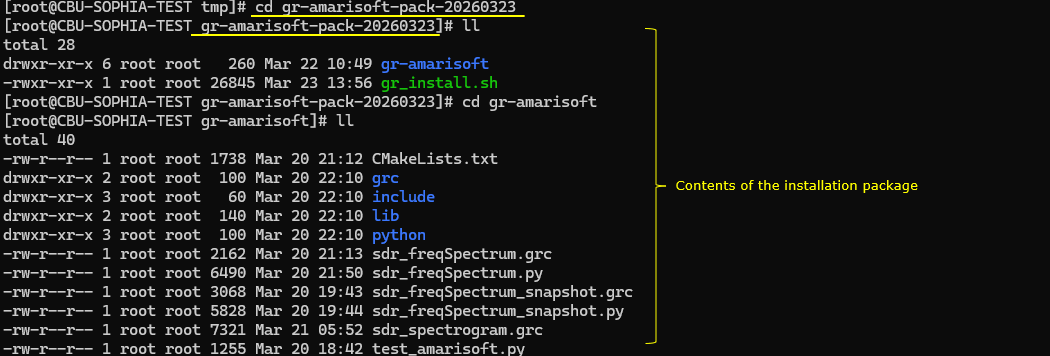
In this step the extracted installation directory is entered and the contents of the package are inspected. The command cd gr-amarisoft-pack-20260323 moves into the directory created when the tarball was extracted. Inside this directory two main items are visible. One is the gr-amarisoft directory that contains the GNU Radio out-of-tree module source code. The other is the gr-install.sh script, which is the installation script used to build and install the module on the system.
After entering the gr-amarisoft directory, the structure of the project becomes visible. This directory contains the full source tree of the GNU Radio module. The CMakeLists.txt file defines the build configuration for compiling the module. The grc directory contains the GNU Radio Companion block definition files that make the custom blocks appear in the GUI. The include directory contains the public header files that define the interfaces of the Amarisoft blocks. The lib directory contains the C++ implementation files that interact with the Amarisoft SDR library and process the IQ data. The python directory contains the Python bindings that expose the C++ blocks to Python and GNU Radio.
Additional files such as sdr_freqSpectrum.grc and sdr_spectrogram.grc are example flowgraphs that demonstrate how to use the Amarisoft blocks inside GNU Radio Companion. The corresponding Python scripts are generated versions of those flowgraphs that can also be executed directly. The test_amarisoft.py file is a simple test program used to verify that the SDR device and the Amarisoft source block are functioning correctly.
This directory structure represents the complete development and installation source tree for the Amarisoft GNU Radio module.
In this step the installation script is executed to start the automated installation process. The command `./gr_install.sh` runs the shell script included in the installation package.
This script performs the main setup tasks required to install the Amarisoft GNU Radio module on the target system. It typically installs the required development tools and dependencies, prepares the build environment, and copies the Amarisoft GNU Radio source tree to the appropriate working location. The script may also invoke the build process using CMake and make, and then install the compiled module into the system directories so that GNU Radio can discover and use the custom blocks.
Running this script simplifies the installation process because it eliminates the need to manually perform each setup step. Instead of installing dependencies, configuring paths, building the module, and copying files individually, the script automates these tasks to ensure the environment is configured correctly and consistently on the target machine.

This screen shows the initial step of the interactive installation process. When the installation script is executed, it first analyzes the system environment and displays the detected configuration settings. These settings include the source directory containing the Amarisoft GNU Radio module, the target installation directory where the project will be copied and built, the location of the SDR library root directory, and the path to the libsdr header file.
The installer also verifies basic system requirements such as the operating system version. In this example the script confirms that the system is running Fedora 39, which satisfies the minimum supported requirement.
At this stage the script asks the user to confirm whether the detected configuration should be used. The user can proceed with the default settings or override specific paths using command line options if the SDR library or installation directory is located elsewhere.
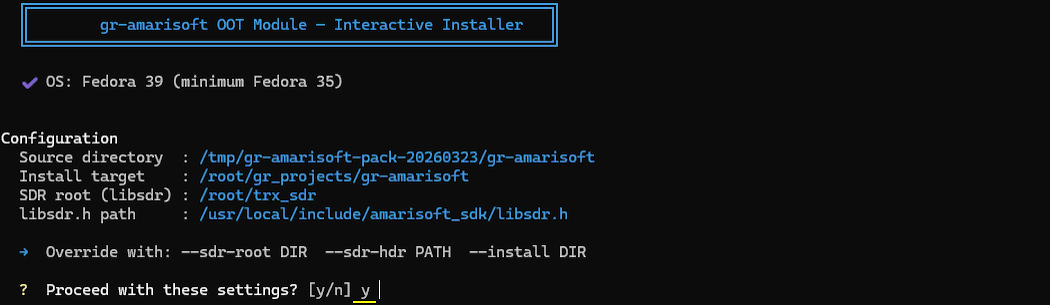
This step performs the prerequisite checks before the installation begins. The installation script verifies that the system environment satisfies the basic requirements needed to build and run the Amarisoft GNU Radio module.
First, the script checks whether it is being executed with root privileges. Root access is required because the installation process may install system packages, write files into system directories, and update the shared library cache.
Next, the script searches for the Amarisoft SDR library. It checks whether the file libsdr.so exists in the expected SDR root directory. This library provides the user-space API used by the GNU Radio blocks to communicate with the SDR hardware.
The script then verifies that the corresponding header file libsdr.h is present in the Amarisoft SDK include directory. This header defines the function prototypes and data structures required to compile the SDR interface code.
After confirming the SDR library and header, the installer checks that the source directory of the Amarisoft GNU Radio module exists and contains the expected project files.
Finally, the script verifies that GNU Radio is installed on the system and that the installed version meets the minimum required version. Once all required components are detected successfully, the prerequisite check is completed and the installation process proceeds to the next stage.
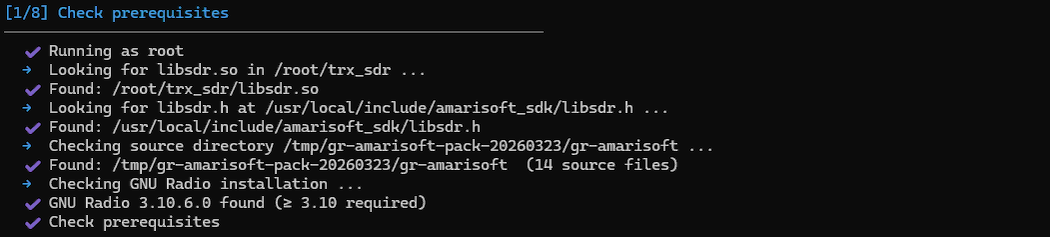
This step installs or verifies the system packages required to build and run the Amarisoft GNU Radio module. The installation script checks whether the necessary development tools, libraries, and build dependencies are already present on the system.
The script lists several packages that are required for the project. These include GNU Radio and its development package, Boost libraries, GMP development libraries, the libxml2 library, the CMake build system, the GCC C++ compiler, rsync for file synchronization, Python Qt bindings, Qt development libraries, and pybind11 for creating Python bindings to C++ code.
For each package, the script checks the system package manager to determine whether it is already installed. If the package is present, the script reports that it is already installed. If a package is missing, the installer would download and install it automatically.
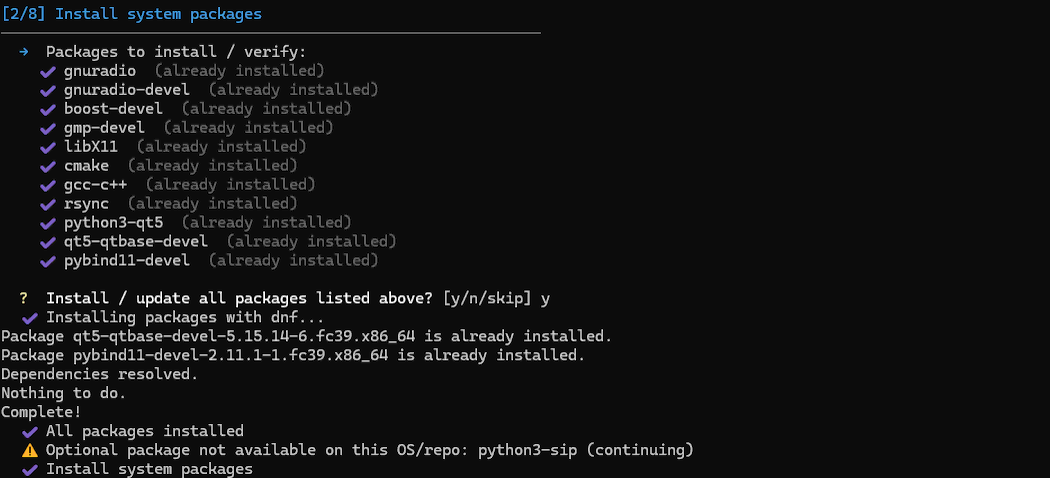
This step copies the Amarisoft GNU Radio module source tree into the working project directory. The installer moves the source files from the extracted installation package into the target development location, which in this example is /root/gr_projects/gr-amarisoft.
Before copying the files, the script checks whether the target directory already exists. In this case the directory is already present, so the installer displays a warning and informs the user that existing files will be overwritten. The build directory is preserved so that previously compiled files are not removed unnecessarily.
After the user confirms the operation, the installer copies the source files from the package directory into the target project directory. These files include the C++ implementation files, header files, Python bindings, GNU Radio Companion block definitions, and example flowgraphs. Once the copying process is complete, the project source tree in /root/gr_projects/gr-amarisoft is updated and ready for the next stage of the installation process.

This step configures the build environment for the Amarisoft GNU Radio module using CMake. The installer prepares the build directory and generates the build configuration files required for compilation.
First, the script identifies the build directory located at `/root/gr_projects/gr-amarisoft/build`. If an existing CMake cache or previous build configuration is detected, the installer asks whether the build directory should be cleaned and reconfigured. Cleaning the directory removes previous build artifacts to ensure that the configuration process starts from a clean state, which is recommended when the source code has changed.
After the old build directory is removed, the installer runs the CMake configuration command. During this process, CMake reads the `CMakeLists.txt` file from the source tree and prepares the compilation environment. The command also provides the locations of the Amarisoft SDR library and header file so that the module can link correctly with the `libsdr` API.
CMake then performs a series of checks to detect the system toolchain and required libraries. It identifies the C and C++ compilers, verifies compiler capabilities, and detects system components such as threads, Boost libraries, Python, GNU Radio dependencies, and pybind11 for Python bindings. Each dependency is verified so that the module can be compiled and linked correctly.
Once all checks are completed successfully, CMake generates the build files inside the build directory. These files are used by the make tool to compile the C++ implementation, build the Python bindings, and produce the shared library for the Amarisoft GNU Radio module. At the end of this step, the project is fully configured and ready for compilation.
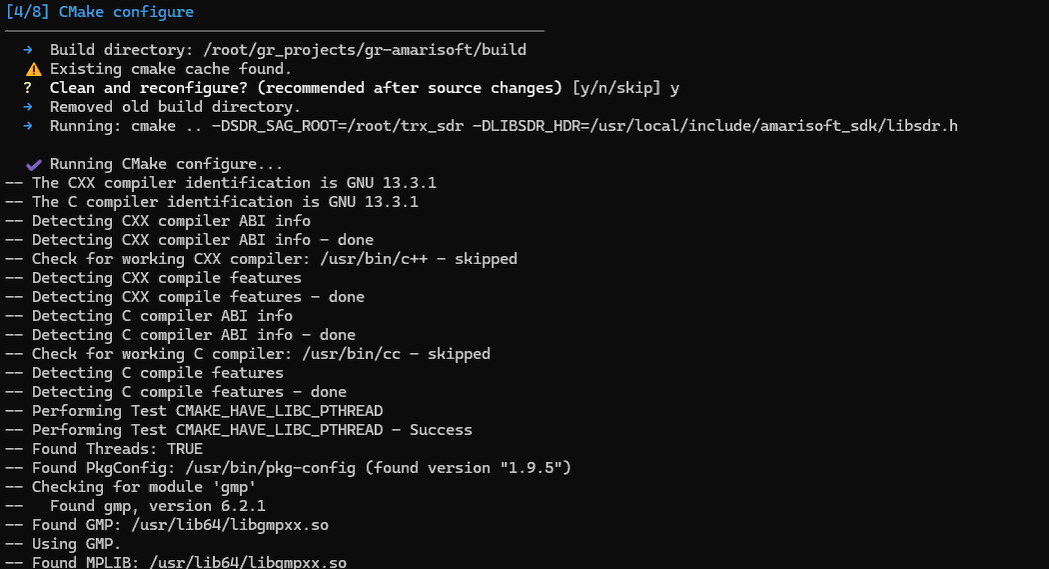
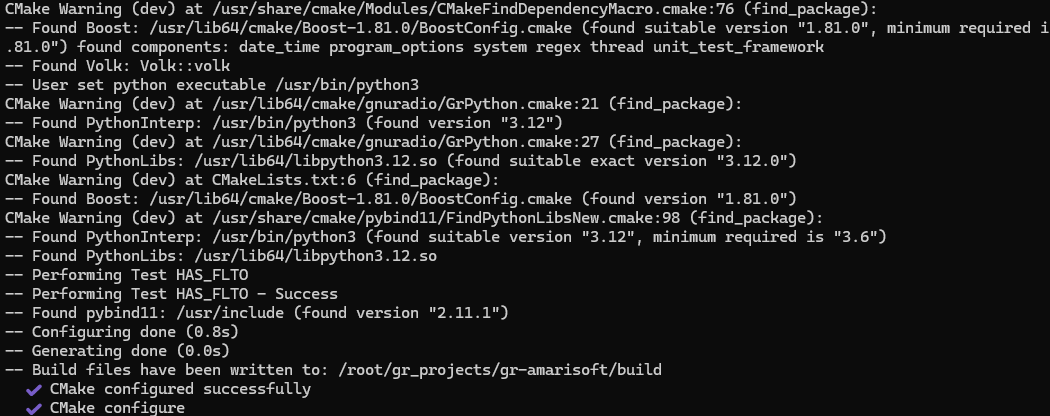
This step compiles the Amarisoft GNU Radio module using the build configuration generated by CMake in the previous stage.
The installer invokes the make command with the -j36 option, which enables parallel compilation using 36 CPU threads. This allows multiple source files to be compiled simultaneously, significantly reducing build time on multi-core systems.
During the build process, the C++ source files that implement the GNU Radio blocks are compiled. For example, files such as amarisoft_sa_impl.cc and amarisoft_freq_sink_impl.cc contain the core implementation of the Amarisoft Spectrum Analyzer source and frequency sink blocks. These files are compiled into object files and then linked together to produce the shared GNU Radio module library.
After compiling the C++ implementation, the build system compiles the Python binding components. These bindings allow the C++ blocks to be accessible from Python so that GNU Radio Companion (GRC) and Python scripts can instantiate and use the Amarisoft blocks. The binding code is compiled into a Python extension module.
At the end of the build step, several output artifacts are produced. The primary GNU Radio runtime library libgnuradio-amarisoft.so contains the compiled C++ block implementations. Versioned symbolic links for the library are also generated. In addition, the Python extension module amarisoft_python.cpython-312-x86_64-linux-gnu.so is created to expose the blocks to Python.
When this step completes successfully, it means the Amarisoft GNU Radio blocks have been compiled correctly and are ready for installation into the system. The next installation step will copy these compiled libraries and Python modules into the appropriate GNU Radio directories so they can be discovered and used by GNU Radio Companion and Python applications.
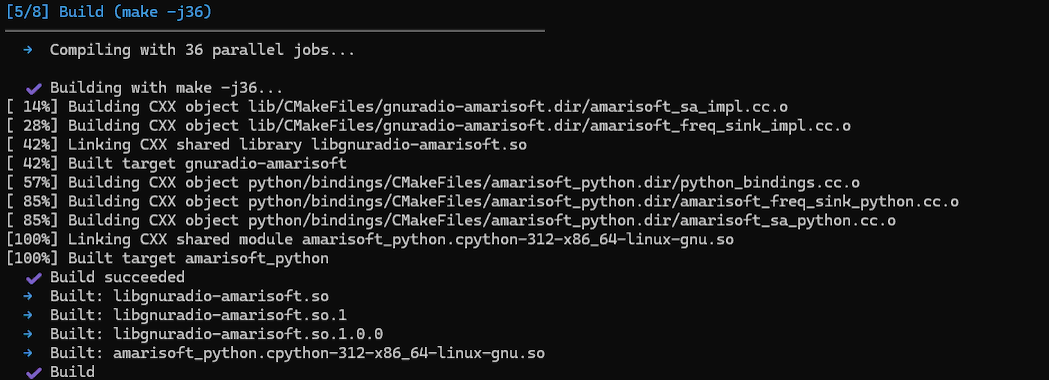
This step installs the compiled Amarisoft GNU Radio module into the system directories so that it can be used by GNU Radio applications and GNU Radio Companion.
The installer runs the make install command inside the build directory. This command copies the compiled files and supporting resources into standard system locations used by GNU Radio and the operating system.
First, the C++ header files are installed into /usr/local/include/amarisoft/. These headers define the public interfaces of the Amarisoft GNU Radio blocks and allow other C++ programs to reference the module if needed.
Next, the compiled shared library libgnuradio-amarisoft.so and its versioned links are installed into /usr/local/lib64/. This library contains the actual implementation of the Amarisoft GNU Radio blocks and is loaded at runtime by GNU Radio.
The GNU Radio Companion block definition files (*.block.yml) are installed into /usr/local/share/gnuradio/grc/blocks/. These YAML files describe the block parameters and graphical interface elements so that the Amarisoft blocks appear in the GNU Radio Companion block palette.
The Python components are then installed into the Python site-packages directory under /usr/local/lib64/python3/site-packages/gnuradio/amarisoft/. This includes the Python extension module that exposes the C++ blocks to Python as well as the package initialization file.
After this step completes, the Amarisoft GNU Radio blocks become fully integrated with the system. GNU Radio Companion can discover the blocks automatically, and Python scripts can import and use the Amarisoft module without additional configuration.
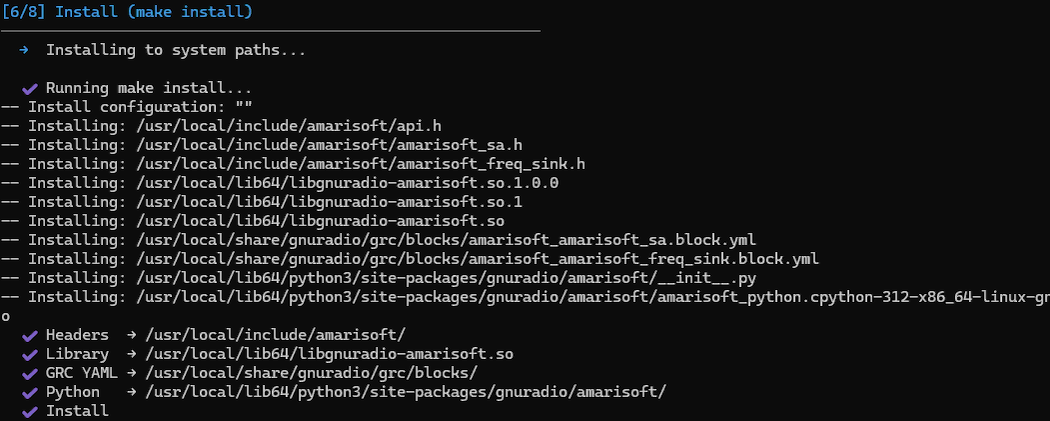
This step ensures that the Linux dynamic linker can locate the newly installed Amarisoft GNU Radio library at runtime.
When shared libraries are installed into directories such as /usr/local/lib64, the system loader must know that this directory should be searched when an application tries to load a shared library. If the directory is not listed in the system’s library configuration, programs will not be able to find the installed library even though it exists on disk.
The installer first checks the system configuration directory /etc/ld.so.conf.d/ to determine whether /usr/local/lib64 is already registered as a runtime library path. In this case, the directory was not present in the configuration, so the installer proposes creating a new configuration file.
When the user confirms the prompt, the installer creates the file /etc/ld.so.conf.d/usr-local-lib64.conf and adds /usr/local/lib64 to it. After updating the configuration, the installer runs the ldconfig command.
The ldconfig command scans all configured library directories, updates the system’s shared library cache, and registers any newly installed libraries. As a result, the Amarisoft GNU Radio library libgnuradio-amarisoft.so becomes visible to the runtime linker.
At the end of this step, the system confirms that the Amarisoft library has been successfully registered, showing the mapping between the library name and its physical location in /usr/local/lib64. This ensures that GNU Radio and other applications can load the Amarisoft module automatically during execution.

This final step verifies that the Amarisoft GNU Radio module can be correctly imported and used from Python. It also ensures that all runtime dependencies are properly configured.
The installer first detects the Python version used by the system and identifies the Python site-packages directory where GNU Radio Python modules are located. The Amarisoft Python module installed earlier must be accessible from this location so that Python can import it.
To ensure correct visibility, the installer creates a symbolic link inside the GNU Radio Python package directory that points to the installed Amarisoft module. This allows Python statements such as from gnuradio import amarisoft to locate the module correctly.
During the first import attempt, Python reports that it cannot load libsdr.so. This indicates that although the Amarisoft GNU Radio library is installed, the underlying Amarisoft SDR runtime library is not yet visible to the system loader. The installer automatically detects this missing dependency and registers the directory /root/trx_sdr with the dynamic linker configuration.
After updating the runtime library configuration with ldconfig, Python is able to successfully import the Amarisoft module. The installer then performs several verification tests to confirm that all components are correctly installed.
The verification checks confirm that the libgnuradio-amarisoft library is visible to the system loader, that Python can import the Amarisoft module, that the individual blocks amarisoft_sa and amarisoft_freq_sink can be loaded, that the GNU Radio Companion block definition files are installed, and that the example spectrum analyzer application is present.
Once all checks pass, the installation process is complete. At this point the Amarisoft GNU Radio module can be used either from Python scripts or through GNU Radio Companion. The installer also prints example commands showing how to run the spectrum analyzer script or open the example flowgraph in GNU Radio Companion.
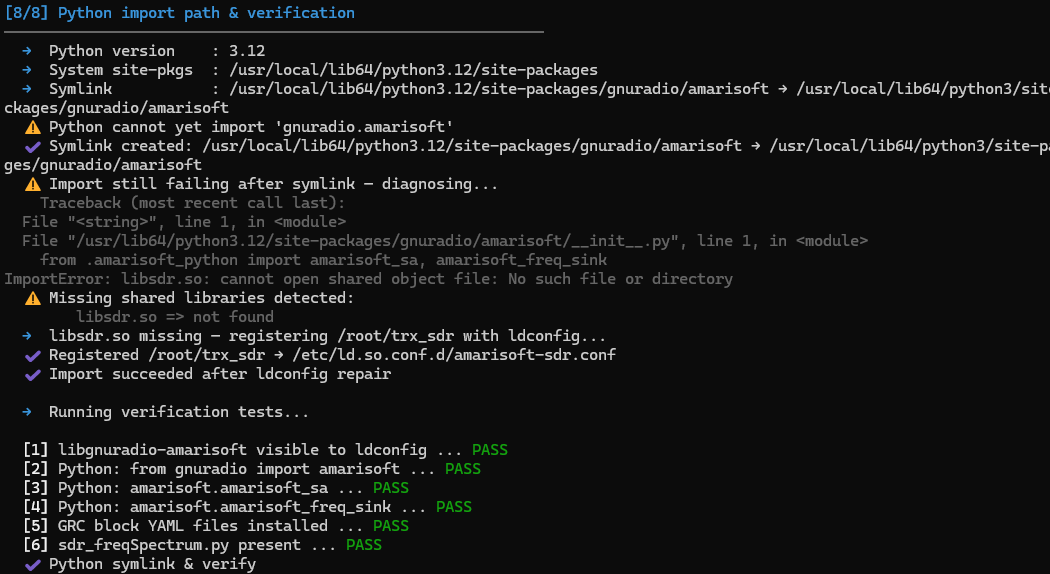
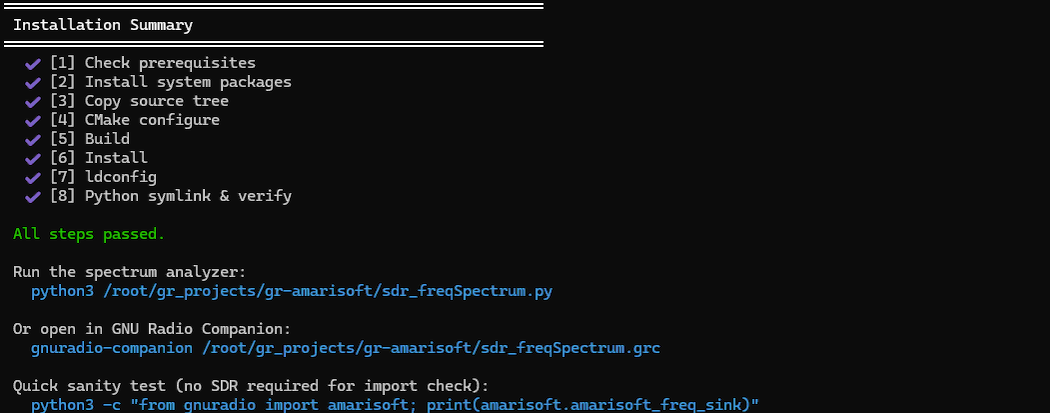
After the installation is completed, GNU Radio Companion can be launched to verify that the Amarisoft blocks are correctly integrated into the GNU Radio environment.
The command gnuradio-companion starts the GNU Radio Companion graphical interface. During startup, GNU Radio prints a short initialization message and displays the directories where it searches for block definitions. These directories are called block paths. In this case, GNU Radio searches both the default system block directory and the local installation directory under /usr/local/share/gnuradio/grc/blocks.
Because the Amarisoft installation step copied the block definition files into the /usr/local/share/gnuradio/grc/blocks directory, GNU Radio Companion automatically discovers the new Amarisoft blocks during this initialization phase. As a result, the Amarisoft block category becomes available in the block selection panel of GNU Radio Companion.
Once the GUI finishes loading, the user can search for the Amarisoft blocks and drag them into a flowgraph just like any other GNU Radio block. This confirms that the installation has been completed successfully and that the Amarisoft SDR interface is now available inside the GNU Radio development environment.

This screen shows that GNU Radio Companion has started successfully and that the Amarisoft blocks have been properly integrated into the GNU Radio block library.
On the right side of the interface, the block category list is displayed. Among the standard GNU Radio categories such as Core, Filters, Modulators, and GUI Widgets, a new category named Amarisoft appears. This confirms that the Amarisoft block definition files installed earlier were correctly detected by GNU Radio Companion.
Inside the Amarisoft category, two custom blocks are available: Amarisoft SA Source and Amarisoft Freq Sink. These blocks correspond to the implementation provided in the Amarisoft GNU Radio module. The SA Source block reads I/Q samples from the Amarisoft SDR device through the libsdr driver interface, while the Freq Sink block performs spectrum analysis and visualization of the received signal.
The presence of these blocks in the block list indicates that several components of the installation are working correctly. GNU Radio has successfully located the block definition YAML files, the runtime library libgnuradio-amarisoft.so is properly registered, and the Python bindings are accessible from the GNU Radio environment.
At this point, the user can simply drag the Amarisoft blocks into a flowgraph and connect them with other GNU Radio blocks to build signal processing applications. This confirms that the Amarisoft SDR interface is now fully available within the GNU Radio Companion development environment.
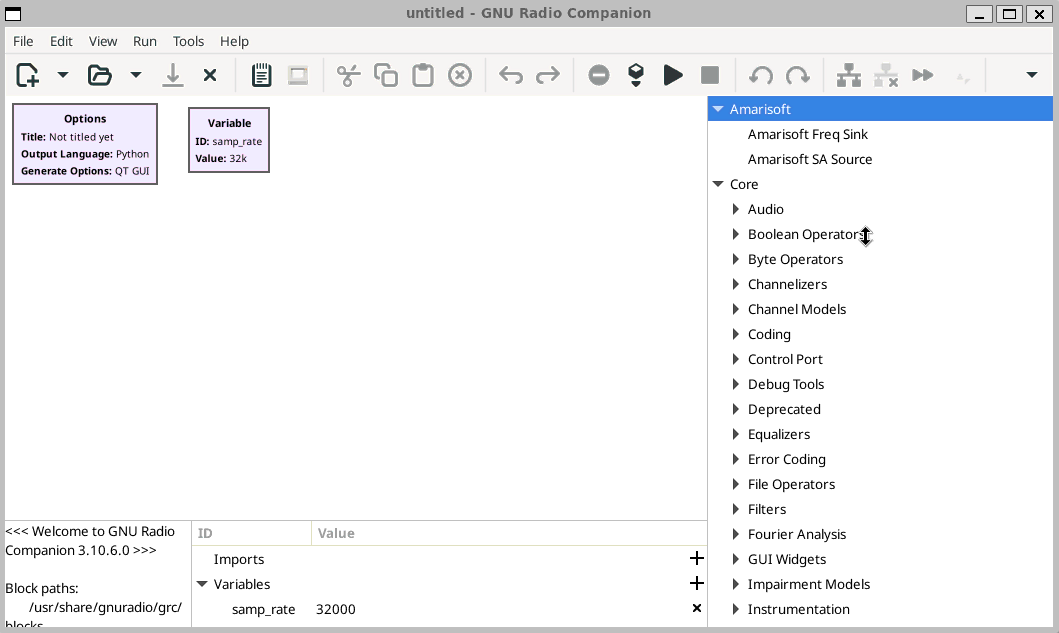
Directory Structure
This is just for information purpose. This is the current directory structure and files under it when I completed the installation and verified working.
This file structure shows a complete GNU Radio out-of-tree module project for integrating Amarisoft SDR functions into GNU Radio. At the top level, '/root/gr_projects/gr-amarisoft' is the project root. This is the directory you copy, edit, build, and maintain as your actual development workspace. It contains the top-level 'CMakeLists.txt', which controls the whole build, locates GNU Radio and the Amarisoft SDK, and connects all the subdirectories such as 'include', 'lib', 'python', and 'grc'.
The 'include' directory contains the public C++ interface of the module. This is the API layer that other code sees. It defines the Amarisoft source block and spectrum sink block, along with the factory functions and run-time control methods. The 'lib' directory contains the actual C++ implementation. This is where the real SDR interaction happens. It opens the Amarisoft device, reads IQ samples through 'libsdr', pushes the data into buffers, converts it into GNU Radio streams, and also implements the custom spectrum display widget and FFT processing logic.
The 'python' directory provides the Python integration layer. It exposes the C++ blocks to Python through pybind11, which makes the blocks usable from GNU Radio Companion and from Python-generated flowgraphs. This layer is critical because GNU Radio flowgraphs are often executed through Python even when the actual signal processing block is implemented in C++. The 'grc' directory contains the block definition YAML files. These files tell GNU Radio Companion how the custom Amarisoft blocks should appear in the GUI, what parameters they accept, and how they are instantiated inside a flowgraph.
The source tree is therefore the editable project itself. It is the part you version-control, copy to another machine, or modify when adding new blocks or changing existing logic. The build tree under 'build/' is different. It is generated automatically by 'cmake' and 'make'. It contains compiled outputs such as 'libgnuradio-amarisoft.so' and the Python extension module. This is not the original source. It is the temporary and generated area used to compile the project.
After 'sudo make install', the important outputs are copied into system locations under '/usr/local'. The public headers go to '/usr/local/include/amarisoft', the shared library goes to '/usr/local/lib64', the Python package goes to the GNU Radio Python package path, and the GRC YAML block files go to '/usr/local/share/gnuradio/grc/blocks'. This installed layout is what makes the module visible to the linker, to Python, and to GNU Radio Companion.
Finally, the external system files outside the project are also essential. These include the Amarisoft SDK headers, the 'libsdr.so' shared library, the linker configuration files in '/etc/ld.so.conf.d', and the Python path workaround symlink. These are not part of the OOT module itself, but the module depends on them. So the whole setup can be understood as four connected layers. The source tree is the development layer. The build tree is the compilation layer. The installed files are the runtime integration layer. The external SDK and system configuration files are the dependency layer that allows the whole module to work correctly.
|
## 1. Source tree (what you `scp` from this repo)
/root/gr_projects/gr-amarisoft/ ← project root; scp the whole directory here | +-- CMakeLists.txt [MANDATORY] top-level build script | * finds GNU Radio, Boost, libsdr | * configures SDR_SAG_ROOT / LIBSDR_HDR | * adds subdirs: lib, include, python, grc | +-- test_amarisoft.py sanity test: runs the block 3 s into a null sink | usage: python3 test_amarisoft.py [--device /dev/sdr1] | +-- sdr_freqSpectrum.grc [MANDATORY] GRC flowgraph — open in gnuradio-companion | sdr_freqSpectrum.py Python script generated from .grc (can also run standalone) | sdr_freqSpectrum_snapshot.grc snapshot/backup of an earlier flowgraph variant | sdr_freqSpectrum_snapshot.py matching Python backup | +-- include/ | +-- amarisoft/ | +-- CMakeLists.txt [MANDATORY] installs public headers | +-- api.h [MANDATORY] AMARISOFT_API DLL-export macro | +-- amarisoft_sa.h [MANDATORY] public interface: IQ source block | | * amarisoft_sa::make() factory (6 params) | | * set_center_freq() / set_gain() run-time controls | +-- amarisoft_freq_sink.h [MANDATORY] public interface: spectrum sink block | * amarisoft_freq_sink::make() factory (7 params) | * set_center_freq / set_avg_alpha / set_y_axis | * pyqwidget() → void* for sip.wrapinstance() | +-- lib/ | +-- CMakeLists.txt [MANDATORY] builds libgnuradio-amarisoft.so | | links: gnuradio-runtime, gnuradio-fft, libsdr, Qt5::Widgets | +-- amarisoft_sa_impl.h [MANDATORY] private header: IQ source | | * RingBuf<T> template (mutex-guarded ring) | | * IQSample struct {float i, q} | | * amarisoft_sa_impl class | +-- amarisoft_sa_impl.cc [MANDATORY] IQ source implementation | | * msdr_open / msdr_set_start_params / msdr_start | | * rx_loop thread → msdr_read → ring push | | * work() → ring pop → gr_complex output | | * set_center_freq → msdr_set_freq_fast | +-- amarisoft_freq_sink_impl.h [MANDATORY] private header: spectrum sink | | * forward-declares SpectrumWidget and fft_complex | +-- amarisoft_freq_sink_impl.cc [MANDATORY] spectrum sink implementation | * SpectrumWidget class (QWidget + QPainter, no Q_OBJECT) | - paintEvent: dark-themed spectrum plot with grid/labels | - post_spectrum(): thread-safe via mutex + | QMetaObject::invokeMethod(…, QueuedConnection) | * work(): accumulates samples into fft_size chunks | * process_chunk(): Hamming window → FFT → IIR avg → | FFT-shift → dBFS → post_spectrum() | * pyqwidget(): returns QWidget* for sip.wrapinstance() | +-- python/ | +-- CMakeLists.txt [MANDATORY] installs Python package | +-- __init__.py [MANDATORY] exposes amarisoft_sa to Python | | content: from .amarisoft_python import amarisoft_sa | +-- bindings/ | +-- CMakeLists.txt [MANDATORY] pybind11_add_module(amarisoft_python …) | +-- python_bindings.cc [MANDATORY] PYBIND11_MODULE entry point | | CRITICAL: must call py::module::import("gnuradio.gr") | | first, or GR base types are unregistered → crash | +-- amarisoft_sa_python.cc [MANDATORY] pybind11 binding for amarisoft_sa | | exposes make(), set_center_freq(), set_gain() | +-- amarisoft_freq_sink_python.cc [MANDATORY] pybind11 binding for amarisoft_freq_sink | exposes make(), set_center_freq(), set_avg_alpha(), | set_y_axis(), pyqwidget() | +-- grc/ +-- CMakeLists.txt [MANDATORY] installs both .block.yml files +-- amarisoft_amarisoft_sa.block.yml [MANDATORY] GRC block: IQ source | * group: Amarisoft | * dtype: enum for device, sample_rate, read_block_size | * read_block_size sentinels: -3=20 ms (default), | -4=50 ms, -2=10 ms, -1=1 ms +-- amarisoft_amarisoft_freq_sink.block.yml [MANDATORY] GRC block: spectrum sink * group: Amarisoft * parameters: center_freq, sample_rate, fft_size (enum), avg_alpha, ymin, ymax, update_time * make template embeds widget via sip.wrapinstance + top_layout.addWidget()
## 2. Build tree (generated by cmake + make)
/root/gr_projects/gr-amarisoft/build/ ← created by: mkdir build && cd build && cmake ..
+-- lib/ | +-- libgnuradio-amarisoft.so [GENERATED] symlink → .so.1 | +-- libgnuradio-amarisoft.so.1 [GENERATED] symlink → .so.1.0.0 | +-- libgnuradio-amarisoft.so.1.0.0 [GENERATED] actual shared library
+-- python/bindings/ +-- amarisoft_python.cpython-39-x86_64-linux-gnu.so [GENERATED] pybind11 extension
## 3. Installed files (written by `sudo make install`)
/usr/local/include/amarisoft/ +-- api.h public header (installed from include/amarisoft/) +-- amarisoft_sa.h public header
/usr/local/lib64/ +-- libgnuradio-amarisoft.so* C++ shared library (3 symlink variants)
/usr/local/lib64/python3/site-packages/gnuradio/amarisoft/ +-- __init__.py Python package init +-- amarisoft_python.cpython-39-…so pybind11 extension module
/usr/local/share/gnuradio/grc/blocks/ +-- amarisoft_amarisoft_sa.block.yml GRC block descriptor (picked up by gnuradio-companion)
## 4. System files required outside the project
/usr/local/include/amarisoft_sdk/ SDK headers — copy from trx_sdr release tarball | +-- libsdr.h [MANDATORY] msdr_* API declarations | +-- sdr.h [MANDATORY] SDRStartParams, enums | +-- flags.h [MANDATORY] included transitively by libsdr.h | +-- csr.h, nr_38_213_tables.h supplementary headers (copy whole dir)
/usr/lib/libsdr.so (or /usr/local/lib64/libsdr.so) [MANDATORY] Amarisoft libsdr shared library must be discoverable by cmake find_library(sdr)
/etc/ld.so.conf.d/amarisoft.conf [MANDATORY] makes libsdr visible at runtime content example: /usr/local/lib64 run: sudo ldconfig after creating this file
/etc/ld.so.conf.d/usr-local-lib64.conf [MANDATORY] makes libgnuradio-amarisoft visible content: /usr/local/lib64 (same file as above if both libs are in /usr/local/lib64)
/usr/lib64/python3.9/site-packages/gnuradio/amarisoft [MANDATORY — symlink workaround] cmake installs to /usr/local/lib64/python3/… but Python 3.9 searches /usr/lib64/python3.9/… fix: ln -s \ /usr/local/lib64/python3/site-packages/gnuradio/amarisoft \ /usr/lib64/python3.9/site-packages/gnuradio/amarisoft |